pengenalan
This manual provides detailed instructions for the setup, operation, maintenance, and troubleshooting of your Timex Ironman Triathlon T200 42mm Watch. Please read this guide thoroughly to ensure proper use and to maximize the functionality of your timepiece.

Rajah 1: Depan view of the Timex Ironman Triathlon T200 watch.
Komponen Tonton
Familiarize yourself with the buttons and display elements of your watch:
- Butang MOD: Kitaran melalui mod jam tangan yang berbeza (Masa, Kronograf, Pemasa, Penggera).
- SET/RECALL Button: Used to set values in setting modes and recall lap/split times.
- INDIGLO Button: Mengaktifkan lampu malam Indiglo.
- START/LAP Button: Starts and stops the chronograph, records lap times.
- Butang BERHENTI/SET SEMULA: Stops the chronograph or timer, resets values.
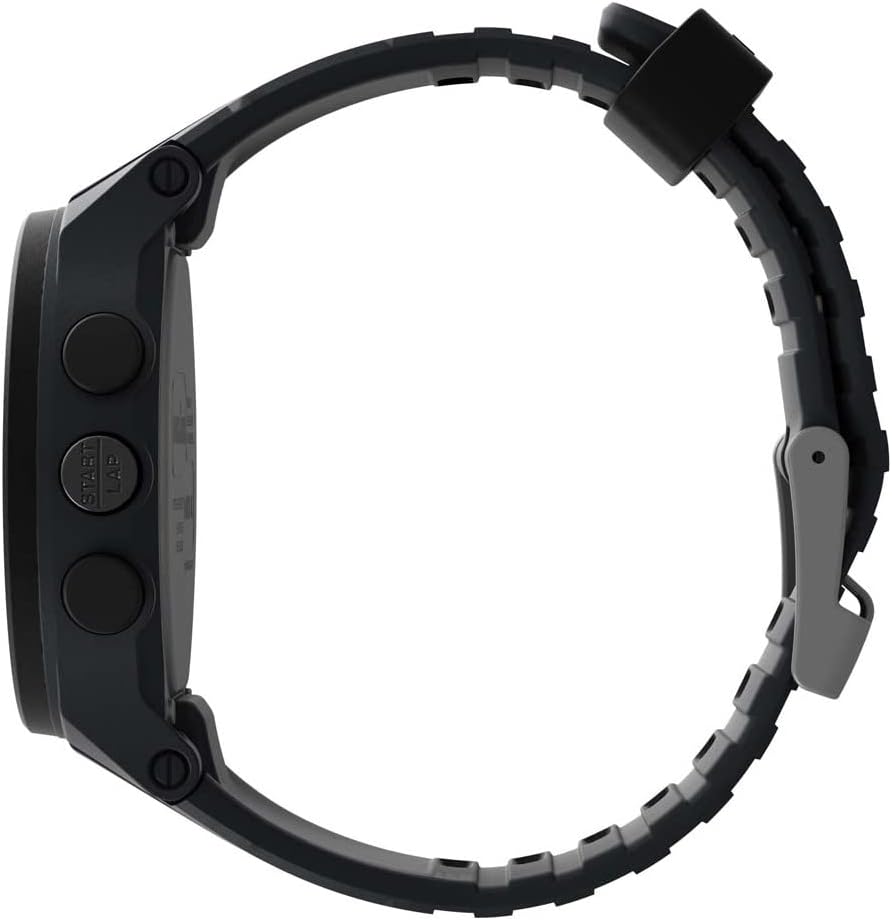
Rajah 2: Sisi view illustrating button placement.
Persediaan
1. Tetapan Masa dan Tarikh Permulaan
- In Timekeeping mode, press and hold the SET/PANGGILAN SEMULA butang sehingga paparan berkelip.
- Tekan ke MULA/LAP or BERHENTI / RESET button to adjust the flashing segment (e.g., hour, minute, year, month, day).
- Tekan ke MODE button to advance to the next segment.
- Setelah semua tetapan selesai, tekan butang SET/PANGGILAN SEMULA butang untuk keluar dari mod tetapan.
2. Pelarasan Tali
The watch features an adjustable silicone strap designed for comfort and secure fit. Adjust the buckle to fit your wrist circumference, ensuring it is snug but not overly tight.
Arahan Operasi
1. Mod Penjagaan Masa
This is the default display mode, showing the current time, day, and date. Press the INIGLO button to activate the backlight for visibility in low-light conditions.
2. Chronograph (Jam randik)
The chronograph measures elapsed time up to 100 hours with a 200-lap memory.
- From Timekeeping mode, press the MODE button until 'CHRONO' or stopwatch icon appears.
- Tekan MULA/LAP untuk memulakan masa.
- Tekan MULA/LAP again to record a lap time while the chronograph continues running.
- Tekan BERHENTI / RESET untuk menjeda kronograf. Tekan MULA/LAP untuk menyambung semula atau BERHENTI / RESET sekali lagi untuk menetapkan semula kepada sifar.
- To recall lap times, press SET/PANGGILAN SEMULA semasa kronograf dihentikan.
3. Interval Training Timer
The watch supports interval training with customizable warm-up, interval, and cool-down segments.
- From Timekeeping mode, press the MODE button until 'INTERVAL' or interval icon appears.
- Tekan dan tahan SET/PANGGILAN SEMULA to enter setting mode for intervals.
- Adjust warm-up, interval duration, number of repeats, and cool-down times using MULA/LAP or BERHENTI / RESET, and advance with MODE.
- Tekan SET/PANGGILAN SEMULA untuk menyimpan tetapan.
- Tekan MULA/LAP to begin the interval training sequence.
4. Pemasa Undur
A 24-hour countdown timer is available for various activities.
- From Timekeeping mode, press the MODE button until 'TIMER' or timer icon appears.
- Tekan dan tahan SET/PANGGILAN SEMULA untuk menetapkan tempoh kira detik yang diingini.
- Tekan MULA/LAP untuk memulakan undur.
- Jam tangan akan mengeluarkan amaran apabila kiraan detik mencecah sifar.
5. Penggera
Set up to 3 daily, weekday, or weekend alarms.
- From Timekeeping mode, press the MODE button until 'ALARM' or alarm icon appears.
- Tekan MODE to cycle through Alarm 1, Alarm 2, Alarm 3.
- Tekan dan tahan SET/PANGGILAN SEMULA to set the alarm time and type (daily, weekday, weekend).
- Tekan MULA/LAP untuk menghidupkan/mematikan penggera.
6. Dual Time Zones
The watch allows for tracking two different time zones.
- From Timekeeping mode, press the MODE button until 'T2' or dual time icon appears.
- Tekan dan tahan SET/PANGGILAN SEMULA to adjust the second time zone.
Penyelenggaraan
1. Pembersihan
Bersihkan jam tangan anda dengan lembut, damp cloth. Avoid harsh chemicals or abrasive materials that could damage the case or strap. For water-resistant models, rinse with fresh water after exposure to salt water or chlorine.
2. Tahan Air
This watch is water resistant to 100 meters (330 feet), making it suitable for swimming and snorkeling. It is not recommended for diving. Do not press any buttons while the watch is submerged to prevent water intrusion.
3. Penggantian Bateri
The watch uses one Lithium Metal battery (CR2025). Battery replacement should be performed by a qualified watch technician to ensure water resistance is maintained. Attempting to replace the battery yourself may void the warranty and compromise the watch's water resistance.

Figure 3: Case back detailing water resistance and battery type.
Menyelesaikan masalah
- Paparan kosong atau malap: Bateri mungkin rendah atau kehabisan kuasa. Gantikan bateri seperti yang diterangkan dalam bahagian Penyelenggaraan.
- Butang tidak bertindak balas: Ensure the watch is not in a locked mode (if applicable, refer to specific model features). If the issue persists, a soft reset may be required by pressing all four side buttons simultaneously for a few seconds.
- Indiglo light not working: This could indicate a low battery or a malfunction. If battery replacement does not resolve the issue, contact customer support.
- Masa/tarikh salah: Re-enter the time and date settings as described in the Setup section. Ensure the correct time zone is selected.
Spesifikasi
| Nombor Model | TW5M48900SO |
| Diameter Kes | 42mm |
| Bahan Kes | damar |
| Bahan Lensa | Akrilik |
| Bahan Tali | silikon |
| Tahan Air | 100 meter (330 kaki) |
| Chronograph | 100 jam dengan memori 200 pusingan |
| Pemasa | 24-hour countdown |
| Penggera | 3 penggera harian, hari bekerja atau hujung minggu |
| Lampu latar | Dail jam tangan menyala Indiglo |
| Jenis Bateri | 1 bateri Lithium Metal (CR2025) |
Waranti dan Sokongan
Your Timex watch is covered by a limited warranty. For specific warranty details, service, or support, please refer to the warranty information included with your purchase or visit the official Timex webtapak. Simpan bukti pembelian anda untuk tuntutan waranti.
Untuk bantuan lanjut, anda boleh melawati Kedai Timex di Amazon atau portal sokongan pelanggan Timex rasmi.