1. Pengenalan
Thank you for choosing the Yaheetech Office Filing Cabinet. This manual provides essential information for the safe assembly, operation, and maintenance of your new filing cabinet. Please read these instructions carefully before beginning assembly and retain them for future reference.
Garis Panduan Keselamatan
- Pastikan semua bahagian ada dan tidak rosak sebelum dipasang. Jangan gunakan jika ada bahagian yang hilang atau patah.
- Pasang unit pada permukaan yang lembut dan bersih untuk mengelakkan calar.
- Jauhkan bahagian kecil daripada kanak-kanak semasa pemasangan.
- Jangan ketatkan skru, kerana ini boleh merosakkan bahan.
- Always use the appropriate tools as indicated in the instructions.
- Jangan berdiri atau memanjat kabinet.
- Agihkan berat secara sama rata di seluruh rak dan laci untuk mengelakkan tip.
2. Kandungan Pakej
Sahkan bahawa semua komponen yang disenaraikan di bawah disertakan dalam pakej anda:
Panel Kayu
- Panel 1 (x1): Top Board
- Panel 2 (x2): Side Boards
- Panel 3 (x1): Back Board
- Panel 4 (x1): Bottom Board
- Panel 5 (x1): Middle Shelf
- Panel 6 (x2): Drawer Fronts
- Panel 7 (x4): Drawer Side Boards
- Panel 8 (x2): Drawer Back Boards
Perkakasan
- A (x2): Drawer Handles
- B (x4): Handle Screws
- C (x16): Small Screws for Slides
- D (x8): Medium Screws for Frame
- E (x16): Large Screws for Panels
- F (x1): Allen Wrench
- G (x2): Lockable Wheels
- H (x2): Non-Lockable Wheels
- I (x8): Dowels
- J (x8): Cam Locks
- K (x8): Cam Lock Screws
- L (x4): Corner Brackets
- M (x1): Lock Mechanism
- N (x2): Keys
- O (x4): Drawer Slide Rails (inner part)
- P (x4): Drawer Slide Rails (middle part)
- Q (x4): Drawer Slide Rails (outer part)
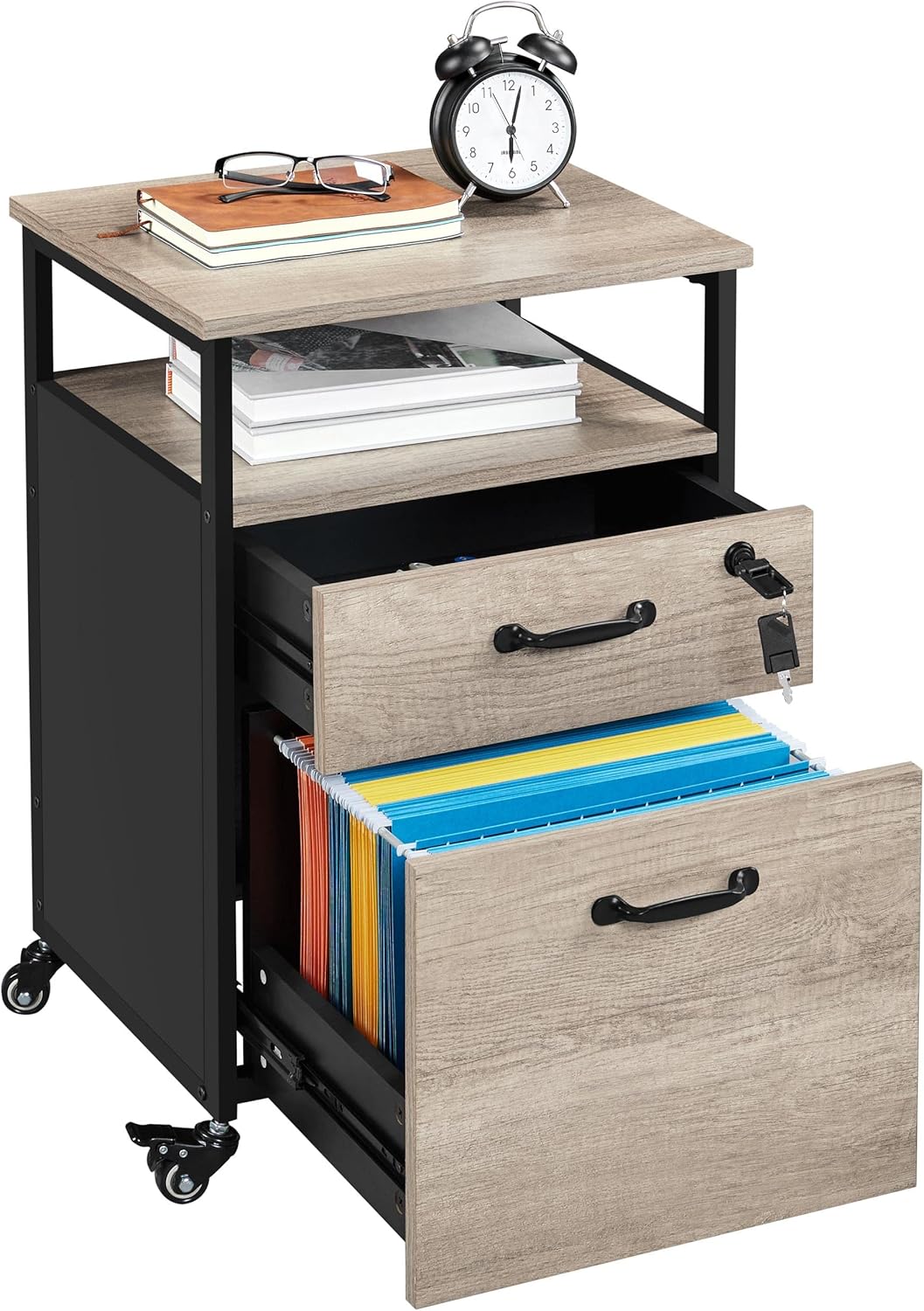
Image of the Yaheetech Office Filing Cabinet, showcasing its two-tone design, open shelf, and two drawers, one of which is lockable and contains hanging files. The cabinet is on wheels.
3. Arahan Perhimpunan
Follow these steps carefully to assemble your filing cabinet. Refer to the assembly video for visual guidance.
Panduan Video Perhimpunan
Official Yaheetech assembly video demonstrating the step-by-step process for constructing the filing cabinet.
Perhimpunan Langkah demi Langkah
- Prepare Drawer Slides: Separate the inner (O), middle (P), and outer (Q) parts of the drawer slides. The inner part will attach to the drawer, and the outer part to the cabinet frame.
- Assemble Drawer Frames: Attach the drawer side boards (Panel 7) and back board (Panel 8) to form the drawer frame using screws (E) and cam locks (J, K).
- Attach Drawer Bottom: Slide the drawer bottom (Panel 8) into the grooves of the assembled drawer frame.
- Install Lock Mechanism (for top drawer): Secure the lock mechanism (M) to the designated hole on the inside of one drawer front (Panel 6) using screws (K).
- Lampirkan Bahagian Hadapan Laci: Connect the drawer fronts (Panel 6) to the assembled drawer frames using dowels (I) and cam locks (J, K).
- Install Drawer Handles: Attach the drawer handles (A) to the front of each drawer using handle screws (B).
- Attach Drawer Slides to Drawers: Secure the inner parts of the drawer slides (O) to the sides of the assembled drawers using small screws (C).
- Pasang Rangka Kabinet: Connect the side boards (Panel 2) and back board (Panel 3) to form the main cabinet frame using screws (E) and cam locks (J, K).
- Attach Drawer Slides to Cabinet: Secure the outer parts of the drawer slides (Q) to the inside of the cabinet side boards (Panel 2) using small screws (C). Ensure they align correctly with the drawer slides.
- Install Bottom Board and Middle Shelf: Place the bottom board (Panel 4) and middle shelf (Panel 5) into the cabinet frame, securing them with screws (E) and cam locks (J, K).
- Lampirkan Papan Atas: Secure the top board (Panel 1) to the top of the cabinet frame using screws (E) and cam locks (J, K).
- Pasang Roda: Screw the two lockable wheels (G) to the front bottom corners and the two non-lockable wheels (H) to the rear bottom corners of the cabinet. Use the provided Allen wrench (F) for tightening.
- Sisipkan Laci: Carefully slide the assembled drawers into the cabinet frame, aligning the drawer slides.
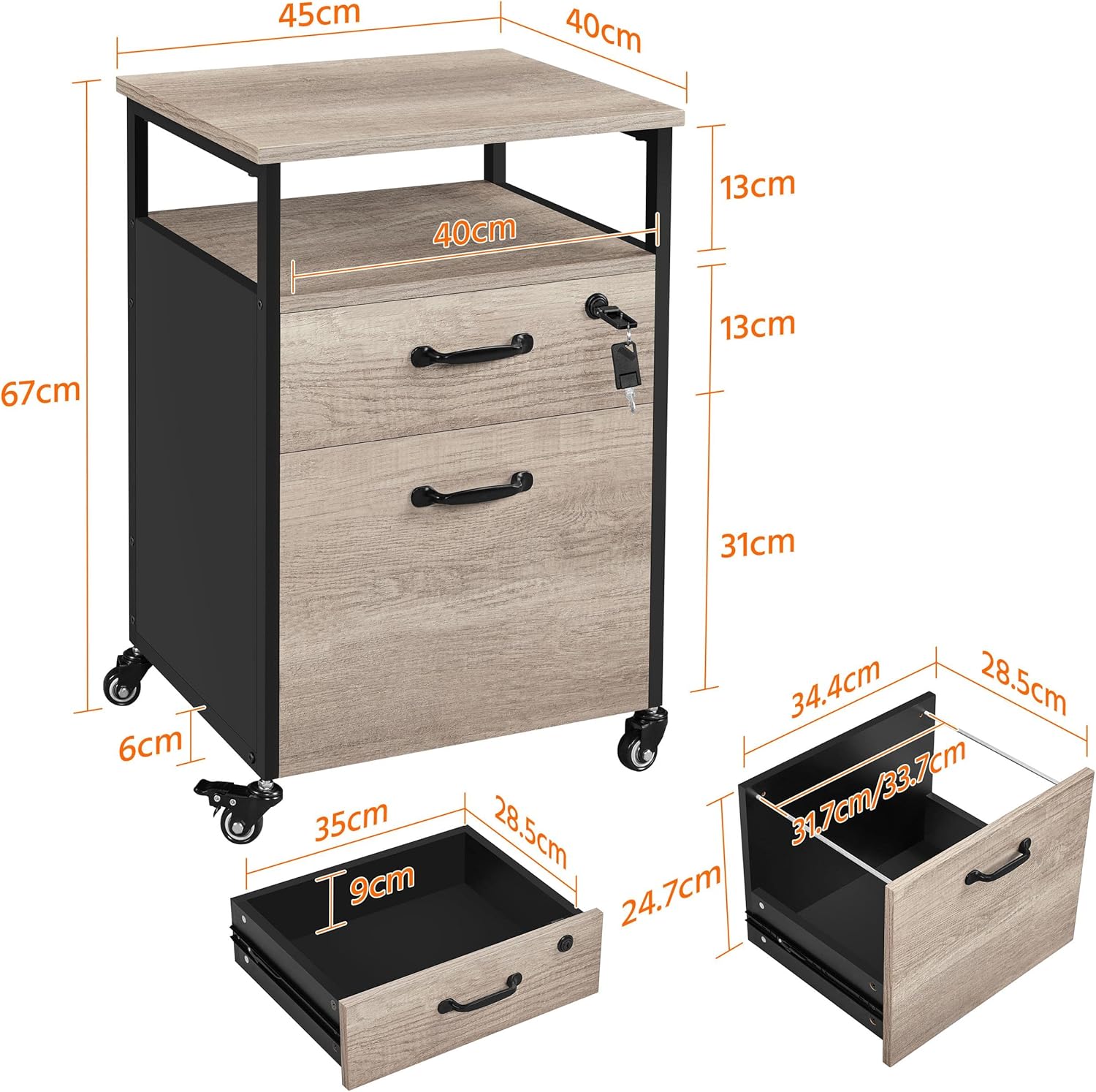
Detailed diagram showing the dimensions of the Yaheetech filing cabinet, including overall height, width, depth, and internal drawer measurements.
4. Operasi
Menggunakan Laci
- Operasi lancar: The drawers are equipped with ball-bearing slides for smooth and quiet opening and closing.
- Mekanisme Mengunci: The top drawer features a lock for securing important documents. Insert the key (N) into the lock (M) and turn to lock or unlock. Ensure the drawer is fully closed before locking.
- File Organisasi: The large bottom drawer includes adjustable bars to accommodate A4-sized hanging file folders (folders not included). Adjust the width of the bars to fit your documents.
Menggunakan Roda
- Mobiliti: The cabinet is fitted with four 360° swivel wheels for easy movement across various floor surfaces.
- Ciri Mengunci: Two of the wheels are lockable (G). Press down the lever on these wheels to engage the brake and keep the cabinet stationary. Lift the lever to unlock and allow movement.

The Yaheetech filing cabinet with both drawers open, revealing hanging file folders in the bottom drawer and office supplies in the top drawer. The top drawer is shown with a key in its lock.
5. Penjagaan dan Penyelenggaraan
Proper care will ensure the longevity and appearance of your filing cabinet.
- Pembersihan: Lap permukaan dengan lembut, damp kain. Elakkan menggunakan bahan kimia yang keras atau pembersih yang kasar, kerana ini boleh merosakkan kemasan.
- Tumpahan: Immediately wipe up any spills to prevent moisture damage to the MDF.
- Perlindungan: The cabinet's surface is treated for water and scratch resistance. However, avoid placing extremely hot or sharp objects directly on the surface without protection.
- Perkakasan: Periksa semua skru dan pengikat secara berkala untuk memastikan ia ketat. Ketatkan semula jika perlu.

Close-up image illustrating the waterproof and scratch-resistant properties of the MDF material used in the Yaheetech filing cabinet.
6. Penyelesaian masalah
Rujuk bahagian ini untuk penyelesaian kepada isu-isu biasa:
| Masalah | Kemungkinan Punca | Penyelesaian |
|---|---|---|
| Laci tidak meluncur dengan lancar. | Slaid laci tidak sejajar atau skru longgar. | Check the alignment of the drawer slides and ensure all screws are securely tightened. Apply a silicone-based lubricant to the slides if needed. |
| Roda tidak terkunci atau bergolek dengan betul. | Locking mechanism engaged/disengaged incorrectly or debris in wheels. | Ensure the locking lever is fully engaged or disengaged. Clean any debris from the wheel casters. |
| Kabinet terasa tidak stabil. | Skru pemasangan longgar atau lantai yang tidak rata. | Check and tighten all assembly screws. Ensure the cabinet is placed on a level surface. |
| Drawer front is loose. | Cam locks or dowels not fully engaged. | Re-check the connection between the drawer front and the drawer frame, ensuring cam locks are tightened and dowels are fully inserted. |
7. Spesifikasi Produk
| Ciri | Perincian |
|---|---|
| Jenama | Yaheetech |
| Model | YA-00112989 |
| warna | Black/Grey (Nero/Grigio) |
| Dimensi (L x W x H) | 45 x 40 x 67 cm (17.7 x 15.7 x 26.4 inci) |
| Berat badan | 18 kg (39.7 lbs) |
| bahan | MDF (Medium Density Fiberboard), Iron |
| Kapasiti Beban Maksimum | 50 kg (110 lbs) |
| Ciri Khas | Durable, Water-resistant, Scratch-resistant, Lockable Drawer, Mobile (with 2 lockable wheels) |
8. Waranti dan Sokongan
Yaheetech products are designed for quality and durability. For specific warranty details, please refer to the warranty card included with your purchase or visit the official Yaheetech webtapak.
Sokongan Pelanggan
If you encounter any issues during assembly or use, or if you have questions about your product, please contact our customer support team:
- Webtapak: www.yaheetech.com
- e-mel: Rujuk kepada pembungkusan produk anda atau website for specific contact email.
- telefon: Rujuk kepada pembungkusan produk anda atau website for specific contact number.
Please have your model number (YA-00112989) and purchase information ready when contacting support.


