1. Pengenalan
The EKSA EM100 Gaming Mouse is a high-performance wired ergonomic gaming mouse designed for PC gamers. It features 7 programmable buttons, customizable Chroma RGB lighting, and an adjustable optical sensor with up to 8000 DPI. This manual provides detailed instructions for setting up, operating, and maintaining your EM100 Gaming Mouse to ensure optimal performance and longevity.
2. Kandungan Pakej
Sila sahkan bahawa semua item terdapat dalam pakej:
- 1 x EKSA EM100 Gaming Mouse
- 1 x Manual Pengguna
- 1 x Kotak Hadiah (pembungkusan)
- 1 x 1.5m/59in Cable (integrated)

Figure 2.1: Contents of the EKSA EM100 Gaming Mouse package, including the mouse, user manual, and gift box.
3. Ciri-ciri Produk
- 7 Butang Boleh Aturcara: Customize functions for Left, Right, Scroll, DPI, Forward, Backward, and RGB Light buttons.
- DPI boleh laras: 6-level DPI settings (800/1600/2400/3200/4800/8000) for precise control.
- Chroma RGB Backlighting: 6 backlight modes with 16 million customizable colors, including "Breathing and Streamer" effects.
- Reka bentuk ergonomik: Shaped for comfort during extended use, with non-slip sides to reduce hand sweat and improve grip.
- Kabel Tahan Lama: 5-inch flexible braided cable designed to minimize drag and interference.
- Keserasian Luas: Supports Windows 2000/XP/Vista/7/8/10/11 for programmable features and macOS for normal use. Compatible with Laptops, PCs, and MacBooks.

Gambar 3.1: Lebihview of key features including 7 functional buttons, RGB lighting, ergonomic design, 8000 DPI, and parachute cord.
4. Persediaan
- Buka bungkusan Tetikus: Carefully remove the EKSA EM100 Gaming Mouse and its accessories from the packaging.
- Sambung ke Komputer: Insert the USB plug of the mouse cable into an available USB port on your computer (PC, Laptop, or MacBook).

Figure 4.1: The USB plug and braided cable of the EKSA EM100 Gaming Mouse.
- Driver Installation (Windows): For programmable features and advanced customization on Windows operating systems, it is recommended to download and install the official EKSA EM100 driver. Refer to the official EKSA website for the latest driver software. For macOS, the mouse functions normally without additional drivers, but programmable features are not available.

Gambar 4.2: Cthample of the programmable software interface for the EKSA EM100 Gaming Mouse.
- penempatan: Place the mouse on a flat, clean surface, preferably a mouse pad, for optimal tracking performance.
5. Arahan Operasi
5.1 Fungsi Butang
The EKSA EM100 Gaming Mouse features 7 buttons, each with a default function. These can be customized via the driver software on Windows.
- Butang Kiri: Fungsi klik utama.
- Butang Kanan: Fungsi klik sekunder (menu konteks).
- Scroll Button (Middle Click): Activates middle click, often used for opening links in new tabs or auto-scrolling.
- Butang DPI: Kitaran melalui tetapan DPI.
- Butang ke hadapan: Navigasi ke hadapan web pelayar atau file penjelajah.
- Butang ke belakang: Navigasi ke belakang web pelayar atau file penjelajah.
- Butang Lampu: Cycles through RGB lighting modes or turns lights off.

Figure 5.1: Diagram illustrating the location and default function of each button on the EKSA EM100 Gaming Mouse.
5.2 Melaraskan Tetapan DPI
The mouse offers 6 adjustable DPI levels, allowing you to change cursor sensitivity on the fly. Press the Butang DPI located behind the scroll wheel to cycle through the following settings:
- 800 DPI (Hijau)
- 1600 DPI (Ungu)
- 2400 DPI (Biru)
- 3200 DPI (Merah)
- 4800 DPI (Cyan)
- 8000 DPI (Kuning)
Each DPI level is indicated by a specific color on the mouse's lighting, providing visual feedback for your current setting.
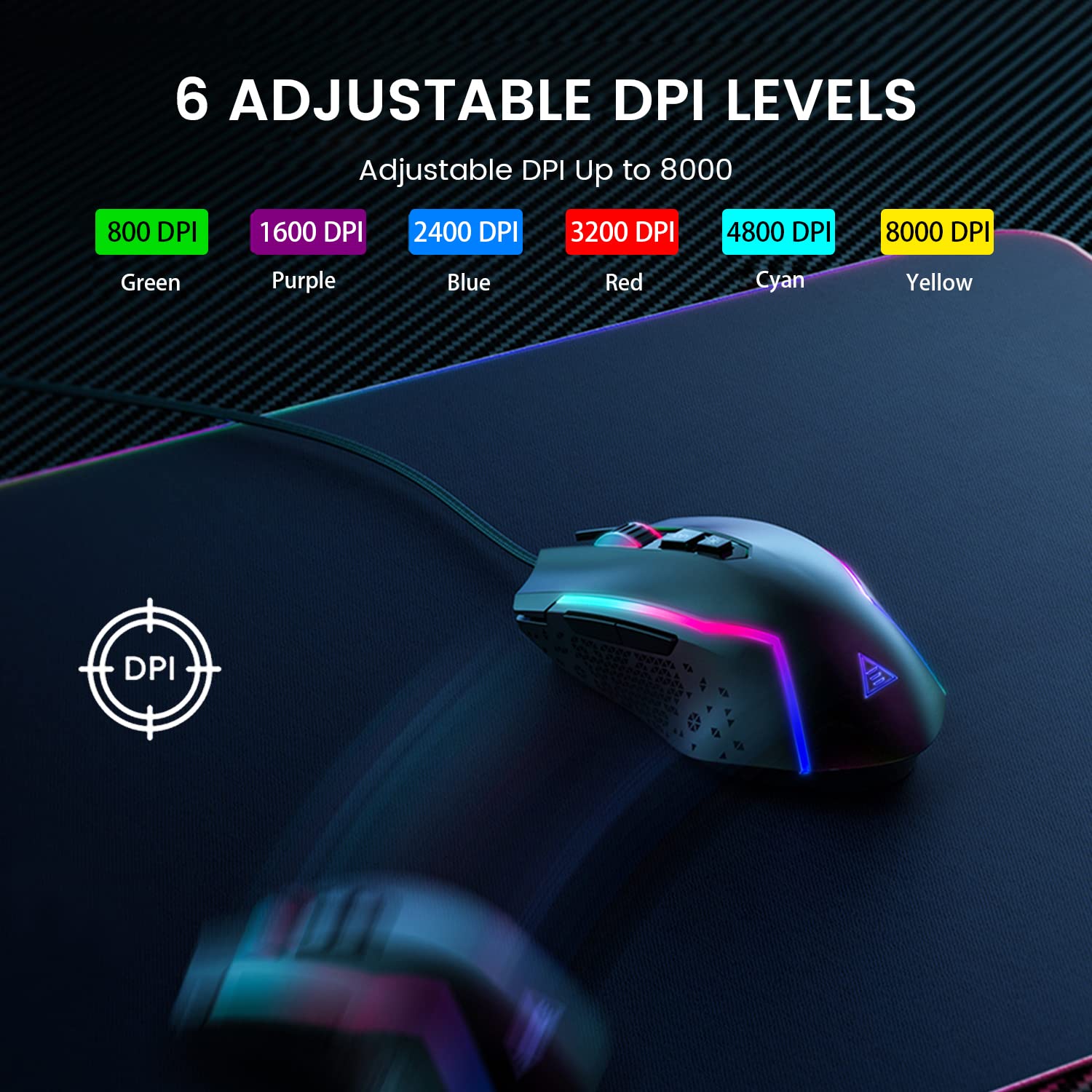
Figure 5.2: Visual representation of the 6 adjustable DPI levels and their corresponding indicator colors.
5.3 Customizing RGB Backlighting
The EKSA EM100 features dynamic Chroma RGB backlighting with 6 distinct modes and 16 million color options. Press the Butang Lampu (located near the DPI button) to cycle through the available lighting effects, including "Breathing" and "Streamer" modes, or to turn the lights off.

Figure 5.3: The EKSA EM100 Gaming Mouse showcasing its vibrant RGB backlight effects.
6. Penyelenggaraan
Proper maintenance ensures the longevity and optimal performance of your EKSA EM100 Gaming Mouse.
- Pembersihan: Gunakan kain lembut dan kering untuk mengelap permukaan tetikus. Untuk kotoran degil, sedikit dampLap kain dengan air atau larutan pembersih yang lembut. Elakkan menggunakan bahan kimia yang keras atau bahan yang melelas.
- Penjagaan Sensor: Pastikan sensor optik di bahagian bawah tetikus bersih dan bebas daripada habuk atau serpihan. Gunakan swab kapas atau udara termampat jika perlu.
- Pengurusan Kabel: Avoid sharp bends or excessive pulling on the braided cable to prevent internal damage.
- Storan: Apabila tidak digunakan untuk tempoh yang lama, simpan tetikus di persekitaran yang bersih dan kering, jauh daripada cahaya matahari langsung dan suhu yang melampau.
7. Penyelesaian masalah
| Masalah | Kemungkinan Punca | Penyelesaian |
|---|---|---|
| Tetikus tidak bertindak balas. | Sambungan USB longgar, port USB rosak, isu pemandu. |
|
| Pergerakan kursor tidak menentu atau gelisah. | Sensor optik kotor, permukaan yang tidak sesuai, gangguan perisian. |
|
| Lampu RGB tidak berfungsi atau tersekat. | Software glitch, light mode setting. |
|
| Programmable buttons not working (Windows). | Driver not installed or corrupted, incorrect software settings. |
|
8. Spesifikasi
| Ciri | Perincian |
|---|---|
| Jenama | EKSA |
| Model | EM100 |
| Ketersambungan | Berwayar (USB) |
| Jenis Sensor | Optik |
| Tahap DPI | 800 / 1600 / 2400 / 3200 / 4800 / 8000 |
| Butang Boleh Aturcara | 7 |
| Pencahayaan latar | Chroma RGB (6 modes, 16 million colors) |
| Panjang Kabel | 1.5 meter (59 inci) |
| Jenis Kabel | Jalinan |
| Orientasi Tangan | Ambidextrous |
| Dimensi Produk (L x W x H) | 11.5 x 5.5 x 17.5 cm |
| Berat Barang | 150 g |
| Sistem Operasi yang Serasi | Windows 2000/XP/Vista/7/8/10/11, macOS (normal use) |
| Platform Perkakasan | PC/Mac/Linux/Unix |
| Negara Asal | China |
9. Waranti dan Sokongan
EKSA products are designed for reliability and performance. For warranty information, technical support, or to download the latest drivers and software for your EM100 Gaming Mouse, please visit the official EKSA webtapak:
Please retain your proof of purchase for any warranty claims. For specific regional support or inquiries, refer to the contact information provided on the EKSA webtapak.