pengenalan
This manual provides comprehensive instructions for setting up, operating, and maintaining your new Tecno Pop 5 LTE smartphone. Designed for seamless performance and a vibrant user experience, your device comes equipped with advanced features to keep you connected and entertained.

Figure 1: Tecno Pop 5 LTE - Front and Back View
Produk Selesaiview Video
Tonton video rasmi ini untuk penjelasan pantasview of the Tecno Pop 5 LTE's main features and design.
Video 1: Tecno Pop 5 LTE Product Overview
Kandungan Pakej
Upon unboxing your Tecno Pop 5 LTE, please ensure all the following items are present:
- Tecno Pop 5 LTE Smartphone
- Penyesuai Kuasa
- Kabel USB Mikro
- Alat Ejector SIM
Panduan Persediaan
Pemasangan SIM dan Kad SD
Your Tecno Pop 5 LTE supports dual Nano SIM cards and expandable memory via a microSD card.
- Cari dulang SIM di sisi peranti.
- Masukkan alat ejektor SIM ke dalam lubang kecil di sebelah dulang dan tolak perlahan-lahan sehingga dulang terkeluar.
- Place your Nano SIM card(s) and/or microSD card into the designated slots on the tray, ensuring correct orientation.
- Tolak dulang kembali ke dalam peranti dengan berhati-hati sehingga rata dengan sisi.
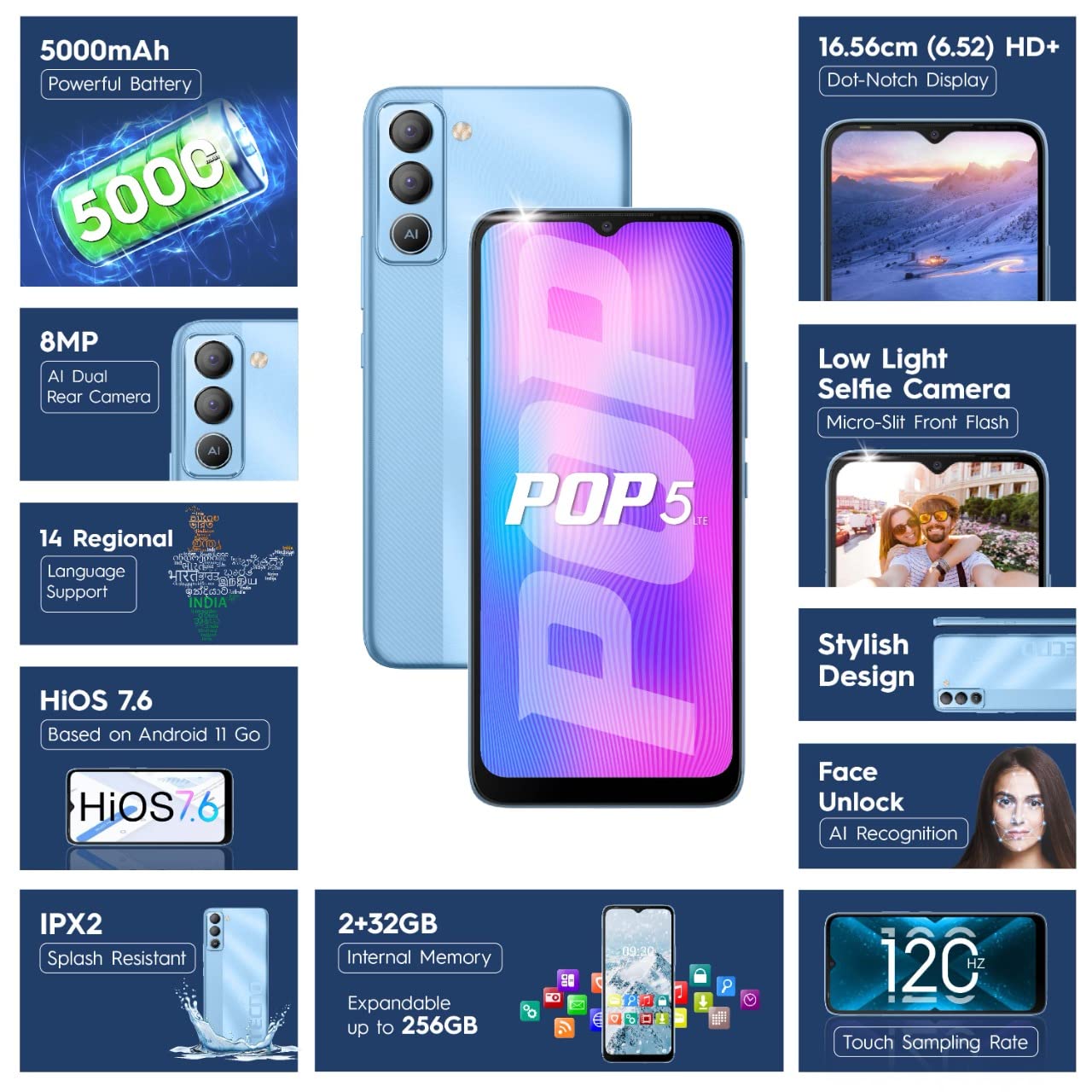
Figure 2: SIM Tray Insertion
Hidupkan dan Persediaan Awal
Press and hold the power button located on the side of the device until the Tecno logo appears. Follow the on-screen prompts to select your language, connect to Wi-Fi, and set up your Google account.
Ciri Utama Berakhirview
Paparan Cergas
The Tecno Pop 5 LTE features a vibrant 6.52-inch Dot Notch HD+ display with a 90% screen-to-body ratio, offering an immersive viewing experience. With up to 480 nits maximum brightness, content remains clear even in bright conditions.

Figure 3: Immersive Dot Notch Display
Bateri Tahan Lama
Dilengkapi dengan yang berkuasa Bateri 5000mAh, the Tecno Pop 5 LTE provides extended usage times, including up to 48 hours of video playback and 31 days of standby time. The Ultra Power Saving Mode further optimizes battery life.
Advanced Camera System
Capture clear and detailed images with the 8MP Portrait Dual rear Camera, featuring excellent image processing and a dual flashlight for enhanced low-light photography. For selfies, the 5MP F2.0 Aperture Front Camera includes a Micro Slit Front Flash with adjustable brightness for brighter night selfies.

Figure 4: Rear Camera Module
Prestasi dan Storan
The device runs on a 2GB RAM and is powered by a MediaTek Helio A22 2GHz Quad-core processor, ensuring smooth daily operations. It comes with 32GB storan dalaman, expandable up to 256GB, providing ample space for your apps and media.
Perisian dan Keselamatan
Your smartphone operates on HiOS 7.6 based on Android 11, offering a user-friendly interface and various localized features. Security features include Buka Kunci Muka with closed eye protection for instant and secure access. Additional features like Kids Mode, Anti-Theft Alarm, Vault 2.0, and Voice Changer enhance usability and safety.
Ketahanan yang Dipertingkatkan
The Tecno Pop 5 LTE is Splash Resistant up to IPX2 rating, providing protection against water splashes.
Mengendalikan Peranti Anda
Navigasi Asas
Navigate your device using intuitive touch gestures. The 120Hz Touch SampKadar ling ensures a smoother and more responsive touch experience.
Using Face Unlock
To set up Face Unlock, go to Tetapan > Keselamatan > Buka Kunci Wajah and follow the instructions. Once set up, simply look at your phone to unlock it instantly.
Fungsi Kamera
Open the Camera app to access various modes like AI Portrait, HDR, AI Beauty, and Filters. Tap the shutter button to capture photos or switch to video mode for 1080P video recording.
Mod Penjimatan Kuasa
To extend battery life, activate Ultra Power Saving Mode via the quick settings panel or in Settings > Battery Lab.
Regional Language Support
The device supports 14 regional languages. To change your device language, go to Settings > System > Languages & input > Languages.
Phone Cloner
Easily migrate your data from an old device to your new Tecno Pop 5 LTE using the Phone Cloner feature, which allows one-tap data migration without using mobile data.
Penyelenggaraan dan Penjagaan
Penjagaan Bateri
To maximize battery lifespan, avoid extreme temperatures and try to keep the battery charge between 20% and 80%. Use only the provided adaptor and Micro USB cable for charging.
Membersihkan Peranti Anda
Use a soft, lint-free cloth to gently wipe the screen and body of your phone. Avoid using harsh chemicals or abrasive materials.
Kemas Kini Perisian
Regularly check for and install software updates to ensure your device has the latest features, security patches, and performance improvements. You can find updates in Tetapan > Sistem > Kemas kini sistem.
Menyelesaikan masalah
Isu dan Penyelesaian Biasa
- Peranti tidak dihidupkan: Ensure the battery is charged. Connect the phone to the charger for at least 15 minutes before attempting to power on.
- Skrin tidak bertindak balas: Try restarting the device by holding the power button for 10-15 seconds. If the issue persists, a factory reset might be necessary (Note: This will erase all data).
- Isyarat rangkaian yang lemah: Periksa pemasukan kad SIM anda. Beralih ke kawasan yang mempunyai liputan rangkaian yang lebih baik.
- Apl ranap: Kosongkan cache aplikasi yang bermasalah (Settings > Apps & notifications > App info > [App Name] > Storage & cache > Clear cache). If the issue continues, reinstall the app.
Spesifikasi Teknikal
Spesifikasi terperinci
| Ciri | Perincian |
|---|---|
| Nombor Model | BD4i |
| Sistem Operasi | HiOS 7.6 based on Android 11 |
| RAM | 2 GB |
| Storan Dalaman | 32 GB (Boleh dikembangkan sehingga 256GB) |
| Pemproses | MediaTek Helio A22, 2 GHz Quad-core |
| Paparan | 6.52" Dot Notch HD+ (720p), 480 nits max. brightness, 120Hz Touch SampKadar ling |
| Kamera Belakang | 8MP + AI Lens, Dual Flashlight, F2.0 Aperture, AI Portrait, HDR, AI Beauty, Filters, 16 AI Scene Detection, 4X Zoom, 1080P Video |
| Kamera Depan | 5MP F2.0 Aperture, Micro Slit Front Flash |
| Bateri | Polimer Lithium 5000mAh |
| Ketersambungan | Cellular (LTE), Bluetooth, Wi-Fi, USB, GPS/GNSS/BEIDOU/Galileo |
| Bicu Audio | 3.5 mm |
| Dimensi | 16.5 x 7.6 x 0.9 cm |
| Berat badan | 195 g |
| warna | Biru Ais |
| Ciri Khas | Enhanced Regional Language Supports (14 languages), Kids Mode, Anti Theft Alarm, Vault 2.0, Voice Changer, Splash Resistant (IPX2), Face Unlock (0.93 Sec Instant Unlock) |
Waranti dan Sokongan
Sokongan Produk
Your Tecno Pop 5 LTE comes with a Waranti 1 Tahun from the manufacturer, G Mobiles India.
For any technical assistance, service, or warranty claims, please contact Tecno customer support. You can find more information on their official website or visit one of their 950+ Service Centers across India.
Manufacturer: G Mobiles India, Ismartu India Private Limited, D-197 and 198, Sector 63, Noida, Gautam Buddha nagar, Uttar Pradesh 201301.
Importer: G-Mobile Devices Private Limited, Unit No. B 301, Third Floor Tower B Plot no 7, Sec - 142, Noida, Uttar Pradesh PIN - 201301.
For further information, you may also visit the product detail page on Amazon.in.


