1. Produk Lebihview
The SONAR 112 Xi is an active, state-of-the-art loudspeaker designed for various sound reinforcement scenarios, including speech applications and musical performances. It functions effectively as a full-range speaker, a stage monitor, or when combined with a subwoofer for extended bass response.
Engineered with powerful components and meticulous HK Audio acoustic design, the SONAR 112 Xi delivers an impressive sound experience with robust bass. It features three input channels: two for microphone or line-level signals, and one AUX channel that supports both analog signals and Bluetooth 5.0 connectivity. For enhanced audio setups, music can be streamed in stereo to two SONAR Xi speakers using Bluetooth TWS (True Wireless Stereo) technology.
User control is intuitive, with a rotary control and color display allowing adjustment of volume and a 3-band EQ for each channel. Additionally, all functions can be conveniently controlled remotely via the free SONAR REMOTE app, available for both iOS and Android devices.
Ciri-ciri Utama:
- Active, state-of-the-art loudspeaker suitable for medium-sized sound reinforcement.
- Intuitive app control simplifies operation, potentially eliminating the need for an external mixing console.
- Expandable into a larger PA system with the SONAR 115 Sub D subwoofer.
- Equipped with 2 x SingleGrip carrying handles for easy transport.
- Features a durable steel front grille with anticorrosive coating and backed acoustic foam.
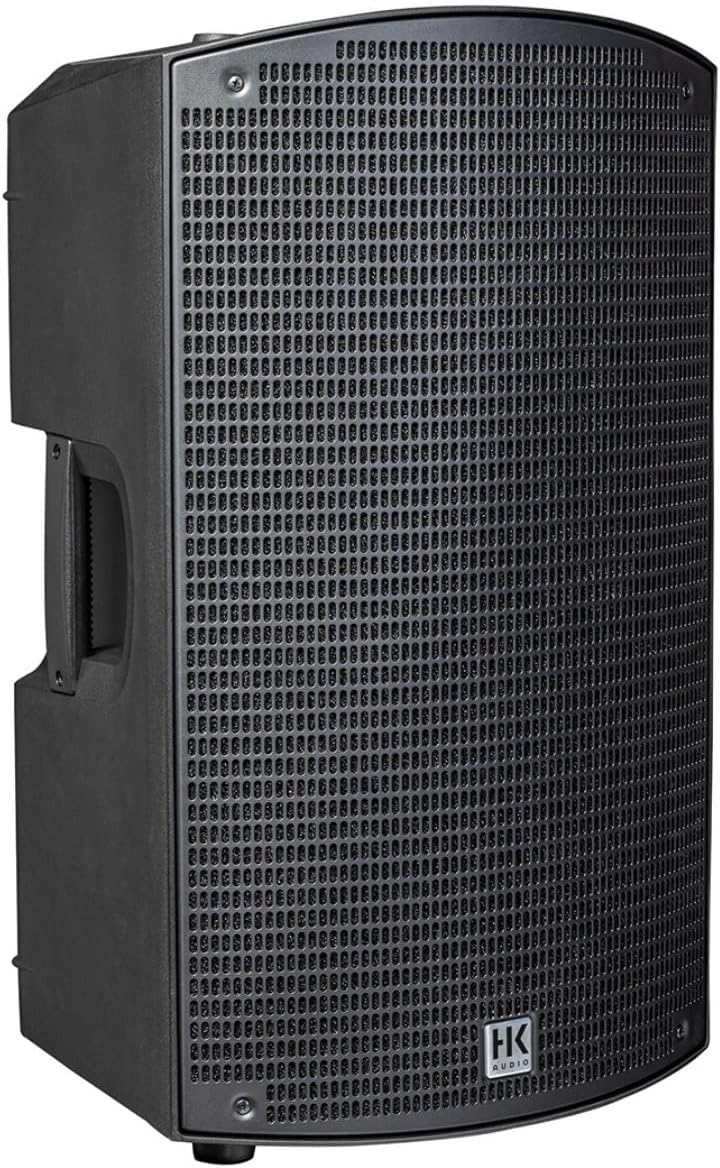
Rajah 1: Depan view of the SONAR-112-XI powered speaker, showcasing its robust grille and integrated handles.
2. Kandungan Pakej
Upon unpacking your SONAR-112-XI speaker, please ensure all components are present and in good condition. The standard package includes:
- 1 x SONAR-112-XI Powered Speaker
- 1 x Kabel Kuasa
- 1 x Manual Pengguna (dokumen ini)
If any items are missing or damaged, please contact your dealer or HK Audio customer support immediately.
3. Persediaan
3.1 Membongkar dan Meletakkan
- Carefully remove the speaker from its packaging. Retain the packaging for future transport or storage.
- Place the speaker on a stable, flat surface, or mount it on a compatible speaker stand. The SONAR-112-XI can also be used as a stage monitor by placing it on its side.
- Ensure adequate ventilation around the speaker, especially around the rear panel where the amplifier and cooling vents are located.

Figure 2: The SONAR-112-XI can be positioned as a stage monitor for optimal sound projection towards performers.

Rajah 3: Bawah view illustrating the integrated pole mount for stand-alone setup.
3.2 Sambungan Kuasa
- Connect the supplied power cable to the AC input on the rear panel of the speaker.
- Plug the other end of the power cable into a suitable grounded AC outlet.
- Ensure the power switch on the rear panel is in the "OFF" position before connecting to power.
3.3 Sambungan Input
The SONAR-112-XI features multiple input options on its rear panel:
- Channels 1 & 2 (Mic/Line): These inputs accept both XLR and 1/4" (6.35mm) TRS/TS connectors for microphones or line-level audio sources.
- Channel 3 (AUX In): This input accepts 1/8" (3.5mm) stereo mini-jack for connecting devices like smartphones or tablets. It also supports Bluetooth audio streaming.
- Campurkan: An XLR output for sending the mixed audio signal to another speaker or audio device.

Figure 4: Rear panel of the SONAR-112-XI, displaying the input channels, controls, and power connection.

Rajah 5: Terperinci view of the SONAR-112-XI control panel, highlighting input knobs, display, and master control.
4. Arahan Operasi
4.1 Menghidupkan/Mematikan
- To power on, flip the power switch on the rear panel to the "ON" position. The display will illuminate.
- To power off, flip the power switch to the "OFF" position.
4.2 Basic Controls (Rear Panel)
- Input Gain Knobs (1, 2, 3): Laraskan tahap input untuk setiap saluran.
- Tombol Master: Controls the overall output volume of the speaker. Push to access the setup menu and adjust EQ settings.
- paparan: Shows current settings, input levels, and menu options.
4.3 Kesambungan Bluetooth
- Ensure Channel 3 is selected for Bluetooth input.
- Activate Bluetooth on your source device (smartphone, tablet, etc.).
- On your device, search for "SONAR 112 Xi" and pair with it. A confirmation sound may play from the speaker.
4.4 Penggandingan Stereo Tanpa Wayar Sebenar (TWS)
To link two SONAR Xi speakers for stereo playback via Bluetooth:
- Power on both SONAR Xi speakers.
- On one speaker (this will be the master), initiate TWS pairing (refer to the speaker's display menu or the SONAR REMOTE app for specific steps).
- The master speaker will search for and connect to the second SONAR Xi speaker.
- Once paired, connect your Bluetooth source device to the master speaker. Audio will now play in stereo across both units.
4.5 SONAR REMOTE App Control
The free SONAR REMOTE app provides comprehensive control over your SONAR-112-XI speaker from your iOS or Android device.
- Download the "SONAR REMOTE" app from the Apple App Store or Google Play Store.
- Ensure your mobile device's Bluetooth is enabled and the speaker is powered on.
- Open the app and follow the on-screen instructions to connect to your SONAR-112-XI speaker.
- The app allows remote adjustment of input volumes, 3-band EQ, and access to advanced settings and scene management.

Figure 6: Screenshot of the SONAR REMOTE app, showing equalizer and volume controls.
5. Penyelenggaraan
- Pembersihan: Use a soft, dry cloth to clean the exterior of the speaker. For stubborn dirt, a slightly damp cloth can be used, but ensure no liquid enters the speaker grilles or control panel. Do not use abrasive cleaners or solvents.
- Storan: When not in use for extended periods, store the speaker in a dry, cool environment, ideally in its original packaging or a protective cover.
- Pengendalian: Always use the integrated carrying handles when moving the speaker. Avoid dropping or subjecting the speaker to strong impacts.
- Pengudaraan: Regularly check that the ventilation openings on the rear panel are free from dust and debris to prevent overheating.
6. Penyelesaian masalah
| Masalah | Kemungkinan Punca | Penyelesaian |
|---|---|---|
| Tiada kuasa | Power cable not connected; power outlet faulty; power switch off. | Ensure power cable is securely connected. Test outlet with another device. Flip power switch to "ON". |
| Tiada keluaran bunyi | Input volume too low; master volume too low; incorrect input selected; source device issue. | Increase input gain and master volume. Verify correct input channel is active. Check audio source device. |
| Kegagalan berpasangan Bluetooth | Speaker not in pairing mode; device too far; interference; previously paired. | Ensure Channel 3 is selected for Bluetooth. Move device closer. Turn off other Bluetooth devices. Forget "SONAR 112 Xi" on your device and try pairing again. |
| Bunyi herot | Input signal too high (clipping); speaker overloaded; faulty cable. | Reduce input gain from source or on speaker. Do not exceed maximum volume for extended periods. Try a different audio cable. |
| Apl tidak bersambung | Bluetooth off on mobile device; app permissions; speaker not powered on. | Ensure Bluetooth is enabled on your phone. Check app permissions. Restart app and speaker. |
7. Spesifikasi
| Ciri | Perincian |
|---|---|
| Nama Model | SONAR-112-XI |
| Jenis Pembesar Suara | Monitor / Powered Speaker |
| Kuasa Output Maksimum Pembesar Suara | 1200 Watt |
| Diameter Woofer | 12 Inci |
| Jenis Pemacu Audio | Pemandu Dinamik |
| Teknologi Ketersambungan | XLR, Bluetooth |
| Teknologi Komunikasi Tanpa Wayar | Bluetooth 5.0 (with TWS) |
| Jenis Pengawal | App Control, On-board Rotary Control |
| Mod Keluaran Audio | Stereo (via TWS) |
| Dimensi Produk (D x W x H) | 20"D x 14.4"W x 24.8"H |
| Berat Barang | 35.1 paun |
| Membawa Pemegang | 2 x SingleGrip |
| Gril Depan | Steel with anticorrosive coating and acoustic foam |
| Sumber Kuasa | AC |
| Jenis Pemasangan | Floor Standing, Pole Mount, Stage Pantau |
| Peranti Serasi | Desktop, Laptop, MP3 Player, Smartphone, Tablet |
8. Maklumat Waranti
HK Audio products are manufactured to the highest quality standards. This product comes with a limited warranty. For detailed information regarding the warranty period, coverage, and terms and conditions, please refer to the warranty card included with your product or visit the official HK Audio webtapak.
Sila simpan bukti pembelian anda untuk sebarang tuntutan waranti.
9. Sokongan Pelanggan
Should you encounter any issues or have questions not covered in this manual, please contact HK Audio customer support or your authorized dealer.
For the most up-to-date support information, FAQs, and contact details, please visit the official HK Audio webtapak:


