pengenalan
Thank you for choosing the MageGee GT860 96-Key Wired RGB Backlit Gaming Keyboard. This keyboard is designed for both gaming and daily use, featuring a compact layout, ergonomic design, and customizable RGB backlighting. This manual will guide you through the setup, operation, and maintenance of your new keyboard to ensure optimal performance and user experience.
Kandungan Pakej
- MageGee GT860 96-Key Wired RGB Backlit Gaming Keyboard
- Manual Pengguna
Produk Selesaiview
Susun atur papan kekunci
The MageGee GT860 features a 92% compact layout, retaining essential keys while offering a space-saving design. It includes a full numeric keypad and function keys.

Image: The MageGee GT860 keyboard showcasing its 96-key layout with RGB backlighting and black and yellow keycaps.

Imej: A terperinci view of the standard 96-key layout with full RGB backlighting, highlighting the compact yet functional design.
Ciri-ciri Utama
- 92% Susun Atur Padat: Offers a balance between full functionality and a space-saving design.
- Membran dengan Rasa Mekanikal: Utilizes advanced imitation mechanical technology for a tactile typing experience.
- Reka bentuk ergonomik: Key layout is engineered for comfortable use during extended periods, reducing fatigue.
- Pencahayaan latar RGB: Features multiple lighting modes and colors, with adjustable brightness and breathing speed.
- Pasang dan Main: No drivers required for basic functionality.
- Keserasian Luas: Supports Windows 10, 8, 7, XP, VISTA, and Mac OS.
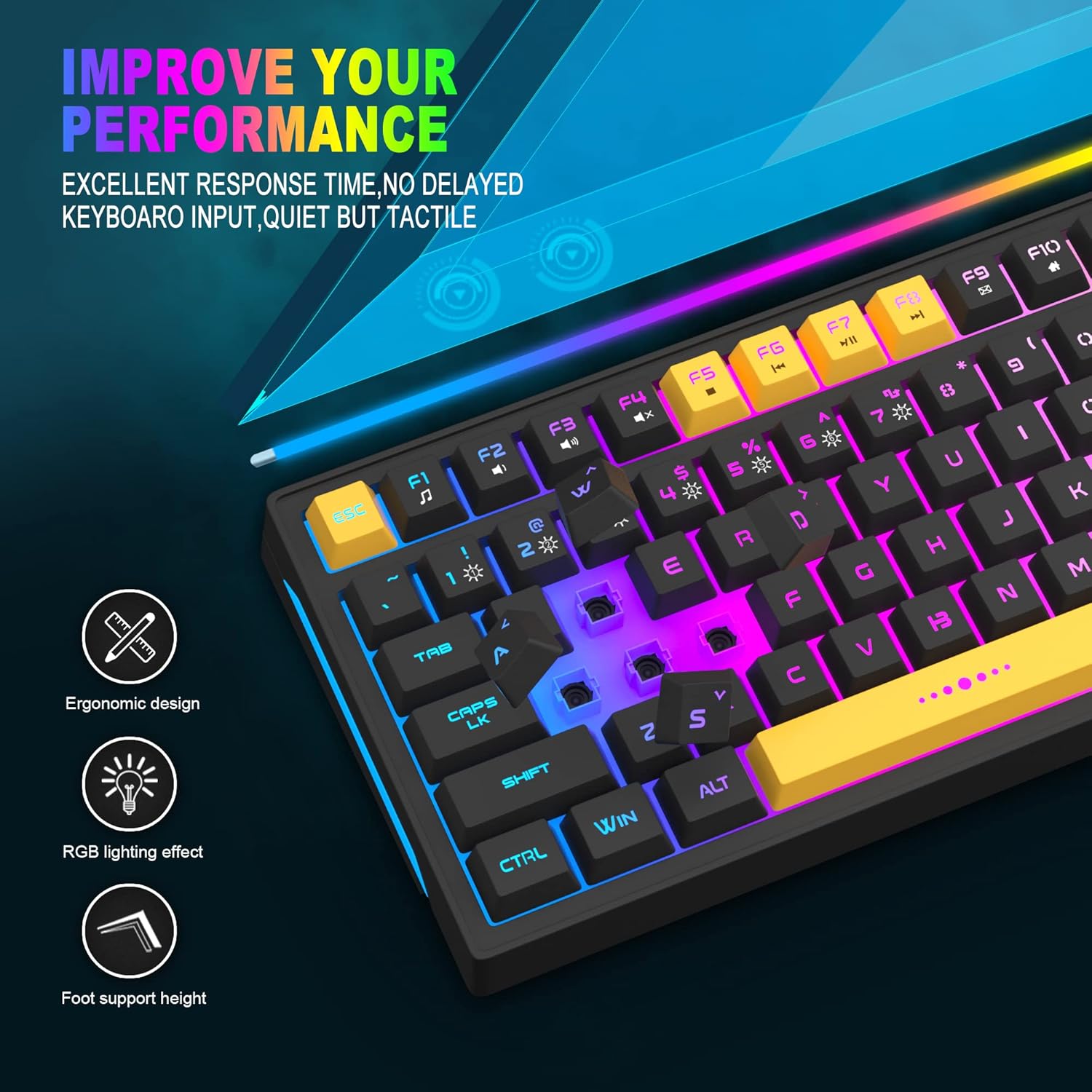
Image: Close-up showing the ergonomic design and RGB lighting effect of the keyboard, emphasizing comfort and visual appeal.

Imej: Sebelah view of the keyboard illustrating its thoughtful ergonomic design with a 7-degree tilt for improved typing posture.
Arahan Persediaan
- Unpack the keyboard and ensure all package contents are present.
- Connect the USB cable from the keyboard to an available USB port on your computer.
- The keyboard is plug-and-play and should be automatically recognized by your operating system (Windows, Mac OS). No additional drivers are typically required for basic functionality.
- Once connected, the RGB backlighting will illuminate, indicating the keyboard is powered on and ready for use.
Arahan Operasi
Kawalan Lampu Latar RGB
The MageGee GT860 keyboard features customizable RGB backlighting with various modes and effects.
- Menukar Mod Pencahayaan: Tekan ke FN key combined with keys 1 melalui 6 to cycle through different RGB lighting effects and colors.
- Melaraskan Kecerahan: Use specific key combinations (refer to keyboard legends or experiment with FN + Arrow keys if not explicitly labeled) to increase or decrease backlight brightness.
- Adjusting Breathing Speed: Some modes allow adjustment of the breathing or animation speed.

Image: The keyboard displaying various RGB backlit lighting modes, illustrating the range of color options available.

Image: A dynamic view daripada paparan papan kekunciasing its 18 RGB LED light effects, highlighting the vibrant backlighting.
Multimedia and Function Keys
The keyboard includes dedicated function keys (F1-F12) that can be accessed by pressing the FN kekunci serentak dengan kekunci F yang dikehendaki.
| Gabungan Kunci | Fungsi |
|---|---|
| FN + F1 | Pemain Media |
| FN + F2 | Kelantangan Kurang |
| FN + F3 | Kelantangan Naik |
| FN + F4 | bisu |
| FN + F5 | Trek Sebelumnya |
| FN + F6 | Trek Seterusnya |
| FN + F7 | Main/Jeda |
| FN + F8 | Berhenti |
| FN + F9 | E-mel |
| FN + F10 | Halaman Utama |
| FN + F11 | Kunci Tatal |
| FN + F12 | Kalkulator |

Image: Diagram illustrating the various multimedia and function key combinations using the FN key (FN + F1-F12).
Penyelenggaraan
To ensure the longevity and optimal performance of your MageGee GT860 keyboard, follow these maintenance guidelines:
- Pembersihan: Regularly clean the keyboard with a soft, dry cloth. For deeper cleaning, use compressed air to remove dust and debris from between the keys. A slightly damp cloth (not wet) can be used for keycap surfaces.
- Elakkan Cecair: Jangan tumpahkan cecair pada papan kekunci. Jika berlaku tumpahan, segera putuskan sambungan papan kekunci daripada komputer anda dan biarkan ia kering sepenuhnya sebelum menyambung semula.
- Storan: Simpan papan kekunci di tempat yang sejuk dan kering, jauh daripada cahaya matahari langsung dan suhu yang melampau apabila tidak digunakan untuk tempoh yang lama.
- Penjagaan Kabel: Elakkan membengkokkan atau memusingkan kabel USB secara berlebihan untuk mengelakkan kerosakan dalaman.

Imej: Dari dekat view of the keyboard with some keycaps removed, showing the underlying switches. This illustrates the internal structure for cleaning purposes.
Menyelesaikan masalah
If you encounter issues with your MageGee GT860 keyboard, please refer to the following common troubleshooting steps:
- Papan Kekunci Tidak Membalas:
- Ensure the USB cable is securely connected to both the keyboard and your computer's USB port.
- Cuba sambungkan papan kekunci ke port USB lain pada komputer anda.
- Uji papan kekunci pada komputer lain untuk menentukan sama ada isu itu adalah dengan papan kekunci atau sistem anda.
- Lampu Latar Tidak Berfungsi atau Tidak Betul:
- Verify that the keyboard is properly connected and receiving power.
- Cycle through the RGB lighting modes using FN + 1-6 untuk memastikan mod dipilih.
- Adjust the brightness settings.
- Kunci Tidak Mendaftar:
- Clean the affected keys to remove any debris that might be obstructing the switch.
- Ensure no software conflicts are present (e.g., other keyboard drivers or gaming software).
- Tingkah laku yang tidak dijangka:
- Mulakan semula komputer anda.
- If the issue persists, contact MageGee customer support for further assistance.
Spesifikasi
| Ciri | Perincian |
|---|---|
| Jenama | MageGee |
| Model | GT860 |
| Susun atur | 96 Kekunci (92% Padat) |
| Ketersambungan | USB berwayar |
| Pencahayaan latar | RGB Backlit (Multiple modes) |
| Jenis Kekunci | Membrane with Mechanical Feeling |
| Ergonomik | Reka Bentuk Ergonomik |
| OS yang serasi | Windows 10, 8, 7, XP, VISTA, Mac OS |
| Dimensi Produk | 35.56 x 10.16 x 5.08 cm (14 x 4 x 2 inci) |
| Berat badan | 744 g (1.64 paun) |
| Voltage | 5 Volt |
| warna | Hitam Kuning |
Waranti dan Sokongan
For warranty information or technical support, please refer to the documentation provided with your purchase or contact MageGee customer service directly. Contact details can typically be found on the manufacturer's official webtapak atau pada pembungkusan produk.
Sila simpan bukti pembelian anda untuk sebarang tuntutan waranti.


