1. Pengenalan
Si Hitamweb BWA21HO008C 1440p 5 Megapiksel USB Webcam is designed to provide high-quality video and still image capture for your personal computer. It features an integrated adjustable light ring to ensure optimal illumination in various environments, enhancing your communication and recording experience. This manual provides instructions for setting up, operating, maintaining, and troubleshooting your webcam.
2. Ciri-ciri Produk
- Up to 1440p Resolution @ 30 frames per second (fps) for clear video.
- 5 Megapixel still image resolution for high-quality photos.
- Built-in adjustable 3-level LED ring light to provide optimal lighting.
- Adjustable base designed to fit various sizes of computer monitors, laptop screens, or stand on flat surfaces.
- USB plug and play functionality for easy setup without additional drivers.
3. Kandungan Pakej
Sila semak pakej untuk item berikut:
- 1 x Hitamweb USB 5 Megapiksel 1440p Webcam (Model: BWA21HO008C)
- 1 x Manual Pengguna
4. Panduan Persediaan
4.1 Persediaan Fizikal
- Memposisikan Webcam: Open the adjustable base of the webcam. Place the webcam on top of your computer monitor or laptop screen, ensuring the front lip of the base rests securely on the front of the screen and the rear clip holds the back. Alternatively, the base can be folded to allow the webcam to stand on a flat surface such as a desk.
- Menyambung ke Komputer Anda: Masukkan kabel USB dari webcam ke dalam port USB yang tersedia pada komputer anda.

Imej: Sisi view daripada Hitamweb webcam demonstrating its adjustable base for mounting on a monitor or laptop screen.
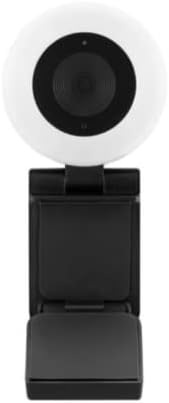
Imej: Depan view daripada Hitamweb webcam, highlighting the central lens and the surrounding adjustable light ring.
4.2 Persediaan Perisian
Si Hitamweb BWA21HO008C webcam is a plug-and-play device, requiring no additional driver installation for most operating systems (Windows, macOS, Chrome OS). Upon connecting, your computer should automatically detect and configure the webcam.
- Pengesanan Automatik: Once connected, your operating system should recognize the webcam as a new video device.
- Application Selection: Untuk menggunakan webcam, open your preferred video conferencing software (e.g., Zoom, Microsoft Teams, Skype) or recording application. Navigate to the video/camera settings within the application and select "Blackweb BWA21HO008C" (or similar name) as your video input device.
5. Arahan Operasi
5.1 Menggunakan Webcam
Once connected and recognized by your system and chosen in your application, the webcam is ready for use in video calls, live streaming, or recording.
- Ensure your chosen application is open and the webcam is selected as the active camera source.
- Laraskan webcam's angle manually to frame your desired view.
5.2 Adjusting the Light Ring
The webcam features a built-in adjustable 3-level LED light ring to improve illumination in low-light conditions.
- Locate the light control button, typically found on the top or side of the webcam body.
- Press the button repeatedly to cycle through the brightness levels: Low, Medium, High, and Off. Select the level that best suits your lighting needs.

Imej: Bersudut view daripada Hitamweb webcam, highlighting the prominent light ring and the camera lens.
6. Penyelenggaraan
- Pembersihan: Untuk membersihkan webcam lens and body, use a soft, dry, lint-free cloth. Avoid using harsh chemicals, abrasive materials, or excessive moisture, as these can damage the device. Ensure the device is disconnected from your computer before cleaning.
- Storan: Apabila tidak digunakan, simpan webcam in a cool, dry place, away from direct sunlight, extreme temperatures, and high humidity.
7. Penyelesaian masalah
- Tiada Imej/Video:
- Pastikan kabel USB disambungkan dengan selamat ke kedua-dua webcam dan komputer anda.
- Cuba sambungkan webkamera ke port USB berbeza pada komputer anda.
- Sahkan bahawa webcam is selected as the active video input device in your application's settings.
- Mulakan semula komputer anda.
- Kualiti Video Lemah:
- Ensure adequate lighting in your environment; use the built-in light ring if necessary.
- Bersihkan webcam lens with a soft, dry cloth.
- Confirm your application settings are configured for 1440p resolution if desired and your internet connection is stable if streaming.
- Light Ring Not Working:
- Memastikan webcam is connected to a powered USB port.
- Press the light control button multiple times to cycle through all brightness settings.
- If the issue persists, try connecting the webcam to a different USB port or computer.
8. Spesifikasi
| Nombor Model | BWA21HO008C |
| Resolusi Video | Up to 1440p @ 30 fps |
| Resolusi Imej Pegun | 5 Megapiksel |
| Ketersambungan | USB |
| Ciri Khas | Adjustable 3-level LED light ring, Low Light capability |
| Peranti Serasi | Komputer Peribadi |
| warna | Hitam |
| Dimensi (L x W x H) | 16.2 x 10.5 x 5.9 cm (approximate parcel dimensions) |
| Berat badan | 170 g (approximate parcel weight) |
9. Maklumat Keselamatan
- Do not expose the device to water, rain, or excessive moisture.
- Do not attempt to disassemble, modify, or repair the device yourself. Refer all servicing to qualified personnel.
- Jauhkan peranti daripada kanak-kanak dan haiwan peliharaan.
- Use only with compatible devices and power sources as specified.
- Elakkan daripada meletakkan webcam in direct sunlight or near heat sources.
10. Waranti dan Sokongan
For warranty information, technical support, or customer service inquiries regarding your Blackweb BWA21HO008C webcam, please refer to the documentation provided at the point of purchase or contact your retailer. You may also visit the official Blackweb sokongan website for further assistance, if available.