pengenalan
The Bell+Howell BH65TWS Bluetooth True Wireless Stereo Link Cinema Speaker offers a versatile audio experience. It allows wireless music streaming via Bluetooth up to 33 feet away and includes an auxiliary input for wired connections. Featuring True Wireless Stereo (TWS) technology, two BH65TWS speakers can be paired for an immersive surround sound experience. Its compact and robust design makes it suitable for various environments, providing up to 10 hours of audio playback on a single charge.
Apa yang ada dalam Kotak
Sila semak kandungan pakej untuk memastikan semua item ada:
- BH65TWS Speaker
- Kabel USB
- Kabel Auxiliary
- Manual Arahan (dokumen ini)
- Kad Waranti
Produk Selesaiview
Biasakan diri anda dengan kawalan dan port pembesar suara.

Imej 1: Depan view of the Bell+Howell BH65TWS speaker, highlighting the top control panel with power, volume, play/pause, and mode buttons, and the front speaker grille.
Butang Kawalan:
- Butang Kuasa: Tekan dan tahan untuk menghidupkan atau mematikan pembesar suara.
- Perlahankan suara (-): Tekan untuk mengurangkan kelantangan. Tekan dan tahan untuk melangkau ke trek sebelumnya.
- Kelantangan Naik (+): Tekan untuk meningkatkan kelantangan. Tekan dan tahan untuk melangkau ke trek seterusnya.
- Butang Main/Jeda/Panggil: Press to play or pause music. Press to answer or end a phone call. Press and hold to reject an incoming call. Double-press to redial the last number.
- Butang Mod (M): Press to switch between Bluetooth and Auxiliary input modes.
Pelabuhan dan Penunjuk:
- Port Pengecasan USB Mikro: Untuk mengecas bateri dalaman pembesar suara.
- Input AUX 3.5mm: For connecting external audio devices via the auxiliary cable.
- Penunjuk LED: Memaparkan status pengecasan dan status gandingan Bluetooth.
- mikrofon: Untuk panggilan bebas tangan.
Persediaan
Mengecas Speaker
- Connect the small end of the included USB cable to the Micro USB charging port on the speaker.
- Sambungkan hujung besar kabel USB ke penyesuai kuasa USB (tidak disertakan) atau port USB komputer.
- The LED indicator will illuminate to show charging status. It will typically turn off or change color once fully charged. A full charge provides up to 10 hours of music playtime.
Menghidupkan/Mematikan
- Untuk Menghidupkan: Press and hold the Power button for approximately 3 seconds until you hear an audible tone and the LED indicator flashes.
- Untuk Mematikan: Press and hold the Power button for approximately 3 seconds until you hear an audible tone and the LED indicator turns off.
Arahan Operasi
Berpasangan Bluetooth
- Ensure the speaker is powered on and in Bluetooth mode (the LED indicator will be flashing blue). If not, press the Mode button to switch to Bluetooth mode.
- Dayakan Bluetooth pada telefon pintar, tablet anda atau peranti lain yang didayakan Bluetooth.
- Cari untuk available Bluetooth devices. Select "BH65TWS" from the list.
- Once paired, the LED indicator will stop flashing and remain solid blue, and you will hear a confirmation tone.
- You can now stream audio wirelessly from your device to the speaker. The effective range is up to 33 feet (10 meters).
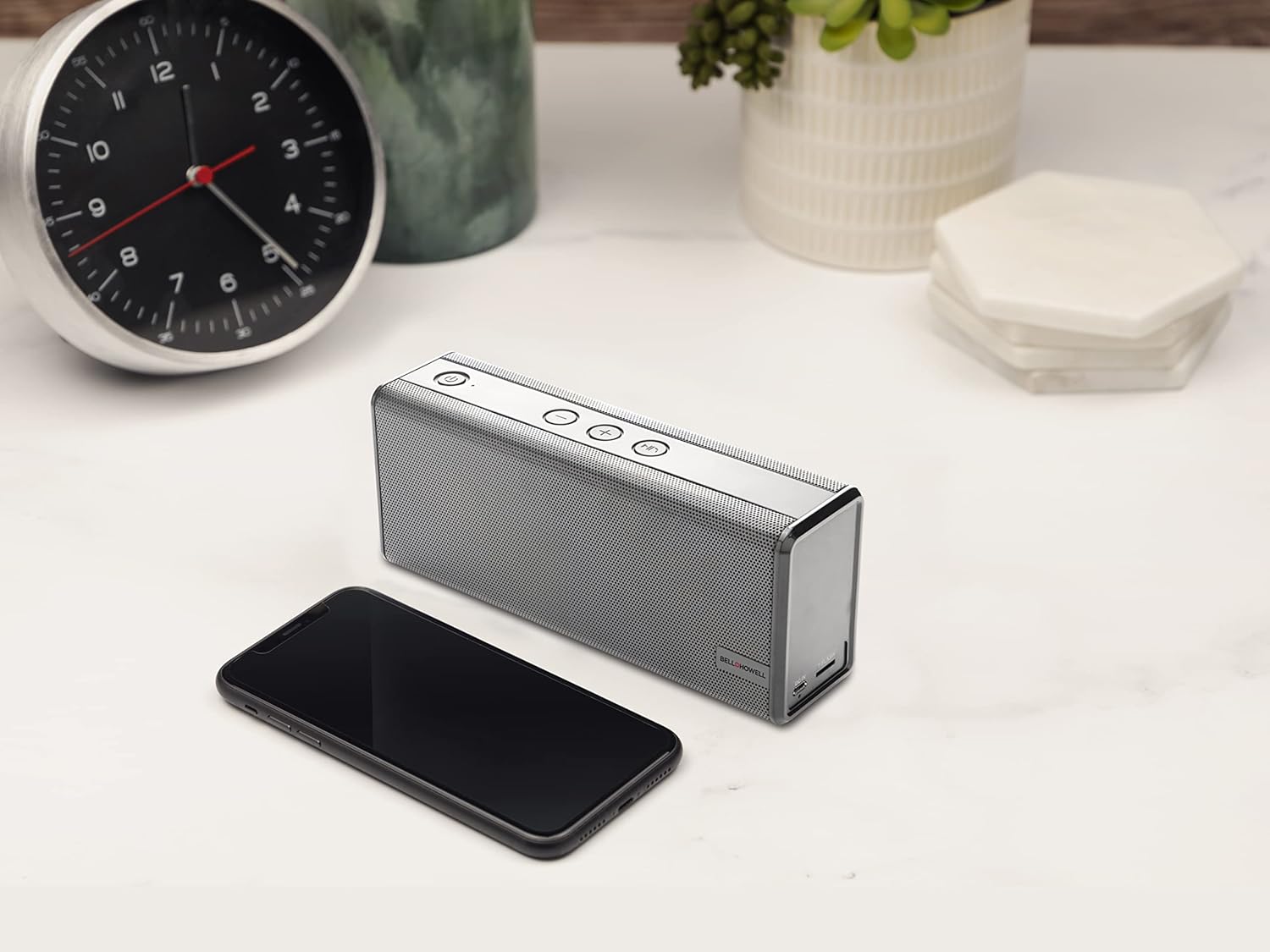
Imej 2: The Bell+Howell BH65TWS speaker positioned on a desk next to a smartphone, illustrating its compact size and readiness for wireless audio streaming.
Pasangan Stereo Tanpa Wayar Sejati (TWS)
To achieve a true stereo sound experience, you can pair two BH65TWS speakers together.
- Ensure both BH65TWS speakers are powered on and not connected to any Bluetooth device.
- On one of the speakers (this will be your primary speaker), press and hold the Mode button for approximately 3 seconds. You will hear a tone, and the speaker will enter TWS pairing mode.
- The two speakers will automatically search for and connect to each other. Once connected, you will hear a confirmation tone, and the LED indicator on the primary speaker will flash blue, while the secondary speaker's LED will be solid blue.
- Now, connect your Bluetooth device to the primary speaker as described in the "Bluetooth Pairing" section. The audio will play through both speakers in stereo.
Auxiliary Input (AUX) Mode
For devices without Bluetooth, use the auxiliary input:
- Connect one end of the included 3.5mm auxiliary cable to the AUX input port on the speaker.
- Connect the other end of the auxiliary cable to the headphone jack or audio output of your external device.
- Press the Mode button on the speaker until it enters AUX mode (the LED indicator may change color or pattern).
- Kawal main balik dan kelantangan terus daripada peranti anda yang disambungkan.
Panggilan Bebas Tangan
Apabila disambungkan melalui Bluetooth ke telefon pintar, pembesar suara boleh digunakan untuk panggilan bebas tangan:
- Jawab Panggilan: Press the Play/Pause/Call button once to answer an incoming call.
- Tamatkan Panggilan: Press the Play/Pause/Call button once to end an active call.
- Tolak Panggilan: Press and hold the Play/Pause/Call button for 2 seconds to reject an incoming call.
- Panggil semula: Double-press the Play/Pause/Call button to redial the last number called.
Penyelenggaraan
Proper care ensures the longevity of your speaker.
- Pembersihan: Use a soft, dry cloth to wipe the speaker's surface. Do not use abrasive cleaners, waxes, or solvents.
- Storan: Apabila tidak digunakan untuk tempoh yang lama, simpan pembesar suara di tempat yang sejuk dan kering jauh dari cahaya matahari langsung dan suhu yang melampau.
- Penjagaan Bateri: Untuk mengekalkan kesihatan bateri, cas sepenuhnya pembesar suara sekurang-kurangnya sekali setiap tiga bulan, walaupun tidak digunakan secara tetap.
- Tahan Air: Penceramah ini adalah bukan kalis air. Elakkan pendedahan kepada air atau kelembapan berlebihan.
Menyelesaikan masalah
If you encounter issues, refer to the following solutions:
| Masalah | Penyelesaian yang Mungkin |
|---|---|
| Speaker tidak dihidupkan. | Ensure the battery is charged. Connect the speaker to a power source using the USB cable and try again after a few minutes. |
| Tidak boleh berpasangan melalui Bluetooth. |
|
| Tiada suara dari pembesar suara. |
|
| Gandingan TWS gagal. |
|
Spesifikasi
| Ciri | Perincian |
|---|---|
| Nama Model | Pembesar suara Bluetooth Stereo Tanpa Wayar Sejati |
| Jenama | Bell + Howell |
| Teknologi Ketersambungan | Bluetooth, Bantu |
| Teknologi Komunikasi Tanpa Wayar | Bluetooth |
| Julat Bluetooth | 33 Kaki (10 meter) |
| Jenis Pembesar Suara | Surround Sound (with TWS pairing) |
| Ciri Khas | Built-in Microphone, Stereo Pairing (TWS) |
| Penggunaan yang Disyorkan | Music, Outdoor, Travel |
| Peranti Serasi | Desktop, Laptop, MP3 Player, Smartphone, Tablet |
| Sumber Kuasa | Dikuasakan Bateri |
| Jenis Bateri | 1 bateri Lithium Ion (termasuk) |
| Kapasiti Bateri | 2200 mAh |
| Waktu Main Muzik | Sehingga 10 jam |
| Kuasa Output Maksimum Pembesar Suara | 6 Watts (Dual 3 watt drivers) |
| Mod Keluaran Audio | Stereo, Surround |
| Kaedah Kawalan | Sentuh Butang |
| Dimensi Produk | 8.7 x 4.7 x 2.8 inci |
| Berat Barang | 2 paun |
| warna | Perak |
| Kalis air | Tidak |
Maklumat Keselamatan
Sila baca dan patuhi garis panduan keselamatan ini untuk operasi yang selamat:
- Jangan dedahkan pembesar suara kepada suhu yang melampau, cahaya matahari langsung atau kelembapan yang tinggi.
- Elakkan daripada menjatuhkan atau menundukkan pembesar suara kepada impak yang kuat.
- Jangan buka, baiki atau ubah suai pembesar suara sendiri. Ini boleh membatalkan jaminan dan menimbulkan risiko keselamatan.
- Jauhkan pembesar suara daripada air dan cecair. Ia tidak kalis air.
- Gunakan hanya kabel USB yang disediakan untuk mengecas.
- Do not operate the speaker at excessively high volumes for prolonged periods, as this may cause hearing damage.
- Buang bateri dan pembesar suara mengikut peraturan tempatan. Jangan buang bateri ke dalam api.
Maklumat Waranti
The Bell+Howell BH65TWS speaker comes with a Waranti Terhad. Please refer to the included Warranty Card for specific terms, conditions, and duration of coverage. Keep your purchase receipt as proof of purchase for warranty claims.
Sokongan
For further assistance or inquiries not covered in this manual, please contact Bell+Howell customer support. Refer to the contact information provided on the Warranty Card or visit the official Bell+Howell webtapak untuk sumber sokongan.


