1. Pengenalan
Thank you for choosing the Dalton 10 kVA Uninterruptible Power Supply (UPS) unit. This manual provides essential information for the safe and efficient operation of your UPS. Please read this manual thoroughly before installation and operation, and keep it for future reference.
This UPS is designed to provide reliable power protection for critical equipment, safeguarding against power outages, surges, and fluctuations. Its advanced technology ensures stable and clean power delivery, extending the lifespan of your connected devices.
2. Maklumat Keselamatan
Sentiasa patuhi langkah keselamatan berikut untuk mengelakkan kecederaan atau kerosakan pada UPS dan peralatan yang disambungkan:
- Jangan buka UPS casing. Tiada bahagian yang boleh diservis pengguna di dalamnya. Rujuk semua servis kepada kakitangan perkhidmatan yang berkelayakan.
- Pastikan UPS disambungkan ke soket kuasa yang dibumikan.
- Do not block ventilation openings. Adequate airflow is crucial for proper cooling.
- Elakkan memasang UPS di kawasan yang mempunyai habuk, kelembapan atau suhu yang melampau.
- Putuskan sambungan UPS daripada sumber kuasa AC sebelum melakukan sebarang penyelenggaraan atau mengalihkan unit.
- Bateri boleh menyebabkan risiko renjatan elektrik dan arus litar pintas yang tinggi. Patuhi langkah berjaga-jaga yang betul semasa bekerja dengan bateri.
3. Kandungan Pakej
Carefully unpack the UPS and check if all items are present and undamaged. If any items are missing or damaged, contact your dealer immediately.
- Dalton 10 kVA UPS Unit
- Manual Pengguna (dokumen ini)
- Kabel Kuasa Input
- Output Power Cables (quantity may vary)
- USB Communication Cable (for monitoring software)
- CD Perisian (jika berkenaan)
4. Produk Lebihview
The Dalton 10 kVA UPS is a robust power protection solution. Below is an overview of its typical components and features.
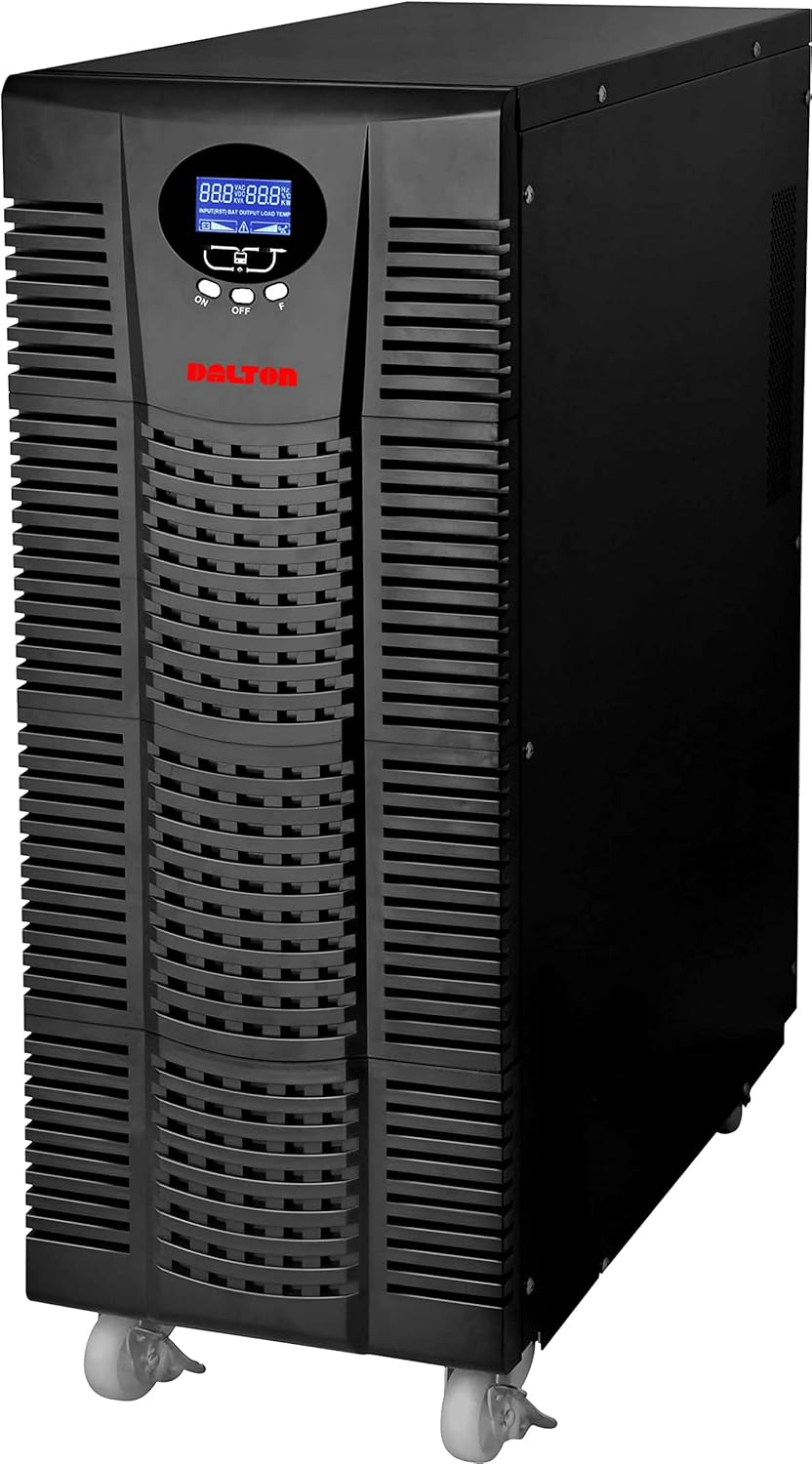
Rajah 4.1: Depan view of the Dalton 10 kVA UPS unit. This image displays the tall, black tower design of the UPS, featuring a prominent vented front panel for airflow and integrated wheels at the base for easy mobility. The control panel and display are visible towards the top of the unit.
4.1 Panel Depan
- Paparan LCD: Shows real-time status, input/output voltage, battery level, load percentage, dan kod ralat.
- Butang Kawalan: Used to navigate menus, acknowledge alarms, and perform system tests.
- Butang Kuasa: Turns the UPS on or off.
4.2 Panel Belakang
- Penyambung Kuasa Input: For connecting the UPS to the main AC power source.
- Bekas Output: Untuk menyambungkan peralatan yang dilindungi.
- Communication Ports (USB/RS232): For connecting to a computer for monitoring and management.
- External Battery Connector (if applicable): For connecting optional external battery packs.
- Pemutus litar: Provides overload protection.
5. Persediaan dan Pemasangan
Follow these steps for proper installation of your UPS unit:
- penempatan:
- Place the UPS in a clean, dry, and well-ventilated area.
- Ensure sufficient clearance around the unit for proper airflow.
- Avoid direct sunlight, heat sources, and excessive moisture.
- Caj Bateri Permulaan:
- Sambungkan UPS ke salur keluar kuasa AC yang dibumikan.
- Allow the UPS to charge for at least 8 hours before connecting any equipment to ensure full battery capacity. The display will indicate charging status.
- Peralatan penyambung:
- With the UPS turned off and fully charged, connect your critical equipment (computers, servers, networking devices) to the UPS output receptacles.
- Do not connect laser printers or other high-surge current devices to the battery-backed outlets, as this may overload the UPS.
- Menghidupkan:
- Press and hold the power button on the front panel until you hear a beep and the display illuminates.
- The UPS will perform a self-test and then enter normal operating mode.
6. Arahan Operasi
6.1 Operasi Biasa
Once powered on, the UPS continuously monitors the incoming AC power. In normal mode, it provides clean and stable power to connected devices.
6.2 Mod Bateri
If the utility power fails or fluctuates outside acceptable limits, the UPS will automatically switch to battery mode, providing power from its internal batteries. An audible alarm will sound, and the LCD display will indicate "Battery Mode".
- During battery mode, save your work and shut down connected equipment gracefully to prevent data loss.
- The duration of battery backup depends on the load connected and the battery charge level.
6.3 Mematikan UPS
To turn off the UPS and disconnect power to connected devices:
- Shut down all connected equipment.
- Press and hold the power button on the UPS until it powers off.
- Disconnect the UPS from the AC power outlet.
7. Penyelenggaraan
7.1 Penjagaan Bateri
- Regularly charge the batteries by keeping the UPS connected to AC power.
- Perform a battery self-test periodically (refer to your UPS display menu for this option) to check battery health.
- Batteries have a limited lifespan (typically 3-5 years). Contact service for battery replacement when performance degrades.
7.2 Pembersihan
- Clean the exterior of the UPS with a soft, dry cloth.
- Jangan gunakan pembersih cecair atau aerosol.
- Pastikan bukaan pengudaraan bebas daripada habuk dan serpihan.
8. Penyelesaian masalah
Bahagian ini menyediakan penyelesaian kepada isu biasa yang mungkin anda hadapi dengan UPS anda.
| Masalah | Kemungkinan Punca | Penyelesaian |
|---|---|---|
| UPS tidak dihidupkan. | Tiada kuasa input AC; Bateri lemah; Kerosakan UPS. | Check power cord connection and wall outlet. Allow UPS to charge for several hours. Contact service if problem persists. |
| UPS berbunyi bip berterusan dalam mod biasa. | Overload; Battery fault. | Reduce connected load. Perform battery self-test. |
| Masa sandaran yang singkat. | Overload; Old battery; Insufficient charging. | Reduce load. Replace battery. Ensure UPS is fully charged. |
For issues not listed here, or if solutions do not resolve the problem, please contact Dalton customer support.
9. Spesifikasi
| Ciri | Perincian |
|---|---|
| Jenama | Dalton |
| Model | UPS 10 kVA |
| Kuasa Maksimum | 10,000 Watt |
| Kuasa Keluaran | 10,000 Watt |
| Julat Kekerapan | 50/60 Hz (± 3 Hz) |
| Jenis Penyambung | IEC 320, Battery |
| warna | Hitam |
| bahan | logam |
| ASIN | B09NC2FXNC |
| Tarikh Tersedia Pertama | 9 Disember 2021 |
10. Waranti dan Sokongan
Dalton provides comprehensive support for its products. As authorized distributors in the Arab Republic of Egypt, we maintain an authorized service center for all Dalton UPS units.
- For technical assistance, troubleshooting, or warranty claims, please contact our authorized service center.
- Ensure you have your product model and ASIN (B09NC2FXNC) ready when contacting support.
- Pembaikan atau pengubahsuaian yang tidak dibenarkan akan membatalkan jaminan produk.
For more information, please visit the official Dalton webtapak atau hubungi pengedar tempatan anda.


