1. Pengenalan
Thank you for choosing the Dalton 2000VA Uninterruptible Power Supply (UPS). This device is designed to provide reliable power backup and protection for your electronic equipment against power outages, surges, and fluctuations. Please read this manual thoroughly before installation and operation to ensure optimal performance and safety.
2. Arahan Keselamatan Penting
Sentiasa ikuti langkah berjaga-jaga keselamatan asas ini untuk mengurangkan risiko kebakaran, renjatan elektrik dan kecederaan:
- Jangan buka UPS casing. There are no user-serviceable parts inside. Refer servicing to qualified service personnel.
- Do not use the UPS in environments with excessive dust, humidity, or extreme temperatures.
- Pastikan UPS disambungkan ke soket kuasa yang dibumikan.
- Do not connect non-computer related items like medical equipment, life support equipment, or household appliances to the UPS.
- Position the UPS in a well-ventilated area, away from direct sunlight or heat sources.
- In case of emergency, press the power button to turn off the UPS and disconnect it from the AC power source.
3. Kandungan Pakej
Sahkan bahawa semua item terdapat dalam pakej anda:
- Dalton 2000VA UPS Unit
- Kord Kuasa
- USB Communication Cable (if applicable)
- Manual Pengguna (dokumen ini)

Rajah 3.1: Depan view of the Dalton 2000VA UPS unit, showing the display screen and power button.
4. Persediaan dan Pemasangan
Follow these steps to set up your UPS:
- Membongkar: Keluarkan UPS dari pembungkusannya dengan berhati-hati. Periksa sebarang kerosakan penghantaran.
- penempatan: Place the UPS on a flat, stable surface in a cool, dry, and well-ventilated area. Ensure there is adequate space around the unit for airflow.
- Caj Permulaan: Before connecting any devices, plug the UPS power cord into a grounded wall outlet. Allow the unit to charge for at least 8 hours to ensure the battery is fully charged. The display will indicate charging status.
- Menyambung Peranti:
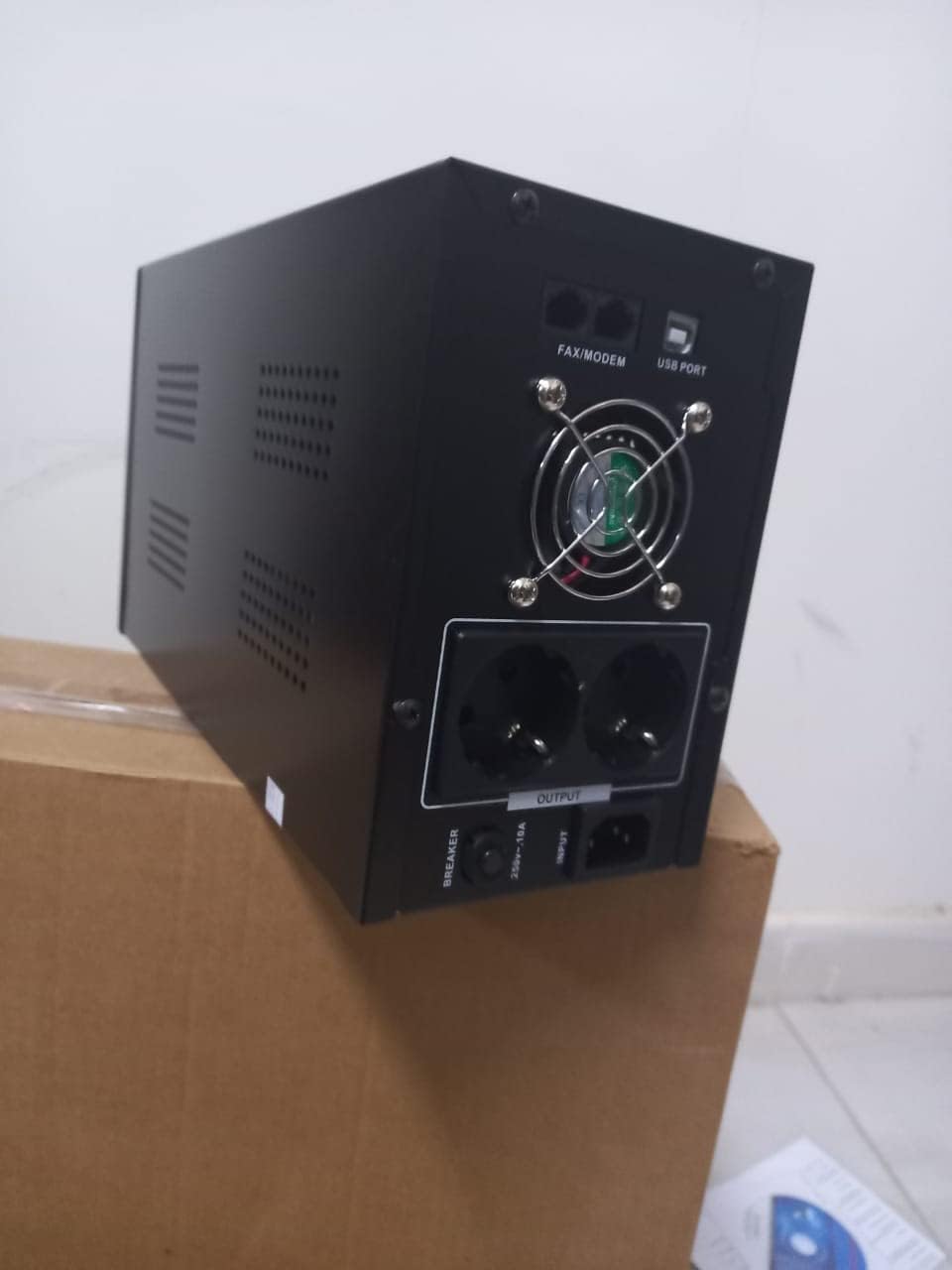
Rajah 4.1: Belakang view of the Dalton 2000VA UPS, highlighting the input power port, output sockets, and USB/Modem ports.
- Once the battery is charged, connect your computer, monitor, and other critical electronic devices to the UPS output sockets.
- Do not overload the UPS. Refer to the specifications section for maximum load capacity.
- If applicable, connect the USB communication cable from the UPS to your computer for monitoring software (software not included, check manufacturer's webtapak).
5. Mengendalikan UPS
5.1 Menghidupkan/Mematikan
- Untuk Menghidupkan: After connecting to AC power and charging, press and hold the power button on the front panel for approximately 3 seconds until you hear a beep and the display illuminates.
- Untuk Mematikan: Press and hold the power button for approximately 3 seconds until you hear a beep and the display turns off. If the UPS is running on battery, it will shut down immediately. If connected to AC, it will switch to bypass mode before shutting down.
5.2 Memahami Paparan
The front panel LCD display provides real-time status information:
- DALAM: Memaparkan vol inputtage from the utility power.
- KELUAR: Memaparkan vol keluarantage provided by the UPS to connected devices.
- BIASA: Indicates the UPS is operating on utility power.
- kelawar: Menunjukkan tahap cas bateri semasa.
- Muatkan: Menunjukkan peratusantage kapasiti UPS yang digunakan oleh peranti yang bersambung.
- Battery Mode Icon: Appears when the UPS is running on battery power during an outage.

Rajah 5.1: Sisi view of the UPS, showing the illuminated display with power status indicators.
5.3 Battery Backup Function
Sekiranya berlaku kuasa outage, the UPS will automatically switch to battery power, providing continuous power to your connected devices. The duration of backup power depends on the load connected and the battery's charge level. The UPS will emit an audible alarm during battery operation.
When utility power returns, the UPS will automatically switch back to AC power and begin recharging its battery.
6. Penyelenggaraan
- Penjagaan Bateri: To maximize battery life, ensure the UPS is always connected to an AC outlet to keep the battery charged. If the UPS is stored for an extended period, recharge it every three months for at least 8 hours.
- Pembersihan: Disconnect the UPS from all power sources before cleaning. Use a soft, dry cloth to wipe the exterior. Do not use liquid or aerosol cleaners.
- Pengudaraan: Regularly check that the ventilation openings are not blocked by dust or debris to prevent overheating.
7. Penyelesaian masalah
Rujuk jadual di bawah untuk isu biasa dan penyelesaiannya:
| Masalah | Kemungkinan Punca | Penyelesaian |
|---|---|---|
| UPS tidak dihidupkan. | Battery not charged or power cord disconnected. | Ensure power cord is securely plugged in and allow battery to charge for 8 hours. |
| UPS berbunyi bip berterusan dalam mod biasa. | Keadaan beban berlebihan. | Disconnect non-essential equipment until the alarm stops. Check total load. |
| Masa sandaran yang singkat. | Battery not fully charged or battery nearing end of life. | Allow UPS to charge for 8 hours. If issue persists, battery may need replacement (contact service center). |
| UPS tidak memberikan kuasa semasa outage. | Battery discharged or internal fault. | Ensure UPS was fully charged. If problem persists, contact authorized service center. |
8. Spesifikasi Teknikal
| Ciri | Perincian |
|---|---|
| Dimensi Produk | 12.5 x 22.5 x 38 cm |
| Pengeluar | Dalton |
| Nama Jenama | Generik |
| warna | Hitam |
| bahan | logam |
| semasa | 5 Ampsebelum |
| Faktor Bentuk | rak |
| Julat Kekerapan | 50-60 Hz |
| Keluaran Voltage | 220 Volt |
| Jenis Penyambung | AC |
9. Waranti dan Sokongan
Dalton provides an authorized maintenance center for all Uninterruptible Power Supply units. For warranty claims, technical support, or service inquiries, please contact your local Dalton authorized distributor or service center. Keep your purchase receipt as proof of purchase for warranty validation.
For further assistance, please visit the official Dalton webtapak atau hubungi sokongan pelanggan.


