pengenalan
The Cellularline Keen True Wireless Stereo (TWS) earbuds are designed for an optimal audio experience, whether for calls or music. Featuring a soft-touch finish and intuitive touch controls, these earbuds offer convenience and high-quality sound for everyday use. The Keen earbuds provide up to 6 hours of playback on a single charge, with the included charging case extending total battery life to over 24 hours.

This image shows the Cellularline Keen True Wireless Stereo (TWS) earbuds. The earbuds are black with a soft-touch finish, and one earbud is visible resting in its open charging case. The charging case is also black with a silver interior, designed to store and charge the earbuds.
Kandungan Pakej
Sebelum anda memulakan, sila pastikan semua item terdapat dalam pakej:
- Cellularline Keen TWS Earbuds (Left and Right)
- Kes Pengecasan
- Kabel Pengecasan
- Eartips in 3 Sizes (Small, Medium, Large)
- Manual Pengguna
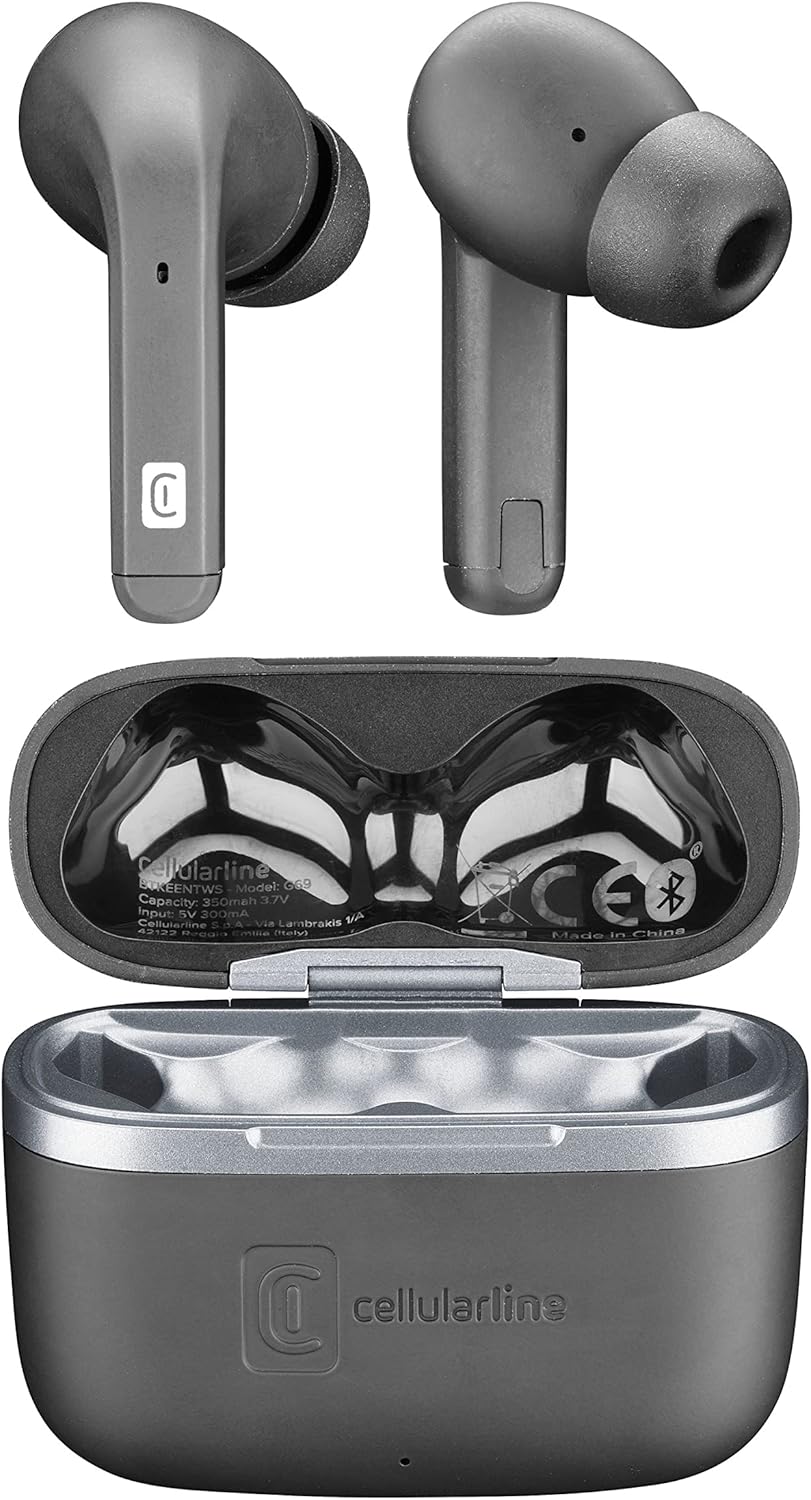
Imej ini menyediakan atas ke bawah view of the Cellularline Keen earbuds and their charging case. Both earbuds are shown outside the case, highlighting their design. The open charging case reveals the charging cradles and internal markings, including the Cellularline logo and regulatory information.
Persediaan
1. Pengecasan Awal
Before first use, it is recommended to fully charge the earbuds and the charging case. Connect the provided charging cable to the charging case and a compatible USB power source. The charging indicators on the case will show the charging status. A full charge provides up to 6 hours of earbud playtime, with the case offering an additional 24 hours of battery life.
2. Berpasangan dengan Peranti Anda
The Cellularline Keen earbuds are designed for easy pairing with any Bluetooth-enabled device (smartphones, tablets, laptops, etc.).
- Pastikan fon telinga berada dalam bekas pengecasan dan penutup kotak terbuka.
- Pada peranti anda, navigasi ke tetapan Bluetooth.
- Activate Bluetooth if it is not already enabled.
- Cari untuk new devices. You should see "Cellularline Keen" or a similar name appear in the list of available devices.
- Select "Cellularline Keen" to initiate the pairing process.
- Once paired, your device will confirm the connection, and the earbuds are ready for use.
The earbuds will automatically connect to the last paired device when removed from the case, provided Bluetooth is active on the device.
Arahan Operasi
The Keen earbuds feature intuitive touch controls for managing audio playback and calls.
Main balik Muzik
- Main/Jeda: Ketik sekali pada salah satu fon telinga.
- Lagu Seterusnya: Ketik dua kali pada fon telinga kanan.
- Trek Sebelumnya: Ketik dua kali pada fon telinga kiri.
- Kelantangan: Ketik tiga kali pada fon telinga kanan.
- Perlahankan suara: Ketik tiga kali pada fon telinga kiri.
Pengurusan Panggilan
- Jawab/Tamatkan Panggilan: Ketik sekali pada salah satu fon telinga.
- Tolak Panggilan: Tekan dan tahan salah satu fon telinga selama 2 saat.
Pembantu Suara
- Aktifkan Pembantu Suara: Press and hold either earbud for 3 seconds (e.g., Siri, Google Assistant).
Penyelenggaraan
Proper maintenance ensures the longevity and optimal performance of your Cellularline Keen earbuds.
- Pembersihan: Regularly clean the earbuds and charging case with a soft, dry, lint-free cloth. Do not use abrasive cleaners or solvents. For eartips, remove them and clean with a damp kain, pastikan ia benar-benar kering sebelum dipasang semula.
- Tahan Air: The earbuds are rated as waterproof. However, this does not mean they are suitable for prolonged submersion or use during swimming. Avoid exposing them to strong jets of water or saltwater. Always ensure the charging port is dry before charging.
- Storan: Apabila tidak digunakan, simpan fon telinga di dalam bekas pengecas untuk melindunginya daripada habuk dan kerosakan. Simpan di tempat yang sejuk dan kering, jauh daripada cahaya matahari langsung dan suhu yang melampau.
- Penjagaan Bateri: Untuk menjimatkan hayat bateri, elakkan daripada kerap mengecas fon telinga dan sarungnya sepenuhnya. Caskannya secara berkala, walaupun tidak digunakan secara berterusan.
Menyelesaikan masalah
If you encounter any issues with your Cellularline Keen earbuds, refer to the following common solutions:
| Masalah | Penyelesaian yang Mungkin |
|---|---|
| Fon telinga tidak berpasangan/bersambung |
|
| Tiada bunyi daripada satu atau kedua-dua fon telinga |
|
| Kes pengecas tidak dicas |
|
| Kawalan sentuh tidak bertindak balas |
|
Spesifikasi
| Ciri | Perincian |
|---|---|
| Nama Model | BTKEENTWSK |
| Jenama | talian selular |
| Teknologi Ketersambungan | Wayarles (Bluetooth) |
| Faktor Bentuk | Dalam Telinga |
| Jenis Kawalan | Kawalan Sentuh |
| Masa Main Earbud | Sehingga 6 jam |
| Jumlah Masa Main (dengan kes) | Over 24 hours (up to 30 hours) |
| Komposisi Bateri | Lithium-polymer (2 included) |
| Ciri Khas | Fast Charging, Wireless |
| Tahap Ketahanan Air | Kalis air |
| Julat Kekerapan | 20 Hz - 20,000 Hz |
| bahan | plastik |
| Berat Barang | 40 Gram |
| warna | Hitam |
Waranti dan Sokongan
For warranty information, technical support, or service inquiries regarding your Cellularline Keen earbuds, please refer to the warranty card included in your package or visit the official Cellularline website. Information regarding spare parts availability and software updates is not provided in this manual.
You can also contact Cellularline customer support directly for assistance.


