1. Maklumat Keselamatan
Read and understand all instructions before beginning installation. This product must be installed in accordance with the applicable installation code by a person familiar with the construction and operation of the product and the hazards involved. Failure to follow these instructions may result in electric shock, fire, or serious personal injury.
- Sentiasa putuskan sambungan kuasa pada pemutus litar utama sebelum pemasangan atau servis.
- Ensure all electrical connections are in accordance with local codes, ordinances, and the National Electric Code.
- Kipas mesti dipasang dengan jarak minimum 7 kaki (2.1 meter) dari lantai ke tepi belakang bilah.
- The fan must be mounted to a ceiling outlet box marked "Acceptable for Fan Support of 35 lbs (15.9 kg) or less."
- Jangan kendalikan kipas dengan bilah yang rosak. Gantikan semua bilah jika salah satu rosak.
- Elakkan meletakkan objek di laluan bilah kipas.
- This fan is ETL Listed for indoor and outdoor use. Ensure proper sealing for outdoor installations to prevent water damage.
2. Kandungan Pakej
Sahkan bahawa semua komponen hadir sebelum memulakan pemasangan.
- Pemasangan Motor
- Bilah Kipas (3)
- Downrod (5" and 10" included for Downrod Mount)
- Pendakap Pemasangan
- Kanopi
- Kawalan Jauh dengan Pelekap di Dinding
- Pemasangan Kit Cahaya
- Pek Perkakasan (skru, nat dawai, pencuci)
- Manual Arahan

Image: Main components of the OFANTOP 52-Inch Smart Ceiling Fan.
3. Spesifikasi Produk
| Jenama | OFANTOP |
| Nama Model | 52YFT-7068 |
| Saiz | 52 inci |
| Bilangan Bilah | 3 |
| Jenis Motor | Motor DC tanpa berus |
| Kapasiti Aliran Udara | 6031 Kaki Kubik Seminit (CFM) |
| Sumber Kuasa | AC/DC (120 Volts AC) |
| Wattage | 35 Watt |
| Kaedah Kawalan | Remote, App (Smart Life), Voice (Alexa, Google Assistant) |
| Ciri-ciri Cahaya | Dimmable, 3 Color Temperature Options (3000K, 4500K, 6000K), Memory Function |
| Penggunaan Dalaman/Luar | Yes (ETL Listed, IP44 for outdoor) |
| Jenis Pemasangan | Downrod Mount (5" and 10" downrods included) |
| Tahap Kebisingan | 35dB (Kendalian Senyap) |
| Kecekapan Tenaga | 75% Less Energy than AC Fan |

Image: Energy Efficiency label for the ceiling fan.
4. Arahan Pemasangan
4.1 Senarai Semak Pra-Pemasangan
- Pastikan kuasa diputuskan pada pemutus litar.
- Sahkan bahawa anda mempunyai semua peralatan yang diperlukan (pemutar skru, penanggal wayar, tangga, dll.).
- Verify the mounting location can support the fan's weight (16.42 lbs).
- Choose the appropriate downrod length (5" or 10") for your ceiling height.
4.2 Pilihan Pemasangan
This fan supports both standard downrod mount and angled mount (up to 20 degrees).
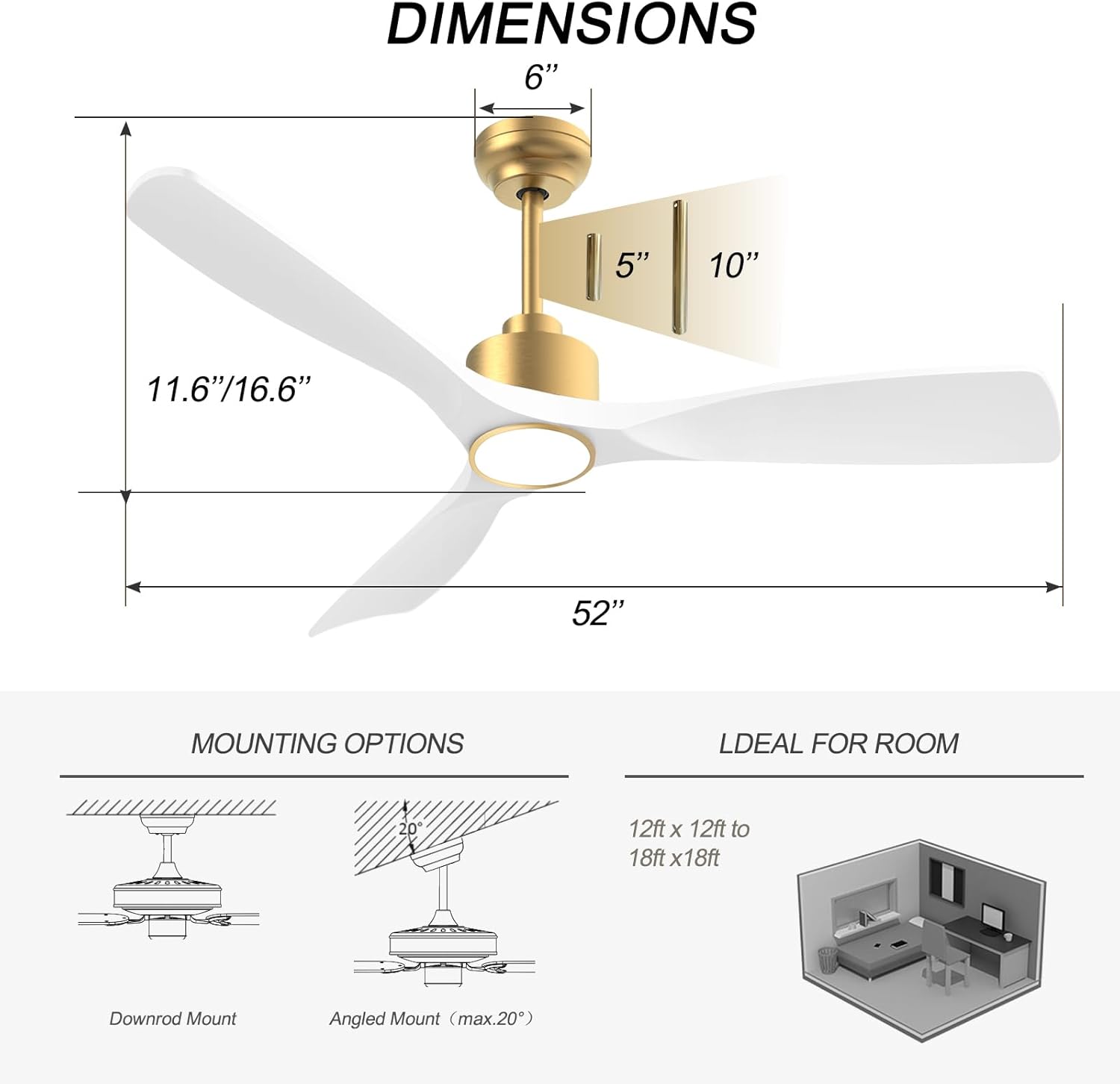
Image: Diagram showing fan dimensions and available downrod and angled mounting options.
- Pasangkan pendakap pelekap pada kotak soket siling menggunakan skru yang disediakan.
- Feed the electrical wires from the ceiling through the center hole of the mounting bracket.
- Assemble the downrod to the motor assembly, ensuring all screws are tightened securely.
- Angkat pemasangan kipas dengan berhati-hati dan gantungkannya dari pendakap pelekap.
4.3 Pendawaian
The fan features quick connectors for simplified wiring.
- Connect the fan's wires to the household wiring according to the color codes (typically black to black, white to white, green/bare copper to ground).
- Pastikan semua sambungan kukuh menggunakan nat dawai.
- Masukkan semua wayar dengan kemas ke dalam kotak keluar.
Video: A short demonstration of the fan's appearance and operation. This video is a 7-second preview and shows the fan spinning with its light on.
4.4 Lampiran Bilah
- Carefully attach each of the three fan blades to the motor housing using the provided screws.
- Ensure all screws are tightened evenly to prevent wobbling.
Video: Tamatview of the BOOSANT White and Gold Ceiling Fan, demonstrating its features and design. This video provides a general look at the fan's aesthetics and functionality.
4.5 Light Kit Installation
- Connect the light kit wires to the corresponding wires from the fan motor.
- Selamatkan pemasangan kit cahaya ke bahagian bawah perumah motor kipas.
5. Arahan Operasi
5.1 Fungsi Kawalan Jauh
The included remote control allows for convenient operation of all fan and light functions.
- Hidupkan/Mati Kuasa: Menghidupkan atau mematikan kipas dan lampu.
- Kelajuan Kipas: Select from 6 different fan speeds.
- Nyala / Mati: Controls the light independently.
- Suhu Warna: Cycle through 3 color temperature options (3000K Warm White, 4500K Natural White, 6000K Cool White).
- Lebih malap: Laraskan kecerahan cahaya.
- Motor Boleh Balik: Tukar antara mod musim panas (aliran udara ke bawah) dan musim sejuk (aliran udara ke atas).
- Pemasa: Set the fan to turn off automatically after a set period (e.g., 1H, 2H, 4H, 8H).
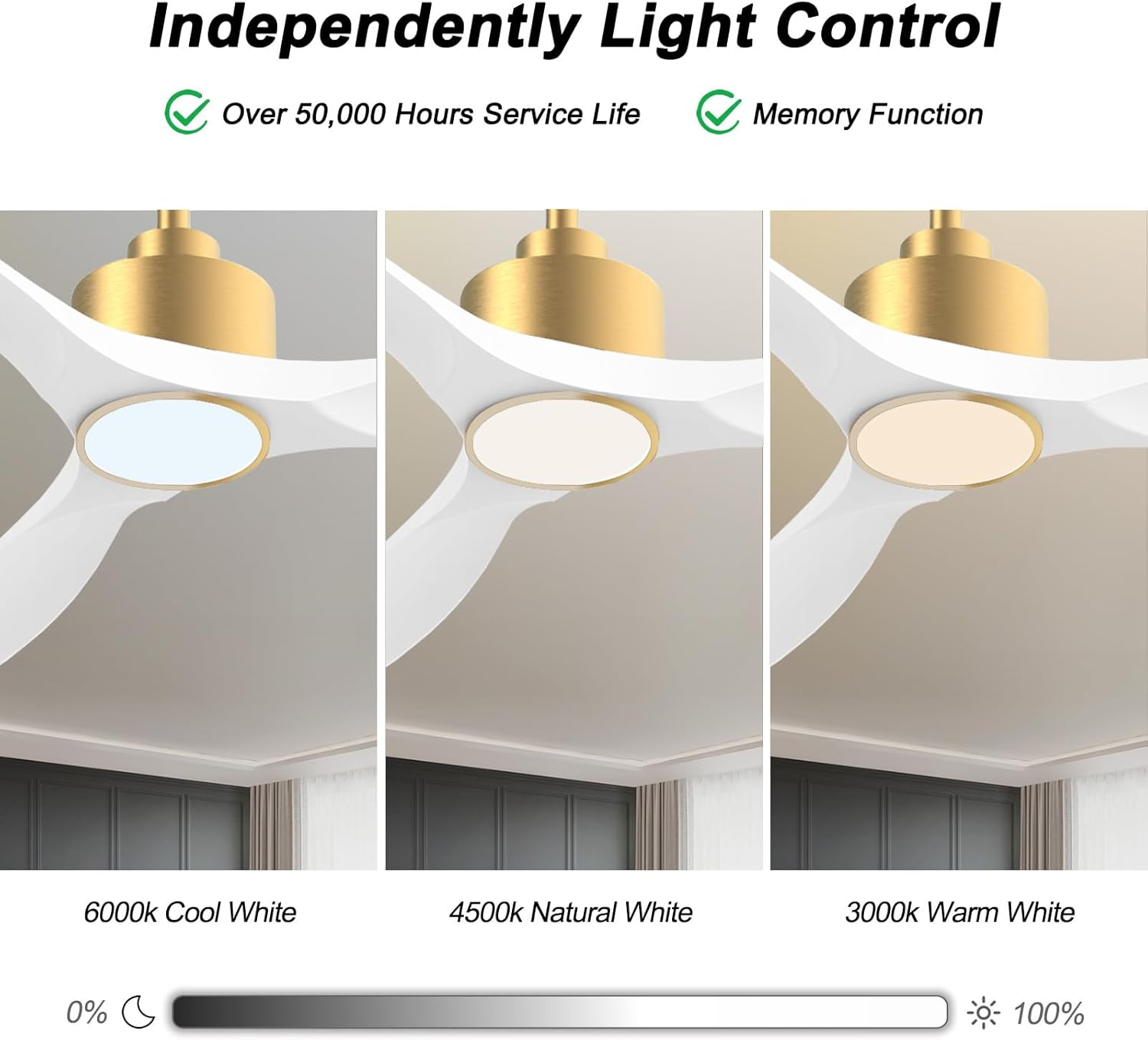
Image: Visual representation of the three adjustable light color temperatures (Warm, Natural, Cool White).

Image: Illustration of the reversible motor function for summer cooling and winter warm air circulation.
5.2 Smart Control (App/Voice)
The OFANTOP Smart Ceiling Fan can be controlled via the Smart Life app or voice assistants like Amazon Alexa and Google Assistant.
- Muat turun Apl: Muat turun aplikasi "Smart Life" daripada gedung aplikasi peranti anda.
- Berpasangan Wi-Fi:
- Pastikan rangkaian Wi-Fi anda ialah 2.4GHz.
- Turn the fan power off and back on at the switch.
- Within 10 seconds, press the "8H Fan Timer & Wi-Fi Pairing" button on the remote for 3 seconds to enter pairing mode.
- Open the Smart Life app, select "Add Device" or click the "+" in the upper right corner.
- Find the fan device and click "ADD".
- Fill in your 2.4GHz Wi-Fi name and password.
- Wait for the connection to complete. A beep from the fan indicates successful pairing.
- Kawalan Suara: Once paired with the Smart Life app, enable the Smart Life skill/action in your Amazon Alexa or Google Assistant app to control the fan with voice commands.

Image: Depiction of smart control features, including compatibility with Google Assistant and Amazon Alexa.
Video: Instructions on how to connect the BOOSANT 102 Series Smart Ceiling Fan to the Smart Life app for mobile control. This video details the Wi-Fi pairing process.
6. Penyelenggaraan
- Pembersihan: Untuk membersihkan kipas, lap dengan lembut, damp kain. Jangan gunakan pembersih atau pelarut yang melelas.
- Penjagaan Bilah: Periodically check blade screws for tightness. Loose blades can cause wobbling and noise.
- Sumber Cahaya: The integrated LED light source is designed for long life (over 50,000 hours) and is not user-replaceable.
- Motor: The DC motor is maintenance-free and does not require lubrication.
7. Penyelesaian masalah
| Masalah | Kemungkinan Punca | Penyelesaian |
|---|---|---|
| Kipas tidak bermula | Tiada kuasa kepada kipas; Sambungan wayar longgar; Bateri kawalan jauh lemah. | Check circuit breaker; Verify all wire connections; Replace remote control battery. |
| Kipas bergoyang | Skru bilah longgar; Bilah yang tidak seimbang dengan betul; Pendakap pelekap longgar. | Tighten all blade screws; Use a balancing kit (not included) if necessary; Ensure mounting bracket is securely fastened. |
| Cahaya tidak berfungsi | Loose wire connection to light kit; LED driver failure; Remote control issue. | Check light kit wiring; Contact customer support if LED driver is suspected; Check remote battery/functionality. |
| Alat kawalan jauh tidak berfungsi | Battery depleted; Remote not paired with fan; Obstruction between remote and receiver. | Replace battery (23A 12V); Re-pair remote with fan (refer to pairing instructions); Ensure clear line of sight. |
| Isu sambungan Wi-Fi | Incorrect Wi-Fi password; 5GHz Wi-Fi network; Fan not in pairing mode. | Verify password; Ensure 2.4GHz network is used; Follow app pairing instructions carefully. |
8. Waranti dan Sokongan
OFANTOP products are manufactured to the highest quality standards. For specific warranty details and customer support, please refer to the warranty card included with your purchase or contact OFANTOP customer service directly. Keep your proof of purchase for warranty claims.
Maklumat Hubungan: Refer to your product packaging or the official OFANTOP webtapak untuk mendapatkan butiran hubungan yang paling terkini.