pengenalan
The SCHWAIGER UFB3802 533-8 is a versatile 8-in-1 universal remote control designed to operate up to eight different audio/video devices. This remote serves as an ideal replacement for lost or broken original remote controls, offering compatibility with a wide range of brands and an extensive code database. Please read this manual carefully to ensure proper setup and operation of your new universal remote control.

Imej: Depan view of the SCHWAIGER UFB3802 533-8 Universal Remote Control. This image displays the full layout of the remote's buttons, including number keys, navigation, volume, channel, and device selection buttons, all in a dark grey finish.
Persediaan
1. Pemasangan Bateri
The SCHWAIGER UFB3802 533-8 requires two AAA (LR03) alkaline batteries. These are typically included with the product.
- Cari petak bateri di belakang alat kawalan jauh.
- Luncurkan penutup petak bateri ke bawah atau tekan selak dan angkat untuk membuka.
- Masukkan dua bateri AAA, pastikan kekutuban (+ dan -) yang betul seperti yang ditunjukkan di dalam petak.
- Gantikan penutup petak bateri sehingga ia terkunci pada tempatnya.

Imej: belakang view of the SCHWAIGER UFB3802 533-8 Universal Remote Control. This image highlights the battery compartment cover and product information label on the rear of the remote.
2. Programming Your Devices (Code Setup)
The remote control can be programmed using direct code entry or an automatic search function. Refer to the included code list for your specific device brands. The remote has an extensive database with over 2000 codes.
Langkah-langkah Pengaturcaraan Umum (Contohnyaample untuk TV):
- Turn on the device you wish to control (e.g., your television).
- Tekan dan tahan butang SET butang (jika ada, atau kombinasi seperti SET + TV1) until the indicator light stays on.
- Tekan butang peranti yang dikehendaki (cth., TV1). The indicator light will blink once and then remain on.
- Enter the 3 or 4-digit code for your device brand from the code list. After entering the last digit, the indicator light should turn off.
- Uji alat kawalan jauh dengan menekan butang KUASA butang. Jika peranti dimatikan, kod tersebut adalah betul.
- Jika peranti tidak bertindak balas, ulangi proses tersebut dengan kod seterusnya yang disenaraikan untuk jenama anda.
Carian Kod Automatik:
- Hidupkan peranti yang ingin anda kendalikan.
- Tekan dan tahan butang SET button (or equivalent) until the indicator light stays on.
- Tekan butang peranti yang dikehendaki (cth., TV1).
- Halakan alat kawalan jauh pada peranti dan tekan berulang kali KUASA butang (atau CH+) slowly until the device turns off.
- Setelah peranti dimatikan, tekan segera SET button (or equivalent) to save the code. The indicator light will turn off.
- Test other functions like volume and channel. If they work, the programming is complete. If not, restart the automatic search.
Mengendalikan Alat Kawalan Jauh
Once programmed, the remote control functions similarly to your original device remotes. Ensure you select the correct device mode before operating.
Butang Pemilihan Peranti
- TV1, TV2, TV3: For controlling up to three different televisions.
- VCR: For controlling a Video Cassette Recorder.
- SAT1, SAT2: For controlling up to two different satellite receivers.
- DVD: For controlling a DVD player.
- DVB-T: For controlling a Digital Video Broadcasting - Terrestrial receiver.
Fungsi Biasa
- KUASA (Butang Merah): Menghidupkan atau mematikan peranti yang dipilih.
- MUTE (Speaker Icon): Membisukan atau menyahredamkan audio.
- 0-9 (Number Buttons): For direct channel entry or menu navigation.
- VOL+ / VOL-: Laraskan kelantangan ke atas atau ke bawah.
- CH+ / CH-: Menukar saluran ke atas atau ke bawah.
- MENU: Mengakses menu utama peranti.
- BACK / EXIT: Kembali ke skrin sebelumnya atau keluar dari menu.
- FAV: Mengakses saluran kegemaran.
- SENARAI: Memaparkan senarai saluran atau media.
- DARI: Switches between input sources (e.g., HDMI, AV1).
- GAMBAR: Melaraskan tetapan gambar.
- ZOMAN: Zooms in or out on the display.
- DISP: Memaparkan maklumat tentang program atau input semasa.
- TEKS: Activates teletext (if supported by the device).
- Navigation (Up, Down, Left, Right, OK): Untuk navigasi dan pemilihan menu.
- TIDUR: Sets a sleep timer for the device.
- Butang Warna (Merah, Hijau, Kuning, Biru): Functionality varies by device and menu context.
- Butang Kawalan Media (Main, Jeda, Henti, Undur, Maju Pantas, Langkau): For controlling playback on compatible devices like DVD players or VCRs.

Imej: bersudut view of the SCHWAIGER UFB3802 533-8 Universal Remote Control. This perspective provides a clear view of the ergonomic design and the arrangement of various function buttons, including the navigation pad and media controls.
Penyelenggaraan
Proper care will extend the life of your universal remote control.
- Pembersihan: Use a soft, dry cloth to clean the remote control. Do not use abrasive cleaners, solvents, or alcohol, as these can damage the surface and buttons.
- Penggantian Bateri: Replace batteries when the remote's performance degrades or the indicator light does not illuminate. Always replace both batteries at the same time with new AAA alkaline batteries.
- Storan: If the remote will not be used for an extended period, remove the batteries to prevent leakage and potential damage. Store in a cool, dry place away from direct sunlight.
- Faktor Persekitaran: Avoid exposing the remote to extreme temperatures, high humidity, or direct water contact.
Menyelesaikan masalah
If you encounter issues with your universal remote control, refer to the following common solutions:
| Masalah | Kemungkinan Punca | Penyelesaian |
|---|---|---|
| Jauh tidak berfungsi sama sekali. | Bateri mati atau salah dimasukkan. | Periksa polariti bateri. Gantikan dengan bateri AAA yang baru. |
| Peranti tidak bertindak balas kepada arahan. | Incorrect device code programmed or remote not in correct device mode. | Ensure the correct device button (e.g., TV1, DVD) is selected. Reprogram the device using a different code from the code list or use the automatic search function. |
| Hanya beberapa fungsi sahaja yang berfungsi. | Partially compatible code or device limitations. | Try another code for your device brand. Some advanced functions may not be supported by universal remotes. |
| Indicator light does not illuminate during programming. | Programming steps not followed correctly. | Review the programming steps carefully and repeat the process. Ensure buttons are pressed and held for the correct duration. |
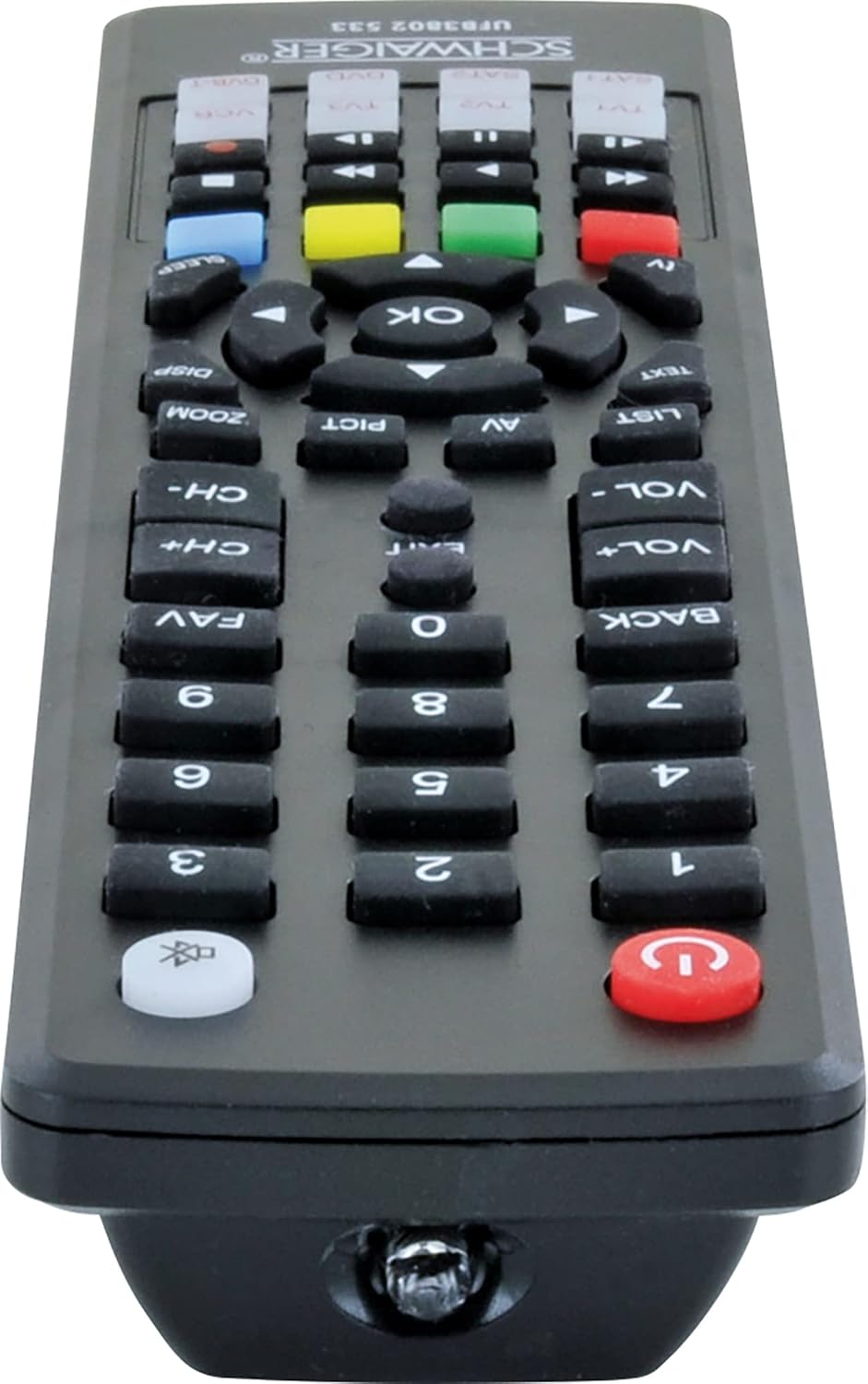
Imej: Bawah view of the SCHWAIGER UFB3802 533-8 Universal Remote Control. This image shows the infrared (IR) emitter at the front tip of the remote, which transmits signals to your devices.
Spesifikasi
- Jenama: SCHWAIGER
- model: UFB3802 533-8
- Nombor Model Pengeluar: 4004005032864
- Peranti Serasi: Television, VCR, Satellite Receiver, DVD Player, DVB-T Receiver (up to 8 devices)
- Ciri Khas: Keserasian sejagat
- warna: Hitam
- Jenis Bahan: Akrilik
- Jenis Penyambung: Inframerah (IR)
- Bateri Diperlukan: 2 x AAA (LR03) Alkaline (included)
- Dimensi Produk: 27 x 4.3 x 4.3 cm
- Berat Barang: 190 g
Waranti dan Sokongan
For warranty information or technical support, please refer to the documentation provided with your purchase or contact SCHWAIGER customer service directly. Contact details can typically be found on the manufacturer's official webtapak atau pada pembungkusan produk.


