pengenalan
Thank you for choosing the Aiwa BST-650 Bluetooth Speaker. This manual provides essential information for setting up, operating, and maintaining your speaker. Please read it carefully before use to ensure optimal performance and longevity of your device.
The Aiwa BST-650 is a compact, durable, and powerful TWS Bluetooth speaker featuring Hyper Bass technology, 20W RMS audio output, RGB LED lighting with 9 modes, a Micro-SD card reader, and an IPX6 waterproof rating. It is designed for superior sound quality and robust performance in various environments.
Kandungan Pakej
Sila tandai kotak untuk item berikut:
- Aiwa BST-650 Bluetooth Speaker
- 3.5mm to 3.5mm Stereo AUX Cable
- Braided Nylon USB Type-C Charging Cable with Leather Belt
- Tali Pergelangan Tangan
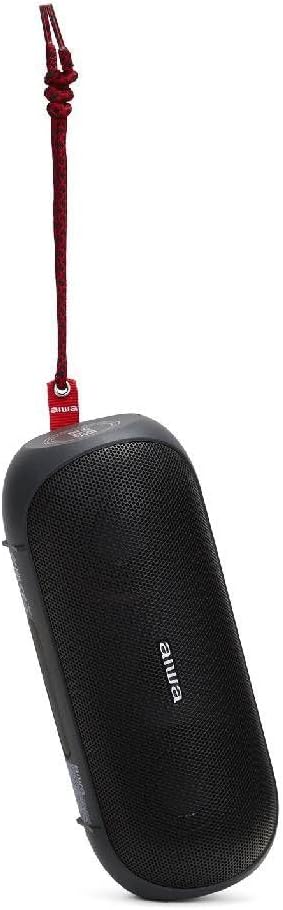
Image: Aiwa BST-650 speaker shown with the included wrist strap.
Produk Selesaiview
The Aiwa BST-650 features a robust rubber casing with twin metallic grilles, housing two 45mm high-performance speakers and a passive HyperBASS radiator. It includes intuitive controls for power, volume, playback, and LED lighting.
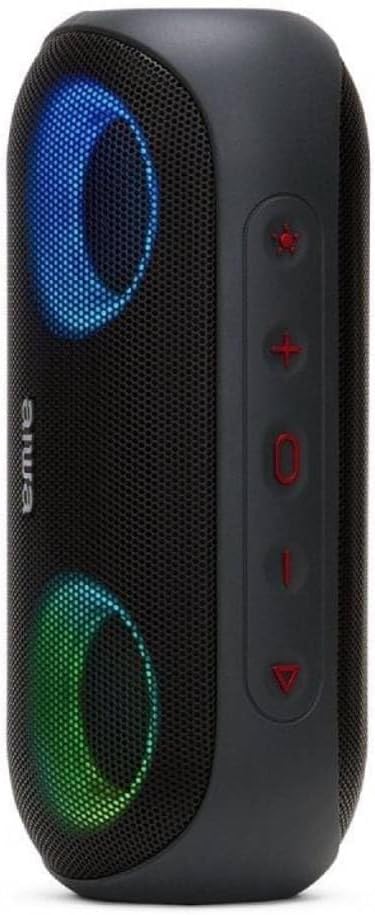
Imej: Sisi view of the Aiwa BST-650 speaker, highlighting the control buttons.
Kawalan dan Pelabuhan
- Butang Kuasa: Tekan dan tahan untuk menghidupkan atau mematikan pembesar suara.
- Kelantangan Naik (+): Tingkatkan kelantangan.
- Perlahankan suara (-): Kurangkan volum.
- Butang Main/Jeda: Play or pause music, answer or end calls.
- Butang Lampu LED: Cycle through 9 RGB lighting modes or turn off lights.
- Micro-SD (TF) Card Slot: Untuk main balik MP3 daripada kad memori.
- AUX-IN Port (3.5mm): For wired connection to external audio devices.
- Port Pengecasan USB Jenis-C: Untuk mengecas bateri dalaman pembesar suara.
Persediaan
1. Mengisi Speaker
- Connect the supplied USB Type-C charging cable to the speaker's charging port.
- Sambungkan hujung kabel yang satu lagi ke penyesuai kuasa USB yang serasi (tidak disertakan) atau port USB komputer.
- Penunjuk LED akan menunjukkan status pengecasan. Pengecasan penuh mengambil masa kira-kira 4 jam.
- The speaker provides approximately 8.5 hours of music playback on a full charge.
2. Menghidupkan/Mematikan
- To power on, press and hold the Power button until you hear an audible prompt and the LED lights activate.
- To power off, press and hold the Power button again until the speaker powers down.
3. Berpasangan Bluetooth
- Pastikan pembesar suara dihidupkan dan dalam mod berpasangan Bluetooth (ditunjukkan oleh LED berkelip).
- Pada peranti mudah alih anda (telefon pintar, tablet, dll.), dayakan Bluetooth dan cari peranti yang tersedia.
- Select "Aiwa BST-650" from the list of devices.
- Sebaik sahaja dipasangkan, pembesar suara akan mengeluarkan pengesahan yang boleh didengar dan LED akan berhenti berkelip.
- The speaker supports Bluetooth V5.0 with a wireless range of up to 10 meters (30 feet).
4. Penggandingan TWS (Stereo Tanpa Wayar Sejati)
The BST-650 supports TWS, allowing two BST-650 speakers to connect wirelessly for a stereo sound experience.
- Ensure both Aiwa BST-650 speakers are powered on and not connected to any Bluetooth device.
- On one speaker, press and hold the Play/Pause button for 2-3 seconds. The speaker will enter TWS pairing mode.
- The two speakers will automatically connect to each other. You will hear a confirmation tone once connected.
- Once TWS is established, connect your mobile device to one of the speakers via Bluetooth as described in step 3. Both speakers will then play audio in stereo.
5. Using Micro-SD Card
- Insert a Micro-SD (TF) card containing MP3 audio files ke dalam slot kad.
- The speaker will automatically switch to Micro-SD mode and begin playing music.
- Use the Play/Pause, Volume Up, and Volume Down buttons to control playback.
6. Using AUX-IN
- Connect one end of the 3.5mm AUX cable to the speaker's AUX-IN port.
- Sambungkan hujung kabel yang lain ke bicu fon kepala atau output audio peranti luaran anda.
- Pembesar suara secara automatik akan bertukar kepada mod AUX.
- Kawal main balik dan kelantangan daripada peranti luaran anda.
Beroperasi
1. Main balik Muzik
- Main/Jeda: Tekan butang Main/Jeda.
- Lagu Seterusnya: Tekan dan tahan butang Naik Kelantangan (+).
- Trek Sebelumnya: Tekan dan tahan butang Turun Kelantangan (-).
- Kawalan Kelantangan: Short press Volume Up (+) or Volume Down (-) buttons.
2. Call Management (Hands-free Function)
When connected via Bluetooth, the speaker's built-in microphone allows for hands-free calling.
- Jawab Panggilan: Tekan butang Main/Jeda sekali.
- Tamatkan Panggilan: Tekan butang Main/Jeda sekali semasa panggilan.
- Tolak Panggilan: Tekan dan tahan butang Main/Jeda selama 2 saat.
3. RGB LED Lighting Modes
The speaker features dual RGB LED lighting with 9 dynamic effects.

Image: Aiwa BST-650 speaker with its RGB LED lights active, displaying blue and green colors.
- Press the LED Light button to cycle through the 9 different lighting modes.
- Teruskan menekan untuk mematikan lampu.
4. Maklumat Kalis Air (IPX6)
The Aiwa BST-650 has an IPX6 water protection rating, meaning it is protected against high-pressure water jets from any direction. This makes it suitable for outdoor use and resistant to splashes and rain.
- Jangan tenggelamkan pembesar suara di dalam air.
- Pastikan semua penutup port ditutup dengan selamat sebelum mendedahkan pembesar suara kepada air.
- Selepas terdedah kepada air, lap pembesar suara sehingga kering sebelum dicas.
Penyelenggaraan
Pembersihan
- Lap pembesar suara dengan lembut, damp kain.
- Jangan gunakan pembersih yang melelas, alkohol atau pelarut kimia.
Penyimpanan
- Simpan pembesar suara di tempat yang sejuk dan kering jauh dari cahaya matahari langsung dan suhu yang melampau.
- Jika menyimpan untuk tempoh yang lama, cas bateri secara berkala untuk mengekalkan jangka hayatnya.
Menyelesaikan masalah
| Masalah | Kemungkinan Punca | Penyelesaian |
|---|---|---|
| Speaker tidak dihidupkan. | Bateri lemah. | Cas pembesar suara selama sekurang-kurangnya 30 minit. |
| Tidak boleh berpasangan melalui Bluetooth. | Pembesar suara tidak dalam mod berpasangan; peranti Bluetooth dimatikan; terlalu jauh dari pembesar suara. | Ensure speaker is in pairing mode. Turn Bluetooth on/off on your device. Move device closer to speaker (within 10m). |
| Tiada bunyi. | Kelantangan terlalu rendah; mod input yang salah; peranti tidak bermain. | Increase speaker and device volume. Check if correct mode (Bluetooth, AUX, SD) is active. Ensure audio is playing on the connected device. |
| Gandingan TWS gagal. | Speakers already paired to another device; too far apart. | Disconnect speakers from any other Bluetooth devices. Ensure both speakers are BST-650 models. Place speakers closer together. |
Spesifikasi
| Ciri | Spesifikasi |
|---|---|
| Kuasa Output Audio | 20W RMS |
| Saiz Pembesar Suara | 2 x 45mm |
| Versi Bluetooth | V5.0 |
| Julat Tanpa Wayar | Sehingga 10 meter (30 kaki) |
| Respons Kekerapan | 60 Hz - 20,000 Hz |
| Penilaian Perlindungan Air | IPX6 |
| Jenis Bateri | Bateri Litium Boleh Dicas semula |
| Kapasiti Bateri | 7.4V, 2000mAh |
| Masa Mengecas | lebih kurang 4 jam |
| Masa Main semula Muzik | lebih kurang 8.5 jam |
| Port Pengecasan | USB Jenis-C |
| Dimensi (L x W x H) | 200 x 85 x 83 mm |
| Berat badan | 613g |
| Peranti Serasi | Smartphones, Tablets (Android, iOS, Windows) |
| Ciri Khas | DSP for superior sound, HyperBASS passive radiator, TWS function, Hands-free with microphone, Micro-SD (TF) card reader, 3.5mm AUX-IN, RGB LED lighting (9 modes) |
Waranti dan Sokongan
The Aiwa BST-650 Bluetooth Speaker comes with a limited warranty. For specific warranty terms and conditions, please refer to the warranty card included in your package or contact Aiwa customer support.
For technical assistance or support, please visit the official Aiwa webtapak atau hubungi bahagian perkhidmatan pelanggan mereka.


