1. Pengenalan
This manual provides essential instructions for the safe and efficient operation of your Crosley CR6252A-YS Portfolio 3-Speed Bluetooth Turntable. Please read this manual thoroughly before using the product and retain it for future reference.
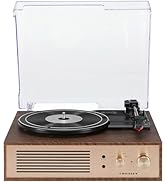
The Crosley Portfolio turntable is designed to play vinyl records at three speeds and features built-in speakers, Bluetooth connectivity for wireless audio streaming, and a moving magnetic cartridge for audio reproduction.

Figure 1.1: Crosley CR6252A-YS Portfolio Turntable (Open View)
2. Arahan Keselamatan
- Baca semua arahan sebelum digunakan.
- Jauhkan produk daripada air atau kelembapan.
- Jangan letakkan berhampiran sumber haba seperti radiator, daftar haba, dapur atau peralatan lain yang menghasilkan haba.
- Bersihkan hanya dengan kain kering.
- Hanya gunakan lampiran/aksesori yang ditentukan oleh pengilang.
- Cabut plag radas ini semasa ribut petir atau apabila tidak digunakan untuk jangka masa yang lama.
- Rujuk semua servis kepada kakitangan perkhidmatan yang berkelayakan. Servis diperlukan apabila radas telah rosak dalam apa jua cara, seperti kord bekalan kuasa atau palam rosak, cecair telah tertumpah atau objek jatuh ke dalam radas, radas telah terdedah kepada hujan atau lembapan, tidak beroperasi seperti biasa. , atau telah digugurkan.
3. Kandungan Pakej
Sahkan bahawa semua item yang disenaraikan di bawah disertakan dalam pakej anda:
- Crosley CR6252A-YS Portfolio Turntable
- Penyesuai Kuasa
- Manual Pengguna (dokumen ini)
4. Ciri dan Komponen Produk
The Crosley CR6252A-YS Portfolio Turntable includes the following key features and components:
- Meja Putar 3-Kelajuan: Menyokong 33 rekod 1/3, 45 dan 78 RPM.
- Penerima Bluetooth Terbina Dalam: Allows wireless streaming from compatible devices.
- Kawalan Pitch Boleh Laras: Fine-tune record speed.
- Moving Magnetic Cartridge: Pre-mounted for optimal sound.
- Input Bantu: Sambungkan sumber audio luaran.
- USB Enabled: Untuk sambungan PC.
- Pembesar Suara Terbina dalam: Output audio bersepadu.

Figure 4.1: Turntable Mechanism and Controls
Rajah 4.2: Butiran Panel Kawalan

Rajah 4.3: Sambungan Panel Belakang
5. Persediaan
5.1 Penempatan Awal
Letakkan meja putar di atas permukaan yang rata dan stabil, jauh daripada cahaya matahari langsung, sumber haba dan habuk atau getaran yang berlebihan.
5.2 Sambungan Kuasa
- Connect the power adapter to the DC 12V input jack on the rear of the turntable.
- Palamkan penyesuai kuasa ke salur keluar dinding yang sesuai.
5.3 Turntable Preparation
- Carefully remove any protective packaging materials from the turntable platter and tonearm.
- Ensure the tonearm is unlocked from its rest.
6. Arahan Operasi
6.1 Rekod Memainkan
- Pusingkan HIDUP/MATI tombol mengikut arah jam untuk menghidupkan unit.
- Select the desired speed (33 1/3, 45, or 78 RPM) using the speed selector switch. Note: A 78 RPM stylus (not included) is required for 78 RPM records.
- Place a record on the turntable platter. If playing a 45 RPM single, place the 45 RPM adapter (if included) over the spindle.
- Lift the tonearm using the cueing lever and position it over the desired track on the record.
- Turunkan tonearm perlahan-lahan ke atas rekod menggunakan tuil isyarat. Rekod akan mula dimainkan.
- Laraskan kelantangan menggunakan JILID tombol.
- Gunakan PITCH control knob to fine-tune the playback speed if necessary.
- To stop playing, lift the tonearm, return it to its rest, and turn the HIDUP/MATI butang lawan arah jam.
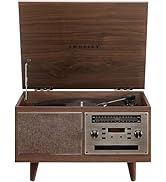
Figure 6.1: Stylus on Record
6.2 Operasi Bluetooth
- Pusingkan HIDUP/MATI tombol mengikut arah jam untuk menghidupkan unit.
- Slide the function switch to the Bluetooth position. The indicator light will flash, indicating pairing mode.
- Enable Bluetooth on your external device (e.g., smartphone, tablet) and search for "Crosley Portfolio".
- Select "Crosley Portfolio" from the list of available devices to pair. Once paired, the indicator light will stop flashing and remain solid.
- You can now stream audio wirelessly from your device to the turntable's built-in speakers.
- Laraskan kelantangan menggunakan JILID tombol pada meja putar dan/atau peranti luaran anda.
6.3 Input Bantu (AUX IN)
- Pusingkan HIDUP/MATI tombol mengikut arah jam untuk menghidupkan unit.
- Sambungkan peranti audio luaran (cth., pemain MP3, pemain CD) ke AUX IN port menggunakan kabel audio 3.5mm (tidak termasuk).
- Meja putar secara automatik akan bertukar kepada mod AUX IN.
- Laraskan kelantangan menggunakan JILID tombol pada meja putar dan/atau peranti luaran anda.
6.4 Kesambungan USB
The turntable features a PC-USB port for connecting to a computer. This allows for digital conversion of your vinyl records using appropriate software (not included). Refer to your chosen software's instructions for recording procedures.
7. Penyelenggaraan
7.1 Membersihkan Meja Putar
- Sentiasa cabut plag meja putar dari salur keluar kuasa sebelum membersihkan.
- Gunakan kain lembut dan kering untuk mengelap permukaan luar. Jangan gunakan pembersih atau pelarut yang melelas.
- Gently brush the stylus with a soft brush designed for stylus cleaning, moving from back to front.
7.2 Penggantian Stilus
The stylus (needle) is a consumable part and will wear out over time. A worn stylus can damage your records and degrade sound quality. Replace the stylus after approximately 200-300 hours of playback. Consult your retailer or Crosley support for compatible replacement styli.
8. Penyelesaian masalah
| Masalah | Kemungkinan Punca | Penyelesaian |
|---|---|---|
| Tiada kuasa | Penyesuai kuasa tidak disambungkan atau alur keluar rosak. | Pastikan penyesuai kuasa disambungkan dengan selamat dan soketnya berfungsi. |
| Tiada suara dari pembesar suara | Volume too low; function switch in wrong position; Bluetooth not paired. | Increase volume; ensure function switch is set to PHONO or Bluetooth is correctly paired. |
| Melangkau rekod | Record is dirty or damaged; stylus is worn; turntable not level. | Clean record; replace stylus; ensure turntable is on a level surface. |
| Peranti Bluetooth tidak akan berpasangan | Turntable not in pairing mode; device too far; device already paired to another unit. | Ensure turntable is in Bluetooth pairing mode; move device closer; disconnect from other Bluetooth devices. |
9. Spesifikasi
- Dimensi Produk: 12.4 x 15.28 x 6.5 inci
- Berat Barang: 13 paun
- Nombor Model Item: CR6252A-YS
- Jenama: Crosley
- Komponen yang Disertakan: CR6252A-YS Portfolio Turntable
- gaya: Vintage
- warna: Yellow Submarine
- Format Isyarat: Analog
- Sumber Kuasa: Elektrik Bertali
- UPC: 710244246569
10. Waranti dan Sokongan
For warranty information and technical support, please refer to the warranty card included with your product or visit the official Crosley webtapak. Simpan resit pembelian anda sebagai bukti pembelian untuk sebarang tuntutan waranti.
Pengeluar: Crosley
Tarikh Mula-mula Tersedia: 30 November 2021


