pengenalan
Thank you for choosing the beFree Sound 2.1 Channel Bluetooth Tower Speakers. This manual provides essential information for the safe and optimal operation of your new speaker system. Please read it thoroughly before use and retain it for future reference.

Image: The beFree Sound 2.1 Channel Bluetooth Tower Speakers, showcasing their sleek black design and tall, slender form factor.
Maklumat Keselamatan Penting
- Penggunaan Dalaman Sahaja: This product is designed for indoor use. Do not expose it to rain, moisture, or extreme temperatures.
- Sumber Kuasa: Ensure the power supply matches the specifications (110V/60Hz). Use only the provided AC power cord.
- Pengudaraan: Do not block any ventilation openings. Maintain adequate space around the speakers for proper airflow.
- haba: Avoid placing the speakers near heat sources such as radiators, heat registers, stoves, or other apparatus (including amplifiers) that produce heat. The rear panel may become hot; JANGAN SENTUH semasa operasi.
- Cecair dan Kelembapan: Do not expose the unit to dripping or splashing liquids. Do not place objects filled with liquids, such as vases, on the apparatus.
- Pembersihan: Cabut plag unit daripada soket kuasa sebelum membersihkan. Gunakan kain kering untuk membersihkan.
- Servis: Jangan cuba menservis produk ini sendiri. Rujuk semua servis kepada kakitangan servis yang berkelayakan. Membuka casing boleh mendedahkan anda kepada voltage atau bahaya lain.
Apa yang ada dalam Kotak
Sila semak kandungan pakej anda untuk memastikan semua item ada:
- Two Speakers (Main and Satellite)
- Satu Mikrofon Tanpa Wayar
- Satu Alat Kawalan Jauh
- Satu Kord Kuasa AC
- One Aux Cord
- One Optical Cord
- Satu Manual Pengguna (dokumen ini)

Image: Included accessories: remote control, optical cable, and an RCA to 3.5mm auxiliary cable.

Image: The wireless microphone, featuring an on/off/mute switch and battery compartment.
Ciri dan Kawalan Produk
Kawalan Panel Hadapan

Imej: Terperinci view of the main speaker's front control panel, showing buttons for volume, input, menu, and ports for SD card, USB, and microphone.
- STBY: Butang siap sedia.
- MASUKKAN: Selects audio input source (Bluetooth, USB, SD, Optical, FM).
- VOL +/-: Melaraskan kelantangan induk.
- CH +/-: Changes FM radio channels or navigates tracks.
- MENU: Mengakses pilihan menu.
- KAD SD/MMC: Slot for SD or MMC memory cards.
- U DISK (USB): Port for USB flash drives.
- MIC: Bicu input mikrofon.
Sambungan Panel Belakang

Image: The back panel of the main speaker, detailing connections for FM antenna, audio input (RCA), optical input, coaxial input, right speaker output, AC input, and power switch.
- SEMUT FM: FM antenna input.
- AUDIO INPUT (L/R): RCA stereo audio input for external devices.
- INPUT OPTIK: Input audio optik digital.
- INPUT COAXIAL: Input audio sepaksi digital.
- OUTPUT KANAN: Connects to the satellite (right) speaker.
- INPUT AC: Sambungan kord kuasa.
- SUIS KUASA: Suis hidup/mati kuasa utama.
Persediaan
Penempatan Pembesar suara
Place the two tower speakers on a flat, stable surface. For optimal stereo sound, position them equidistant from your listening position and spaced appropriately apart. Ensure there is sufficient space around the speakers for ventilation.
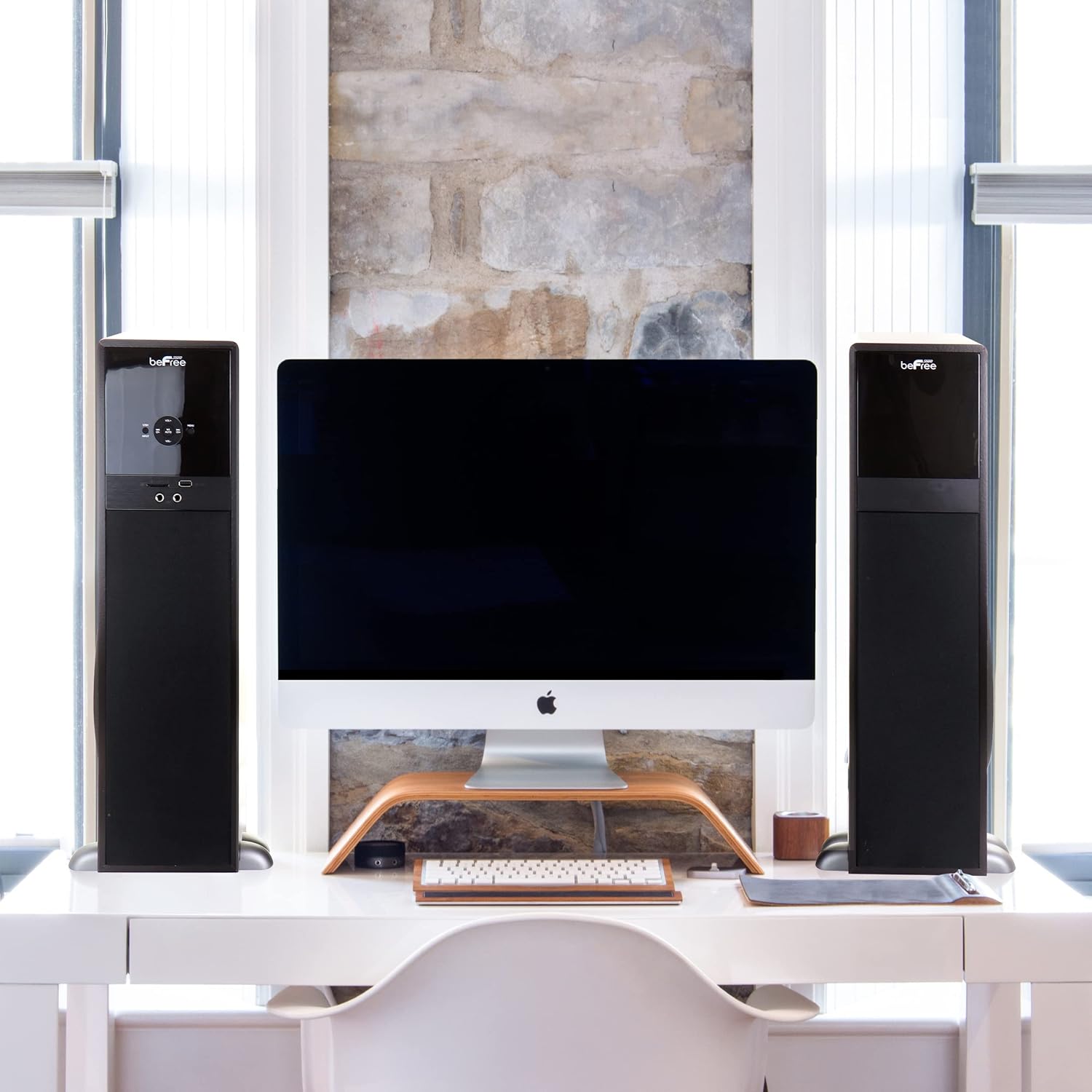
Imej: Cthample setup showing the beFree Sound tower speakers flanking a computer monitor on a desk, illustrating typical indoor placement.
Menghubungkan Penceramah
- Identify the main speaker (with the control panel and rear inputs) and the satellite speaker.
- Connect the cable from the "RIGHT OUTPUT" on the main speaker's rear panel to the input on the satellite speaker.
Sambungan Kuasa
- Pastikan suis kuasa utama pada panel belakang berada dalam kedudukan "OFF".
- Insert the provided AC power cord into the "AC INPUT" on the rear panel of the main speaker.
- Plug the other end of the AC power cord into a standard 110V/60Hz wall outlet.
Sambungan Input Audio
Connect your audio source device (TV, DVD player, smartphone, etc.) using one of the following methods:
- RCA Audio Input: Use the provided Aux Cord to connect your device's audio output to the "AUDIO INPUT (L/R)" jacks on the speaker's rear panel.
- Input Optik: Use the provided Optical Cord to connect your device's optical audio output to the "OPTICAL INPUT" on the speaker's rear panel.
- Input sepaksi: Connect a coaxial audio cable (not included) from your device to the "COAXIAL INPUT" on the speaker's rear panel.
Arahan Operasi
Menghidupkan/Mematikan
- Flip the "POWER SWITCH" on the rear panel to the "ON" position.
- Press the "STBY" button on the front panel or remote control to turn the speakers on or put them into standby mode.
Memilih Sumber Input
Press the "INPUT" button on the front panel or remote control repeatedly to cycle through available input sources: Bluetooth, USB, SD, Optical, Coaxial, FM, and AUX.
Operasi Bluetooth
- Select "Bluetooth" as the input source. The speaker will enter pairing mode, indicated by a flashing Bluetooth indicator.
- On your Bluetooth-enabled device (smartphone, tablet, laptop), enable Bluetooth and search for "beFree Sound" or similar.
- Select the speaker from the list of available devices to pair. Once paired, the indicator will stop flashing.
- You can now play audio from your device through the speakers.
Main Semula USB/Kad SD
- Insert a USB flash drive into the "U DISK" port or an SD/MMC card into the "SD/MMC CARD" slot on the front panel.
- The speaker should automatically switch to USB or SD input and begin playing compatible audio files. If not, select the appropriate input using the "INPUT" button.
- Use the playback controls (Play/Pause, Next/Previous Track) on the front panel or remote control.
Operasi Radio FM
- Ensure the FM antenna is connected to the "FM ANT" port on the rear panel.
- Select "FM" as the input source.
- Press the "AUTO" button on the remote or front panel to automatically scan and save available FM stations.
- Use the "CH+/-" buttons to navigate between saved stations.
Penggunaan Mikrofon
- Insert the wireless microphone's receiver (if applicable) or a wired microphone into the "MIC" input jack on the front panel.
- Adjust the microphone volume using the dedicated controls on the remote or through the menu.
Kawalan Kelantangan
Adjust the master volume using the "VOL+/-" buttons on the front panel or the remote control.
Penyelenggaraan
- Pembersihan: Always unplug the speakers before cleaning. Use a soft, dry cloth to wipe down the surfaces. Do not use liquid cleaners or aerosol sprays.
- Pengudaraan: Periksa secara berkala bahawa bukaan pengudaraan bersih daripada habuk dan serpihan.
- Storan: If storing the speakers for an extended period, unplug them from the power outlet and store them in a cool, dry place.
Menyelesaikan masalah
| Masalah | Kemungkinan Punca | Penyelesaian |
|---|---|---|
| Tiada kuasa | Kord kuasa tidak disambungkan; Suis kuasa dimatikan; Soket tidak berfungsi. | Ensure power cord is securely plugged in. Check rear power switch. Test outlet with another device. |
| Tiada bunyi | Incorrect input selected; Volume too low; Audio cables loose; Device not playing. | Press INPUT to select correct source. Increase volume. Check all audio cable connections. Ensure source device is playing audio. |
| Bluetooth tidak bersambung | Speaker not in pairing mode; Device Bluetooth off; Speaker too far. | Select Bluetooth input on speaker. Ensure Bluetooth is enabled on your device. Move device closer to speaker (within 10 meters). |
| Radio FM statik | Poor antenna connection; Weak signal. | Adjust FM antenna position. Try auto-scanning for stations again. |
Spesifikasi
| Nombor Model | BFS-750 |
| Jenis Pembesar Suara | Menara |
| Konfigurasi Saluran Bunyi Sekeliling | 2.1 |
| Kuasa Output Maksimum Pembesar Suara | 80 Watt |
| Respons Kekerapan | 40kHz-20Hz |
| Sumber Kuasa | Corded Electric (110V/60Hz 70020mA) |
| Teknologi Ketersambungan | Bluetooth, Optical, USB, SD, FM Radio, AUX, Coaxial |
| Teknologi Komunikasi Tanpa Wayar | Bluetooth |
| Julat Bluetooth | 10 Meter |
| Peranti Serasi | Telefon Pintar, Tablet, Pemain MP3, Komputer Riba |
| Kaedah Kawalan | Jauh, Butang |
| Berat Barang | 36 paun |
| Dimensi Produk | 24 x 13 x 12 inci |
| warna | Hitam |
Waranti dan Sokongan
This beFree Sound product comes with a Waranti Terhad. For specific details regarding warranty coverage, duration, and terms, please refer to the warranty card included with your purchase or contact beFree Sound customer support.
For technical support, troubleshooting assistance, or warranty claims, please visit the official beFree Sound weblaman web atau hubungi jabatan khidmat pelanggan mereka menggunakan maklumat hubungan yang diberikan pada pembungkusan atau webtapak.


