
1. Pengenalan
This manual provides detailed instructions for the installation, operation, and maintenance of your Hiseeu WTD803-2 2K Solar-Powered Wireless PTZ Security Camera. Designed for outdoor use, this camera offers 2K (3MP) resolution, pan-tilt-zoom functionality, two-way audio, color night vision, and PIR motion detection, all powered by an integrated solar panel and rechargeable battery for wire-free operation. It is compatible with the EseeCloud mobile application and can integrate with Hiseeu wireless camera systems.

Imej: Selesaiview of the Hiseeu solar-powered PTZ camera, highlighting its wire-free design and outdoor suitability.
2. Apa yang ada di dalam Kotak
Sila semak kandungan pakej untuk memastikan semua item ada:
- Hiseeu WTD803-2 PTZ Security Camera
- Solar Panel (integrated or separate, depending on model variant)
- Pendakap dan Skru Pemasangan
- Kabel Pengecas USB
- Manual Pengguna (dokumen ini)
Note: An SD card for local storage is not included and must be purchased separately if desired.
3. Ciri-ciri Utama
- 2K (3MP) HD Resolution: Menyediakan foo video yang jelas dan terperincitage.
- 100% Operasi Tanpa Wayar: Powered by a solar panel and built-in 15600mAh rechargeable battery, eliminating the need for power cables.
- Fungsi Pan & Condongkan: Remotely control the camera to rotate 330° horizontally and 90° vertically for comprehensive coverage.
- Penglihatan Malam Warna: Equipped with 4 white LEDs and 2 infrared LEDs for clear color vision up to 65ft in low light conditions, or infrared black and white night vision.
- Pengesanan Gerakan PIR: Highly sensitive Passive Infrared sensor reduces false alarms from environmental factors.
- Audio Dua hala: Mikrofon dan pembesar suara terbina dalam untuk komunikasi masa nyata.
- Siren & Light Alarm: Deter intruders with an audible siren and flashing lights upon motion detection.
- IP66 Kalis Cuaca: Designed to withstand outdoor conditions, operating in temperatures from -4°F to 122°F (-20°C to 50°C).
- Storan Setempat: Supports Micro SD card storage up to 128GB for motion-triggered recordings.
- App Control & Sharing: Manage the camera via the EseeCloud app (iOS/Android) and share access with family members.
- Keserasian Alexa: View live video streams on Alexa Echo Show devices via voice command.
- Hiseeu System Compatibility: Can operate standalone or integrate with existing Hiseeu wireless camera systems.
4. Panduan Persediaan
4.1 Pengecasan Awal
Before first use, fully charge the camera's internal battery using the provided USB cable. Connect the cable to the camera's charging port and a standard 5V USB power adapter (not included). The charging indicator will show status.
4.2 Muat Turun Apl dan Pembuatan Akaun
- Muat turun EseeCloud aplikasi daripada gedung aplikasi peranti anda (iOS atau Android).
- Open the app and create a new user account. Follow the on-screen prompts to register.
4.3 Menambah Kamera pada Apl
- Pastikan telefon pintar anda disambungkan ke a Rangkaian Wi-Fi 2.4GHz. Kamera ini tidak menyokong Wi-Fi 5GHz.
- In the EseeCloud app, tap the '+' icon to add a new device.
- Select the appropriate camera type (e.g., 'Wireless Camera' or 'Solar Camera').
- Follow the app's instructions to power on the camera and reset it if necessary (usually by pressing a reset button until an audible prompt is heard).
- Scan the QR code on the camera or enter its device ID manually.
- Enter your 2.4GHz Wi-Fi network password when prompted.
- The camera will attempt to connect to your Wi-Fi. Once connected, you will hear a confirmation sound and the camera will appear in your app's device list.
Nota Penting:
- If connection fails after multiple attempts, verify your router supports 2.4GHz Wi-Fi and that the password is correct.
- This camera is not compatible with Blue Iris or other third-party software.
4.4 Pemasangan Kad Mikro SD (Pilihan)
To enable local video recording, install a Micro SD card (up to 128GB, not included) into the designated slot on the camera. Refer to the camera's physical diagram for the exact location of the SD card slot. Ensure the camera is powered off before inserting or removing the SD card.
4.5 Memasang Kamera
Choose a mounting location that provides optimal sunlight exposure for the solar panel and the desired viewing angle. The camera is IP66 weatherproof, suitable for outdoor installation.
- Use the mounting bracket as a template to mark drill holes on the wall or surface.
- Drill the holes and insert wall anchors if necessary.
- Selamatkan pendakap pelekap menggunakan skru yang disediakan.
- Attach the camera to the mounting bracket, ensuring it is firmly secured.
- Adjust the solar panel's angle to maximize direct sunlight exposure throughout the day.

Image: The Hiseeu solar-powered camera mounted outdoors, illustrating its wire-free setup and solar panel for continuous power.

Image: The Hiseeu camera with its solar panel, demonstrating its IP66 waterproof rating under simulated rain conditions.
5. Arahan Operasi
5.1 Langsung View dan Kawalan PTZ
Open the EseeCloud app and select your camera from the device list to access the live view. From the live view antara muka, anda boleh:
- Kuali/Condongkan: Use the on-screen joystick or directional controls to rotate the camera horizontally (330°) and vertically (90°).
- Zum Digital: Pinch to zoom in or out on the live feed. Note that this is digital zoom and may reduce image clarity at higher magnifications.
- Snapshot/Record: Capture still images or manually record video clips.
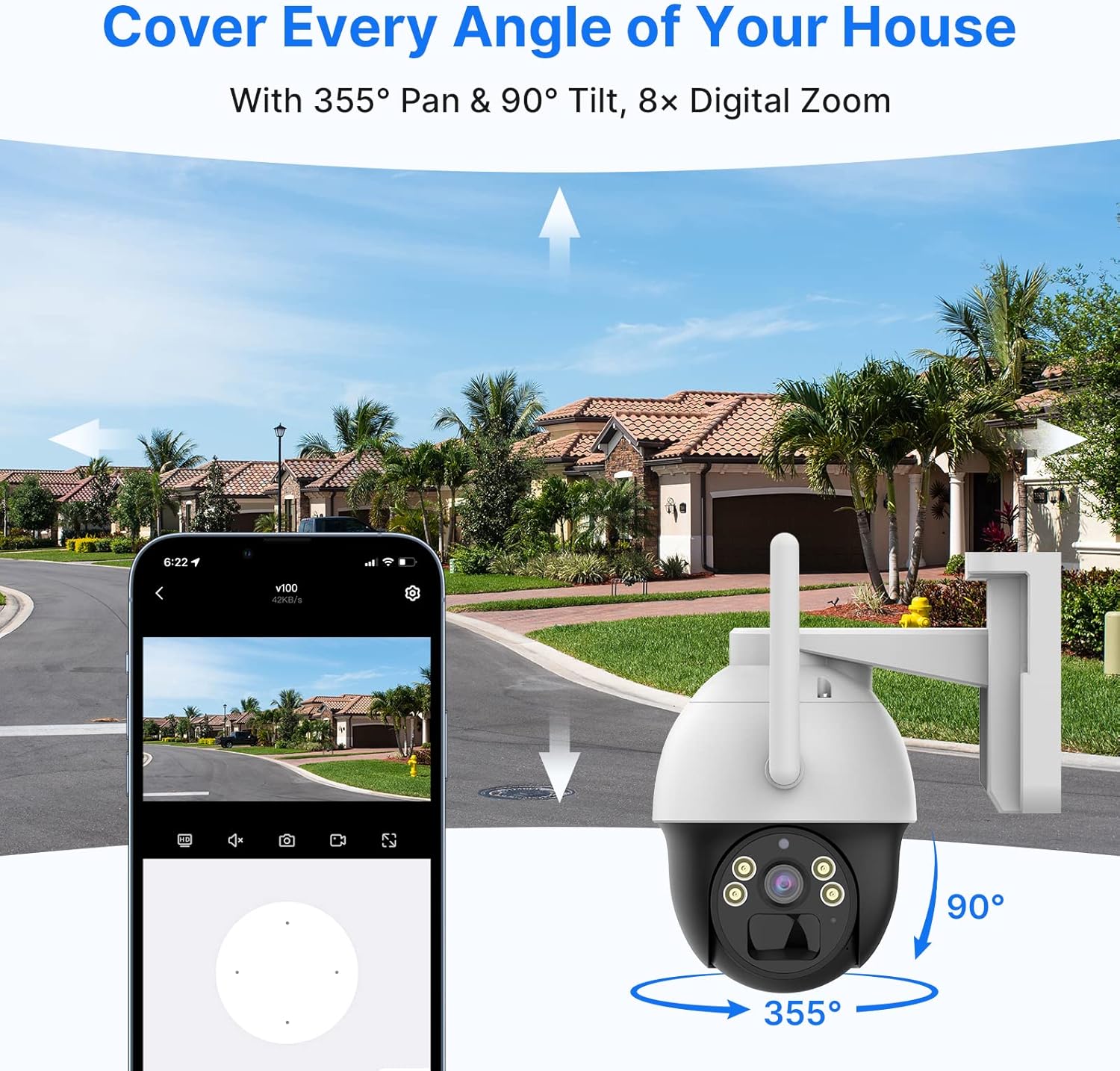
Image: A smartphone displaying the EseeCloud app interface, showing pan and tilt controls for the Hiseeu camera, with arrows indicating its wide range of motion.
Video: Demonstrates the PTZ (Pan-Tilt-Zoom) functionality of the Hiseeu camera, controlled remotely via a smartphone app. The camera moves up, down, left, and right, showcasing its ability to cover a wide area.
5.2 Mod Penglihatan Malam
The camera supports both color and infrared night vision:
- Penglihatan Malam Warna: Activates the built-in white LEDs to provide full-color images in low-light conditions.
- Penglihatan Malam Inframerah: Menggunakan LED inframerah untuk imej hitam putih yang jelas dalam kegelapan sepenuhnya.
You can switch between these modes or set them to automatic activation based on ambient light levels within the app settings.

Imej: Perpecahan view demonstrating the difference between color night vision (with spotlight on) and infrared night vision (spotlight off) from the Hiseeu camera.
Video: Shows various usage scenarios for the Hiseeu WiFi Solar PTZ camera, including its solar charging capability, motion detection, and two-way audio features in different environments.
5.3 Audio Dua Hala
Untuk menggunakan ciri audio dua hala:
- Dalam siaran langsung view, ketik ikon mikrofon untuk bercakap melalui pembesar suara kamera.
- Tap the speaker icon to listen to audio from the camera's microphone.

Image: Illustrates the two-way audio feature, showing a person speaking through the camera and another person listening and responding via the app.
5.4 Pengesanan Gerakan dan Penggera PIR
The camera utilizes a PIR sensor for accurate motion detection. When motion is detected:
- You will receive instant push notifications on your smartphone via the EseeCloud app.
- The camera can trigger a siren and/or flashing lights (if enabled in settings).
- Video recordings will be saved to the installed Micro SD card.
Adjust motion detection sensitivity and alarm settings within the EseeCloud app to suit your environment and reduce false alarms.
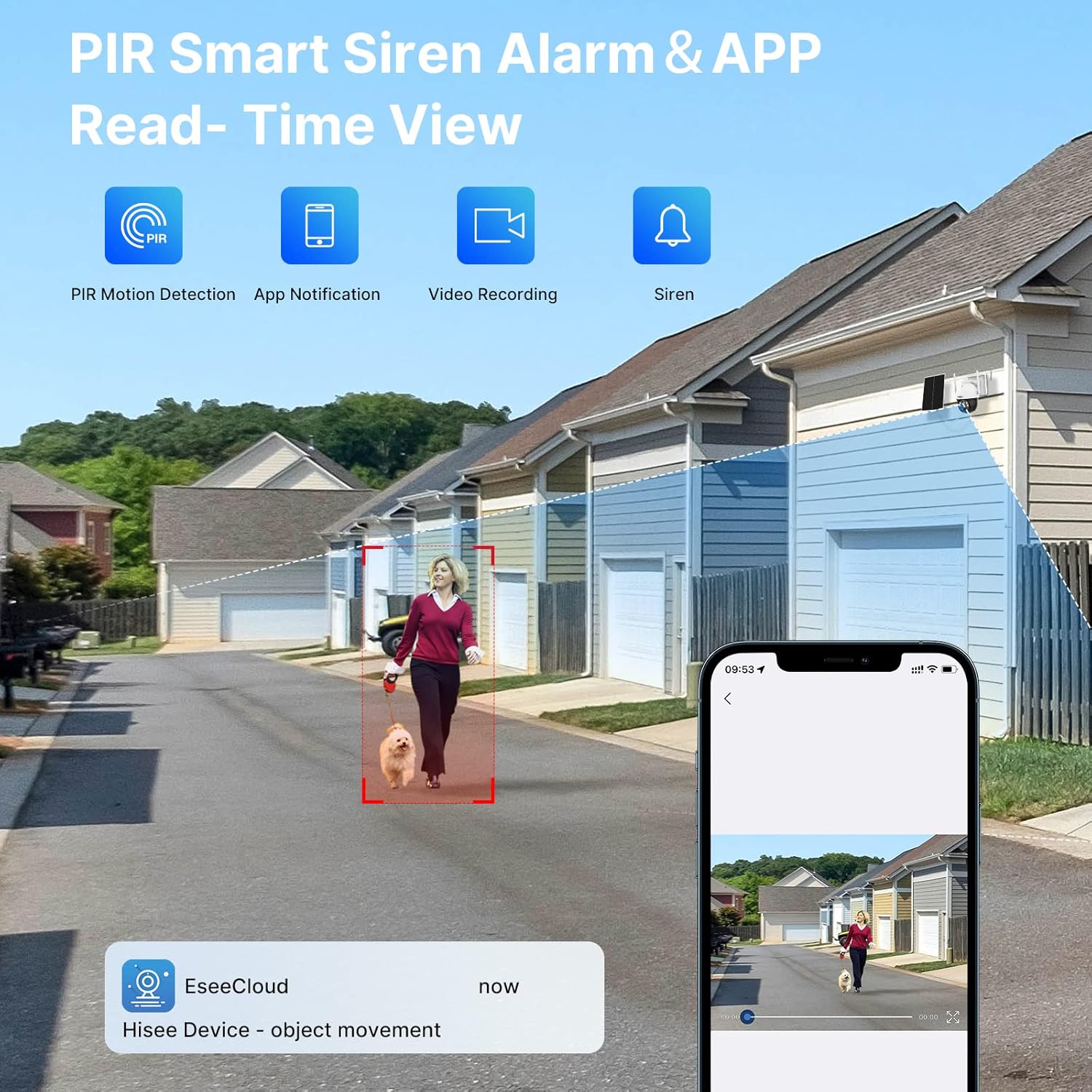
Image: A visual representation of the PIR motion detection zone and how the camera sends an app notification when an object movement is detected.
5.5 Integrasi Alexa
To link your Hiseeu camera with Alexa Echo Show:
- Ensure your camera is successfully set up in the EseeCloud app.
- Buka apl Alexa pada telefon pintar anda.
- Cari untuk and enable the 'EseeCloud' skill.
- Link your EseeCloud account with Alexa.
- Discover devices. Your Hiseeu camera should appear.
You can now use voice commands like, "Alexa, show me the [camera name]" to view the live feed on your Echo Show.
5.6 Perkongsian Berbilang Pengguna
You can share access to your camera with family members through the EseeCloud app. Navigate to the camera settings and look for the 'Share Device' option. Follow the prompts to invite other users.

Image: Diagram illustrating how multiple users can access and view the camera feed from different locations via the EseeCloud app.
6. Penyelenggaraan
- Pembersihan Panel Suria: Kerap mengelap panel solar dengan lembut, damp kain untuk menghilangkan habuk, kotoran atau serpihan yang boleh mengurangkan kecekapan pengecasan.
- Pembersihan Kanta: Bersihkan lensa kamera dengan lembut menggunakan kain microfiber untuk memastikan kualiti imej yang jelas. Elakkan bahan yang melelas.
- Kemas kini Firmware: Check the EseeCloud app periodically for available firmware updates to ensure optimal performance and security.
- Kesihatan Bateri: While solar-powered, prolonged periods of low sunlight may require occasional manual charging via the USB port to maintain battery health.
7. Penyelesaian masalah
- Kamera tidak bersambung ke Wi-Fi: Ensure your Wi-Fi is 2.4GHz. Verify the Wi-Fi password. Try resetting the camera and re-pairing it with the app. Ensure the camera is within range of your Wi-Fi router.
- Kualiti imej yang lemah: Check if the camera lens is clean. Ensure there are no obstructions in the camera's field of view. Verify your internet connection speed.
- No motion detection alerts: Adjust the PIR motion detection sensitivity in the app settings. Ensure notifications are enabled on your phone and within the EseeCloud app.
- Bateri tidak dicas: Ensure the solar panel is receiving direct sunlight for several hours daily. Clean the solar panel surface. If the issue persists, try charging manually via USB.
- PTZ control unresponsive: Check your internet connection. Restart the app or the camera.
- Alexa integration not working: Confirm the EseeCloud skill is enabled in the Alexa app and your accounts are linked. Ensure the camera is online and accessible via the EseeCloud app.
8. Spesifikasi
| Ciri | Spesifikasi |
|---|---|
| Nombor Model | US-WTD803-2 |
| Resolusi Tangkapan Video | 3 MP (2304*1296) |
| Teknologi Ketersambungan | Wireless (2.4GHz Wi-Fi only) |
| Sumber Kuasa | Bertenaga Bateri, Suria |
| Kapasiti Bateri | 15600 mAh |
| Pan Range | 330 Darjah |
| Julat Kecondongan | 90 Darjah |
| Julat Penglihatan Malam | Up to 65 feet (Color & Infrared) |
| Penilaian Perlindungan Antarabangsa | IP66 |
| Suhu Operasi | -4°F hingga 122°F (-20°C hingga 50°C) |
| Penyimpanan | Kad SD Mikro (sehingga 128GB, tidak disertakan) |
| Peranti Serasi | Telefon Pintar (iOS/Android), Amazon Alexa |
| Dimensi (L x W x H) | 13 x 7 x 10 inci |
| Berat Barang | 4 paun |
9. Waranti
The Hiseeu WTD803-2 camera comes with a Waranti 1 Tahun dari tarikh pembelian. Waranti ini meliputi kecacatan pembuatan dan memastikan produk memenuhi prestasi yang dinyatakan. Sila simpan bukti pembelian anda untuk tuntutan waranti.
10. Sokongan
For technical assistance, troubleshooting, or warranty inquiries, please contact Hiseeu customer support. Our professional technicians are available to provide the best service.
You can also scan the QR code below for direct access to Hiseeu support resources:

Scan for Hiseeu Support