pengenalan
This manual provides comprehensive instructions for the safe and efficient use of your Coby True Wireless Earbuds (Model CETW535). Please read this manual thoroughly before using the product and retain it for future reference.
The Coby True Wireless Earbuds offer a seamless audio experience with Bluetooth 5.3 technology, a smart battery display, and intuitive controls for music and calls. They are designed for comfort and convenience, featuring a built-in microphone for hands-free communication.
Kandungan Pakej
- Coby True Wireless Earbuds (Left and Right)
- Charging Case with Smart Battery Display
- Kabel Pengecas USB
- Manual Pengguna (dokumen ini)
Persediaan
1. Pengecasan Awal
Before first use, fully charge the earbuds and the charging case. Connect the charging case to a USB power source using the provided USB cable. The digital display on the case will indicate the charging status and battery level.

Image: The Coby True Wireless Earbuds are shown inside their open charging case, which displays "100%" on its digital screen, indicating a full charge. The earbuds are black and fit snugly into their respective slots.
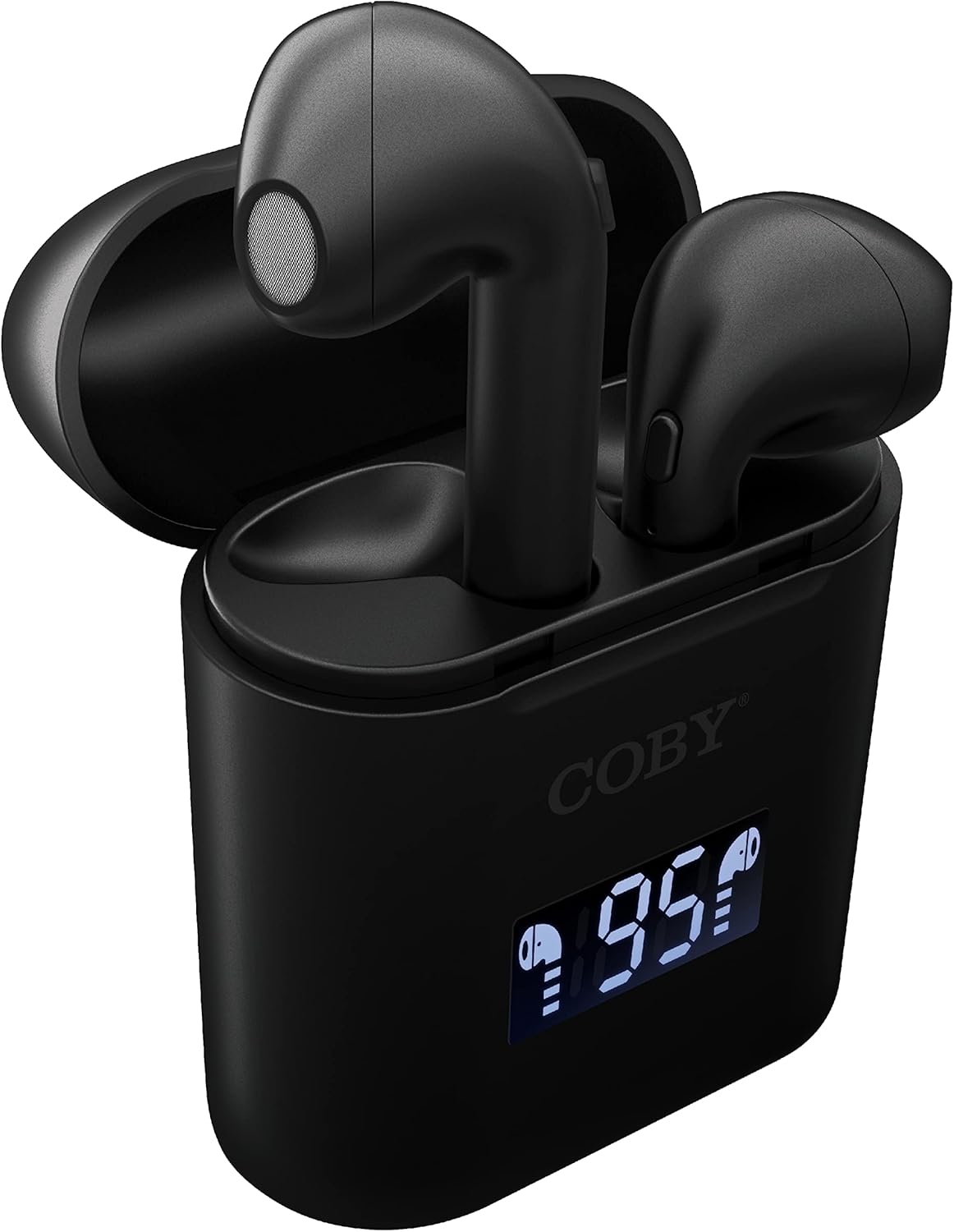
Imej: Dari dekat view of the Coby True Wireless Earbuds resting in their open charging case. The case features a digital display showing "95%", indicating the current battery level of the case. The black earbuds are visible, with their microphones facing upwards.
2. Berpasangan dengan Peranti Bluetooth
- Pastikan fon telinga dicas dan di dalam bekas pengecasan.
- Buka bekas pengecas. Fon telinga akan dihidupkan secara automatik dan memasuki mod berpasangan.
- Pada peranti anda (telefon pintar, tablet, dll.), dayakan Bluetooth.
- Cari untuk "CETW535" or "Coby Earbuds" in the list of available Bluetooth devices.
- Select the device name to connect. Once connected, you will hear a confirmation tone.
- The earbuds will automatically re-pair with the last connected device when removed from the case, if Bluetooth is enabled on the device.
3. Memasang Putik Telinga
Gently insert each earbud into the corresponding ear (L for left, R for right). Adjust them slightly until they feel secure and comfortable. A proper fit ensures optimal sound quality and comfort.

Image: A woman is shown smiling while wearing a black Coby True Wireless Earbud in her right ear, demonstrating a comfortable and secure fit.
Arahan Operasi
Hidupkan/Mati Kuasa
- Hidupkan kuasa: Open the charging case, or press and hold the touch control area on each earbud for 3 seconds.
- Matikan: Place the earbuds back into the charging case and close the lid, or press and hold the touch control area on each earbud for 5 seconds.
Kawalan Muzik
The earbuds feature touch-sensitive controls for easy management of your audio playback.
- Main/Jeda: Ketik mana-mana fon telinga sekali.
- Lagu Seterusnya: Ketik dua kali pada fon telinga kanan.
- Trek Sebelumnya: Ketik dua kali pada fon telinga kiri.
- Kelantangan: Ketik tiga kali pada fon telinga kanan.
- Perlahankan suara: Ketik tiga kali pada fon telinga kiri.

Image: A man is shown wearing a Coby True Wireless Earbud in his right ear, taking a drink from a water bottle, illustrating the earbuds' use during active moments.
Kawalan Panggilan
Manage your calls effortlessly with the built-in microphone and touch controls.
- Jawab/Tamatkan Panggilan: Ketik mana-mana fon telinga sekali.
- Tolak Panggilan: Tekan dan tahan salah satu fon telinga selama 2 saat.

Image: A man is depicted wearing a Coby True Wireless Earbud in his left ear while concentrating on a laptop screen, highlighting the earbuds' suitability for work or study environments.
Pengaktifan Pembantu Suara
Activate your device's voice assistant (Siri or Google Assistant) for hands-free commands.
- Aktifkan Pembantu Suara: Press and hold either earbud for 3 seconds (after powering on, before powering off gesture).
Intelligent Digital Battery Display
The charging case features a digital display that shows the remaining battery percentage pada bekas dan status pengecasan individu pada fon telinga.
- The large number indicates the charging case's battery percentage.
- Small icons next to the percentage indicate the charging status of the left and right earbuds.

Image: The Coby True Wireless Earbuds are shown in their open charging case, with the digital display indicating "95%" battery life for the case. The black earbuds are visible, ready for use or charging.
Penyelenggaraan
- Pembersihan: Gunakan kain lembut, kering, bebas serabut untuk membersihkan fon telinga dan bekas pengecas. Jangan gunakan bahan kimia yang keras atau bahan yang melelas.
- Storan: Apabila tidak digunakan, simpan fon telinga dalam bekas pengecasnya untuk melindunginya dan memastikan ia dicas. Simpan di tempat yang sejuk dan kering jauh dari suhu yang melampau.
- mengecas: To prolong battery life, avoid fully discharging the battery frequently. Charge the case and earbuds regularly, even if not in constant use.
Menyelesaikan masalah
| Masalah | Penyelesaian yang Mungkin |
|---|---|
| Fon telinga tidak berpasangan dengan peranti. |
|
| Hanya satu fon telinga yang memainkan bunyi. |
|
| Kes pengecas tidak dicas. |
|
| Kualiti bunyi yang buruk atau gangguan sambungan. |
|
Spesifikasi
| Ciri | Perincian |
|---|---|
| Jenama | Coby |
| Nama Model | Earbud Wayarles Benar |
| Nombor Model | CETW535 |
| Teknologi Ketersambungan | Bluetooth 5.3 |
| warna | Hitam |
| Masa Main Earbud | Sehingga 6.5 jam (dengan cas penuh) |
| Jumlah Masa Main (dengan kes) | Sehingga 22 jam |
| Mikrofon | terbina dalam |
| Sokongan Pembantu Suara | Siri, Pembantu Google |
| Dimensi (L x W x H) | 0.99 x 1.85 x 2.44 inci (Sarung Pengecas) |
| Berat Barang | 6.1 auns |
| UPC | 643620020982 |
| Pengeluar | Summit Electronics, LLC |
Waranti dan Sokongan
Specific warranty information for the Coby True Wireless Earbuds (Model CETW535) is not provided within this manual. For details regarding warranty coverage, terms, and conditions, please refer to the warranty card included with your product packaging or visit the official Coby webtapak.
For technical support or further assistance, please contact Coby customer service through the contact information provided on their official webtapak atau pembungkusan produk.


