pengenalan
Terima kasih kerana membeliasing the Technical Pro 1500 Watts Professional Receiver. This high-quality audio component is designed to provide powerful and versatile sound for your home entertainment system, karaoke setup, or public address needs. Featuring 1500 watts of peak power, Bluetooth compatibility, USB and SD card inputs, and comprehensive microphone controls, this receiver offers a robust audio experience. This manual provides detailed instructions for setup, operation, maintenance, and troubleshooting to ensure optimal performance and longevity of your device.
Maklumat Keselamatan
Please read all safety and operating instructions carefully before using this product. Retain these instructions for future reference.
- Sumber Kuasa: Connect the unit only to an AC power outlet of the type described in the operating instructions or as marked on the appliance.
- Pengudaraan: Pastikan pengudaraan yang betul. Jangan sekat sebarang bukaan pengudaraan. Pasang mengikut arahan pengilang.
- Air dan Kelembapan: Jangan gunakan radas ini berhampiran air atau dalam damp environments. Do not expose to dripping or splashing.
- haba: Jangan pasang berhampiran mana-mana sumber haba seperti radiator, daftar haba, dapur, atau radas lain (termasuk amppenghidup) yang menghasilkan haba.
- Pembersihan: Clean only with a dry cloth. Unplug this apparatus during lightning storms or when unused for long periods of time.
- Servis: Jangan cuba servis produk ini sendiri. Rujuk semua perkhidmatan kepada pegawai perkhidmatan yang berkelayakan.
- Beban berlebihan: Jangan membebankan alur keluar dinding atau kord sambungan kerana ini boleh mengakibatkan risiko kebakaran atau kejutan elektrik.
- Objek Asing: Jangan sekali-kali menolak objek dalam apa jua bentuk ke dalam produk ini melalui bukaan kerana ia boleh menyentuh vol berbahayatagmata e atau bahagian pendek yang boleh mengakibatkan kebakaran atau kejutan elektrik.
Kandungan Pakej
Please check to ensure all items are present in the package:
- Technical Pro 1500 Watts Professional Receiver (TRX55URIBTT)
- Alat Kawalan Jauh
- Manual Pengguna (dokumen ini)
Produk Selesaiview
The Technical Pro 1500 Watts Professional Receiver is a central component for your audio system. Familiarize yourself with its design and layout.

Image: Front perspective view of the Technical Pro 1500 Watts Professional Receiver, showcasing its sleek black design and illuminated controls.
Panel Depan
The front panel provides access to all primary controls and inputs for easy operation.

Imej: Terperinci view of the receiver's front panel, showing the digital display, volume knob, equalizer controls, microphone inputs, and various function buttons.
- Butang Kuasa: Menghidupkan atau mematikan unit.
- Paparan Pendarfluor Digital: Shows current input, track information, and equalizer levels.
- Tombol Kelantangan Induk: Adjusts the overall output volume. Features blue LED illumination.
- Penyama 5 Band: Individual sliders for precise frequency adjustment.
- Pemilih Input: Buttons for selecting Tuner, DVD, AUX, MP3/iPod/Bluetooth, and USB/SD inputs.
- Input Mikrofon (MIC1, MIC2): Two 1/4" inputs for connecting microphones.
- Kawalan Mikrofon: Echo, Mic Tone, and Mic Volume knobs for microphone effects.
- Bass, Treble, Balance: Rotary knobs for fine-tuning audio output.
- USB/SD Card Inputs: Ports for playing media directly from USB drives and SD cards (up to 32GB).
- Jack fon kepala: 1/8" (3.5mm) output for private listening.
Panel Belakang
The rear panel houses all the necessary connections for speakers and external audio devices.
Imej: Terperinci view of the receiver's rear panel, showing speaker terminals, RCA audio inputs/outputs, FM antenna input, and power connection.
- Main Speaker Outputs: Banana binding post (2 speakers) and push button (surround speakers) terminals for connecting passive speakers.
- Audio Inputs (RCA): Multiple RCA stereo inputs (AUX, DVD, LINE) for connecting external audio sources like CD players, TVs, or other devices.
- Audio Outputs (RCA): RCA Line Out and 2 Mono RCA Subwoofer Out for connecting to other audio equipment or powered subwoofers.
- Input Antena FM: Untuk menyambungkan antena FM yang disertakan.
- Input Kuasa: AC power cord connection.
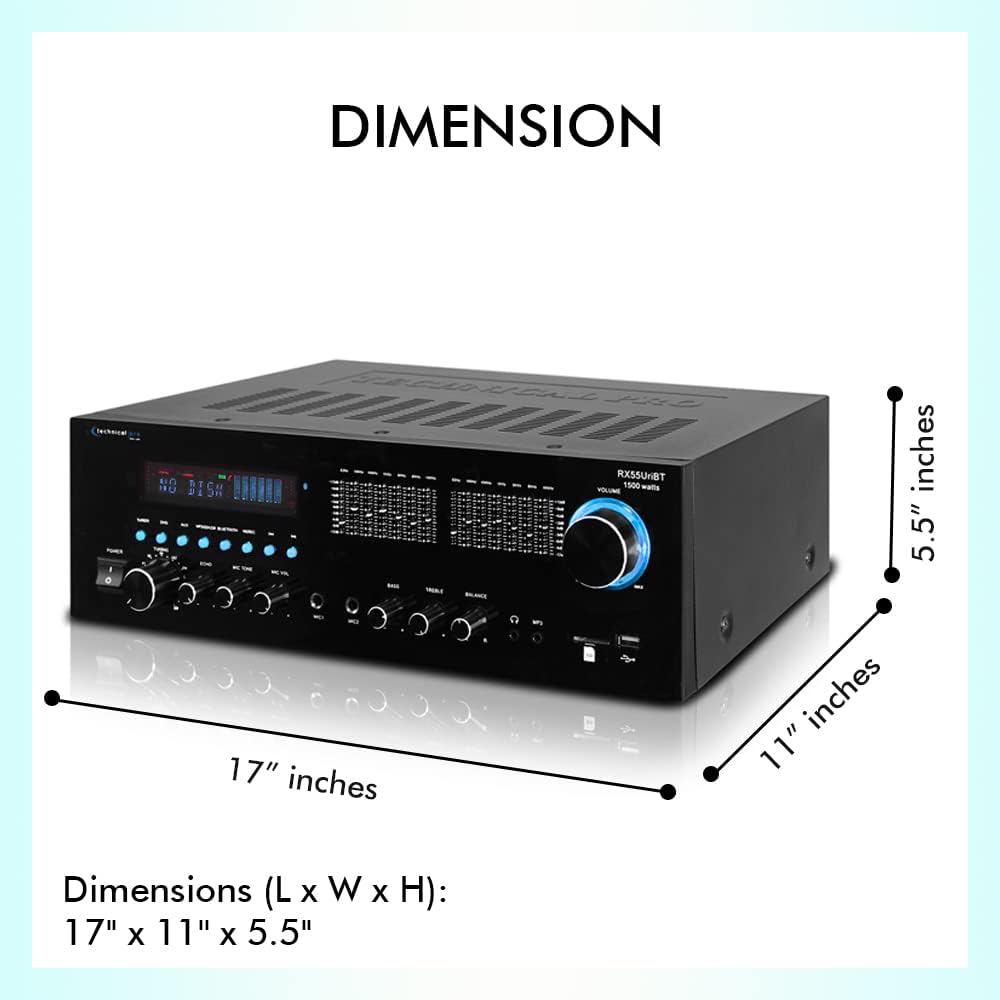
Dimensi
Understanding the dimensions of your receiver is important for proper placement within your audio setup.

Image: Diagram illustrating the length, width, and height of the receiver, showing dimensions of 17 inches (L) x 11 inches (W) x 5.5 inches (H).
The receiver measures approximately 17 inches (Length) x 11 inches (Width) x 5.5 inches (Height).
Persediaan
1. Pembesar Suara Penyambung
Ensure the receiver is powered off before making any connections.
- Identify the "MAIN SPEAKERS" terminals on the rear panel. These are typically red (+) and black (-) for each channel (Left and Right).
- Connect your passive speakers to these terminals. Match the positive (+) terminal on the receiver to the positive (+) terminal on your speaker, and the negative (-) to the negative (-).
- For surround speakers, use the "SURROUND SPEAKERS" push-button terminals, ensuring correct polarity.
- If using a powered subwoofer, connect it to the "SUB OUT" RCA jacks.
2. Menyambung Sumber Audio
Connect your external audio devices using RCA cables.
- For devices like CD players, DVD players, or other audio components, connect their audio output to the "AUX", "DVD", or "LINE" RCA inputs on the receiver's rear panel. Match the red (right) and white (left) connectors.
- For USB drives or SD cards, insert them into the corresponding slots on the front panel.
3. Connecting the FM Antenna
For optimal FM radio reception, connect the included FM antenna to the "FM ANTENNA" terminal on the rear panel.
4. Sambungan Kuasa
Once all audio and speaker connections are made, plug the receiver's power cord into a standard AC power outlet.
Arahan Operasi
Menghidupkan/Mematikan
Tekan ke KUASA butang pada panel hadapan atau alat kawalan jauh untuk menghidupkan atau mematikan penerima.
Pemilihan Sumber
Use the input selector buttons on the front panel (Tuner, DVD, AUX, MP3/iPod/Bluetooth, USB/SD) or the remote control to choose your desired audio source.
Kawalan Kelantangan
Putarkan yang besar VOLUME MASTER knob on the front panel clockwise to increase volume and counter-clockwise to decrease it. You can also use the volume buttons on the remote control.
Berpasangan Bluetooth
The receiver supports Bluetooth v2.0 with EDR technology for wireless audio streaming.

Image: The receiver shown with a graphic indicating Bluetooth compatibility, highlighting its wireless streaming capabilities.
- Pilih MP3/iPod/Bluetooth input on the receiver. The display will indicate Bluetooth mode.
- Pada peranti berdaya Bluetooth anda (telefon pintar, tablet, komputer riba), dayakan Bluetooth dan cari peranti yang tersedia.
- Select "Technical Pro" or a similar name from the list of devices.
- Once paired, you can stream audio wirelessly to the receiver. The Bluetooth range is approximately 30 feet.
Main Semula USB/Kad SD
Insert a USB flash drive or SD card (up to 32GB) containing MP3, WAV, or WMA audio files into the respective front panel slot. The receiver will automatically switch to the USB/SD input and begin playback. The digital display will show track title, number, and elapsed time.
Penggunaan Mikrofon
Sambungkan mikrofon ke MIC1 or MIC2 input pada panel hadapan.
- VOL MIC: Melaraskan kelantangan mikrofon yang disambungkan.
- ECHO: Controls the echo effect applied to the microphone audio.
- MIC TONE: Adjusts the tone (bass/treble) of the microphone audio.
Penalaan Radio FM
Pilih TUNER input. Use the tuning controls on the front panel or remote to scan for and select FM radio stations.
Pelarasan Penyamaan
Use the 5-band equalizer sliders on the front panel to fine-tune the audio frequency response to your preference. Adjustments can be made across a range of ±12dB.
Penyelenggaraan
Penyelenggaraan yang betul memastikan ketahanan dan prestasi optimum penerima anda.
- Pembersihan: Disconnect the power cord before cleaning. Use a soft, dry cloth to wipe the exterior of the unit. Do not use liquid cleaners or aerosol cleaners.
- Pengudaraan: Keep the ventilation openings clear of dust and debris. Ensure adequate airflow around the unit to prevent overheating.
- Storan: Jika menyimpan unit untuk tempoh yang lama, cabut plagnya dari salur keluar kuasa dan simpannya di tempat yang sejuk dan kering jauh daripada cahaya matahari langsung dan suhu yang melampau.
Menyelesaikan masalah
Jika anda menghadapi masalah dengan penerima anda, rujuk kepada masalah dan penyelesaian biasa berikut:
| Masalah | Kemungkinan Punca | Penyelesaian |
|---|---|---|
| Tiada kuasa | Power cord not connected; Power outlet not active; Unit is off. | Ensure power cord is securely plugged in. Check power outlet with another device. Press the POWER button. |
| Tiada keluaran bunyi | Incorrect input selected; Volume too low; Speakers not connected properly; Mute function active. | Select the correct input source. Increase master volume. Check speaker connections (polarity). Deactivate mute if active. |
| Bluetooth tidak bersambung | Receiver not in Bluetooth mode; Device too far; Device already paired with another unit. | Select MP3/iPod/Bluetooth input. Move device closer to receiver (within 30 ft). Disconnect from other Bluetooth devices. |
| Kad USB/SD tidak dimainkan | tak betul file format; Kad/pemacu tidak dimasukkan dengan betul; Kad/pemacu rosak. | pastikan files are MP3, WAV, or WMA. Reinsert card/drive. Try a different card/drive. |
| Mikrofon tidak berfungsi | Mikrofon tidak dipasang; Kelantangan mikrofon terlalu rendah; Mikrofon rosak. | Ensure microphone is fully plugged into MIC1/MIC2. Increase MIC VOL. Test with another microphone. |
If the problem persists after trying these solutions, please contact Technical Pro customer support for assistance.
Spesifikasi
Detailed technical specifications for the Technical Pro 1500 Watts Professional Receiver.
| Jenama | Pro Teknikal |
| Nombor Model | TRX55URIBTT |
| Output Kuasa | Kuasa Puncak 1500 Watt |
| Impedans Pembesar Suara | 2-8 Ohm |
| Versi Bluetooth | v2.0 with EDR (2.4 GHz) |
| Julat Bluetooth | 30 Kaki |
| Sokongan Kad USB/SD | Up to 32GB; Plays .mp3, .wav, .wma files |
| Equalizer Adjustment Range | ±12dB |
| Input Mikrofon | 2 x 1/4" (6.35mm) |
| Input Audio | RCA (AUX, DVD, LINE) |
| Output Audio | RCA Line Out, 2 Mono RCA Subwoofer Out |
| Dimensi Produk (L x W x H) | 17 x 11 x 5.5 inci |
| Berat Barang | 9.9 paun |
Waranti dan Sokongan
Technical Pro products are designed for reliability and performance. For information regarding warranty coverage, technical support, or service inquiries, please visit the official Technical Pro webtapak atau hubungi bahagian perkhidmatan pelanggan mereka. Simpan resit pembelian anda sebagai bukti pembelian untuk tuntutan waranti.
For the most up-to-date support information, please refer to the Technical Pro webtapak: www.technicalpro.com


