pengenalan
This manual provides comprehensive instructions for the safe and effective operation of your HANMATEK HO102 2-in-1 Handheld Digital Oscilloscope and Multimeter. Please read this manual thoroughly before using the device to ensure proper functionality and to prevent damage or injury. Keep this manual for future reference.
Maklumat Keselamatan
Always observe the following safety precautions when operating the HANMATEK HO102:
- Do not operate the device if it appears damaged or if the casing is open.
- Ensure proper probe connections before applying power to the circuit under test.
- Jangan melebihi vol input maksimumtage ratings for both oscilloscope (CAT III 600V) and multimeter (750 VAC / 1000 VDC) inputs.
- Gunakan hanya aksesori yang disediakan atau pengganti yang diluluskan.
- Elakkan beroperasi dalam keadaan basah atau damp syarat.
- Refer to local safety regulations and standards for electrical testing.
Produk Selesaiview
The HANMATEK HO102 is a compact, portable instrument combining the functions of a digital oscilloscope and a true RMS multimeter. It features a 3.5-inch TFT display and a user-friendly interface.
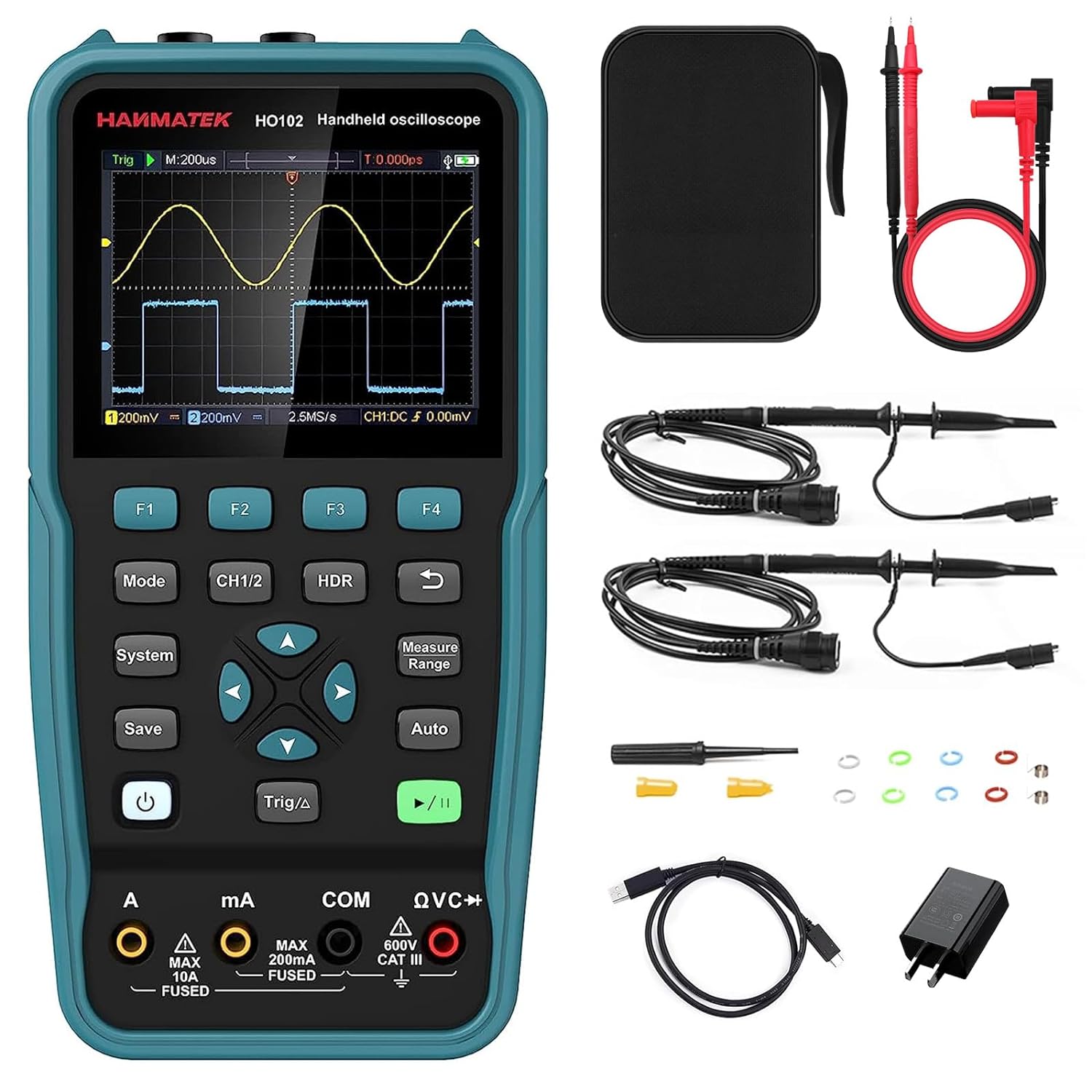
Figure 1: HANMATEK HO102 device and standard accessories.
Reka Letak Peranti dan Kawalan
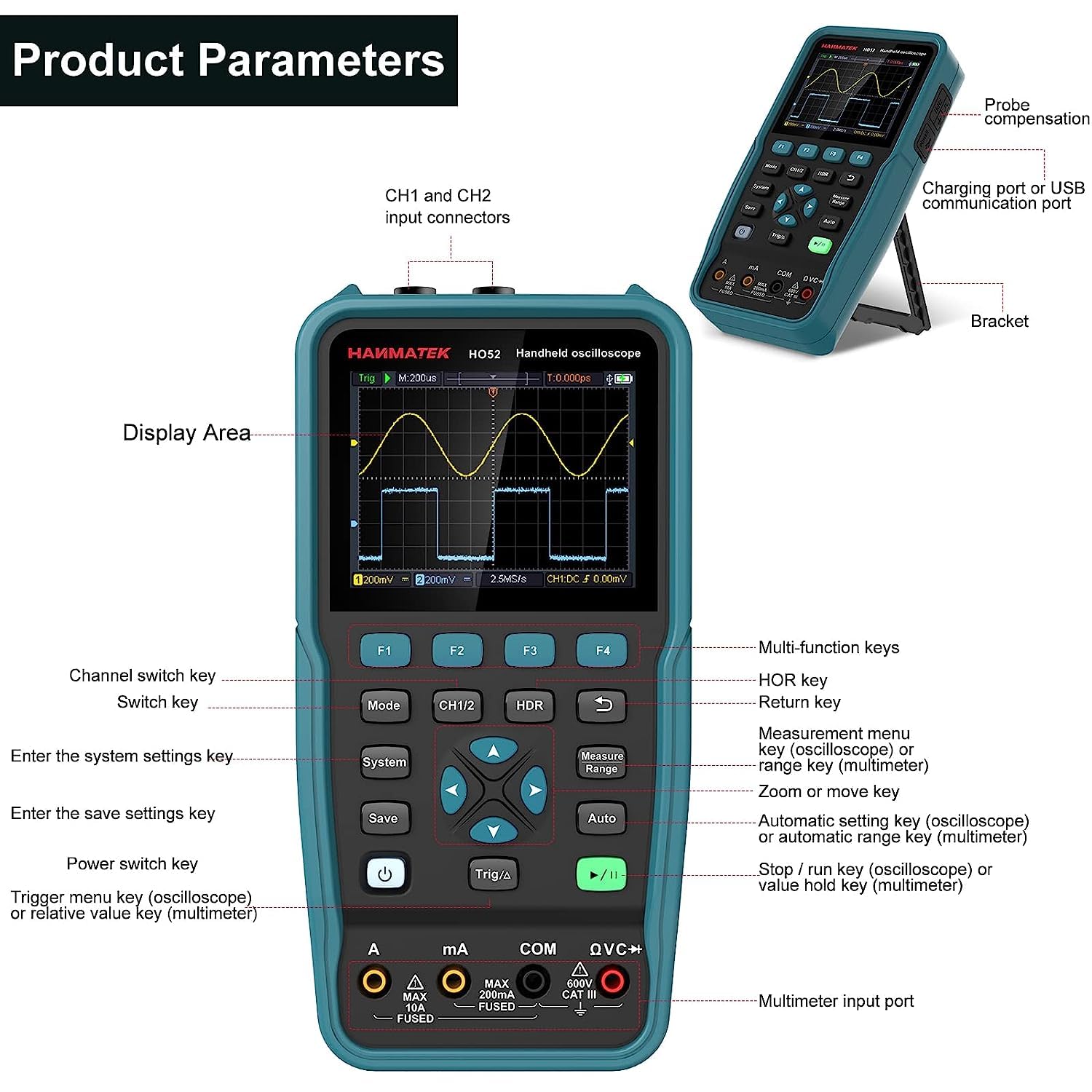
Figure 2: Front panel and side view with key components labeled.
- Kawasan Paparan: 3.5-inch TFT screen for waveform and measurement display.
- Kekunci F1-F4: Multi-function keys, context-sensitive.
- Kunci Mod: Bertukar antara mod Osiloskop dan Multimeter.
- Kunci CH1/2: Channel switch key for oscilloscope.
- HDR Key: Horizontal range key.
- Kunci Sistem: Enters system settings menu.
- Simpan Kunci: Saves current settings or waveforms.
- Kekunci Suis Kuasa: Menghidupkan/mematikan peranti.
- Trigger/Δ Key: Kunci menu pencetus (osiloskop) atau kunci nilai relatif (multimeter).
- Navigation Keys (Up, Down, Left, Right, Enter): Untuk navigasi menu dan pelarasan parameter.
- Measure/Range Key: Kekunci menu ukuran (osiloskop) atau kekunci julat (multimeter).
- Kunci Auto: Kekunci tetapan automatik (osiloskop) atau kekunci julat automatik (multimeter).
- Run/Stop Key: Starts/stops waveform acquisition (oscilloscope) or hold key (multimeter).
- Multimeter Input Ports (A, mA, COM, QVC+): For multimeter lead connections.
- Penyambung Input CH1 dan CH2: Penyambung BNC untuk prob osiloskop.
- Charging Port / USB Communication Port: Port USB Jenis-C untuk pengecasan dan sambungan PC.
- kurungan: Kickstand for desktop use.
Persediaan
Pengecasan Awal
Before first use, fully charge the device using the provided USB Type-C cable and power adapter. The charging port is located on the side of the unit.
Sambungan Probe
Connect the oscilloscope probes to the CH1 and CH2 BNC input connectors. For multimeter functions, connect the multimeter leads to the appropriate input ports (A, mA, COM, QVC+).
Hidupkan/Mati Kuasa
Tekan dan tahan butang kuasa key to turn the device on or off.
Arahan Operasi
Menukar Mod
Tekan ke Mod key to toggle between Oscilloscope mode and Multimeter mode.
Mod Osiloskop
In Oscilloscope mode, the device displays real-time waveforms. Key features include:
- Lebar jalur: Up to 50 MHz.
- Sampkadar le: 125 MSa/s (real-time).
- Saluran: Dual channel operation.
- Kadar Penyegaran Bentuk Gelombang: Up to 10,000 Wfms/s.
- Panjang rekod: Up to 8K.
Basic Waveform Display
Connect the oscilloscope probe to the circuit under test. Press the Auto key for automatic waveform scaling and triggering. This function provides a quick and convenient way to display stable waveforms.
Gambar 3: Cthample of waveform display in Oscilloscope mode.
Melaraskan Tetapan
Gunakan kekunci navigasi untuk melaraskan menegak (volumetage) and horizontal (time) scales. The CH1/2 key switches between channels. The HDR key adjusts the horizontal range.
Mencetuskan
Tekan ke Trig/Δ key to access trigger settings. Adjust trigger level, mode, and source to stabilize the waveform display.
Pengukuran
Tekan ke Ukur/Julat key to access automatic measurement functions. The device supports four automatic measurement functions and cursor measurements for precise analysis.
XY Function
The XY function allows for displaying Lissajous figures, useful for phase difference measurements between two signals.
Mod Multimeter
In Multimeter mode, the device functions as a 4 1/2 digit true RMS multimeter with 20,000 counts. It supports various electrical measurements:
- Voltage (AC/DC)
- Arus (AC/DC)
- Rintangan
- Ujian Diod
- Ujian Kesinambungan
- Kapasitansi
Melaksanakan Pengukuran
Connect the multimeter leads to the appropriate input ports based on the desired measurement. Press the Auto key for automatic ranging, or use the Ukur/Julat key to manually select the range.

Gambar 4: Cthample daripada voltage measurement in Multimeter mode.
Read Hold and Relative Measurement
Gunakan Lari / Berhenti key to hold the current reading. The Trig/Δ key activates the relative measurement function, displaying the difference from a stored reference value.
Fungsi Memori
The HO102 allows saving and recalling various data types:
- 4 sets of parameters.
- 4 reference waveforms.
- 4 images (screenshots).
- 4 sets of waveforms in CSV format.
Tekan ke Jimat key to store data. Saved reference waveforms can be displayed alongside live measurements for comparison.

Figure 5: Comparing a live waveform with a stored reference waveform.
PC Connection and Data Transfer
Connect the HO102 to a computer using the USB Type-C cable. The device will be recognized as a USB flash drive, allowing you to access and transfer stored images and CSV waveform data for further analysis.

Figure 6: HANMATEK HO102 connected to a PC for data transfer and analysis.
Software for this product can be downloaded from: https://bit.ly/3kQe4wQ
Auto-Calibration Function
The device includes an auto-calibration function to maintain measurement accuracy. Refer to the system settings menu for initiating this process.
Penyelenggaraan
Pembersihan
Clean the device with a soft, dry cloth. Do not use abrasive cleaners or solvents. Ensure the device is powered off before cleaning.
Penjagaan Bateri
The built-in Lithium-ion battery provides approximately 6 hours of continuous operation on a full charge. For optimal battery life, avoid fully discharging the battery frequently and store the device in a cool, dry place when not in use for extended periods.
Penyimpanan
Store the device and its accessories in the provided carrying bag to protect them from dust and physical damage.
Menyelesaikan masalah
| Masalah | Kemungkinan Punca | Penyelesaian |
|---|---|---|
| Peranti tidak dihidupkan. | Bateri lemah atau tiada cas. | Connect to power adapter and charge for at least 30 minutes. |
| Unstable or no waveform display. | Incorrect probe connection, improper trigger settings, or signal out of range. | Check probe connections. Press Auto key. Adjust trigger level and time/voltage penimbang. |
| Bacaan multimeter tidak tepat. | Incorrect lead connection, wrong measurement range, or device needs calibration. | Verify lead connections. Use Auto range or select appropriate manual range. Perform auto-calibration. |
| Peranti tidak dikenali oleh PC. | Faulty USB cable or port, or driver issue. | Try a different USB cable or port. Ensure the device is powered on. Check PC device manager. |
Spesifikasi
| Ciri | Perincian |
|---|---|
| Model | HO102 |
| Paparan | Paparan Warna TFT 3.5 inci |
| Lebar Jalur Osiloskop | 50 MHz |
| Saluran Osiloskop | 2 |
| S masa nyataample kadar | 125 MSa/s |
| Kadar Segar Semula Bentuk Gelombang | 10,000 Wfms/s |
| Panjang Rekod | 8K |
| Multimeter Digits | 4 1/2 (20,000 counts) |
| Voltan Input Multimeter Makstage | 750 VAC / 1000 VDC |
| Bateri | 1 Litium-ion (termasuk) |
| Hayat Bateri | lebih kurang 6 jam |
| Penggunaan Kuasa | < 3W |
| Antara muka | USB Jenis-C |
| Dimensi (L x W x H) | 19.9 x 3.9 x 10 cm (7.83 x 1.54 x 3.94 inci) |
| Berat badan | 1.04 kg (2.29 lbs) |
| Pematuhan | CE, RoHS |
Kandungan Pakej
The HANMATEK HO102 package includes:
- 1 x HANMATEK HO102 2-in-1 Digital Oscilloscope and Multimeter
- 1 x Membawa Beg
- 2 x Prob Osiloskop
- 1 x Penyesuai Kuasa
- 1 x Kabel USB Jenis-C
- 1 x Multimeter Test Leads
- 1 x Manual Pengguna
- 1 x Pen Kalibrasi
- 1 x CD (containing software)

Figure 7: All items included in the HANMATEK HO102 product package.
Waranti dan Sokongan
Untuk maklumat jaminan dan sokongan teknikal, sila rujuk laman web rasmi HANMATEK. webtapak atau hubungi pengedar tempatan anda. Simpan resit pembelian anda sebagai bukti pembelian.


