PPLEE Extra Loud Vibrating Alarm Clock with Bed Shaker
Model: CR1018I
1. Produk Lebihview
The PPLEE Extra Loud Vibrating Alarm Clock is designed to provide effective wake-up solutions for deep sleepers, individuals with hearing impairment, and the deaf. It features multiple wake-up modes, a large digital display, dual alarm settings, and convenient charging capabilities.

Image 1.1: The PPLEE Extra Loud Vibrating Alarm Clock with its bed shaker accessory.
Ciri-ciri Utama:
- Strong Bed Shaker & Loud Alarm Buzzer: Offers three wake-up modes: loud buzzer, strong bed shaker, or a combination of both.
- 8.7" Large Mirror LED Display: Provides clear time visibility and can also function as a makeup mirror.
- Dual Alarms with Snooze Function: Allows setting two independent alarms with a 9-minute snooze option.
- Adjustable Brightness & Volume: Features 8 levels of display brightness and 7 levels of alarm volume.
- Port Pengecasan USB: Conveniently charge your mobile devices directly from the clock.
- Bateri tambahan: Mengekalkan tetapan masa dan penggera semasa kuasa dimatikantages (CR2032 battery included).
- 12/24H Mode & DST Function: Supports both 12-hour and 24-hour time formats, along with Daylight Saving Time adjustment.
2. Kandungan Pakej
Sila tandai kotak untuk item berikut:
- 1 x PPLEE Mirror Alarm Clock
- 1 x Bed Shaker
- 1 x Power Plug with USB Cable
- 1 x Manual Arahan
- 1 x CR2032 Cell Coin Battery (pre-installed or separate)

Imej 2.1: Semua komponen termasuk dalam pakej produk.
3. Panduan Persediaan
3.1 Sambungan Kuasa
- Connect the USB cable to the alarm clock's power input port.
- Pasangkan penyesuai kuasa ke soket elektrik standard. Paparan jam akan menyala.
- Ensure the CR2032 backup battery is installed in its compartment. This battery preserves time and alarm settings during power interruptions.

Imej 3.1: Belakang view of the alarm clock showing the AC power input and backup battery compartment.
3.2 Bed Shaker Placement
The bed shaker provides a strong vibration to assist in waking. For optimal effectiveness, place the bed shaker in one of the following locations:
- Under your pillow.
- Under your fitted sheet.
- Between your mattress and box spring.

Image 3.2: Recommended placements for the bed shaker to maximize vibration effectiveness.
4. Arahan Operasi
4.1 Menetapkan Masa
- Tekan dan tahan butang MASA DITETAPKAN butang sehingga digit jam mula berkelip.
- Gunakan JAM dan MINIT butang untuk melaraskan masa.
- Tekan MASA DITETAPKAN sekali lagi untuk mengesahkan dan keluar dari mod tetapan masa.
4.2 Menetapkan Penggera (Penggera 1 & Penggera 2)
Jam ini menyokong dua penggera bebas.
- Tekan dan tahan butang PENGGERA 1 or PENGGERA 2 butang sehingga digit masa penggera berkelip.
- Gunakan JAM dan MINIT butang untuk menetapkan masa penggera yang diingini.
- Tekan PENGGERA 1 or PENGGERA 2 sekali lagi untuk mengesahkan masa penggera.
- To activate or deactivate an alarm, short press the corresponding PENGGERA 1 or PENGGERA 2 butang. Ikon penggera akan muncul/hilang pada paparan.

Image 4.1: The dual alarm feature allows setting two separate wake-up times.
4.3 Fungsi Tunda
Apabila penggera berbunyi, tekan butang MENGEJUTKAN butang untuk menyenyapkan penggera buat sementara waktu selama 9 minit. Penggera akan berbunyi semula selepas tempoh tunda.
4.4 Turning Off Alarms
- Temporary Turn Off: Tekan ke ALARM MATI button once when the alarm is sounding to stop it for the current day. It will reactivate the next day.
- Permanent Turn Off: Tekan dan tahan butang ALARM MATI button to deactivate the alarm permanently. The alarm icon will disappear from the display.
4.5 Melaraskan Kecerahan Paparan
The display has 8 levels of brightness. Short press the DIMMER button repeatedly to cycle through the brightness levels (OFF, Level 1-7). When in 'OFF' mode, the red indicator on top will remain on.
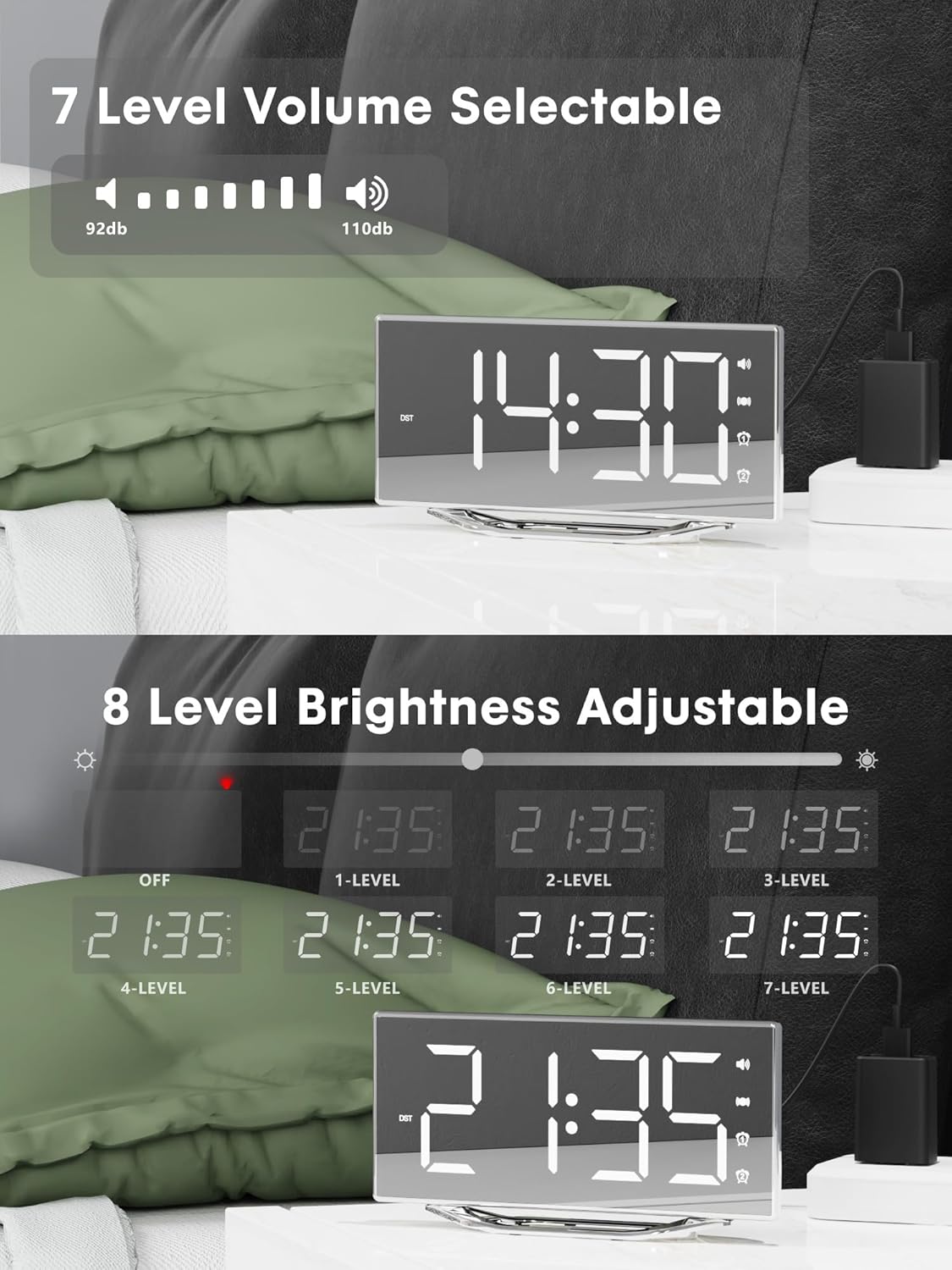
Image 4.2: Visual representation of the 8-level brightness adjustment for the LED display.
4.6 Melaraskan Kelantangan Penggera
The alarm buzzer has 7 adjustable volume levels. Short press the JILID button repeatedly to cycle through the volume levels.

Image 4.3: The alarm volume can be adjusted across 7 levels, from 92dB to 110dB.
4.7 Selecting Wake-Up Mode
Tekan ke BUZZ/VIB button to select your preferred wake-up method:
- Loud Buzzer only
- Strong Bed Shaker only
- Both Buzzer and Shaker

Image 4.4: The alarm clock offers three distinct wake-up modes for personalized use.
4.8 Format & DST 12/24 Jam
- Format 12/24 Jam: Tekan pendek 12/24J button to switch between 12-hour and 24-hour time display.
- Fungsi DST: Tekan pendek DST button to activate or deactivate Daylight Saving Time.

Image 4.5: The clock supports both 12-hour and 24-hour time formats, and features a USB charging port.
4.9 Port Pengecasan USB
The integrated USB charging port allows you to charge your smartphone or other USB-powered devices directly from the alarm clock. Simply connect your device's USB charging cable to the port on the clock.
5. Penyelenggaraan
- Clean the clock surface with a soft, dry cloth. Avoid using abrasive cleaners or solvents.
- Jauhkan jam daripada air dan kelembapan yang tinggi.
- Do not expose the clock to direct sunlight or extreme temperatures.
- If the clock will not be used for an extended period, consider removing the backup battery to prevent leakage.
6. Penyelesaian masalah
| Masalah | Kemungkinan Punca | Penyelesaian |
|---|---|---|
| Paparan jam dimatikan. | No power supply; power cable loose. | Ensure the power adapter is securely plugged into the clock and a working outlet. Check if the dimmer is set to 'OFF'. |
| Alarm does not sound/vibrate. | Alarm not activated; volume too low; bed shaker not connected or placed incorrectly. | Verify alarm is activated (icon visible). Increase alarm volume. Ensure bed shaker is securely plugged in and properly placed. |
| Masa/tetapan ditetapkan semula selepas kuasa dimatikantage. | Bateri sandaran mati atau tidak dipasang. | Replace the CR2032 backup battery. Ensure it is installed correctly. |
| Pengecasan USB tidak berfungsi. | Device not compatible; cable faulty; clock not powered. | Ensure the clock is powered. Try a different USB cable. Verify your device is compatible with standard USB charging. |
7. Spesifikasi
| Ciri | Perincian |
|---|---|
| Jenama | PPLEE |
| Nombor Model | CR1018I |
| warna | Silver Surface (with Bed Shaker) |
| Jenis Paparan | LED digital |
| Dimensi Produk | 8.7"W x 8.7"H (Display size) |
| Sumber Kuasa | Elektrik Bertali |
| Bateri Sandaran | 1 x CR2032 (termasuk) |
| bahan | plastik |
| Berat Barang | 7 auns (0.2 Kilogram) |
| Mod Penggera | Buzzer, Vibration, Buzzer + Vibration |
| Kecerahan Paparan | 8 Levels (including OFF) |
| Kelantangan Penggera | 7 Peringkat |
| Format Masa | 12J/24J boleh dipilih |
| Ciri Khas | Dual Alarms, Snooze, USB Charging Port, DST Function, Mirror Surface |
8. Waranti dan Sokongan
PPLEE is committed to providing high-quality products and customer satisfaction.
- Waranti 1 Tahun: The product is covered by a 1-year warranty from the date of purchase against manufacturing defects.
- Jaminan Wang Dikembalikan 90 Hari: If you are unsatisfied with the product, you may be eligible for a full refund within 90 days of purchase.
- Lifetime Free Support: PPLEE offers free lifetime user support for any questions or concerns regarding the product.
- 24-Hour Response Service: For any inquiries, please contact us via Amazon. We aim to respond within 24 hours.

Image 8.1: Summary of warranty and support offerings.


