1. Pengenalan
This manual provides detailed instructions for the installation, configuration, operation, and maintenance of the GEPRC GEP-F722-45A All-In-One (AIO) Flight Controller. This device integrates a flight controller and electronic speed controllers (ESCs) into a single board, designed for FPV drone applications.

Rajah 1: Atas view of the GEPRC GEP-F722-45A AIO flight controller, showcasing the integrated electronic speed controllers (ESCs) and main components.
2. Spesifikasi
The following table outlines the key technical specifications for the GEP-F722-45A AIO Flight Controller:
| Ciri | Spesifikasi |
|---|---|
| Jenama | GEPRC |
| Model | GEP-F722-45A AIO |
| Flight Controller MCU | STM32F722 |
| Integrated ESC Current | 45A |
| Teknologi Ketersambungan | USB |
| Dimensi | 32mm x 26.5mm |
| Berat badan | 8.8 gram |

Figure 2: Diagram illustrating the dimensions of the GEPRC GEP-F722-45A AIO flight controller, measuring 32mm by 26.5mm.

Figure 3: The GEPRC GEP-F722-45A AIO flight controller on a digital scale, displaying a weight of 8.8 grams.
3. Persediaan dan Pemasangan
Proper installation is crucial for the performance and safety of your drone. Always refer to a detailed wiring diagram for your specific drone frame and components.
3.1 Komponen Lebihview

Rajah 4: Bawah view of the GEPRC GEP-F722-45A AIO flight controller, highlighting the STM32F722 microcontroller and USB port for configuration.

Rajah 5: Bahagian atas dari dekat view of the GEPRC GEP-F722-45A AIO, showing the individual ESC MOSFETs and capacitors, indicating the power delivery section.
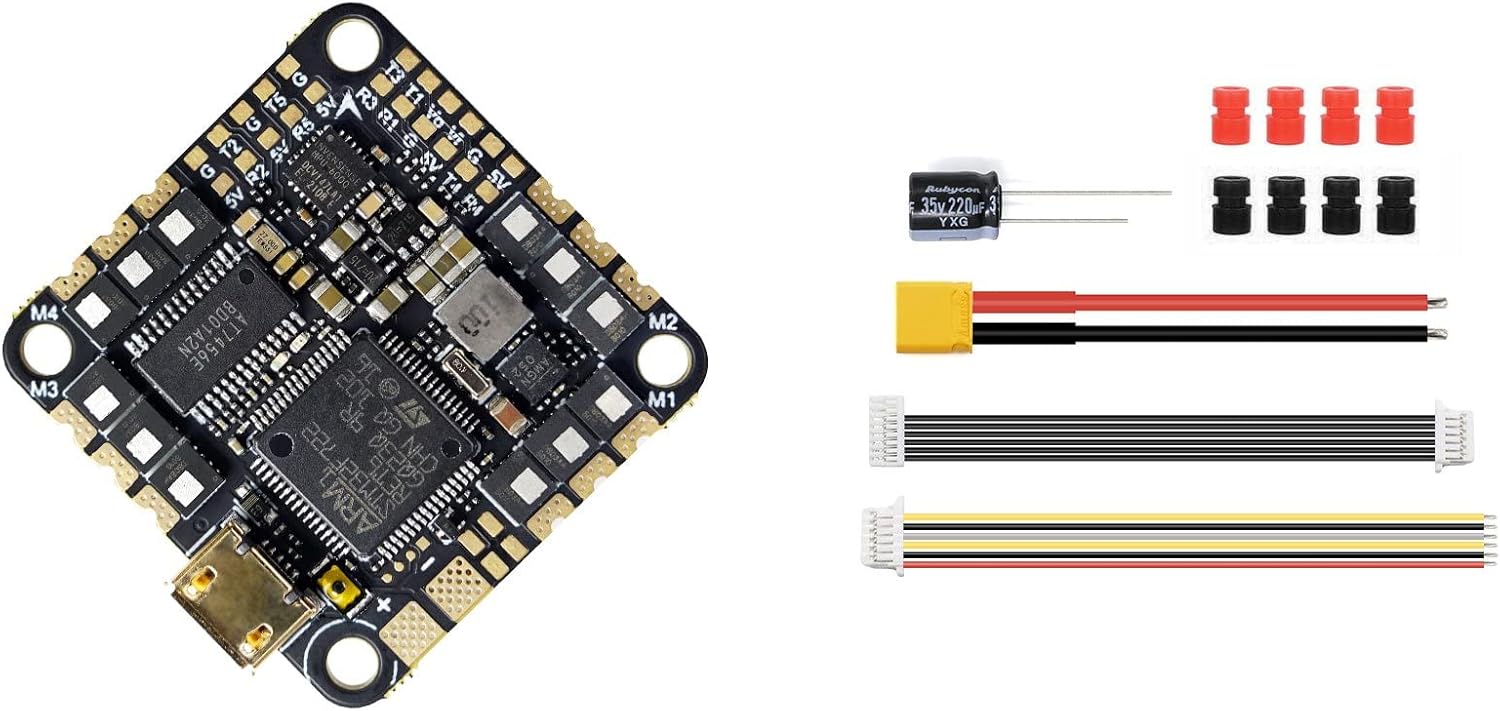
Figure 6: The GEPRC GEP-F722-45A AIO flight controller alongside included accessories such as a capacitor, power cable, and various connection wires, essential for installation.
3.2 Pendawaian
- Sambungan Kuasa: Connect the main battery lead (XT60/XT30) to the designated BAT+ and BAT- pads on the AIO board. Ensure correct polarity.
- Sambungan Motor: Solder motor wires to the M1, M2, M3, M4 pads. Verify motor order and direction according to your flight controller software configuration.
- Sambungan Penerima: Connect your receiver (e.g., SBUS, CRSF, ELRS) to the appropriate UART pads (e.g., RX1, TX1).
- Video Transmitter (VTX) & Camera: Connect your VTX and FPV camera to the designated video in/out and power pads.
- GPS/Other Peripherals: If using, connect GPS modules or other peripherals to available UARTs or I2C pads as required.
3.3 Berkelip dan Konfigurasi Perisian Tegar
- Pasang Pemacu: Ensure necessary USB drivers (e.g., STM32 Virtual COM Port Driver, Zadig) are installed on your computer.
- Sambung ke PC: Connect the AIO board to your computer using a USB-C cable.
- Open Configurator: Launch the Betaflight Configurator (or INAV Configurator, depending on your firmware choice).
- Firmware Flash: Navigate to the 'Firmware Flasher' tab. Select the correct target (e.g., GEP_F722_AIO) and the latest stable firmware version. Click 'Load Firmware [Online]' and then 'Flash Firmware'.
- Konfigurasi Awal: After flashing, connect to the flight controller. Go through the setup wizard or manually configure settings such as accelerometer calibration, receiver protocol, motor output protocol (e.g., DShot600), OSD, and modes.
4. Arahan Operasi
Setelah pengawal penerbangan dipasang dan dikonfigurasikan, ikut garis panduan operasi am ini:
- Semakan Pra-Penerbangan: Before each flight, visually inspect all connections, propeller tightness, and battery charge.
- Arming Procedure: Ensure your drone is on a stable, level surface. Arm the motors using the designated switch on your radio transmitter. The flight controller's status LED will typically change to indicate armed status.
- Disarming Procedure: Disarm the motors immediately after landing or in an emergency by using the designated switch.
- Mod Penerbangan: Utilize various flight modes (e.g., Angle, Acro, Horizon) configured in your flight controller software to suit your flying style and skill level.
- Pengurusan Bateri: Pantau bateri voltage during flight. Land safely before the battery voltage drops below critical levels to prevent damage to the battery and drone.
5. Penyelenggaraan
Regular maintenance helps ensure the longevity and reliability of your GEP-F722-45A AIO.
- Pembersihan: Periodically clean the board to remove dust, dirt, or debris. Use a soft brush or compressed air. Avoid using liquids directly on the electronics.
- Kemas kini Firmware: Check for and install new firmware versions for your flight controller and ESCs regularly. Updates often include performance improvements, bug fixes, and new features.
- Pemeriksaan Sambungan: Routinely inspect all solder joints and wire connections for signs of wear, corrosion, or looseness. Re-solder or replace as necessary.
- Physical Damage Check: After any hard landing or crash, inspect the board for cracks, bent pins, or damaged components.
6. Penyelesaian masalah
Bahagian ini menangani isu biasa yang mungkin anda hadapi:
6.1 No Power to Board
- Semak Sambungan Bateri: Ensure the main battery is properly connected and charged.
- Inspect Solder Joints: Verify that the main power leads (BAT+ and BAT-) are securely soldered to the board.
- Check for Shorts: Look for any accidental solder bridges or conductive debris that could cause a short circuit.
6.2 Motors Not Spinning
- Arming State: Ensure the flight controller is armed.
- Motor Protocol: Verify that the correct motor output protocol (e.g., DShot600) is selected in the Betaflight/INAV configurator.
- Penentukuran ESC: If using analog ESC protocols, ensure ESCs are calibrated. For DShot, calibration is not required.
- Motor/ESC Health: Test individual motors and ESCs using the motor tab in the configurator.
6.3 No Connection to Configurator
- Wayar USB: Try a different USB-C cable. Some cables are for charging only and do not support data transfer.
- Pemandu: Reinstall or update the necessary USB drivers (STM32 Virtual COM Port Driver).
- Mod DFU: If the board is not recognized, try putting it into DFU (Device Firmware Upgrade) mode by holding the BOOT button (if present) while plugging in USB, then attempt to flash firmware.
7. Waranti dan Sokongan
Specific warranty information for the GEPRC GEP-F722-45A AIO Flight Controller is not provided in the product details. For warranty claims, technical support, or further assistance, please contact the retailer or GEPRC directly through their official support channels. Always retain your proof of purchase.


