1. Pengenalan
The TP-Link UB5A is a compact Bluetooth 5.0 Nano USB Adapter designed to provide Bluetooth connectivity to your desktop or laptop computer. This adapter allows you to connect various Bluetooth-enabled devices such as headphones, speakers, keyboards, mice, and game controllers wirelessly. Its nano size ensures a low-profile fit, making it ideal for permanent installation in a USB port.
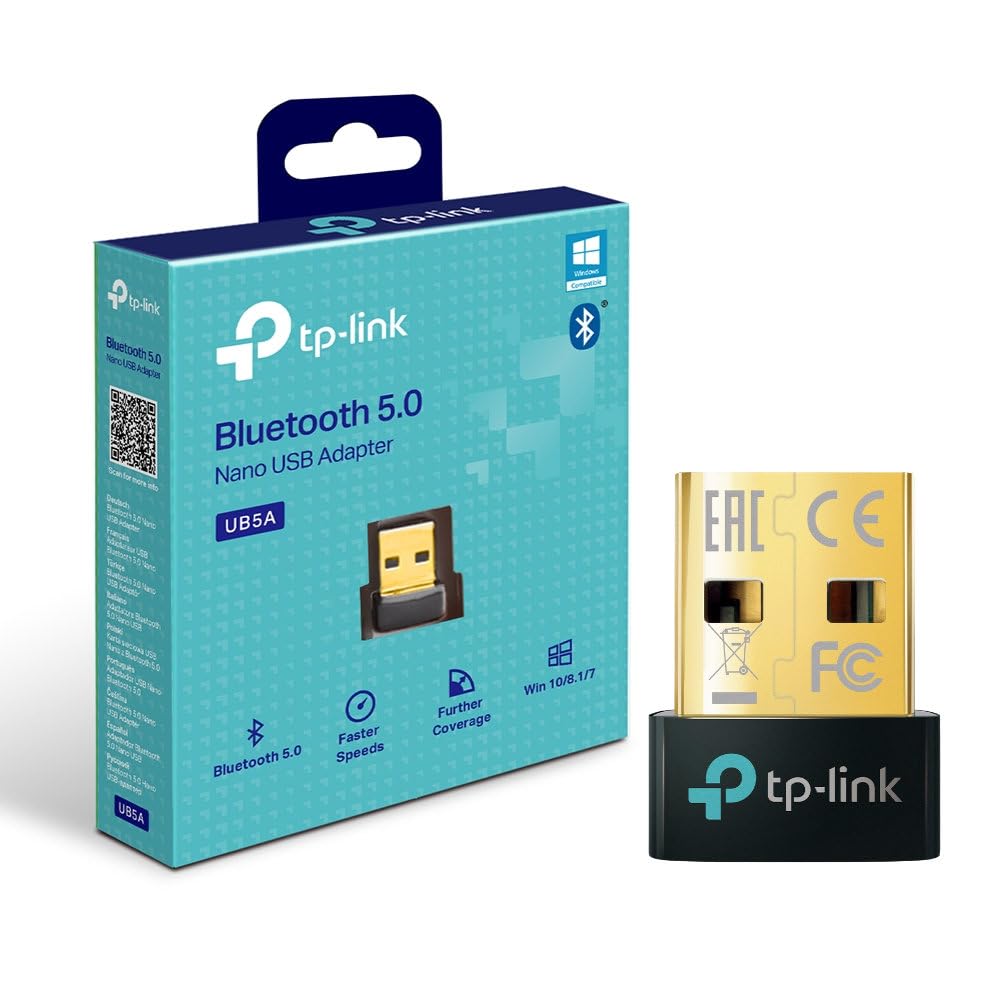
Depan view of the TP-Link UB5A Bluetooth 5.0 Nano USB Adapter, showcasing its compact design and TP-Link branding.
2. Persediaan dan Pemasangan
Follow these steps to install your TP-Link UB5A Bluetooth 5.0 Nano USB Adapter:
- Masukkan Penyesuai: Plug the UB5A adapter into an available USB 2.0 port on your desktop or laptop computer.
- Pemasangan Pemandu: For most modern operating systems (Windows 10/8.1/7), the necessary drivers should install automatically upon connection. If the adapter is not recognized or Bluetooth functionality is not available, you may need to manually install drivers.
- Pemasangan Pemacu Manual (jika perlu):
- Lawati sokongan rasmi TP-Link webtapak: www.tp-link.com/support.
- Cari untuk 'UB5A' and download the latest drivers compatible with your operating system.
- Run the downloaded driver installer and follow the on-screen instructions.

The TP-Link UB5A adapter discreetly plugged into a laptop's USB port, demonstrating its nano size and low-profile sesuai.
3. Arahan Operasi
Once the adapter is installed and recognized by your system, you can begin pairing Bluetooth devices:
- Dayakan Bluetooth: Ensure Bluetooth is enabled on your computer. This can usually be done through the Windows Settings (Settings > Devices > Bluetooth & other devices) or the system tray icon.
- Letakkan Peranti dalam Mod Berpasangan: Place your Bluetooth device (e.g., headphones, speaker, mouse) into pairing mode. Refer to your device's manual for specific instructions on how to do this. Typically, this involves holding down a power or Bluetooth button until an indicator light flashes.
- Tambah Peranti: On your computer, click "Add Bluetooth or other device" and select "Bluetooth." Your computer will scan for nearby Bluetooth devices.
- Pilih dan Sambungkan: From the list of discovered devices, select your device and follow any on-screen prompts to complete the pairing process. You may be asked to enter a PIN or confirm a code.
- Sahkan Sambungan: Once paired, your device should appear as "Connected" in your computer's Bluetooth settings.

The retail packaging for the TP-Link UB5A adapter, highlighting key features like Bluetooth 5.0 and Windows compatibility.
4. Penyelenggaraan
The TP-Link UB5A adapter requires minimal maintenance. To ensure optimal performance and longevity:
- Keep the adapter plugged into a USB port to avoid misplacement, as its small size can make it easy to lose.
- Elakkan daripada mendedahkan penyesuai kepada suhu yang melampau, lembapan atau cahaya matahari langsung.
- Clean the adapter gently with a dry, soft cloth if necessary. Do not use liquid cleaners.
5. Penyelesaian masalah
If you encounter issues with your TP-Link UB5A adapter, try the following troubleshooting steps:
- Penyesuai Tidak Dikesan:
- Cuba pasang penyesuai ke port USB lain pada komputer anda.
- Mulakan semula komputer anda.
- Ensure the drivers are correctly installed (refer to Section 2).
- Tidak Boleh Memasangkan Peranti:
- Pastikan peranti Bluetooth anda berada dalam mod berpasangan.
- Ensure the device is within range (typically up to 10 meters or 33 feet).
- Turn off and on Bluetooth on your computer.
- Alih keluar sebarang contoh peranti yang telah dipasangkan sebelum ini daripada tetapan Bluetooth komputer anda dan cuba pasangkan semula.
- Unstable Connection or Poor Audio Quality:
- Ensure there are no physical obstructions or sources of interference (e.g., Wi-Fi routers, microwaves) between the adapter and your Bluetooth device.
- Update your Bluetooth drivers to the latest version from the TP-Link support webtapak.
- Try moving the computer or the Bluetooth device to a different location.
6. Spesifikasi
| Nombor Model | UB5A |
| Antara Muka Perkakasan | Bluetooth, USB |
| Protokol Pautan Data | Bluetooth, USB |
| Kadar Pemindahan Data | 12 Gigabit Sesaat |
| Dimensi Produk | 4.76 x 3.43 x 3.54 inches (or 7.87"L x 5.91"W x 5.91"H) |
| Berat Barang | 0.952 auns (27 Gram) |
| Peranti Serasi | Desktop, Komputer riba |
| Sistem Pengoperasian Minimum yang Diperlukan | Windows 10, Mac OS 10.12 Sierra |
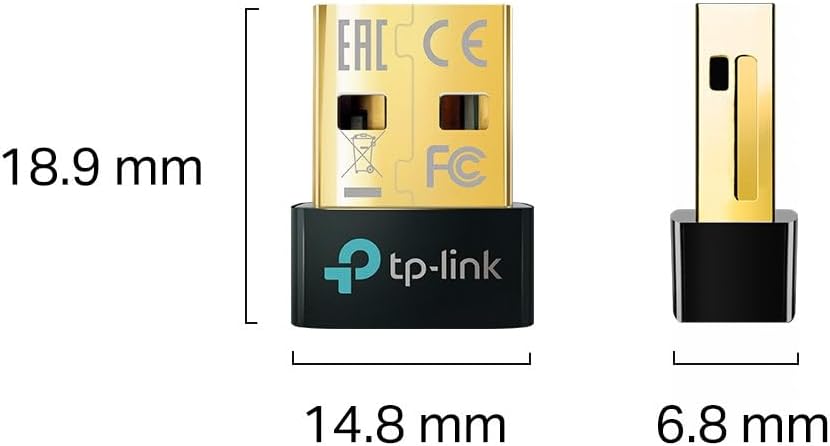
Diagram illustrating the compact dimensions of the TP-Link UB5A adapter: 18.9 mm length, 14.8 mm width, and 6.8 mm height.
7. Waranti dan Sokongan
Maklumat Waranti: The TP-Link UB5A Bluetooth 5.0 Nano USB Adapter comes with a jaminan tiga tahun against manufacturing defects, ensuring reliability and peace of mind.
Sokongan Teknikal: For further assistance, technical support, or warranty claims, please visit the official TP-Link support weblaman web atau hubungi khidmat pelanggan mereka:
- Sokongan TP-Link Webtapak: www.tp-link.com/support
- Sokongan E-mel: support.usa@tp-link.com
- Sokongan Telefon: 866.225.8139
Please have your product model (UB5A) and purchase information ready when contacting support.