1. Produk Lebihview
The AWOW AiBook 10 is a versatile 10.1-inch 2-in-1 device designed to function as both a tablet and a laptop. It features a detachable keyboard, a responsive touchscreen, and an integrated kickstand for multiple viewing modes. Powered by an Intel Celeron N4120 processor, it includes 8GB RAM and 128GB SSD storage, making it suitable for everyday computing tasks, web browsing, and media consumption.

Image: The AWOW AiBook 10 tablet shown with its detachable keyboard, illustrating its 2-in-1 functionality.
Ciri-ciri Utama:
- paparan: 10.1-inch IPS HD (1280x800) Touchscreen
- Pemproses: Intel Celeron N4120 (up to 2.6GHz)
- Ingatan: 8GB LPDDR4 RAM
- Storan: 128GB eMMC SSD, expandable via TF card slot (up to 512GB)
- Sistem pengendalian: Windows 10 Home
- Ketersambungan: 2.4G+5G WiFi, Bluetooth 4.2
- Pelabuhan: USB 3.0, Micro HDMI, DC-in, 3.5mm Earphone Jack, TF Card Slot
- Kamera: 2MP Depan, 5MP Belakang
- Bateri: 6500mAh
2. Komponen dan Pelabuhan
Familiarize yourself with the physical components and available ports on your AWOW AiBook 10 tablet.
Kandungan Pakej:
- AWOW AiBook 10 Tablet
- Papan Kekunci boleh tanggal
- Penyesuai Kuasa
- Manual Pengguna
- Stylus Pen (may be included with some models)
Device Layout and Ports:

Image: A detailed diagram highlighting the various ports and features of the AWOW AiBook 10, including the kickstand and removable keyboard.
- Bicu Fon Telinga 3.5mm: Untuk menyambungkan fon kepala atau pembesar suara luaran.
- Slot Kad TF: Insert a microSD card for expanded storage (up to 512GB).
- Kamera Hadapan (2.0MP): Located above the screen for video calls and selfies.
- Rear Camera (5.0MP): Located on the back of the tablet for taking photos and videos.
- DC-in (12V/3A): Power input port for charging the device.
- HDMI Mikro: Connect to an external display or TV.
- USB 3.0: Connect USB devices such as flash drives, mice, or external hard drives.
- Removable Keyboard Connector: Magnetic connector for attaching the keyboard.
- 150° Kickstand: Integrated stand for adjustable viewsudut-sudut.
3. Persediaan
3.1 Pengecasan Awal
Before first use, fully charge your AWOW AiBook 10. Connect the provided power adapter to the DC-in port on the tablet and plug it into a power outlet. The charging indicator light will illuminate. Allow several hours for a full charge.
3.2 Hidupkan/Mati Kuasa
- Untuk Menghidupkan: Tekan dan tahan butang Kuasa yang terletak di sisi tablet sehingga skrin menyala.
- Untuk Mematikan: Press the Power button briefly to put the device to sleep. To fully shut down, navigate to the Start Menu in Windows, select the Power icon, and choose 'Shut down'.
3.3 Attaching and Detaching the Keyboard
The keyboard connects magnetically to the bottom edge of the tablet. Align the magnetic connector on the keyboard with the corresponding port on the tablet until it snaps into place. To detach, gently pull the tablet away from the keyboard.
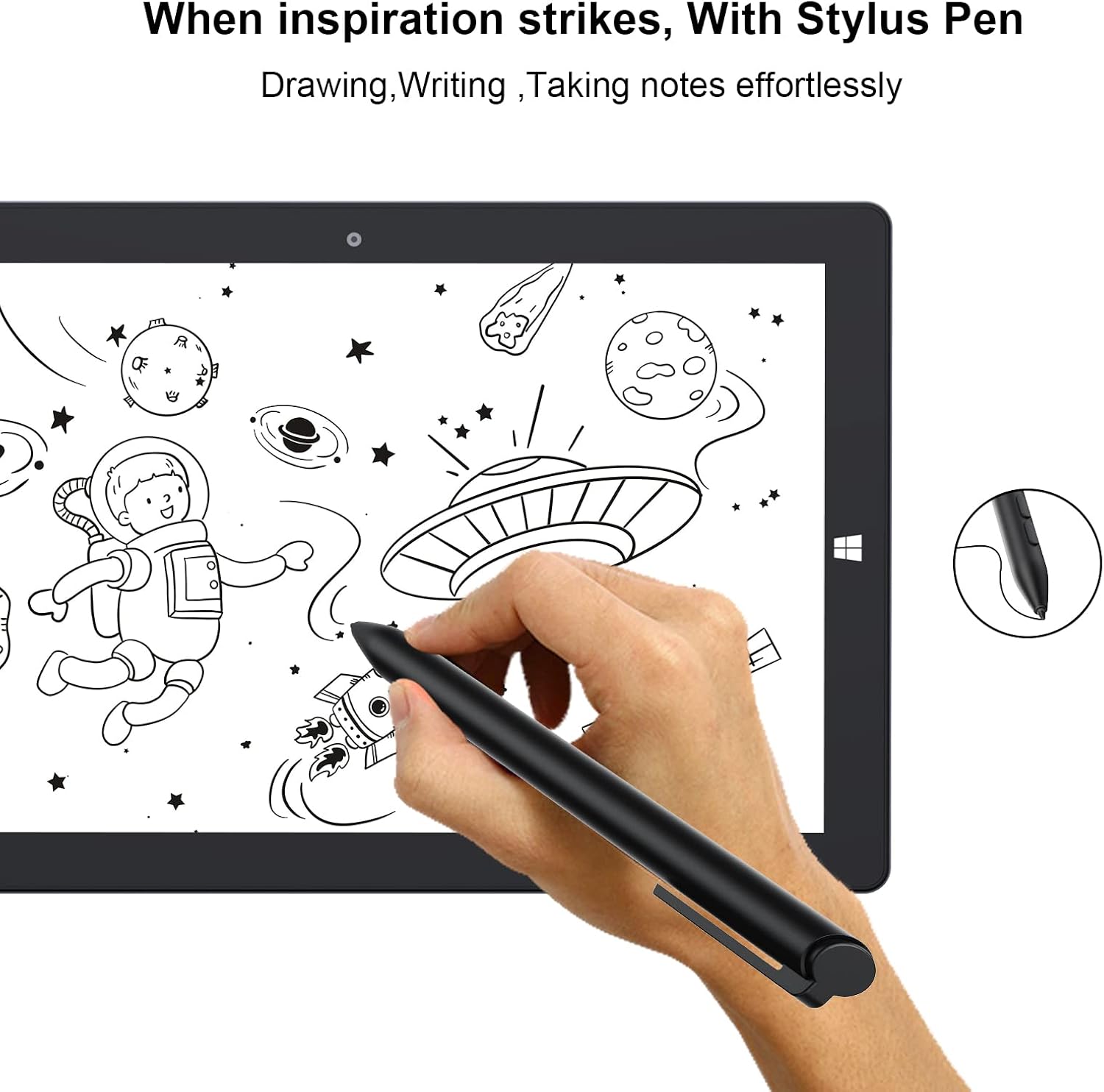
Image: The AWOW AiBook 10 tablet with its detachable keyboard securely attached, ready for use in laptop mode.
3.4 Persediaan Windows Awal
Upon first power-on, you will be guided through the Windows 10 Home setup process. Follow the on-screen prompts to select your region, language, connect to a Wi-Fi network, create a user account, and configure privacy settings.
4. Arahan Operasi
4.1 Switching Between Tablet and Laptop Modes
The AiBook 10 automatically detects when the keyboard is attached or detached and prompts you to switch between tablet and desktop modes in Windows. You can also manually switch via the Action Center (swipe in from the right edge of the screen or click the icon in the taskbar).

Image: The AWOW AiBook 10 configured in laptop mode, demonstrating its functionality with the keyboard and kickstand.
4.2 Touchscreen and Stylus Usage
The 10.1-inch IPS display supports multi-touch gestures. Use your fingers for navigation, tapping, pinching to zoom, and swiping. If your model includes a stylus, it can be used for precise input, drawing, and note-taking.

Image: A hand using the stylus pen on the AWOW AiBook 10 tablet screen for drawing or writing.
4.3 Menyambung ke Wi-Fi dan Bluetooth
- Wi-Fi: Pergi ke Tetapan > Rangkaian & Internet > Wi-Fi. Turn Wi-Fi on and select your desired network, then enter the password if required.
- Bluetooth: Pergi ke Tetapan > Peranti > Bluetooth & peranti lain. Turn Bluetooth on and select 'Add Bluetooth or other device' to pair with compatible accessories.
4.4 Menggunakan Kickstand
The integrated kickstand allows you to prop up the tablet at various angles (up to 150 degrees) for comfortable viewing, typing, or drawing. Gently pull out the kickstand from the back of the tablet to adjust its position.
Video: This video demonstrates the AWOW AiBook 10's versatility, showcasing its tablet, studio, stand, and laptop modes, along with its adjustable kickstand, internal components, and various ports.
5. Penyelenggaraan
5.1 Membersihkan Peranti Anda
- Skrin: Use a soft, lint-free cloth specifically designed for electronics. For stubborn smudges, slightly dampen kain dengan air atau pembersih skrin. Elakkan bahan kimia yang keras.
- Badan: Wipe the tablet and keyboard surfaces with a soft, dry cloth. Keep liquids away from ports and openings.
5.2 Penjagaan Bateri
- Elakkan suhu yang melampau, kerana ia boleh merendahkan hayat bateri.
- Untuk jangka hayat bateri yang optimum, cuba kekalkan tahap cas antara 20% dan 80%.
- Jika menyimpan peranti untuk tempoh yang lama, cas sehingga kira-kira 50% sebelum mematikannya.
5.3 Kemas Kini Perisian
Semak dan pasang kemas kini Windows secara berkala untuk memastikan peranti anda mempunyai tampalan keselamatan dan penambahbaikan prestasi terkini. Pergi ke Tetapan > Kemas Kini & Keselamatan > Kemas Kini Windows.
5.4 Pengurusan Storan
The AiBook 10 comes with 128GB of eMMC storage. To manage space, regularly delete unnecessary files, uninstall unused applications, and utilize the TF card slot for additional storage of documents, photos, and videos.
6. Penyelesaian masalah
This section addresses common issues you might encounter with your AWOW AiBook 10.
6.1 Peranti Tidak Dihidupkan
- Ensure the device is fully charged. Connect the power adapter and wait a few minutes before attempting to power on again.
- Try holding the Power button for 10-15 seconds to perform a hard reset.
6.2 Wi-Fi or Bluetooth Connectivity Issues
- Toggle Wi-Fi/Bluetooth off and on in Windows settings.
- Mulakan semula tablet.
- Ensure your router or Bluetooth device is functioning correctly and within range.
- Update network adapter drivers via Device Manager.
6.3 Skrin Sentuh Tidak Responsif
- Mulakan semula tablet.
- Pastikan skrin bersih dan bebas daripada serpihan.
- Check for Windows updates that might include touchscreen driver fixes.
6.4 Papan Kekunci Tidak Bertindak Balas
- Ensure the keyboard is securely attached to the tablet's magnetic connector.
- Detach and reattach the keyboard.
- Mulakan semula tablet.
6.5 Prestasi Perlahan
- Tutup aplikasi yang tidak perlu berjalan di latar belakang.
- Semak dan pasang kemas kini Windows.
- Jalankan pembersihan cakera dan defragmentasi (untuk HDD, bukan SSD).
- Pastikan ruang storan kosong mencukupi.
6.6 Tetapan Semula Kilang
If persistent issues occur, you may consider a factory reset. This will erase all data and reinstall Windows. Back up all important files before proceeding. Go to Settings > Update & Security > Recovery > Reset this PC.
7. Spesifikasi
Detailed technical specifications for the AWOW AiBook 10.

Image: A graphic detailing the core specifications of the AWOW AiBook 10, including CPU, GPU, RAM, SSD, battery life, and camera resolution.
| Ciri | Spesifikasi |
|---|---|
| Saiz Skrin | 10.1 Inci |
| Resolusi Skrin | 1280 x 800 Pixels (IPS HD) |
| Pemproses | Intel Celeron N4120 (1.1 GHz, 4 Cores, up to 2.6 GHz Boost) |
| Grafik | Intel UHD Graphics 600 (Bersepadu) |
| RAM | 8GB LPDDR4 |
| Penyimpanan | 128GB eMMC SSD |
| Storan Boleh Dikembangkan | TF Card Slot (up to 512GB) |
| Sistem Operasi | Windows 10 Home |
| Kesambungan Wayarles | 2.4G+5G WiFi, Bluetooth 4.2 |
| Pelabuhan | 1x USB 3.0, 1x Micro HDMI, 1x DC-in (12V/3A), 1x 3.5mm Earphone Jack, 1x TF Card Slot |
| Kamera | Depan 2MP, Belakang 5MP |
| Bateri | 6500mAh (Approx. 7-8 hours average use) |
| Dimensi (LxWxH) | 10.1 x 6.8 x 0.38 inci |
| Berat Barang | 2.97 pounds (with keyboard) |
8. Waranti dan Sokongan
8.1 Waranti Produk
The AWOW AiBook 10 typically comes with a 1-year limited warranty from the date of purchase. This warranty covers manufacturing defects and hardware malfunctions under normal use. Please retain your proof of purchase for warranty claims.

Image: A feature overview highlighting key aspects of the AiBook 10, including the 1-year support period, expandable storage, and battery capacity.
8.2 Sokongan Pelanggan
For technical assistance, warranty inquiries, or any questions regarding your AWOW AiBook 10, please contact AWOW customer support. Refer to the contact information provided in your product packaging or visit the official AWOW webtapak untuk sumber sokongan.
Anda juga boleh melawat Kedai AWOW di Amazon for more product information and support options.


