pengenalan
Terima kasih kerana membeliasing the Fenton FT210LED Party Speaker. This manual provides essential information for the safe and correct operation of your device. Please read it thoroughly before use and retain it for future reference.
The FT210LED is a versatile portable party speaker designed for various audio needs, featuring Bluetooth connectivity, a built-in MP3 player, AUX input, and a microphone for karaoke. Its integrated battery and trolley system ensure portability, while colorful LED lighting enhances the atmosphere.
Arahan Keselamatan Penting
- Baca semua arahan dengan teliti sebelum mengendalikan peranti.
- Simpan manual ini untuk rujukan masa hadapan.
- Jangan dedahkan unit kepada hujan atau lembapan untuk mengelakkan kebakaran atau kejutan elektrik.
- Pastikan bekalan kuasa voltage sepadan dengan keperluan yang dinyatakan pada unit.
- Jangan buka casing. Tiada bahagian yang boleh diservis pengguna di dalamnya. Rujuk semua servis kepada kakitangan yang berkelayakan.
- Elakkan meletakkan unit berhampiran sumber haba atau di bawah cahaya matahari langsung.
- Bersihkan hanya dengan kain kering.
- Jangan sekat sebarang bukaan pengudaraan.
- Gunakan hanya lampiran/aksesori yang ditentukan oleh pengilang.
- Disconnect the unit during lightning storms or when unused for long periods.
Kandungan Pakej
Upon unpacking, ensure all items listed below are present and in good condition:
- Fenton FT210LED Party Speaker
- Mikrofon Berwayar
- Alat Kawalan Jauh
- Kabel Kuasa
- Manual Pengguna (dokumen ini)

Rajah 1: The Fenton FT210LED speaker shown with its accompanying remote control, power cable, and wired microphone.
Persediaan
1. Mengecas Bateri
The FT210LED features an integrated rechargeable battery for portable use. Before first use, fully charge the speaker.
- Connect the provided power cable to the speaker's power input and a suitable wall outlet (230V / 50Hz).
- Lampu penunjuk pengecasan akan menyala.
- Allow several hours for a full charge. The indicator light may change or turn off when fully charged (refer to the specific behavior of your unit's indicator).
The speaker can be operated while charging.
2. Meletakkan Speaker
The FT210LED is designed for portability and can be used in various locations. It features a trolley system for easy transport.
- Using the Trolley System: Extend the retractable handle and tilt the speaker to roll it on its integrated wheels.
- Pada Tripod: The speaker is equipped with a hat (pole mount) for placement on a standard speaker tripod (not included). Ensure the tripod is stable and rated for the speaker's weight (11.55 kg).

Rajah 2: The base of the speaker, illustrating the wheels, retractable handle, and the pole mount for tripod placement.
Arahan Operasi
Panel Kawalan Terlaluview

Rajah 3: The main control panel located on the rear of the speaker, featuring media player controls, volume, tone adjustments, and input ports.

Rajah 4: A terperinci view of the input section and control knobs on the speaker's rear panel.
Familiarize yourself with the control panel (Figures 3 & 4) before operation. Key controls include:
- Suis kuasa: Menghidupkan/Mematikan pembesar suara.
- Suis Lampu: Mengawal pencahayaan LED.
- Pemain Media: USB/MicroSD slots, display, and playback controls (Play/Pause, Next, Previous, Mode).
- Tombol Kelantangan: Melaraskan kelantangan induk keseluruhan.
- Tombol Treble: Melaraskan frekuensi tinggi.
- Tombol Bes: Melaraskan frekuensi rendah.
- Mic Vol Knob: Melaraskan kelantangan mikrofon.
- Tombol Gema: Melaraskan kesan gema untuk mikrofon.
- Mikrofon Dalam: 6.3mm jack for microphone connection.
- AUX In: Bicu 3.5mm untuk peranti audio luaran.
- DC12V Luaran: Input for external 12V power source (e.g., car battery, not for charging).
1. Menghidupkan/Mematikan
Cari KUASA switch on the control panel and toggle it to the ON position to power on the speaker. Toggle to DIMATIKAN untuk mematikan kuasa.
2. Sambungan Bluetooth
Stream audio wirelessly from your smartphone, tablet, or laptop.
- Hidupkan pembesar suara.
- Tekan ke MODE button on the control panel or remote control until "Bluetooth" or "BT" appears on the display. The speaker will enter pairing mode, indicated by a flashing Bluetooth icon or sound.
- Pada peranti anda, dayakan Bluetooth dan cari peranti yang tersedia.
- Select "Fenton FT210LED" from the list.
- Sebaik sahaja disambungkan, pembesar suara akan mengeluarkan bunyi pengesahan dan penunjuk Bluetooth akan berhenti berkelip.
- Anda kini boleh memainkan audio daripada peranti anda melalui pembesar suara.
3. USB/MicroSD Playback
Mainkan audio MP3 files directly from a USB flash drive or MicroSD card.
- Masukkan pemacu kilat USB ke dalam USB port or a MicroSD card into the MICROSD slot.
- The speaker will automatically switch to USB/MicroSD mode and begin playing audio. If not, press the MODE butang untuk memilih input yang betul.
- Gunakan kawalan main balik (MAIN/JEDA, SETERUSNYA, SEBELUMNYA) on the control panel or remote control to manage playback.
4. Input AUX
Sambungkan peranti audio luaran menggunakan kabel audio 3.5mm.
- Sambungkan satu hujung kabel audio 3.5mm (tidak disertakan) ke AUX IN port pada pembesar suara.
- Connect the other end to the headphone jack or audio output of your external device (e.g., MP3 player, TV).
- Tekan ke MODE butang sehingga "AUX" muncul pada paparan.
- Adjust the volume on both the speaker and your external device.
5. Penggunaan Mikrofon (Karaoke)
The speaker comes with a wired microphone for karaoke or public address.
- Connect the wired microphone to the MIC DALAM jack on the control panel.
- Ensure the microphone's ON/OFF switch is in the ON kedudukan.
- Laraskan kelantangan mikrofon menggunakan MIC VOL tombol.
- Apply an echo effect using the ECHO tombol.

Rajah 5: The wired microphone, model DM-100, with its power switch.
6. Lampu LED
The integrated colorful LED lights on the woofers can be turned on or off.
- Cari CAHAYA hidupkan panel kawalan.
- Togol suis ke ON to activate the LED lights.
- Togol suis ke DIMATIKAN to deactivate the LED lights.

Rajah 6: The speaker with its LED lights active, displaying blue and purple hues.

Rajah 7: Bersudut view of the speaker showcasing its dynamic green and blue LED lighting.
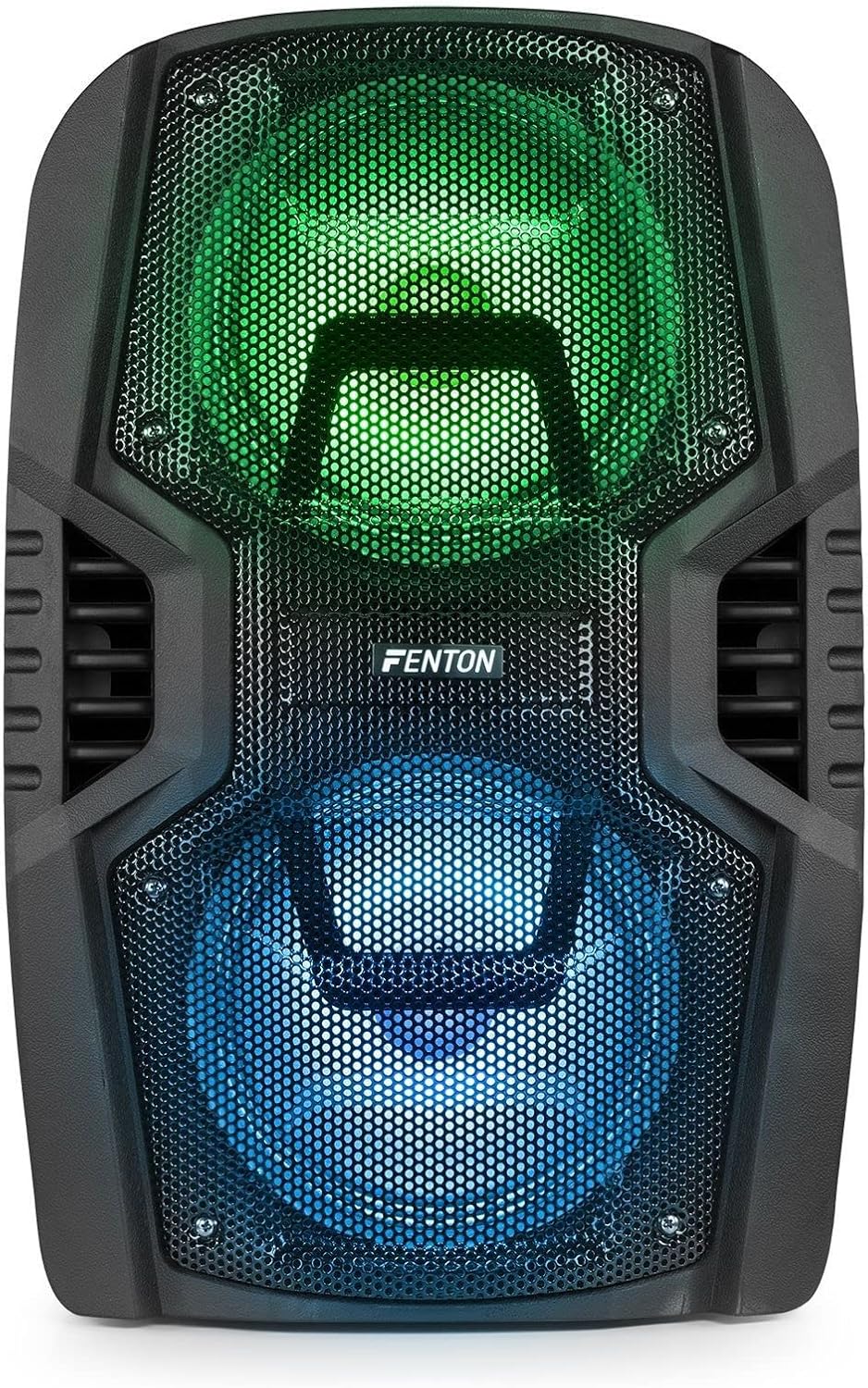
Rajah 8: The front of the speaker with its LED lights displaying vibrant green and blue colors.

Rajah 9: The speaker positioned in a room with low lighting, demonstrating the atmospheric effect of its blue LED lights.
Penyelenggaraan
- Pembersihan: Gunakan kain lembut dan kering untuk membersihkan bahagian luar pembesar suara. Jangan gunakan pembersih yang melelas, lilin atau pelarut.
- Storan: Apabila tidak digunakan untuk tempoh yang lama, simpan pembesar suara di tempat yang sejuk dan kering, jauh dari cahaya matahari langsung dan suhu yang melampau.
- Penjagaan Bateri: To prolong battery life, avoid fully discharging the battery frequently. Recharge the battery periodically if the speaker is stored for a long time.
- Pengudaraan: Pastikan bukaan pengudaraan bersih daripada habuk dan serpihan untuk mengelakkan terlalu panas.
Menyelesaikan masalah
| Masalah | Kemungkinan Punca | Penyelesaian |
|---|---|---|
| Tiada kuasa | Battery discharged; Power cable not connected; Power switch OFF. | Charge the battery; Connect power cable securely; Turn power switch ON. |
| Tiada bunyi | Kelantangan terlalu rendah; Mod input salah dipilih; Peranti tidak disambungkan dengan betul. | Increase volume; Select correct input (Bluetooth, USB, AUX); Reconnect device. |
| Bluetooth tidak berpasangan | Speaker not in pairing mode; Device Bluetooth OFF; Too far from speaker. | Ensure speaker is in BT mode; Enable Bluetooth on device; Move device closer (within 10m). |
| Mikrofon tidak berfungsi | Microphone OFF; Mic Vol too low; Microphone not connected. | Turn microphone ON; Increase Mic Vol; Connect microphone securely. |
| Lampu LED tidak berfungsi | Light switch OFF. | Turn Light switch ON. |
Spesifikasi
| Jenama | Fenton |
| Nombor Model | FT210LED (170.022) |
| Output Kuasa | 700 W |
| Respons Kekerapan | 50 Hz - 18000 Hz |
| Woofer | Dwi 10 inci |
| Bateri | 7.4 V / 3 Ah |
| Sambungan Voltage | 230V / 50Hz |
| Input Audio | Bluetooth, USB, MicroSD, AUX (3.5mm), Wired Microphone (6.3mm) |
| Ciri Khas | Integrated LED lighting, Trolley system, Echo effect for microphone |
| Dimensi Produk (L x W x H) | 48.5 x 39.5 x 75.5 cm |
| Berat Barang | 11.55 kg |
| Pengeluar | Tronios BV |
Waranti dan Sokongan
Untuk maklumat jaminan atau sokongan teknikal, sila rujuk dokumentasi yang disediakan semasa pembelian atau hubungi peruncit anda. Simpan bukti pembelian anda untuk sebarang tuntutan jaminan.


