1. Pengenalan
The FreedConn R1 Plus is an advanced motorcycle intercom system integrating Bluetooth communication, a 1080P HD camera, and WiFi connectivity. Designed for motorcyclists, it offers real-time group intercom, high-definition video recording, and seamless smartphone integration for music, calls, and navigation. This manual provides detailed instructions for setup, operation, and maintenance to ensure optimal performance and safety.
2. Ciri-ciri Produk
- Bluetooth 5.1 Intercom: Supports real-time group communication for up to 6 riders with a range of 100-1000m.
- Kamera HD 1080P: Features a 120° wide-angle lens with automatic light adjustment and zoom for clear video recording.
- Loop Recording & Snapshot: Records video in a loop, automatically overwriting old files when the memory is full. Supports snapshots during recording.
- Up to 64GB Memory Card Support: Compatible with Class 10 or higher microSD cards for amppenyimpanan le.
- Hayat Bateri yang Panjang: Built-in 1500mAh battery provides 4.5 hours of continuous recording, 30 hours of talk time, 30 hours of intercom, and 12 days of standby time. Supports charging while in use.
- Fungsi WiFi: Connects to a smartphone app for convenient viewing and downloading of videos and photos.
- Reka bentuk kalis air: IP65 waterproof rating ensures reliable performance in various weather conditions.
3. Kandungan Pakej
The FreedConn R1 Plus package includes the following items:
- FreedConn R1 Plus Main Unit
- Headset with Microphone (Hard Slot and Soft Wire options)
- Kabel Pengecas USB
- Mounting Bracket (Velcro and Screw-type clips)
- Manual Pengguna
- Pad Velcro untuk Pembesar Suara
- Wrench Hex

Imej: Terperinci view of the FreedConn R1 Plus package contents, showing the main unit, various cables, microphones, mounting clips, and the user manual.
4. Produk Lebihview
Familiarize yourself with the main components and controls of the FreedConn R1 Plus unit:
Image: Diagram illustrating the various parts of the FreedConn R1 Plus, including the speaker, microphone, card slot, charging port, multi-function button, WiFi button, Bluetooth indicator, and recorder indicator.
- Recorder Indicator: Shows the status of video recording.
- Penunjuk Bluetooth: Menunjukkan status sambungan Bluetooth.
- Butang WiFi: Mengaktifkan/menyahaktifkan WiFi untuk sambungan aplikasi.
- Antena: Untuk penerimaan isyarat yang lebih baik.
- Roda Jog: Used for volume adjustment and track selection.
- Multi-function Bluetooth Button: Controls power, pairing, calls, and music playback.
- Recorder On/Off/Pause Button: Mengawal rakaman video.
- Mikrofon Pembatal Bunyi: Ensures clear voice transmission.
- Hard Slot Microphone: Suitable for half-face and open-face helmets.
- Mikrofon Fleksibel: Suitable for full-face helmets.
- Slot Kad: Untuk memasukkan kad microSD.
- Butang Tetapkan Semula: Untuk menetapkan semula peranti.
- Charging Port/Intercom Connection Socket: For charging and connecting to other devices.
5. Pemasangan
The FreedConn R1 Plus is designed to be compatible with various helmet types. Choose the appropriate microphone and mounting clip for your helmet.
5.1 Microphone Selection
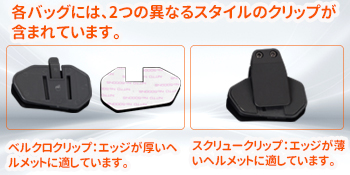
Image: Illustration showing the hard tube microphone suitable for half-face and open-face helmets, and the hose microphone for full-face helmets. Note to attach the microphone to the helmet lining.
- Hard Tube Microphone: Ideal for half-face and open-face helmets.
- Hose Microphone: Recommended for full-face helmets. Ensure the microphone is securely attached to the helmet's inner lining.
5.2 Klip Pemasangan

Image: Two different styles of mounting clips. The Velcro clip is suitable for helmets with thicker edges, while the screw clip is for helmets with thinner edges.
- Klip Velcro: Best for helmets with thicker edges.
- Screw Clip: Best for helmets with thinner edges.
6. Operasi Asas
6.1 Power On/Off and Bluetooth Pairing
To clear Bluetooth pairing history:
- With the power on, press and hold the On/Off button for 10 seconds.
- The red light will flash 3 times quickly, indicating that the pairing history has been cleared.
To pair with your smartphone:
- Press and hold the multi-function button for 6 seconds until the LED flashes red and blue alternately, indicating pairing mode.
- Open your smartphone's Bluetooth settings, select "R1 Plus" from the list, and pair.
Video: Demonstrates clearing Bluetooth pairing history, pairing with a smartphone, music playback controls (play/pause, next/previous track, volume adjustment), automatic call answering, ending/rejecting calls, activating voice assistant, and FM radio functions.
6.2 Music Playback and Call Management
- Main/Jeda Muzik: Tekan butang pelbagai fungsi sekali.
- Lagu Seterusnya: Rotate the jog wheel clockwise.
- Trek Sebelumnya: Rotate the jog wheel counter-clockwise.
- Laraskan Kelantangan: Rotate and hold the jog wheel clockwise to increase volume, counter-clockwise to decrease volume.
- Menjawab Panggilan Automatik: Incoming calls will be automatically answered after 10 seconds if no action is taken.
- Tamatkan Panggilan: Tekan butang berbilang fungsi sekali semasa panggilan.
- Tolak Panggilan: Tekan dan tahan butang berbilang fungsi selama 2 saat apabila panggilan masuk.
- Aktifkan Pembantu Suara: With the headset paired to your smartphone, press and hold the multi-function button for 2 seconds.
6.3 Radio FM
- Hidupkan/Matikan Radio FM: With the headset powered on, double-press the multi-function button.
- Stesen-stesen Tala: Rotate the jog wheel clockwise or counter-clockwise to change stations.
- Adjust FM Volume: Rotate and hold the jog wheel clockwise to increase volume, counter-clockwise to decrease volume.
6.4 Recording and Photography
Untuk memasukkan kad memori:
- Open the TF card slot.
- Masukkan kad memori.
- Close the TF card slot.
Untuk memulakan/menghentikan rakaman:
- Press and hold the recording/camera power button for 3 seconds until the LED flashes green slowly.
- Press the recording/camera power button once. Video recording will start with a voice prompt "WiFi is on".
- Press the recording/camera power button again to stop recording.
To take a snapshot during recording:
- During video recording, press the WiFi button once to take a still photo.

Image: The FreedConn R1 Plus unit highlighting its WiFi feature, showing a smartphone connected to the device via the RoadCam app to view hidup footage.

Image: Visual representation of the FreedConn R1 Plus camera features, including Bluetooth 5.0, HD 1080P recording, 120° wide-angle lens, and snapshot capability, with a motorcycle rider in the background.
7. Intercom Pairing (Group Intercom)
The R1 Plus supports group intercom for up to 6 units. Follow these steps to pair multiple headsets:
- Pastikan semua set kepala dimatikan.
- Press and hold the On/Off button of two headsets (e.g., A and B) for 8 seconds until the red and blue lights flash alternately.
- Once paired, the lights on both units will flash blue only.
- Power off headset B.
- Repeat the pairing process with headset A and C (press and hold On/Off for 8 seconds on A and C).
- Once A and C are paired, power off C.
- Continue this process for all desired headsets (D, E, F).
- After all pairings are complete, power on all headsets. Press the multi-function button once on each unit (A, B, C, D, E, F) to connect them in sequence.
- Once all units are successfully paired and connected, the lights will flash blue, and group intercom will be active.
Video: Demonstrates the step-by-step process of pairing multiple FreedConn R1 Plus headsets for group intercom communication.

Imej: Sebuah udara view showing six motorcycle riders on a snowy road, illustrating the 1000m range for group intercom communication between FreedConn R1 Plus units.
8. Penggunaan Apl
8.1 Muat Turun Apl
- Untuk Apple iOS: Cari untuk "Goplus Cam" in the App Store and download.
- Untuk Android: Open your browser, scan the QR code provided in the manual, and download/install the app. HUAWEI HarmonyOS users should exit pure mode, then open the browser, scan the QR code, download, and install the app.
Video: Instructions on how to download the companion app for both iOS and Android devices, including scanning a QR code for Android users.
8.2 WiFi Activation and Connection
- Press and hold the recording/camera power button for 3 seconds to activate WiFi. A voice prompt "WiFi is on" will sound.
- On your smartphone, open the WiFi settings, select "FreedConn" from the list of available networks.
- Enter the password "12345678" to connect.
8.3 Viewing Dirakam Files and Syncing Time
- Open the app and click the icon on the top page or the file icon on the top left.
- Click and download the desired video to view it, or view foto.
- To synchronize the time between the device and your smartphone, open the app, click the version number bar at the bottom left, then click "WiFi sport Cam time" and "Enable" to complete the time setting.
8.4 Formatting Memory Card
- Open the app, click "Settings" at the top right.
- Click "Format" at the bottom.
- Click "Confirm" to complete the formatting.
9. Spesifikasi
| Ciri | Spesifikasi |
|---|---|
| Saiz Skrin | 2 inci |
| Peranti Serasi | Telefon pintar |
| Bateri Termasuk | ya |
| Penggunaan Bateri | ya |
| Pengeluar | FreedConn |
| Termasuk Aksesori | Manual Pengguna |
| Ciri-ciri lain | WiFi terbina dalam |
| Teknologi Ketersambungan | Bluetooth |
| Jenis Paparan | LCD |
| Kaedah Pemasangan | Pelekat |
| Dimensi Pakej | 14.6 x 11.4 x 6.7 cm |
| Berat Barang | 420 g |
| Rujukan Pengeluar | JPR164 |
| Resolusi Tangkapan Video | 1080p |
| Kaedah Kawalan | Apl, Sentuh, Suara |
10. Penyelesaian masalah
- Difficulty with Bluetooth Pairing: Ensure the device is in pairing mode (red and blue flashing LED). Clear previous pairing history if necessary (refer to section 6.1). Check your smartphone's Bluetooth settings.
- Intercom Connection Issues: Verify that all headsets are powered on and have been paired correctly in sequence (refer to section 7). Ensure no other Bluetooth devices are interfering.
- Masalah Rakaman: Check if a Class 10 or higher microSD card is inserted correctly and has sufficient free space. Format the memory card via the app if issues persist (refer to section 8.4).
- WiFi Connection Failure: Ensure WiFi is activated on the R1 Plus (refer to section 8.2). Double-check the WiFi password "12345678".
- Hayat Bateri Pendek: Ensure the device is fully charged before use. Continuous recording and intercom use will consume battery faster. The device supports charging while in use.
- Kualiti Audio Lemah: Check microphone and speaker connections. Ensure the microphone is positioned correctly to minimize wind noise.
11. Waranti dan Sokongan
FreedConn R1 Plus comes with a 1-year warranty and lifetime after-sales service. If you have any questions about the product or service, please contact us. We will respond promptly within 24 hours.


