pengenalan
This manual provides comprehensive instructions for the safe and proper installation and use of your Amazon Basics Fixed Flat TV Wall Mount. Please read this manual thoroughly before beginning installation and retain it for future reference. This wall mount is designed for TVs weighing up to 40 lbs (18.2 kg) and display sizes from 12 to 40 inches (30.5 cm - 101.6 cm), supporting VESA patterns from 75x75 mm to 200x200 mm.

Figure 1: Amazon Basics Fixed Flat TV Wall Mount (Model AM20F)
Maklumat Keselamatan
Sentiasa patuhi langkah keselamatan berikut untuk mengelakkan kecederaan atau kerosakan pada produk:
- Pastikan struktur dinding dapat menampung berat gabungan dudukan dan televisyen dengan selamat.
- Jangan melebihi kapasiti berat maksimum 40 lbs (18.2 kg).
- Verify that the TV's VESA pattern is compatible with the mount (75x75 mm to 200x200 mm).
- Gunakan alat yang sesuai dan ikuti semua langkah pemasangan dengan teliti.
- If installing into wood studs, ensure the studs are solid and located accurately.
- If installing into concrete or masonry walls, use the provided concrete anchors. Do not mount on drywall alone.
- Jauhkan kanak-kanak dan haiwan peliharaan dari kawasan pemasangan.
- Do not use this mount for RVs or in environments subject to significant shaking.
Apa yang Termasuk
Before beginning installation, ensure all parts listed below are present and undamaged. If any parts are missing or damaged, do not proceed with installation and contact customer support.

Figure 2: All included components and hardware.
| Bahagian | Penerangan | Kuantiti |
|---|---|---|
| WM | Lekap di dinding | 1 |
| MP | Plat Pemasangan | 1 |
| AP | Plat Adaptor | 4 |
| IT | Templat Pemasangan | 1 |
| UM | Manual Pengguna | 1 |
| TS | M6.3x50mm Lag Bolts | 2 |
| U8 | Jangkar Konkrit | 2 |
| A | Skru M4x12mm | 4 |
| B | Skru M4x22mm | 4 |
| D | Skru M6x10mm | 4 |
| J | Skru M6x14mm | 4 |
| K | Skru M6x24mm | 4 |
| M | Skru M8x20mm | 4 |
| N | Skru M8x30mm | 4 |
| Q | Pengatur Jarak M4 | 4 |
| R | Mesin basuh M4 | 4 |
| S | M6/M8 Washers | 4 |
Alat Diperlukan
The following tools are recommended for a successful installation:
- Tape Dispenser (for securing template)
- Pita Pengukur
- Tahap Semangat
- Drill (with appropriate drill bits: 5/32 inch (4 mm) for wood, 5/16 inch (8 mm) for concrete)
- Stud Detector (for wood stud walls)
- Socket & Wrench
- Pensel
- Pemutar skru
Panduan Pemasangan
Follow these steps carefully to install your TV wall mount. For a visual guide, please watch the official installation video below.
Official Installation Video: How To Use
This video provides a step-by-step visual demonstration of the installation process for the Amazon Basics Fixed Flat TV Wall Mount.
Step 1: Wall Compatibility Check
Before installation, confirm your wall type and TV specifications are compatible with the mount.
- This mount is designed for concrete, brick, and single wood stud walls. It is not suitable for drywall-only installation.
- Ensure your TV's VESA pattern is within the supported range (75x75 mm to 200x200 mm).
- The TV size should be between 12 and 40 inches, and its weight should not exceed 40 lbs (18.2 kg).

Figure 3: Compatible VESA patterns, TV size/weight, and wall types.

Rajah 4: Terperinci view of available VESA patterns (75x75mm, 100x100mm, 100x200mm, 200x100mm, 200x200mm).
Step 2: Wall Preparation and Mounting Plate Installation
Determine the desired TV height and location. Use a stud finder to locate the center of a wood stud if installing into wood. For concrete/masonry, ensure the wall is solid.
- Place the installation template (IT) on the wall at the desired height and level it using a spirit level. Secure it with tape.
- Mark the drill points through the template.
- Drill pilot holes at the marked points. For wood studs, use a 5/32 inch (4 mm) drill bit. For concrete/masonry, use a 5/16 inch (8 mm) drill bit and insert the concrete anchors (U8).
- Align the Wall Mount (WM) with the drilled holes and secure it to the wall using the lag bolts (TS) with a socket and wrench.

Figure 5: Use the provided mounting template to mark drill points accurately.
Step 3: Attaching TV Brackets to Television
Attach the TV brackets (AP) to the back of your television. Select the appropriate screws (A, B, D, J, K, M, N) and washers (R, S) based on your TV's VESA hole size and depth. Spacers (Q) may be used if needed to ensure a flush fit or to clear obstructions.
- Letakkan TV anda dengan berhati-hati menghadap ke bawah di atas permukaan yang lembut dan bersih untuk mengelakkan calar.
- Align the Adapter Plates (AP) with the VESA mounting holes on the back of your TV.
- Insert the correct screws through the washers (R or S), then through the Adapter Plates (AP), and into the TV's mounting holes. If necessary, use spacers (Q) between the TV and the adapter plates.
- Tighten all screws securely with a screwdriver, ensuring the brackets are firmly attached and level.
Step 4: Mounting Television to Wall Mount
With the wall mount securely installed and the TV brackets attached, you can now mount your television.
- Carefully lift the television with the attached brackets. It is recommended to have at least two people for this step.
- Align the brackets on the TV with the mounting plate on the wall.
- Gently lower the TV until the brackets engage with the mounting plate. Ensure the safety locking mechanism clicks into place. The pull cords should hang freely below the TV.
- To remove the TV, pull the cords downwards to disengage the safety locks and lift the TV off the mount.
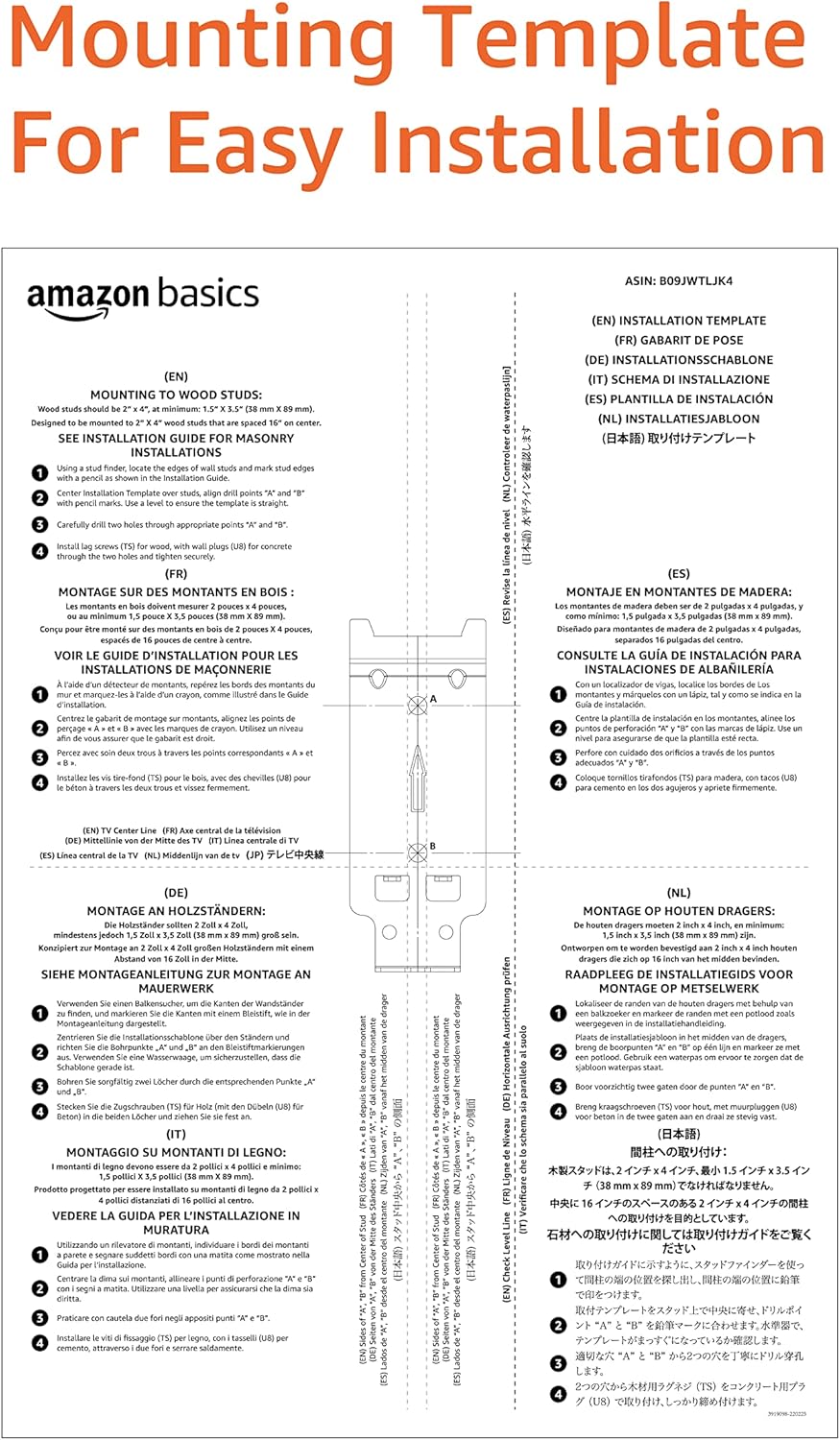
Figure 6: The television securely mounted on the wall.

Rajah 7: Sisi view illustrating the low profile design and the corded easy-release mechanism.
Spesifikasi
| Ciri | Perincian |
|---|---|
| Dimensi Produk | 13.46 x 13.46 x 5.2 inci |
| Berat Barang | 7.3 auns |
| Nombor Model Item | AM20F |
| Jenis Pemasangan | Lekap di dinding |
| Jenis Pergerakan | tetap |
| Jenama | Asas Amazon |
| bahan | Keluli Aloi |
| Saiz Serasi Maksimum | 40 Inci (101.6 cm) |
| Saiz Serasi Minimum | 12 Inci (30.5 cm) |
| Kapasiti Berat | 40 paun (18.2 kg) |
| Keserasian VESA | 75x75 mm hingga 200x200 mm |
| Jarak Dinding | Extends 0.7 inches (1.8 cm) from the wall |
Menyelesaikan masalah
If you encounter issues during installation or use, refer to the following common problems and solutions:
- TV not level after installation: Ensure the wall mount was leveled correctly during installation. Minor adjustments can sometimes be made by slightly loosening and re-tightening the TV brackets.
- Mounting screws do not fit TV: Verify you are using the correct screw size (M4, M6, or M8) and length for your TV's VESA holes. Refer to your TV's manual for specific screw requirements. Use the provided spacers if the screws are too long.
- TV does not securely attach to wall plate: Ensure the TV brackets are properly seated on the wall mount and the safety locking mechanism has engaged. Pull the cords to confirm they release the TV.
- Wall mount feels unstable: Re-check all wall fasteners to ensure they are securely tightened. Confirm that the wall type is appropriate for the mount and that studs/anchors are correctly installed. Do not overload the mount beyond its weight capacity.
- Bahagian yang hilang: Do not proceed with installation if parts are missing. Contact Amazon Basics customer support for replacement parts.
Waranti dan Sokongan
For warranty information and detailed terms and conditions, please refer to the official warranty document:
For further assistance, technical support, or to inquire about replacement parts, please visit the Amazon Basics support page or contact Amazon customer service directly.