1. Pengenalan
This manual provides essential information for the safe and efficient operation, maintenance, and troubleshooting of your Profile GE Automatic Espresso Machine + Milk Frother. Please read these instructions thoroughly before first use and retain for future reference.

Image 1.1: The Profile GE Automatic Espresso Machine with a prepared espresso and a latte.
2. Maklumat Keselamatan
Sentiasa ikuti langkah berjaga-jaga keselamatan asas apabila menggunakan peralatan elektrik untuk mengurangkan risiko kebakaran, renjatan elektrik dan kecederaan kepada orang.
- Ensure the appliance is connected to a grounded outlet.
- Jangan rendam mesin, kord, atau palamkan ke dalam air atau cecair lain.
- Cabut plag dari saluran keluar apabila tidak digunakan dan sebelum membersihkan.
- Jangan kendalikan sebarang perkakas dengan kord atau palam yang rosak.
- Jauhkan tangan dan tali daripada permukaan panas.
- Gunakan hanya lampiran yang disyorkan pengilang.
3. Produk Lebihview
Yang Profile GE Automatic Espresso Machine is designed for convenience and quality, featuring an integrated grinder, milk frother, and smart connectivity.
3.1 Komponen
- Panel Kawalan: Touch-sensitive buttons for various drink selections and functions.
- Bean Hopper: Stores whole coffee beans for grinding.
- Takungan Air: Tangki boleh tanggal untuk bekalan air.
- Muncung Kopi: Dispenses brewed coffee.
- Tongkat Stim: Untuk susu berbuih.
- Dulang Drip: Mengumpul cecair berlebihan.
- Bekas Tanah: Mengumpul serbuk kopi terpakai.

Image 3.1: The top control panel with buttons for Espresso, Americano, My Brew, Steam, and Hot Water.

Image 3.2: The integrated bean hopper with whole coffee beans and grind size adjustment knob.

Image 3.3: The removable water reservoir being lifted from the machine.
4. Persediaan
4.1 Pembongkaran dan Penempatan Awal
- Keluarkan semua bahan pembungkusan dengan berhati-hati.
- Place the machine on a stable, level surface away from heat sources and direct sunlight.
- Pastikan ruang yang mencukupi di sekeliling mesin untuk pengudaraan dan akses kepada komponen.
4.2 Pembersihan Awal
Before first use, clean all removable parts with warm water and mild detergent. Rinse thoroughly and dry. Wipe the exterior of the machine with a damp kain.
4.3 Mengisi Takungan Air
- Remove the water reservoir from the machine (refer to Image 3.3).
- Fill with fresh, cold drinking water up to the MAX line.
- Replace the reservoir securely into the machine.
4.4 Menambah Biji Kopi
- Open the lid of the bean hopper (refer to Image 3.2).
- Pour whole coffee beans into the hopper. Do not overfill.
- Tutup penutup dengan selamat.
4.5 Powering On and Initial Rinse
- Palamkan kord kuasa ke salur keluar elektrik yang dibumikan.
- Press the power button on the control panel. The machine will perform an initial rinse cycle.
- Place a container under the coffee spout to collect the rinse water.
4.6 SmartHQ App Connection
For enhanced customization and software updates, connect your espresso machine to the SmartHQ app.
- Muat turun aplikasi SmartHQ daripada gedung aplikasi peranti anda.
- Follow the in-app instructions to pair your espresso machine.
- Customize drink preferences, volume, and strength through the app.

Image 4.1: Using the SmartHQ app to control and customize the espresso machine.
5. Arahan Operasi
5.1 Membancuh Kopi
The machine offers Espresso, Americano, Lungo, and Hot Water options. The 'My Cup' setting is pre-set to Ristretto and can be adjusted via the SmartHQ app.
- Ensure the water reservoir is filled and the bean hopper contains coffee beans.
- Letakkan cawan di bawah muncung kopi.
- Select your desired drink (Espresso, Americano, Lungo, My Cup) from the control panel.
- The machine will automatically grind the beans, brew, and dispense your coffee.

Image 5.1: The espresso machine dispensing a fresh shot of espresso.
5.2 Adjusting Grind Size
The integrated conical burr grinder allows for 5 levels of grind size adjustment, from coarsest to finest, to optimize flavor extraction.
- Locate the grind size adjustment knob inside the bean hopper (refer to Image 3.2).
- Turn the knob to select your desired grind setting. Finer grinds are suitable for espresso, while coarser grinds are better for longer coffee types.
5.3 Using the Steam Frother
The steam frother creates various milk textures for cappuccinos, lattes, and more.
- Fill the included stainless steel frothing pitcher with cold milk.
- Letakkan tongkat stim ke dalam susu.
- Tekan butang 'Steam' pada panel kawalan.
- Move the pitcher to achieve desired foam texture.
- Once finished, press the 'Steam' button again to stop.
- Immediately clean the steam wand after each use to prevent milk residue buildup.
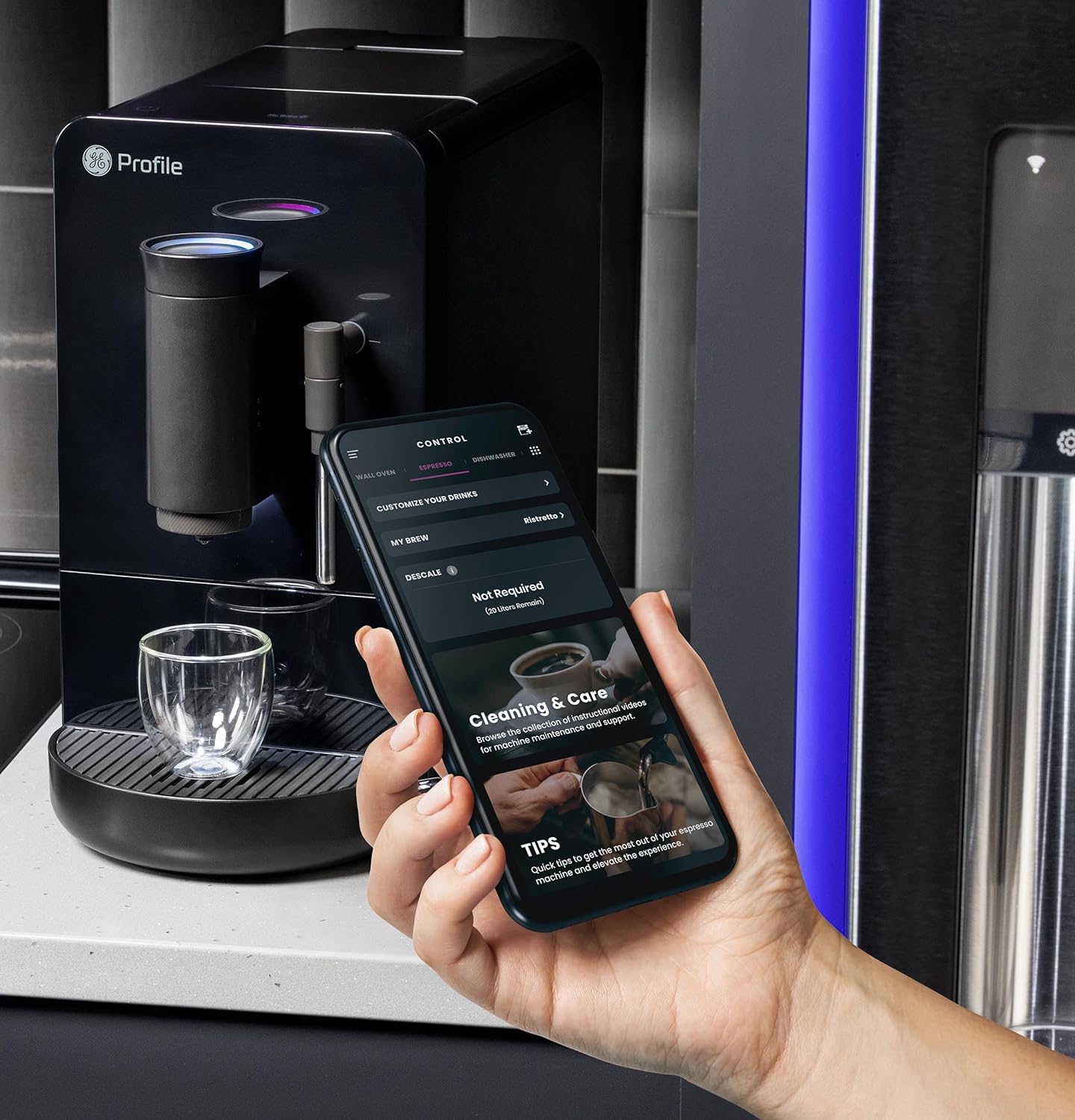
Image 5.2: A hand using the steam wand to froth milk in a stainless steel pitcher.
6. Penyelenggaraan
Pembersihan dan penyelenggaraan yang kerap memastikan prestasi optimum dan jangka hayat mesin espresso anda.
6.1 Pembersihan Harian
- Tongkat Stim: Selepas setiap penggunaan, lap tongkat stim denganamp cloth. Purge steam briefly to clear any milk residue from the nozzle.
- Dulang Titis dan Bekas Tanah: Empty and rinse daily. The machine will indicate when the grounds container needs emptying.
- Takungan Air: Bilas setiap hari dan isi semula dengan air bersih.
6.2 Pembersihan Mingguan
- Unit Pembuatan Bir: The brew unit is typically removable for rinsing under running water. Refer to the included cleaning kit instructions for detailed steps.
- Bean Hopper: Periodically clean out any oil residue or old beans.
6.3 Penyahkelasan
The machine will prompt you when descaling is required. Use a descaling solution specifically designed for espresso machines and follow the instructions provided with the descaling agent or in the SmartHQ app.
7. Penyelesaian masalah
Bahagian ini membincangkan isu-isu biasa yang mungkin anda hadapi dengan mesin espresso anda.
| Masalah | Kemungkinan Punca | Penyelesaian |
|---|---|---|
| No coffee dispensed / "Add Beans" message | Bean hopper empty or beans not feeding correctly. | Refill bean hopper. Gently stir beans to ensure they feed into the grinder. |
| Kopi terlalu lemah atau berair | Grind size too coarse, insufficient coffee dose, or descaling needed. | Adjust grind size to a finer setting. Check SmartHQ app for strength settings. Perform descaling if prompted. |
| Susu tidak berbuih dengan betul | Steam wand clogged, milk type unsuitable, or insufficient steam pressure. | Clean steam wand thoroughly. Use fresh, cold milk. Ensure machine is heated to steam temperature. |
| Mesin tidak dihidupkan | Tidak dipasang, kuasa outage, or circuit breaker tripped. | Check power connection. Verify power outlet functionality. Reset circuit breaker if necessary. |
| SmartHQ app connectivity issues | Incorrect Wi-Fi password, network interference, or app bug. | Verify Wi-Fi credentials. Ensure machine is within Wi-Fi range. Restart app and machine. Check for app updates. |
8. Spesifikasi
- Jenama: Profile
- Nama Model: GE Profile Automatic Espresso Machine + Frother
- Nombor Model Item: P7CEBBS6RBB
- warna: Hitam
- Dimensi Produk: 7"D x 16"W x 12.5"H
- Berat Barang: 16 paun
- Voltage: 120V
- Mod Operasi: Automatik Sepenuhnya
- Ciri Khas: Built-In Bean Hopper, Built-In Conical Burr Grinder & Adjustable Grind Size, Programmable My Brew Setting, Steam Frother & Frothing Pitcher, WiFi Connected
- Komponen yang Disertakan: Cleaning Kit, Coffee Bean Container, Espresso Machine, Steam Wand, Milk Pitcher, Water Tank
- Jenis Input Kopi: Kacang Seluruh
- Input Antara Muka Manusia: Skrin sentuh

Image 8.1: Product dimensions of the espresso machine.
9. Waranti dan Sokongan
This product is covered by a manufacturer's warranty. For specific warranty details, registration, or technical support, please refer to the warranty card included with your product or visit the official GE Profile website. You may also contact customer service through the SmartHQ app for assistance.


