1. Produk Lebihview
The HP Envy x360 Convertible 13-bd0063dx is a versatile 2-in-1 laptop designed for adaptability and performance. Featuring a 13.3-inch IPS Touch Full HD (1920x1080) display, it seamlessly transitions between laptop and tablet modes. Powered by an Intel Core i5-1135G7 processor with Intel Iris Xe Graphics, 8GB of DDR4 RAM, and a 256GB PCIe SSD, this device is equipped for everyday tasks, creative work, and entertainment. It operates on Windows 10 Home, offering a familiar and efficient user experience.

Image 1: The HP Envy x360 Convertible laptop in a folded-back tablet configuration, showcasing its flexible design.
2. Panduan Persediaan
2.1 Penghidupan dan Konfigurasi Awal
- Buka bungkusan Peranti: Keluarkan komputer riba dan semua aksesori dengan berhati-hati dari pembungkusan.
- Sambungkan Kuasa: Plug the power adapter into the laptop's charging port and then into a wall outlet. Allow the battery to charge for at least 30 minutes before first use.
- Hidupkan kuasa: Open the laptop lid and press the power button, usually located on the side or top-right of the keyboard.
- Ikuti Gesaan Pada Skrin: Windows 10 Home will guide you through the initial setup process, including language selection, network connection, account creation, and privacy settings.
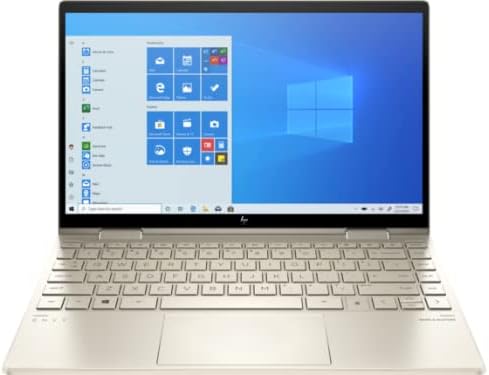
Image 2: The HP Envy x360 Convertible laptop fully open, showing the keyboard and the Windows 10 desktop interface on the screen.
3. Arahan Operasi
3.1 Using Convertible Modes
- Mod Komputer Riba: Use the device as a traditional laptop for typing and productivity tasks.
- Mod Khemah: Fold the screen back to form an inverted "V" shape. Ideal for watching videos or presentations.
- Mod Berdiri: Fold the screen back further, resting the keyboard face down. This positions the screen upright for viewing.
- Mod Tablet: Fold the screen completely back against the base, transforming the laptop into a tablet for touch-based interaction. The operating system will automatically prompt you to switch to tablet mode.
3.2 Touchscreen and Keyboard Usage
- Skrin sentuh: Interact directly with the display using your fingers for navigation, drawing, and app control.
- Papan Kekunci dan Pad Sentuh: Utilize the full-size keyboard for typing and the precision touchpad for cursor control and gestures.
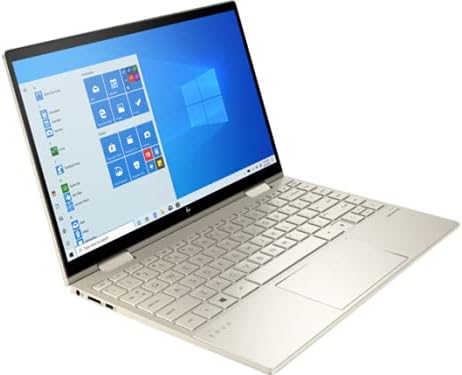
Image 3: The HP Envy x360 Convertible laptop in a partially folded stand mode, highlighting the touchscreen capabilities and flexible hinge.
4. Penyelenggaraan dan Penjagaan
- Membersihkan Skrin: Gunakan kain lembut dan tidak berbulu sedikit dampdiisi dengan air atau pembersih skrin. Elakkan bahan kimia yang keras.
- Membersihkan Papan Kekunci: Use compressed air to remove dust and debris from between the keys. Wipe keys with a soft, damp kain.
- Penjagaan Bateri: To maximize battery life (up to 21 hours), avoid extreme temperatures and fully discharging the battery frequently. Store the laptop with a partial charge if not used for extended periods.
- Kemas Kini Perisian: Regularly install Windows updates and HP driver updates to ensure optimal performance and security.
- Pengudaraan: Pastikan lubang udara pada komputer riba tidak tersumbat untuk mengelakkan terlalu panas.
5. Menyelesaikan masalah Isu Biasa
| Isu | Penyelesaian |
|---|---|
| Komputer riba tidak dihidupkan: | Ensure the power adapter is securely connected and the outlet is functional. Try a different outlet. If the battery is completely drained, it may take a few minutes to respond after plugging in. |
| Skrin sentuh tidak bertindak balas: | Restart the laptop. Check for any pending Windows updates or driver updates for the touchscreen. Ensure the screen is clean and free of obstructions. |
| Prestasi perlahan: | Close unnecessary applications. Check Task Manager for resource-intensive processes. Ensure sufficient free space on the SSD. Run a disk cleanup and defragmentation (for HDD, not typically needed for SSD). Update drivers and Windows. |
| Isu sambungan Wi-Fi: | Restart your router and modem. Restart the laptop. Check Wi-Fi settings and ensure the correct network is selected. Update Wi-Fi drivers. |
6. Spesifikasi
| Ciri | Perincian |
|---|---|
| Nama Model | HP Envy x360 Convertible 13-bd0063dx |
| Saiz Skrin | 13.3 Inci |
| Resolusi Skrin | 1920x1080 Pixels (Full HD IPS Touch) |
| Pemproses | Intel Core i5-1135G7 (2.4 GHz) |
| RAM | 8 GB DDR4 (3200 MHz) |
| Pemacu Keras | 256 GB PCIe NVMe SSD |
| Pemproses bersama Grafik | Grafik Intel Iris Xe |
| Sistem Operasi | Windows 10 Home |
| Purata Hayat Bateri | Sehingga 21 Jam |
| Pelabuhan | 2x SuperSpeed USB-A, 2x SuperSpeed USB-C, 1x HDMI 2.1 |
| Jenis Wayarles | 801.11ac (berkebolehan Wi-Fi 6E) |
| Berat Barang | 2.86 paun |
| Dimensi Produk | 12.05 x 8.35 x 0.58 inci |
| warna | Emas pucat |
7. Video Produk Rasmi
Below are official product videos from the seller, providing additional visual guidance and information about the HP Envy x360 Convertible laptop.
HP AI Business laptop for student and everyday use
Video Description: This video highlights the HP Envy x360 as an AI-powered business laptop suitable for students and daily use, showcasing its capabilities for various tasks.
8. Waranti dan Sokongan
For detailed warranty information, please refer to the documentation included with your HP Envy x360 Convertible laptop or visit the official HP support website. HP offers various support resources, including online troubleshooting, driver downloads, and customer service contact options.
Sokongan dalam talian: www.hp.com/support