1. Pengenalan
The FLYLINKTECH CF600 Car Jump Starter is a portable, powerful device designed to start vehicles with dead batteries. It features a 1500A peak current, suitable for gasoline engines up to 8.0 liters and diesel engines up to 6.0 liters. Beyond its primary function, it also serves as a 16000mAh power bank for charging electronic devices and includes a multi-function LED light for various utility purposes. This manual provides essential information for safe and effective operation, maintenance, and troubleshooting of your jump starter.

Figure 1: FLYLINKTECH Car Jump Starter with smart clamps dan kabel pengecas.
2. Maklumat Keselamatan
Please read all safety warnings and instructions carefully before using this product. Failure to follow the warnings and instructions may result in electric shock, fire, and/or serious injury.
- Always ensure the jump starter is fully charged before use.
- Do not attempt to jump start a vehicle if the jump starter or cables are damaged.
- Sambungkan clamps correctly: Red clamp to positive (+) terminal, Black clamp to negative (-) terminal. Reverse polarity can cause damage.
- Jangan hubungkan cl positif dan negatifampbersama-sama.
- Jauhkan daripada kanak-kanak.
- Jangan dedahkan produk kepada keadaan hujan atau basah.
- Jangan buka unit ini. Rujuk semua servis kepada kakitangan yang berkelayakan.
- Ensure the vehicle's ignition is off before connecting the jump starter.
- Remove the jump starter from the vehicle battery within 30 seconds after the engine starts.
- Ciri peranti 8 Smart Safe Clamp Perlindungan, including reverse polarity, overcharge, short circuit, high temperature, over voltage, and over current protection. However, always exercise caution.

Figure 2: Intelligent clamps with built-in safety features for protection against common errors.
3. Kandungan Pakej
Sahkan bahawa semua item terdapat dalam pakej:
- FLYLINKTECH Car Jump Starter Unit
- Pelompat Pintar Clamps (Merah dan Hitam)
- Kabel Pengecas USB
- EC5 Female Adapter
- Manual Pengguna (Dokumen ini)
- Sarung Penyimpanan
4. Produk Lebihview
The FLYLINKTECH Car Jump Starter is a versatile device designed for emergency vehicle starting and portable power.
Ciri-ciri Utama:
- Permulaan Lompatan yang Berkuasa: 1500A peak current, capable of starting 12V vehicles with up to 8.0L gasoline or 6.0L diesel engines.
- Bank Kuasa Mudah Alih: 16000mAh capacity with two USB ports, including one QC3.0 port for fast charging mobile phones, tablets, and other USB-powered devices.
- Lampu LED Pelbagai Fungsi: Features Torch, SOS, Quick Flash, and Blue & Red Flashing modes for illumination and emergency signaling.
- Smart Safety Clamps: Equipped with 8 intelligent protections: reverse polarity, overcharge, short circuit, high temperature, over voltage, dan lebihan arus.
- EC5 Adapter and Safety Hammer: Includes an EC5 female adapter for powering 12V car accessories (e.g., car cleaner, air pump) and a built-in safety hammer for emergency window breaking.
- Padat dan Ringan: Weighs approximately 1kg with dimensions of 18.5 x 9.5 x 4.5 cm, making it easy to store and carry.

Figure 3: Compact dimensions and lightweight design of the jump starter.

Figure 4: Engine compatibility for the 1500A peak current jump starter.
5. Persediaan dan Pengecasan Awal
Before first use, fully charge the jump starter.
- Connect the provided USB charging cable to the jump starter's input port.
- Connect the other end of the USB cable to a 5V/2A or higher USB wall adapter (not included) or a computer USB port.
- The LED indicator lights on the jump starter will illuminate to show the charging progress. All four lights will be solid when fully charged.
- A full charge typically takes several hours. It is recommended to charge the unit every 3-6 months to maintain battery health, even if not in use.
6. Arahan Operasi
6.1. Lompat Memulakan Kenderaan
Ensure the jump starter is sufficiently charged (at least 3-4 indicator lights).
- Sediakan Kenderaan: Turn off the vehicle's ignition and all electrical loads (headlights, radio, air conditioning, etc.). Engage the parking brake.
- Sambungkan Clamps untuk Melompat Permulaan: Insert the blue plug of the smart jumper clamps into the jump starting port on the jump starter unit. Ensure it is fully inserted. The indicator light on the clamps should flash green and red, indicating it's ready.
- Sambungkan Clamps kepada Bateri:
- Sambungkan MERAH (+) clamp ke terminal positif (+) bateri kenderaan.
- Sambungkan HITAM (-) clamp ke terminal negatif (-) bateri kenderaan.
- Mulakan Kenderaan: Return to the vehicle and start the engine within 30 seconds.
- Keluarkan Clamps: Once the engine starts, immediately remove the clamps daripada bateri kenderaan, kemudian cabut sambungan clamps daripada unit pemula lompat.
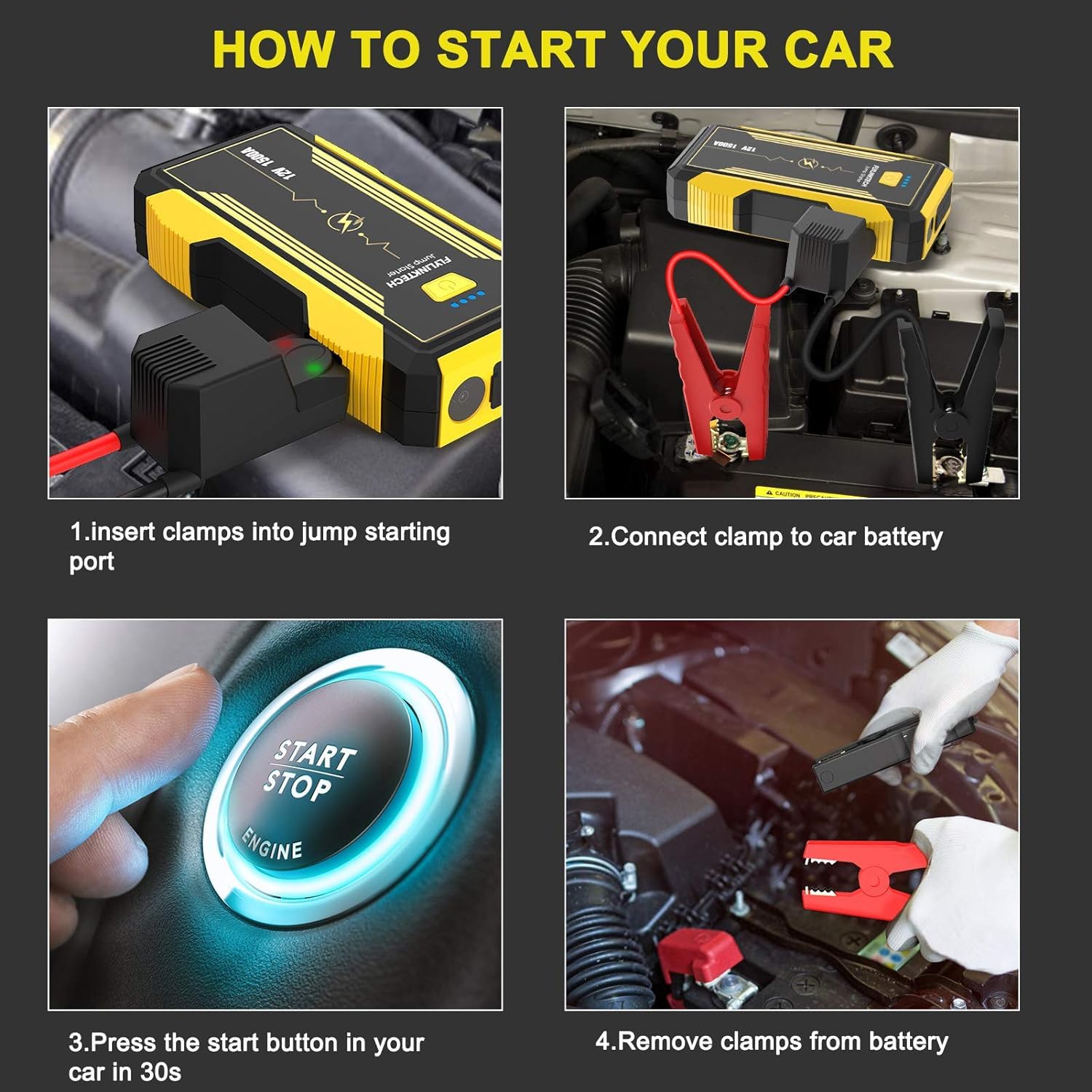
Figure 5: Step-by-step guide for jump starting a vehicle.
6.2. Menggunakan sebagai Power Bank
The jump starter can charge various electronic devices via its USB output ports.
- Sambungkan kabel pengecas USB peranti anda ke salah satu port output USB pada pemula lompat.
- Connect the other end of the cable to your electronic device (e.g., smartphone, tablet, Bluetooth speaker).
- The jump starter will automatically begin charging your device. The QC3.0 port offers faster charging for compatible devices.
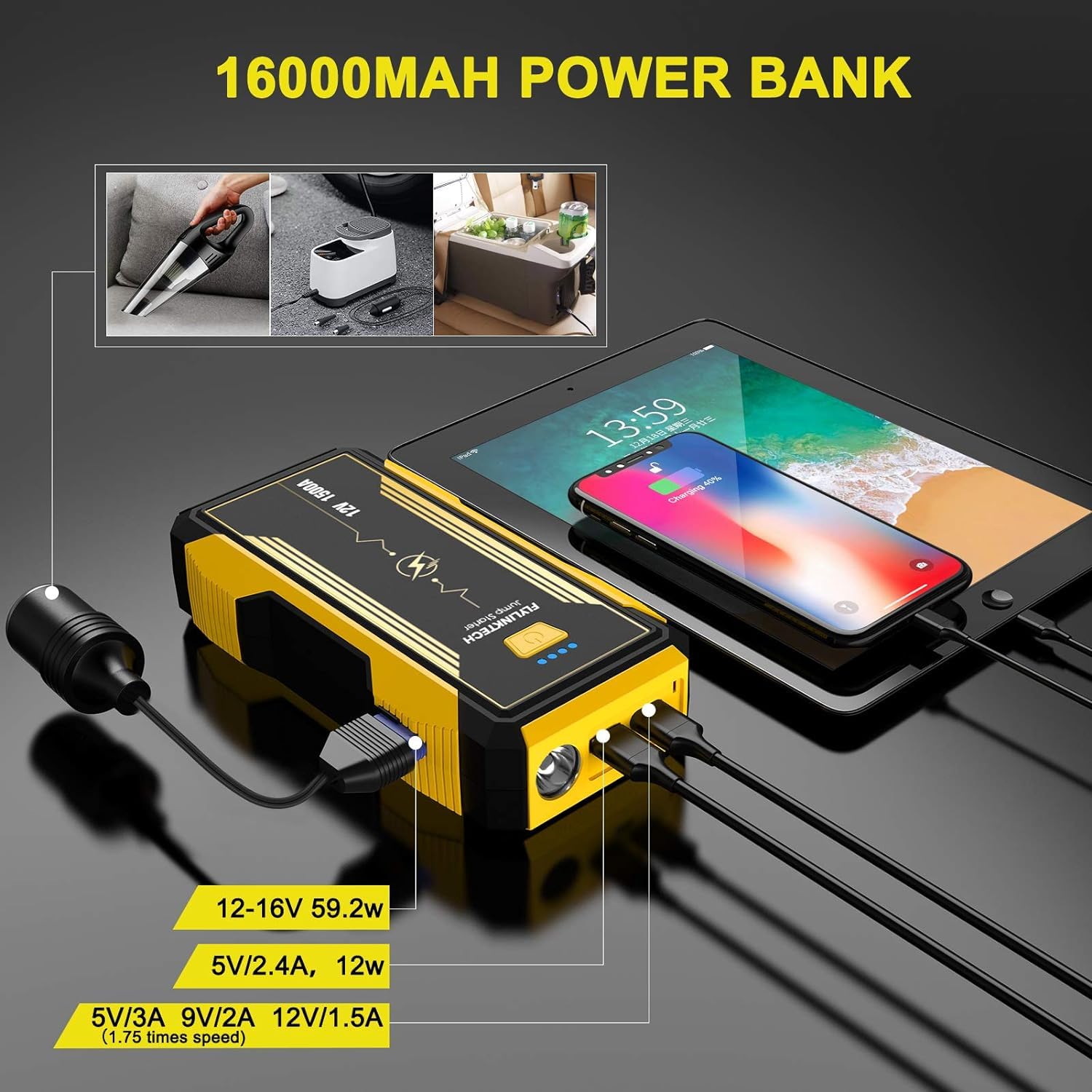
Figure 6: The jump starter's power bank functionality and EC5 adapter use.
6.3. Menggunakan Lampu LED
The built-in LED light offers multiple modes for different situations.
- Tekan dan tahan butang kuasa selama 3 saat untuk menghidupkan lampu LED (mod Obor).
- Press the power button briefly to cycle through the modes: Torch → SOS → Quick Flash → Blue & Red Flash → Off.
- Press and hold the power button again for 3 seconds to turn off the LED light from any mode.

Figure 7: The multi-function LED light in operation, illustrating its various modes.
7. Penyelenggaraan
Proper maintenance ensures the longevity and optimal performance of your jump starter.
- Mengecas semula: Recharge the unit after each use. If not used frequently, recharge every 3-6 months to prevent deep discharge and extend battery life.
- Pembersihan: Lap unit dengan kain lembut dan kering. Jangan gunakan bahan kimia yang keras atau pembersih yang kasar.
- Storan: Store the jump starter in a cool, dry place, away from direct sunlight, moisture, and extreme temperatures. Keep it in its provided storage case for protection.
- Penjagaan Bateri: The internal lithium-ion battery is not user-replaceable. Do not attempt to open the unit.
8. Penyelesaian masalah
If you encounter issues with your FLYLINKTECH Car Jump Starter, refer to the following common problems and solutions:
| Masalah | Kemungkinan Punca | Penyelesaian |
|---|---|---|
| Pemula lompat tidak dihidupkan. | Bateri dinyahcas sepenuhnya. | Caskan penghidup lompat sepenuhnya. |
| Kenderaan tidak bermula selepas bersambung. |
|
|
| Pintar clamps indicator light flashes red or beeps. | Reverse polarity, short circuit, or other connection error. | Putuskan sambungan clamps immediately. Reconnect ensuring RED to (+) and BLACK to (-). Ensure clamps tidak bersentuhan antara satu sama lain. |
| Pengecasan USB tidak berfungsi. |
|
|
9. Spesifikasi
| Ciri | Perincian |
|---|---|
| Model | CF600 |
| Arus Keluaran Puncak | 1500 Amps |
| Kapasiti Bateri | 16000mAh (Ion Litium) |
| Mula Voltage | 12V |
| Keserasian Enjin | Up to 8.0L Gasoline, Up to 6.0L Diesel |
| Keluaran USB 1 | 5V/2.4A, 12W |
| Output USB 2 (QC3.0) | 5V/3A, 9V/2A, 12V/1.5A |
| DC Output (EC5 Adapter) | 12-16V, 59.2W |
| Dimensi Produk (LxWxH) | 18.5 x 9.5 x 4.5 cm |
| Berat Barang | 1 kg |
Catatan: Spesifikasi boleh berubah tanpa notis.
10. Waranti dan Sokongan
FLYLINKTECH products are manufactured to high-quality standards. For information regarding warranty coverage, technical support, or service inquiries, please refer to the warranty card included with your product or visit the official FLYLINKTECH webtapak.
When contacting support, please have your product model number (CF600) and purchase details readily available.


