1. Pengenalan
Terima kasih kerana membeliasing the VEIERSIA Bone Conduction Headphones. This manual provides detailed instructions on how to set up, operate, and maintain your new headphones. Please read this manual carefully before use to ensure proper functionality and longevity of the product.

Imej 1.1: Selesaiview of the VEIERSIA Bone Conduction Headphones. These headphones feature an open-ear design, allowing users to remain aware of their surroundings while listening to audio.
2. Apa yang ada di dalam Kotak
Sila semak kandungan pakej anda untuk memastikan semua item ada:
- VEIERSIA Wireless Bone Conduction Headphones
- Special Earbuds (2 pairs)
- Beg Fon Kepala Indah
- Manual Pengguna (dokumen ini)
- Kabel Pengecasan
3. Ciri-ciri Produk
- Teknologi Pengaliran Tulang: Transmits sound through cheekbones, leaving ears open to ambient sounds.
- Penilaian Kalis Air IP68: Fully submersible, suitable for swimming and other water sports.
- Kesambungan Bluetooth 5.1: Provides stable and fast wireless connection up to 50 feet.
- Built-in 16GB MP3 Player: Allows direct music playback without a connected device.
- Mikrofon Bersepadu: Untuk panggilan bebas tangan.
- Fungsi Pembantu Suara: Compatible with intelligent voice assistants like Siri.
- Reka bentuk ringan: Weighs approximately 30 grams for comfortable wear.
- Struktur Fleksibel: Designed for durability and a secure fit during various activities.
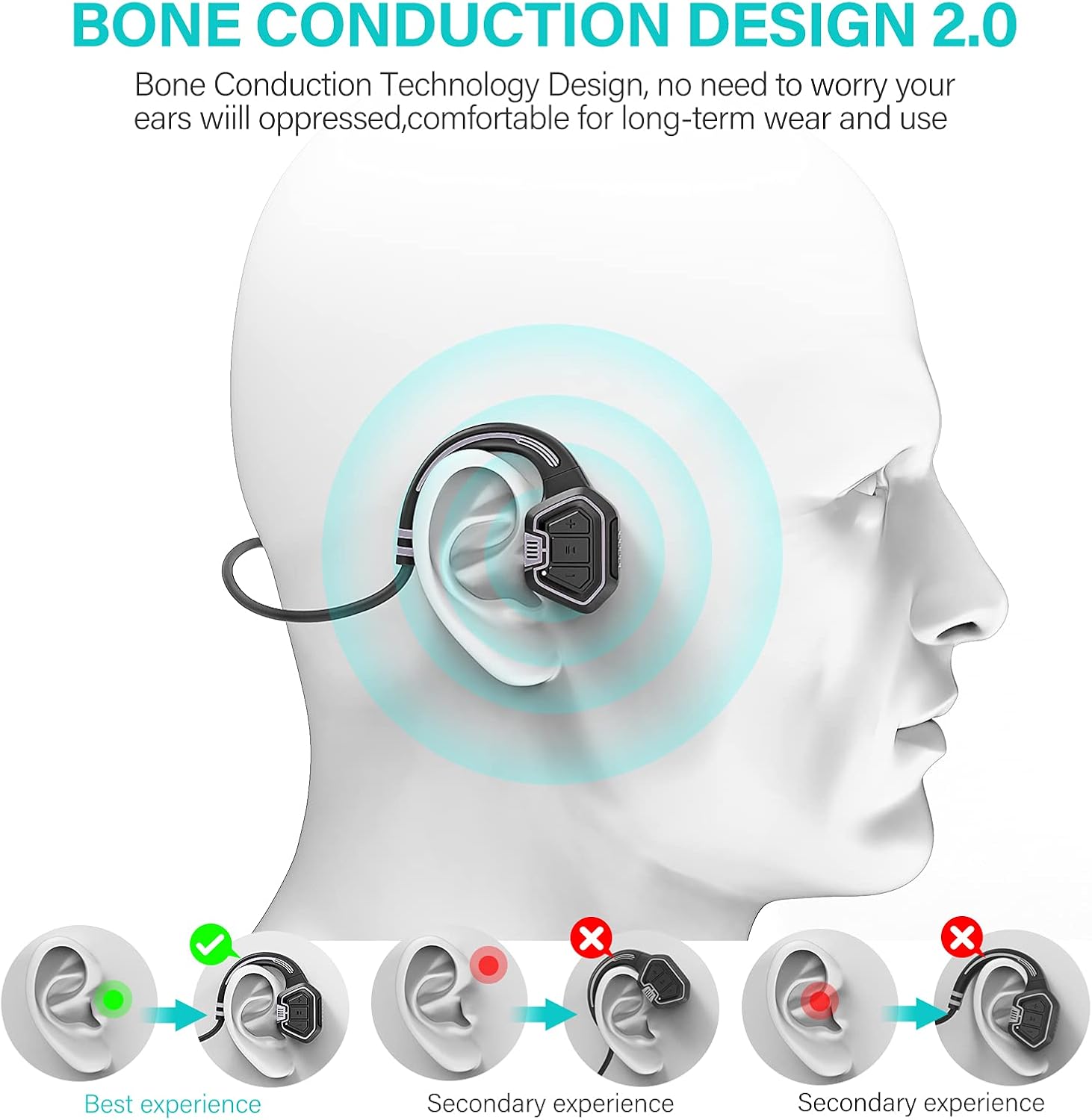
Image 3.1: Visual representation of how bone conduction technology works, showing sound transmission through the cheekbones to the inner ear.

Image 3.2: The headphones are IP68 waterproof, suitable for use during swimming and other water activities, as demonstrated by a person swimming underwater.
4. Kawalan dan Fungsi
Familiarize yourself with the control buttons on your headphones:

Imej 4.1: Terperinci view of the headphone controls, including volume buttons, power button, and the magnetic charging port.
- Butang Kuasa:
- Tekan lama untuk menghidupkan/mematikan kuasa.
- Klik untuk memainkan/menjeda muzik.
- Volume Up (+) / Next Song:
- Short press for Volume Up.
- Long press for Next Song.
- Volume Down (-) / Previous Song:
- Short press for Volume Down.
- Long press for Previous Song.
- Port Pengecasan: Magnetic connection for charging and data transfer.
5. Persediaan
5.1. Mengecas Fon Kepala
Sebelum penggunaan pertama, cas sepenuhnya fon kepala anda. Cas penuh mengambil masa kira-kira 1.5 jam.
- Sambungkan kabel pengecas magnet ke port pengecasan pada fon kepala.
- Connect the USB end of the cable to a USB power adapter (not included) or a computer's USB port.
- The indicator light will show charging status (refer to LED indicator section for details, if available).
- Setelah dicas sepenuhnya, cabut kabel.
5.2. Uploading Music (MP3 Mode)
The headphones have a built-in 16GB memory for MP3 playback. To upload music:
- Connect the headphones to your computer using the provided charging cable. The computer should recognize the headphones as a removable disk.
- Drag and drop your desired MP3 audio files into the recognized disk folder.
- sekali filedipindahkan, keluarkan peranti daripada komputer anda dengan selamat sebelum memutuskan sambungan kabel.

Image 5.1: Visual guide demonstrating how to charge the headphones and upload music files to the built-in 16GB memory, as well as mode switching.
6. Arahan Operasi
6.1. Hidupkan/Mati Kuasa
- To power on, long press the Power button until you hear a prompt.
- To power off, long press the Power button again until you hear a prompt.
6.2. Mod Bluetooth
Untuk menyambung melalui Bluetooth:
- Ensure the headphones are powered on and in Bluetooth mode (indicated by a specific LED light or voice prompt).
- Pada peranti anda (telefon pintar, tablet, dll.), dayakan Bluetooth dan cari peranti yang tersedia.
- Select "VEIERSIA Headphones" (or similar name) from the list to pair.
- Once paired, you can play audio from your device through the headphones.
6.3. MP3 Mode (Local Player)
To use the built-in MP3 player:
- Switch the headphones to MP3 mode. This is typically done by a short press of the mode switch button (refer to Image 5.1 for visual).
- Nota: For optimal performance in MP3 mode, especially during swimming, ensure your mobile phone's Bluetooth connection to the headphones is off. Water can interfere with Bluetooth signals.
6.4. Bertukar Antara Mod
The headphones support switching between Bluetooth and MP3 modes. Refer to the control diagram (Image 5.1) for the specific button. A short press of the mode button will toggle between Bluetooth and MP3 playback.
6.5. Membuat dan Menerima Panggilan
Apabila disambungkan melalui Bluetooth ke telefon pintar:
- Jawab/Tamatkan Panggilan: Tekan pendek butang Kuasa.
- Tolak Panggilan: Tekan lama butang Kuasa.
6.6. Pembantu Suara
To activate your device's voice assistant (e.g., Siri, Google Assistant), double-click the Power button.

Image 6.1: The open-ear design allows for safe driving by enabling awareness of surrounding sounds while listening to audio.
7. Penyelenggaraan dan Penjagaan
- Pembersihan: Lap fon kepala dengan lembut, damp kain. Jangan gunakan bahan kimia yang keras atau pembersih yang kasar.
- Storan: Store the headphones in the provided bag when not in use to protect them from dust and scratches.
- Pendedahan Air: While IP68 waterproof, it is recommended to rinse the headphones with fresh water after use in chlorinated or saltwater environments to prevent corrosion. Ensure the charging port is dry before charging.
- Suhu: Avoid exposing the headphones to extreme temperatures (hot or cold) or direct sunlight for prolonged periods.
- mengecas: Use only the provided charging cable. Do not attempt to charge if the headphones or cable are wet.
8. Penyelesaian masalah
| Masalah | Kemungkinan Punca | Penyelesaian |
|---|---|---|
| Fon kepala tidak dihidupkan. | Bateri lemah. | Cas fon kepala selama 1.5 jam. |
| Tidak dapat menyambung melalui Bluetooth. | Fon kepala tiada dalam mod berpasangan; peranti Bluetooth dimatikan; terlalu jauh dari peranti. | Ensure headphones are in Bluetooth mode. Turn device Bluetooth off/on. Move closer to device (within 50 ft). |
| Tiada bunyi dalam mod MP3. | Tiada muzik files loaded; headphones in Bluetooth mode. | Muat Naik MP3 files to the internal memory. Switch to MP3 mode. |
| Kualiti bunyi kurang baik atau terputus-putus. | Low battery; interference; water affecting Bluetooth signal (in water). | Charge headphones. Move away from sources of interference. Use MP3 mode when swimming. |
| Headphones not recognized by computer. | Faulty cable; driver issue; improper connection. | Try a different USB port or computer. Ensure cable is securely connected. |
9. Spesifikasi
| Ciri | Perincian |
|---|---|
| Nama Model | pengaliran tulang |
| Teknologi Ketersambungan | Wayarles (Bluetooth) |
| Versi Bluetooth | 5.1 |
| Julat Bluetooth | Sehingga 50 kaki (lebih kurang 15 meter) |
| Memori Dalaman | 16GB (untuk main balik MP3) |
| Tahap Ketahanan Air | IP68 Kalis Air |
| Hayat Bateri | Up to 5 hours (playback time) |
| Masa Mengecas | lebih kurang 1.5 jam |
| Berat Barang | 30 Gram (1.06 auns) |
| Dimensi | 3.94 x 3.15 x 0.39 inci |
| bahan | plastik |
| Julat Kekerapan | 20 Hz - 20,000 Hz |
| Jenis Kawalan | Kawalan Media, Sentuh |

Image 9.1: Summary of key specifications and benefits, including Bluetooth version, battery life, charging time, and control features.
10. Maklumat Keselamatan
- Jangan buka, baiki atau ubah suai produk. Ini boleh menyebabkan kebakaran, renjatan elektrik atau kerosakan sepenuhnya pada produk.
- Jauhkan produk daripada suhu, kelembapan dan bahan menghakis yang melampau.
- Elakkan mendengar pada tahap kelantangan tinggi untuk tempoh yang lama untuk mengelakkan kerosakan pendengaran.
- When using the headphones in environments requiring attention (e.g., driving, cycling, walking near traffic), ensure the open-ear design allows you to hear surrounding sounds for safety.
- Buang produk dan bateri secara bertanggungjawab mengikut peraturan tempatan.
11. Waranti dan Sokongan
VEIERSIA provides a 360-day after-sales service for its products. If you encounter any issues or have questions regarding your headphones, please contact VEIERSIA customer support through the retailer where you purchased the product or visit the official VEIERSIA store page on Amazon for contact information.
Untuk maklumat lanjut, lawati VEIERSIA Store on Amazon.


