1. Produk Lebihview
The Renkforce External Graphics Card (Model RF-4718832) is designed to expand your computer's display capabilities by adding two HDMI ports via a single USB-A or USB-C connection. This device is ideal for users who need to connect multiple external monitors to their PC or Mac, including MacBook Air models with M2 chips, allowing for extended or mirrored display configurations.
It features a combined USB-A/USB-C socket for versatile connectivity and an SM768 graphics processor, ensuring efficient external graphics processing with low power consumption (approximately 2 watts). This design minimizes the load on your computer's internal CPU and GPU, maintaining system productivity.
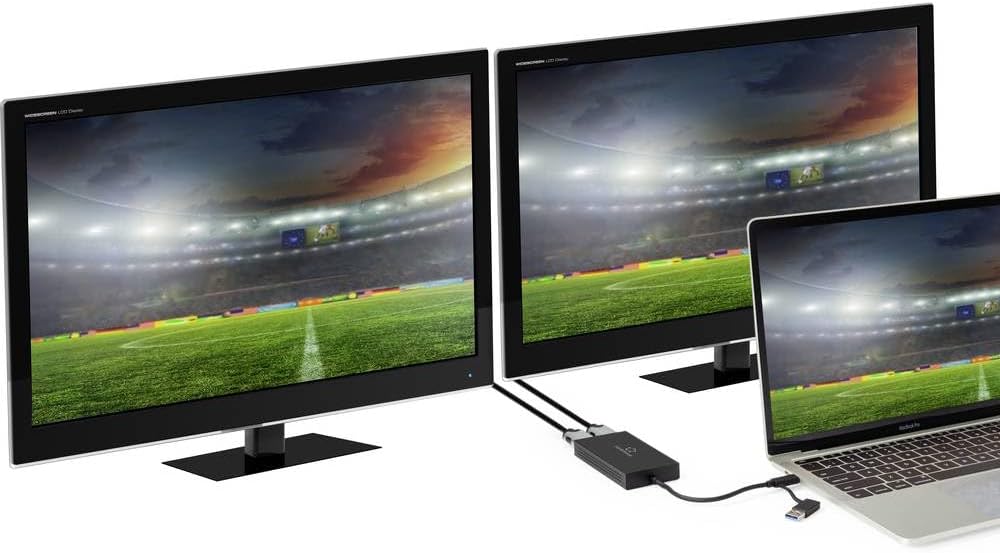
Figure 1: Renkforce External Graphics Card in a multi-monitor setup.
This image shows the Renkforce External Graphics Card connected to a laptop, extending the display across two external monitors. The setup demonstrates the product's primary function of enabling a multi-display workstation.
2. Kandungan Pakej
Sila sahkan bahawa semua komponen terdapat dalam pakej:
- Renkforce External Graphics Card (RF-4718832)
- Integrated USB-A/USB-C cable
- Manual Pengguna (dokumen ini)

Figure 2: Renkforce External Graphics Card unit.
Imej ini memberikan gambaran yang jelas view of the external graphics card unit, highlighting its compact design, the two HDMI output ports, and the integrated USB cable with its dual USB-A/USB-C connector.
3. Persediaan dan Pemasangan
Follow these steps to set up your Renkforce External Graphics Card:
- Sambung ke Komputer: Identify an available USB-A or USB-C port on your computer. The integrated cable on the graphics card features a unique connector that can be used with either port type. Insert the connector firmly into the chosen USB port.

Figure 3: Dual-compatible USB connector.
This image focuses on the innovative USB connector of the Renkforce External Graphics Card, illustrating how it can adapt to both USB-A and USB-C ports on a computer.
- Sambungkan Paparan: Connect your HDMI monitors to the two HDMI output ports on the Renkforce External Graphics Card using standard HDMI cables. Ensure the cables are securely plugged into both the graphics card and your monitors.

Figure 4: Connecting HDMI cables.
This image shows the Renkforce External Graphics Card connected to a MacBook Pro, with two HDMI cables inserted into its output ports, ready to connect to external displays.
- Pemasangan Pemandu (Automatik): The device typically installs necessary drivers automatically upon first connection. If prompted, allow the installation to proceed. For Windows users, drivers are usually installed via Windows Update. For macOS, the necessary components are often built-in or automatically downloaded.
- Kuasa: The external graphics card draws power directly from the USB port, requiring no external power adapter.
4. Arahan Operasi
4.1 Tatarajah Paparan
Once connected, your operating system should detect the new displays. You can configure them as follows:
- Windows: Right-click on the desktop and select "Display settings" or "Screen resolution". Here you can arrange your monitors, set their resolution (one 4K/30Hz, one 1080P/60Hz), and choose between "Extend these displays" or "Duplicate these displays".
- macOS: Go to "System Settings" (or "System Preferences") > "Displays". You can drag and drop the display icons to arrange them, adjust resolutions, and select mirroring or extended desktop modes.
4.2 Resolution and Refresh Rates
The external graphics card supports the following maximum resolutions and refresh rates:
- HDMI Port 1: Up to 4K (3840x2160) at 30Hz
- HDMI Port 2: Up to 1080P (1920x1080) at 60Hz
Ensure your monitors and HDMI cables support these resolutions and refresh rates for optimal performance.
5. Penyelenggaraan dan Penjagaan
To ensure the longevity and optimal performance of your Renkforce External Graphics Card, follow these guidelines:
- Pembersihan: Gunakan kain lembut dan kering untuk membersihkan peranti. Jangan gunakan pembersih cecair atau aerosol.
- Storan: Simpan peranti di tempat yang sejuk dan kering jauh dari cahaya matahari langsung dan suhu yang melampau.
- Pengendalian: Avoid dropping the device or subjecting it to strong impacts. Do not attempt to disassemble the unit.
- Pengudaraan: Ensure the ventilation holes on the device are not obstructed to prevent overheating.
6. Penyelesaian masalah
| Masalah | Kemungkinan Punca | Penyelesaian |
|---|---|---|
| Tiada paparan pada monitor luaran. | Loose cable connection; Incorrect display settings; Driver issue. | Ensure all HDMI and USB cables are securely connected. Check your computer's display settings to ensure the monitor is detected and configured correctly (extended/duplicated). Restart your computer. If issues persist, try updating or reinstalling display drivers. |
| Display flickering or distorted. | Faulty HDMI cable; Resolution/refresh rate mismatch; Driver issue. | Try a different HDMI cable. Verify that the display resolution and refresh rate are supported by both the monitor and the external graphics card. Update display drivers. |
| Peranti tidak dikenali oleh komputer. | Loose USB connection; USB port issue; Driver not installed. | Ensure the USB connector is fully inserted. Try a different USB port on your computer. Check Device Manager (Windows) or System Information (macOS) to see if the device is listed. If not, try manually installing drivers if available from Renkforce support, or restart your computer. |
7. Spesifikasi
| Nombor Model | RF-4718832 |
| Jenama | Renkforce |
| Antara muka input | USB-A / USB-C (combined connector) |
| Antaramuka Output | 2 x HDMI |
| Max Resolution (HDMI 1) | 3840 x 2160 @ 30Hz (4K) |
| Max Resolution (HDMI 2) | 1920 x 1080 @ 60Hz (1080P) |
| Chipset | SM768 Graphics Processor |
| Penggunaan Kuasa | lebih kurang 2 Watt |
| Dimensi (L x W x H) | 5.12 x 3.94 x 0.79 inci (13 x 10 x 2 cm lebih kurang) |
| Berat badan | 5 ounces (142 g approx.) |
| Keserasian Sistem Pengendalian | Windows, macOS |
8. Maklumat Waranti
Renkforce products are designed and manufactured to the highest quality standards. For specific warranty terms and conditions, please refer to the warranty card included with your purchase or visit the official Renkforce webtapak. Simpan bukti pembelian anda untuk tuntutan waranti.
9. Sokongan dan Hubungan
If you encounter any issues or have questions regarding your Renkforce External Graphics Card, please contact Renkforce customer support. Support contact details can typically be found on the Renkforce official webtapak atau pada pembungkusan produk.
For the latest drivers and FAQs, please visit the Renkforce support page.


