1. Pengenalan
This manual provides detailed instructions for the safe and proper installation, operation, and maintenance of your XTRARM TiTon Double TV Wall Mount. Please read this manual thoroughly before installation and retain it for future reference. This wall mount is designed to securely hold televisions within specified weight and VESA compatibility limits, offering flexible viewing angles through its articulated arm, tilt, swivel, and rotation features.
XTRARM TiTon Double TV Wall Mount installed in a modern living room with a large TV.
2. Maklumat Keselamatan
AMARAN: Failure to read and follow all instructions may result in personal injury, property damage, or voiding of your warranty. If you have any questions, please contact customer support.
- Ensure the mounting surface can safely support the combined weight of the mount and your television.
- Jangan melebihi kapasiti berat maksimum bagi 80 kg (176 lbs).
- Verify VESA compatibility with your television before installation.
- Use appropriate tools and follow all drilling and fastening instructions carefully.
- Pemasangan hendaklah dilakukan oleh sekurang-kurangnya dua orang untuk mengelakkan kecederaan atau kerosakan.
- Jauhkan kanak-kanak dan haiwan peliharaan semasa pemasangan.
- Regularly check all fasteners to ensure they remain secure.
3. Kandungan Pakej
Please verify that all components are present and undamaged before beginning installation. If any parts are missing or defective, contact XTRARM customer support.
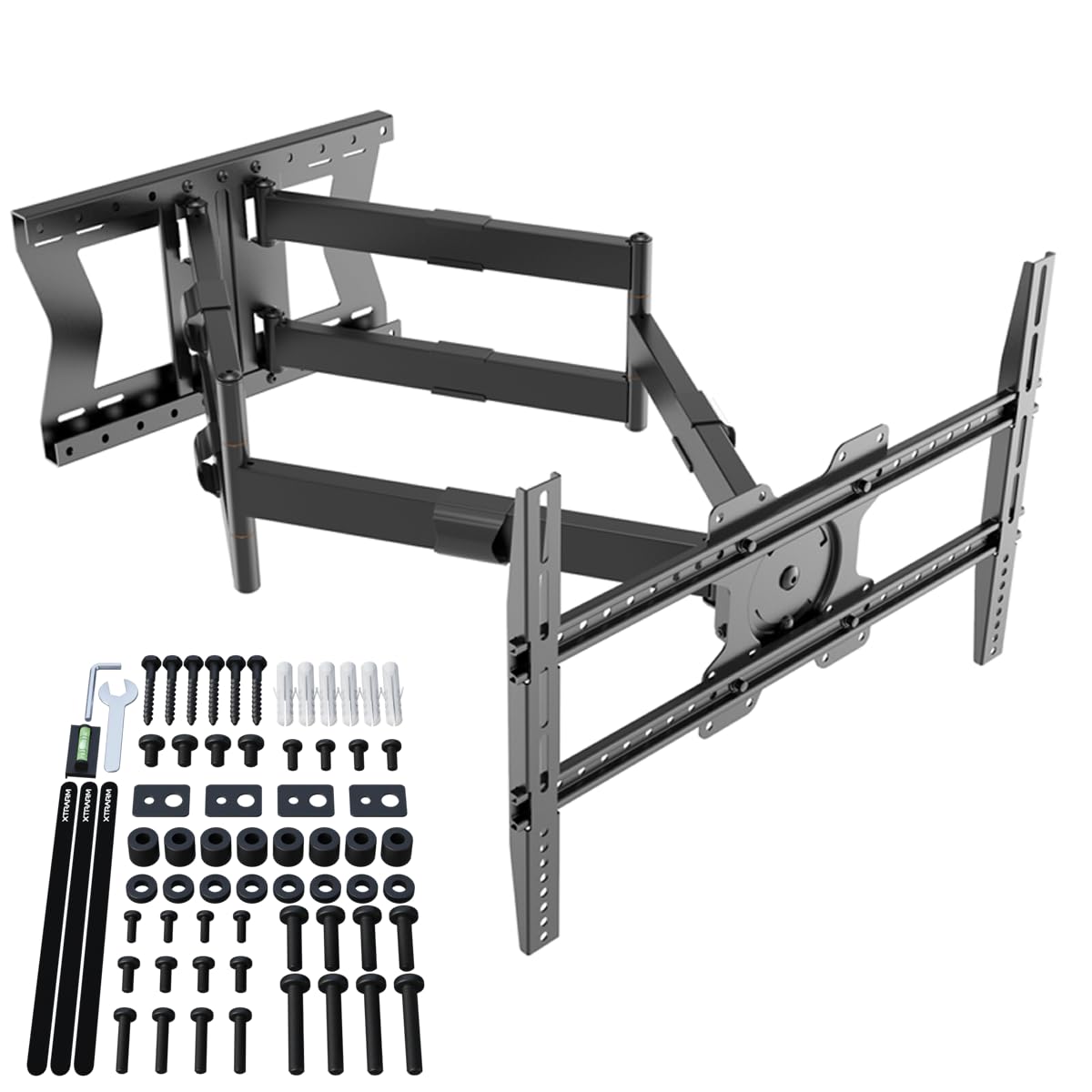
- XTRARM TiTon Double TV Wall Mount assembly
- Mounting hardware kit (screws, anchors, washers for various wall types and TV models)
- Templat pemasangan
- Mini bubble level
- Manual Pengguna
4. Spesifikasi
| Nombor Model | XTR-LA2060-600 |
| bahan | logam |
| warna | Hitam |
| Saiz TV Maksimum | Sehingga 110 inci |
| Minimum TV Size | 45 inci |
| Kapasiti Berat Maksimum | 80 kg (176 lbs) |
| Keserasian VESA | 100x100, 100x200, 200x100, 200x200, 200x300, 300x200, 300x300, 400x200, 400x300, 400x400, 500x300, 600x200, 600x400 |
| Arm Extension Length | 11.4 cm (4.5 inches) to 100 cm (39.3 inches) |
| Sudut Kecondongan | -5° hingga +15° |
| Sudut Pusing | Sehingga 180° (bergantung pada saiz TV) |
| Putaran Skrin | ±3° (level adjustment) |
| Peranti Serasi | Samsung, Sony, LG, Panasonic, Philips, Sharp, and other TVs/Monitors/LCDs |

Diagram showing TV size compatibility (45-110 inches), VESA patterns, and maximum weight capacity (80 kg).

Detailed dimensions of the XTRARM TiTon Double TV Wall Mount, including arm length and VESA plate size.

Image highlighting the 100 cm extension arm of the TV wall mount.
5. Panduan Pemasangan
Before starting, ensure you have all necessary tools (drill, stud finder, screwdriver, etc.) and understand your wall type. It is highly recommended to have two people for installation.
5.1. Penyediaan Dinding
- Locate wall studs (for wood stud walls) or ensure the concrete/brick wall is solid and free of obstructions.
- Use the provided template to mark the drilling locations on the wall. Ensure the template is level using the included bubble level.
- Drill pilot holes according to the instructions for your specific wall type (wood stud, concrete, brick).
5.2. Mounting the Wall Plate
- Attach the wall plate to the wall using the appropriate screws and anchors from the hardware kit. Ensure all fasteners are tightened securely.
5.3. Memasang Pendakap TV
- Letakkan TV anda dengan berhati-hati menghadap ke bawah di atas permukaan yang lembut dan bersih.
- Attach the TV brackets to the back of your television using the correct VESA screws and spacers from the hardware kit. Ensure the brackets are centered and securely fastened.
5.4. Memasang TV pada Plat Dinding
- With assistance, carefully lift the television and hook the TV brackets onto the wall plate.
- Secure the TV to the wall plate using the safety screws or locking mechanisms as indicated in the detailed video instructions.
5.5. Pengurusan Kabel
Route your cables through the integrated cable management clips on the mount arms to maintain a tidy appearance and prevent damage.
Video demonstrating the complete installation process for the XTRARM TiTon Double TV Wall Mount.
Tayangan videocasing the features and installation steps of the XTRARM TiTon TV Wall Mount.
6. Arahan Operasi
The XTRARM TiTon Double TV Wall Mount offers multiple adjustment options for optimal viewkeselesaan.
6.1. Extending and Retracting the Arm
Gently pull or push the television to extend or retract the articulated arm. The arm can extend up to 100 cm (39.3 inches) from the wall.

The XTRARM TiTon Double TV Wall Mount extended from the wall, illustrating its full articulation.
6.2. Tilting the Screen
The screen can be tilted from -5° (downward) to +15° (upward) to reduce glare and achieve the desired viewing angle. Loosen the tilt adjustment knobs, set the angle, and re-tighten to secure.

Diagram showing the tilt adjustment range of the TV wall mount, from -5 to +15 degrees.
6.3. Swiveling the Screen
The mount allows for a swivel range of up to 180° (left to right), depending on your TV size and distance from the wall. Gently push the TV to the desired angle.

Diagram illustrating the 180-degree swivel capability of the TV wall mount.
6.4. Screen Rotation (Level Adjustment)
The TV plate can be rotated ±3° to ensure the screen is perfectly level after installation. Use the provided hex key to adjust the leveling screws, then tighten them to secure the position.

Diagram showing the 90-degree rotation feature of the TV wall mount.
7. Penyelenggaraan
- Pembersihan: Lap pelekap dengan kain lembut dan kering. Jangan gunakan pembersih atau pelarut yang melelas.
- Pemeriksaan Berkala: Every few months, check all screws and bolts to ensure they are tight and secure. Re-tighten if necessary.
- Pelinciran: The moving parts are designed for smooth operation and generally do not require lubrication. If movement becomes stiff, contact customer support.
8. Penyelesaian masalah
- TV tidak tahap: Use the screen rotation (level adjustment) feature as described in Section 6.4.
- Gunung berasa longgar: Immediately check all wall and TV attachment screws. Ensure they are fully tightened. If the issue persists, consult a professional installer.
- Difficulty moving the arm/TV: Ensure no cables are snagged. Check for any obstructions. The joints may be stiff initially; gentle, firm movement should loosen them. Do not force.
- Bahagian yang hilang: Refer to Section 3 (Package Contents) and contact XTRARM customer support for assistance.
9. Waranti dan Sokongan
The XTRARM TiTon Double TV Wall Mount comes with a Waranti pengilang selama 5 tahun against defects in materials and workmanship. Spare parts are available for 2 tahun dari tarikh pembelian.
For warranty claims, technical support, or any questions regarding your product, please contact XTRARM customer service through the retailer where you purchased the product or visit the official XTRARM webtapak.


