1. Pengenalan
Terima kasih kerana membeliasing the beFree Sound BFS-855 5.1 Channel Surround Sound Bluetooth Speaker System. This manual provides essential information for the safe and efficient operation of your new audio system. Please read these instructions thoroughly before use and retain them for future reference.
2. Arahan Keselamatan
- Sumber Kuasa: Pastikan bekalan kuasa voltage matches the requirements specified on the unit (110V/60Hz).
- Pengudaraan: Jangan sekat sebarang bukaan pengudaraan. Kekalkan ruang yang mencukupi di sekeliling unit untuk aliran udara yang betul.
- Air dan Kelembapan: Jangan dedahkan unit kepada hujan, lembapan atau cecair menitis/percikan. Jangan letakkan objek yang diisi dengan cecair, seperti pasu, pada unit.
- haba: Jauhkan unit daripada sumber haba seperti radiator, daftar haba, dapur, atau radas lain (termasuk amppenghidup) yang menghasilkan haba.
- Pembersihan: Cabut palam unit daripada salur keluar kuasa sebelum membersihkan. Gunakan kain lembut dan kering. Jangan gunakan pembersih cecair atau pembersih aerosol.
- Servis: Jangan cuba servis produk ini sendiri. Rujuk semua perkhidmatan kepada pegawai perkhidmatan yang berkelayakan.
3. Kandungan Pakej
Sahkan bahawa semua item yang disenaraikan di bawah disertakan dalam pakej anda:
- 1 x Subwufer
- 5 x Pembesar Suara Satelit
- 4 x Kabel Audio
- 1 x Antena FM
- 1 x Alat Kawalan Jauh
- 1 x Manual Pengguna (dokumen ini)

Image: Various audio cables and an FM antenna included with the system.
4. Produk Lebihview
Familiarize yourself with the components of your beFree Sound BFS-855 system.
4.1. Subwoofer Unit

Imej: Depan dan sisi view of the main subwoofer unit, featuring the beFree logo and a sleek black finish.

Imej: Sisi view of the subwoofer, showing the USB port, SD card slot, and auxiliary input jacks.

Image: Rear panel of the subwoofer, detailing the optical input, coaxial input, AUX audio input, FM antenna port, DVD audio input, LED power, audio output for satellite speakers, and power switch.
4.2. Satellite Speakers
The system includes five satellite speakers: a center speaker, two front speakers, and two rear speakers.

Image: A compact satellite speaker, typically used for front or rear channels.

Image: The horizontal center channel speaker, designed for clear dialogue.
4.3. Alat Kawalan Jauh

Image: The remote control unit, featuring buttons for input selection, volume, channel tuning, and various audio adjustments.
5. Persediaan
5.1. Penempatan Speaker
- subwufer: Place the subwoofer on the floor, preferably near the front of your listening area.
- Penceramah Pusat: Position the center speaker directly above or below your television/monitor.
- Pembesar Suara Hadapan: Place the front left and right speakers equidistant from your listening position, to the left and right of your television/monitor.
- Pembesar Suara Belakang: Position the rear left and right speakers behind your listening position, facing towards you.
5.2. Pembesar Suara Penyambung
Connect the satellite speakers to the corresponding output jacks on the rear panel of the subwoofer. Ensure correct polarity (red to red, black to black) for optimal sound quality.
5.3. Menyambung Sumber Audio
Your system supports multiple audio input options:
- Bluetooth: For wireless connection from compatible devices.
- Input AUX: Use the provided audio cables to connect devices with a 3.5mm or RCA audio output.
- Input Optik: For high-quality digital audio from TVs, game consoles, or DVD/Blu-ray players.
- Input sepaksi: Another option for digital audio connection.
- Kad USB/SD: Insert a USB drive or SD card into the designated slots on the subwoofer for direct media playback.
- Antena FM: Connect the included FM antenna to the FM ANT port for radio reception.
5.4. Sambungan Kuasa
After all audio connections are made, connect the power cord to the subwoofer and then plug it into a standard 110V/60Hz electrical outlet. Turn on the power switch located on the rear panel of the subwoofer.
6. Arahan Operasi
6.1. Hidupkan/Mati Kuasa
Press the 'POWER' button on the remote control or the power switch on the rear of the subwoofer to turn the system on or off.
6.2. Pemilihan Input
Press the 'INPUT' button on the remote control to cycle through available input sources: Bluetooth, AUX, Optical, Coaxial, USB, SD, FM.
6.3. Kawalan Kelantangan
Use the 'VOL+' and 'VOL-' buttons on the remote control to adjust the master volume. Individual channel volumes (FL, FR, CEN, SL, SR, SW) can also be adjusted using their respective buttons on the remote.
6.4. Berpasangan Bluetooth
- Select 'Bluetooth' as the input source. The display will indicate 'BT'.
- Dayakan Bluetooth pada peranti mudah alih atau komputer anda.
- Cari untuk 'BFS-855' in the list of available devices.
- Select 'BFS-855' to pair. Once connected, a confirmation sound will play.
6.5. Operasi Radio FM
- Select 'FM' as the input source.
- Press the 'AUTO' button on the remote to automatically scan and save available FM stations.
- Use 'CH+' and 'CH-' buttons to navigate through saved stations.
- Use 'TUNE+' and 'TUNE-' buttons for manual frequency adjustment.
6.6. Main semula USB/Kad SD
- Insert a USB drive or SD card into the corresponding slot.
- The system will automatically switch to USB/SD input and begin playback. If not, select 'USB' or 'SD' input manually.
- Use the 'PLAY/PAUSE', 'PREV', and 'NEXT' buttons on the remote for media control.
7. Penyelenggaraan
Untuk memastikan ketahanan dan prestasi optimum sistem pembesar suara anda, ikuti garis panduan penyelenggaraan ini:
- Pembersihan: Regularly wipe the surfaces of the speakers and subwoofer with a soft, dry, lint-free cloth. Avoid using abrasive cleaners, waxes, or solvents.
- habuk: Keep the ventilation openings free from dust accumulation. Use a soft brush or vacuum cleaner with a brush attachment to gently remove dust.
- Storan: If storing the system for an extended period, unplug it from the power outlet and store it in a cool, dry place, away from direct sunlight and extreme temperatures.
8. Penyelesaian masalah
Jika anda menghadapi masalah dengan sistem pembesar suara anda, rujuk masalah dan penyelesaian biasa berikut:
| Masalah | Kemungkinan Punca | Penyelesaian |
|---|---|---|
| Tiada kuasa | Power cord not connected; Power switch off; Outlet malfunction | Ensure power cord is securely plugged in; Turn on power switch; Test outlet with another device. |
| Tiada bunyi | Incorrect input selected; Volume too low; Speaker cables loose; Mute function active | Select correct input source; Increase master volume; Check all speaker connections; Press 'MUTE' on remote. |
| Bluetooth tidak bersambung | Speaker not in Bluetooth mode; Device not discoverable; Already connected to another device | Ensure 'BT' input is selected; Make sure device Bluetooth is on and searching; Disconnect from other devices. |
| Penerimaan FM yang lemah | FM antenna not connected or poorly positioned | Connect FM antenna securely; Adjust antenna position for better signal. |
9. Spesifikasi
- Nama Model: BFS-855
- Jenis pembesar suara: Sistem Bunyi Sekeliling
- Konfigurasi Saluran Bunyi Sekeliling: 5.1
- Kuasa Output: 50W (Subwoofer) + 15W x 5 (Satellites) = 125 Watts Total
- Diameter subwufer: 8 Inci
- Saiz Pembesar Suara Satelit: 3.5 Inci (x5)
- Respons Kekerapan: 40Hz - 20KHz
- Pemisahan: >50dB
- Nisbah S/N: >75dB
- Sumber Kuasa: Elektrik Berwayar (110V/60Hz)
- Teknologi Ketersambungan: Bluetooth, USB, SD Card, Optical, Coaxial, AUX (RCA)
- Kaedah Kawalan: Alat Kawalan Jauh
- Dimensi Produk (Subwufer): 21"D x 11"W x 21"H
- Berat Barang: 33 paun
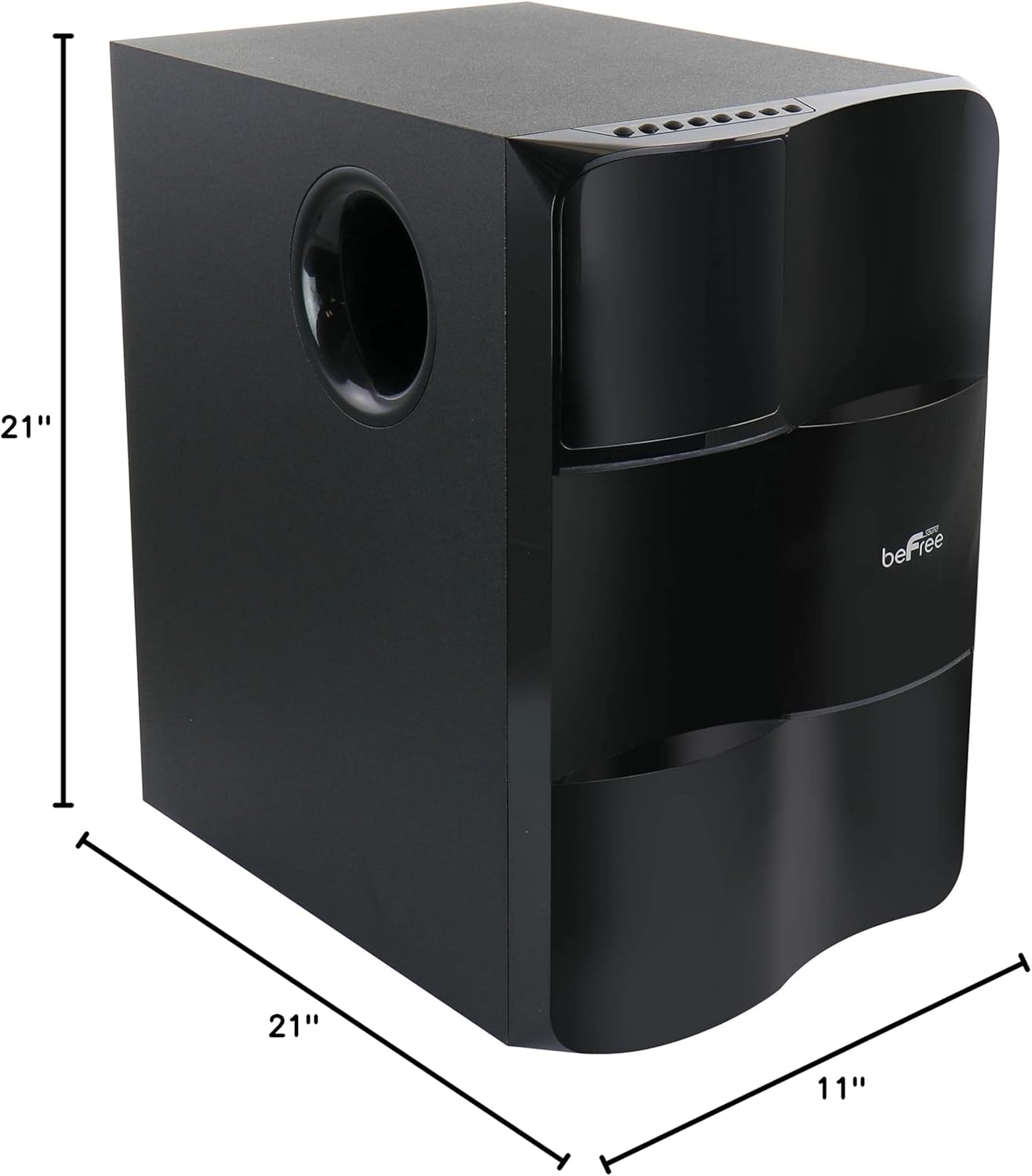
Image: Diagram illustrating the dimensions of the subwoofer unit (21"D x 11"W x 21"H).
10. Waranti dan Sokongan
This product comes with a limited warranty. For specific details regarding warranty coverage and duration, please refer to the warranty card included in your package or contact your retailer. For technical support or service inquiries, please reach out to the point of purchase or the manufacturer's customer service channels.