1. Maklumat Keselamatan
Please read all instructions carefully before assembly and use. Failure to follow these instructions may result in injury or product damage. Keep this manual for future reference.
- This desk requires assembly. Ensure all components are correctly installed before use.
- The maximum weight capacity for this desk is 220 pounds (100 kg). Do not exceed this limit.
- When adjusting the desk height, ensure there are no obstructions above or below the desk that could interfere with its movement.
- Jauhkan kanak-kanak dan haiwan peliharaan dari meja semasa operasi.
- Do not attempt to manually force the desk up or down. Use only the electric control panel.
- Ensure the power cord is properly connected and routed to prevent tripping hazards or damage.
- For optimal stability, ensure the desk is placed on a level surface.
Important Note: When using the LED control panel to adjust height, the three height keys must be pressed and held continuously until the desired height is reached.
2. Kandungan Pakej
Sahkan bahawa semua komponen hadir sebelum memulakan pemasangan. Jika mana-mana bahagian yang hilang atau rosak, sila hubungi sokongan pelanggan.
- Desktop (71"x32" Black Top)
- Bingkai Meja (Bingkai Hitam)
- 4 Kaki
- Panel Kawalan
- Penyesuai Kuasa dan Kabel
- Perkakasan Pemasangan (skru, bolt, dsb.)
- Manual Arahan
3. Arahan Perhimpunan
Assembly typically requires two people. Please follow these steps carefully. A power drill may be helpful for some steps, but is not strictly required.
- Buka Pembungkusan Komponen: Keluarkan semua bahagian dari bungkusan dengan berhati-hati dan letakkannya di atas permukaan yang bersih dan lembut untuk mengelakkan calar.
- Pasangkan Kaki ke Bingkai: Securely attach the four legs to the desk frame using the provided hardware. Ensure all connections are tight.
- Install Desktop: Place the desktop upside down on a soft surface. Carefully align the assembled frame with the pre-drilled holes on the underside of the desktop. Secure the frame to the desktop using the appropriate screws.
- Panel Kawalan Gunung: Attach the LED control panel to the underside of the desktop, typically on the front edge, using the provided screws.
- Sambungkan Kabel: Connect the motor cables from the legs to the control box. Connect the control panel cable to the control box. Finally, connect the power adapter to the control box and plug it into a power outlet. Ensure all cables are neatly managed to avoid interference with desk movement.
- Persediaan Awal: Once assembled, carefully flip the desk upright. Perform an initial height calibration by pressing and holding the 'Down' button until the desk reaches its lowest point, then release. The desk is now ready for operation.

Figure 3.1: Fully assembled FLEXISPOT 4 Leg Standing Desk.
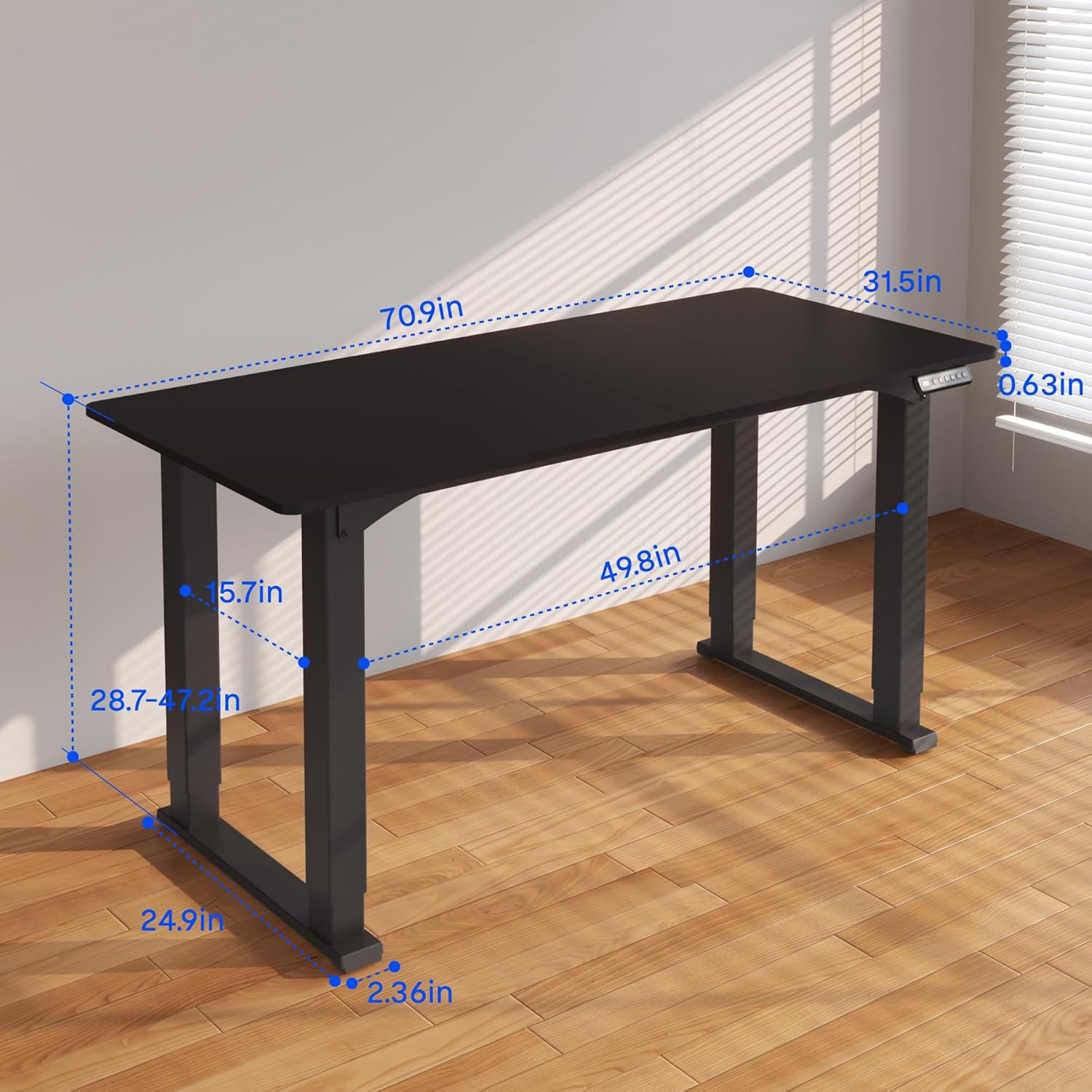
Figure 3.2: Detailed dimensions of the desk, including height range and desktop size.
4. Arahan Operasi
The FLEXISPOT 4 Leg Standing Desk features an intuitive LED control panel for easy height adjustments and memory settings.
4.1. Panel Kawalan Selesaiview

Figure 4.1: Digital Keypad with memory functions and up/down controls.
- Anak panah Atas/Bawah (▲ / ▼): Press and hold to adjust the desk height upwards or downwards. The current height is displayed on the LED screen.
- Butang Memori (1, 2, 3): These buttons allow you to save and recall preferred height settings.
- Memory Set Button (M): Used to program a height into a memory slot.
4.2. Melaraskan Ketinggian
To adjust the desk height, press and hold the ▲ (Up) or ▼ (Down) arrow button until the desk reaches your desired position. The desk will move smoothly between 28.7 inches and 47.2 inches.
4.3. Saving Memory Presets
You can save up to three preferred height settings for quick recall:
- Laraskan meja pada ketinggian yang anda inginkan menggunakan anak panah Atas/Bawah.
- Press the 'M' button. The LED display will show 'S-'.
- Within 3 seconds, press one of the memory buttons (1, 2, or 3). The LED display will show 'S-1', 'S-2', or 'S-3' to confirm the setting has been saved.
4.4. Mengingat Semula Pratetap Memori
To move the desk to a saved height, press and tahan the corresponding memory button (1, 2, or 3) until the desk reaches the programmed height.
4.5. Sistem Anti-Perlanggaran
The desk is equipped with an anti-collision system to prevent damage. If the desk encounters an obstruction during movement, it will stop and reverse slightly. Remove the obstruction before resuming operation.

Figure 4.2: Anti-collision system in action, preventing damage from obstructions.
5. Penyelenggaraan
Regular maintenance ensures the longevity and smooth operation of your standing desk.
- Pembersihan: Lap desktop dan bingkai dengan lembut, damp kain. Elakkan bahan kimia yang keras atau pembersih yang kasar.
- Pengurusan Kabel: Periodically check and organize cables to prevent tangles and ensure they do not interfere with the desk's movement.
- Pemeriksaan Pengikat: Periksa semua skru dan bolt sekali-sekala untuk memastikan ia kekal ketat. Ketatkan semula jika perlu.
- Penjagaan Motor: The electric motors are maintenance-free. Do not attempt to lubricate or disassemble them.
6. Penyelesaian masalah
Jika anda menghadapi masalah dengan meja anda, rujuk masalah dan penyelesaian biasa berikut:
- Meja Tidak Bergerak:
- Periksa sama ada kord kuasa dipasang dengan selamat pada kedua-dua meja dan salur keluar dinding.
- Pastikan semua kabel motor disambungkan dengan betul ke kotak kawalan.
- Perform a reset: Press and hold the 'Down' button until the desk reaches its lowest point and slightly retracts, then release.
- Pergerakan atau Goyangan Tidak Sekata:
- Ensure the desk is on a level surface. Adjust the leveling feet if necessary.
- Check that all assembly screws and bolts are tightened securely.
- Verify that the weight on the desk does not exceed the maximum capacity of 220 lbs and is evenly distributed.
- Kod Ralat pada Paparan:
- If an error code appears, try performing a reset as described above.
- If the error persists, disconnect power for 10 minutes, then reconnect and try again.
- Rujuk pengilang website or contact customer support with the specific error code.
- Pratetap Memori Tidak Berfungsi:
- Ensure you are pressing and memegang the memory button until the desk reaches the saved height.
- Re-program the memory presets if they are not recalling correctly.
Jika langkah-langkah ini tidak menyelesaikan masalah, sila hubungi khidmat pelanggan FLEXISPOT untuk bantuan lanjut.
7. Spesifikasi
| Ciri | Spesifikasi |
|---|---|
| Jenama | FLEXISPOT |
| Nombor Model | QS2B-1880-AU |
| Saiz Desktop | 71"D x 32"W (approx. 180.3cm x 81.3cm) |
| Julat Ketinggian Boleh Laras | 28.7" to 47.2" (approx. 72.9cm to 119.9cm) |
| Kapasiti Berat Maksimum | 220 paun (100 kg) |
| Bahan Bingkai | logam |
| Bahan Atas | kayu |
| warna | Bingkai Hitam & Atasan Hitam |
| Jenis Kawalan | LED Digital Keypad with Memory Presets |
| Ciri Khas | 4-Leg Design, Anti-Collision System, Corded Operation |
| Perhimpunan Diperlukan | ya |
8. Waranti dan Sokongan
FLEXISPOT provides comprehensive warranty coverage for your peace of mind:
- Waranti 5 Tahun: Covers the desk frame and motor components.
- Waranti 2 Tahun: Covers the control panel and other electronic parts.
For warranty claims, technical support, or any questions regarding your FLEXISPOT product, please visit the official FLEXISPOT website or contact their customer service department. Please have your model number (QS2B-1880-AU) and proof of purchase available when contacting support.


