pengenalan
This manual provides comprehensive instructions for the safe installation, operation, and maintenance of your XTRARM TiTon 100 cm TV Wall Mount. Please read this manual thoroughly before installation to ensure correct setup and to prevent damage to the product or injury.
The XTRARM TiTon wall mount is designed to securely attach medium and large televisions to a wall, offering flexibility in viewing angles through its articulated arm, tilt, swivel, and rotation capabilities.
Maklumat Keselamatan
- Kapasiti Berat: Do not exceed the maximum load capacity of 60 kg (132 lbs). Exceeding this limit can result in serious injury or property damage.
- Jenis Dinding: Ensure the mounting surface can safely support the combined weight of the mount and your television. Consult a professional if unsure about your wall's structural integrity.
- Pemasangan: Improper installation may cause serious injury. Follow all instructions carefully. If you have any doubts, contact a qualified installer.
- Alatan: Use appropriate tools for installation. Wear safety glasses and other protective gear as needed.
- Kanak-kanak: Keep children away from the installation area. Small parts may be a choking hazard.
- Pengurusan Kabel: Ensure all cables are routed safely and are not pinched or under tension to prevent damage and tripping hazards.
Kandungan Pakej
Verify that all components are present and undamaged before beginning installation. Standard mounting hardware is included.

Rajah 1: Berakhirview of the XTRARM TiTon 100 cm TV Wall Mount components. This image displays the main articulated arm assembly and the TV mounting plate.
- Pemasangan Plat Dinding
- Lengan Berartikulasi
- Plat Pemasangan TV
- Standard Mounting Hardware (screws, anchors, washers, spacers)
- Templat Penggerudian
- Bubble Level (often included with standard hardware)
Spesifikasi
| Nombor Model | XTR-LA2050-600 |
| Saiz TV yang Disyorkan | Approximately 42-85 inches (107-191 cm) |
| Kapasiti Beban Maksimum | 60 kg (132 lbs) |
| Keserasian VESA (Maks) | 600 x 400 mm |
| Jenis Pergerakan | Articulated, Swivel, Turn, Tilt, Rotate |
| Julat Kecondongan | -5° hingga +15° |
| Swivel/Rotation Range | 180° (depending on TV size and wall distance) |
| Wall Distance (Min/Max) | 11.4 cm / 100 cm (4.5 inches / 39.37 inches) |
| bahan | Keluli Aloi |
| warna | putih |
| Pengurusan Kabel | ya |
| Saiz Plat Dinding | 48 x 28.8 cm |
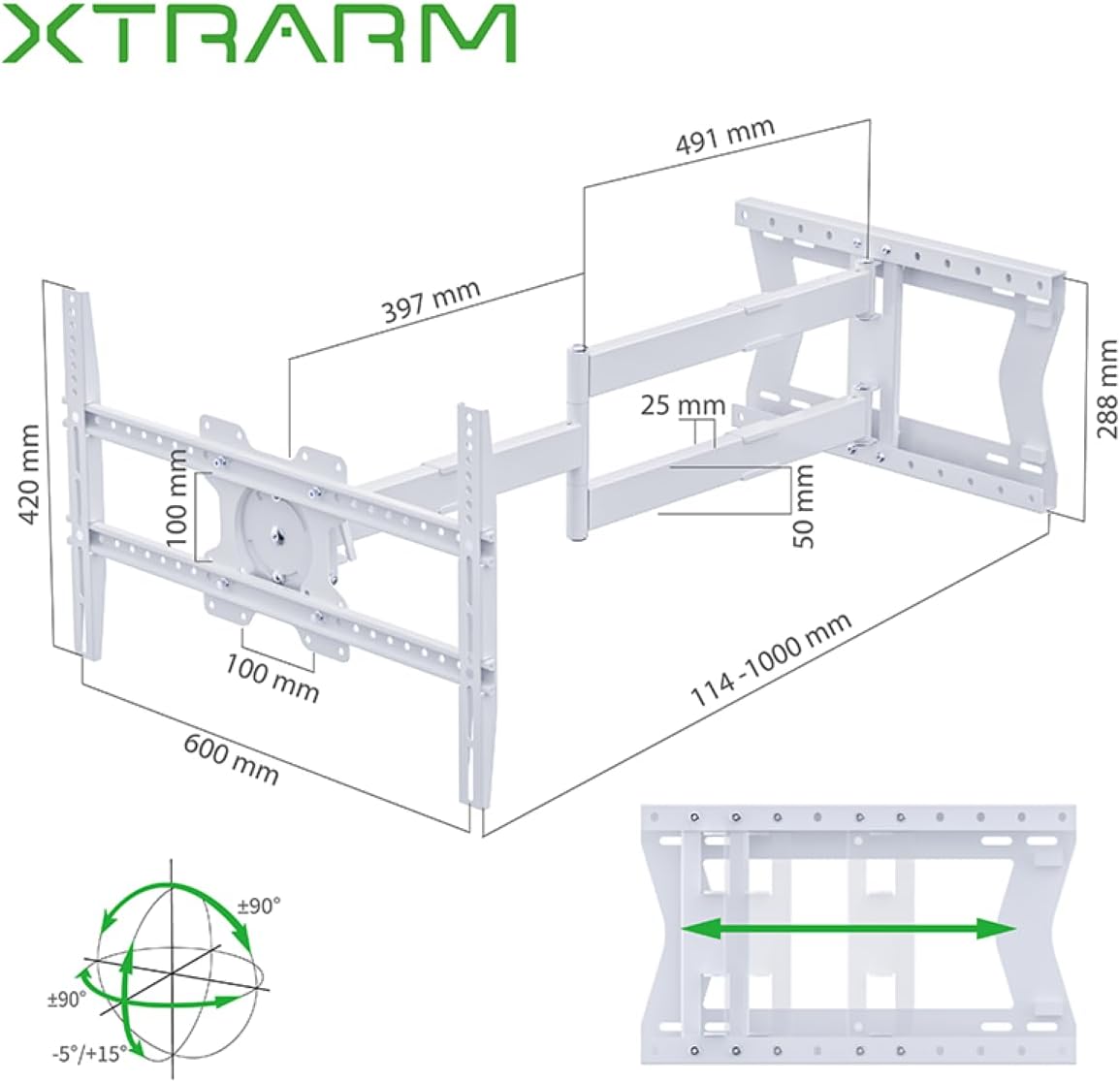
Rajah 2: Detailed dimensions of the XTRARM TiTon wall mount and its range of motion, including extension, swivel, and tilt capabilities.

Rajah 3: VESA compatibility chart for the XTRARM TiTon mount, indicating supported TV sizes from 42 to 85 inches and various VESA patterns.

Rajah 4: The XTRARM TiTon mount is designed to safely support televisions up to 60 kilograms (132 lbs).
Persediaan dan Pemasangan
Before you begin, ensure you have all necessary tools (e.g., drill, stud finder, level, screwdriver, wrench) and that your wall can support the weight. It is recommended to have two people for installation.
1. Determine Wall Type and Location
Identify if your wall is solid concrete, brick, or wood stud. Different wall types require specific anchors and drilling techniques. Use a stud finder to locate wood studs if applicable. Choose a mounting location that allows for optimal viewing angles and movement of the articulated arm.
2. Attach TV Brackets to Television
- Letakkan TV anda dengan berhati-hati menghadap ke bawah di atas permukaan yang lembut dan bersih untuk mengelakkan kerosakan skrin.
- Kenal pasti lubang pelekap VESA di bahagian belakang TV anda.
- Pilih skru, pencuci dan penjarak yang sesuai daripada kit perkakasan yang disediakan yang sesuai dengan corak VESA TV anda.
- Attach the vertical TV brackets to the back of your television, ensuring they are securely fastened but not overtightened. The brackets should be centered horizontally on the TV.
3. Mount Wall Plate to Wall
- Hold the drilling template against the wall at your desired mounting height. Use a level to ensure it is perfectly horizontal. Mark the drill hole locations.
- Drill pilot holes at the marked locations according to the recommended drill bit size for your wall type and anchors.
- Masukkan penambat dinding (jika diperlukan untuk jenis dinding anda).
- Align the wall plate with the drilled holes and secure it to the wall using the provided lag bolts and washers. Tighten all bolts firmly.
4. Gantungkan TV pada Plat Dinding
- Dengan bantuan, angkat televisyen dengan berhati-hati dengan kurungan yang dipasang.
- Hook the TV brackets onto the wall plate assembly. Ensure the TV is securely seated on the mount.
- Pasangkan sebarang mekanisme pengunci keselamatan pada pendakap TV untuk mengelakkan penyongsangan secara tidak sengaja.

Rajah 5: The XTRARM TiTon TV Wall Mount installed on a wall with a television attached, shown in a retracted position.
Arahan Operasi
The XTRARM TiTon mount offers various adjustments to optimize your viewpengalaman dalam.
Adjusting Extension and Retraction
Gently pull or push the television to extend or retract the articulated arm. The mount allows for a wall distance between 11.4 cm and 100 cm.
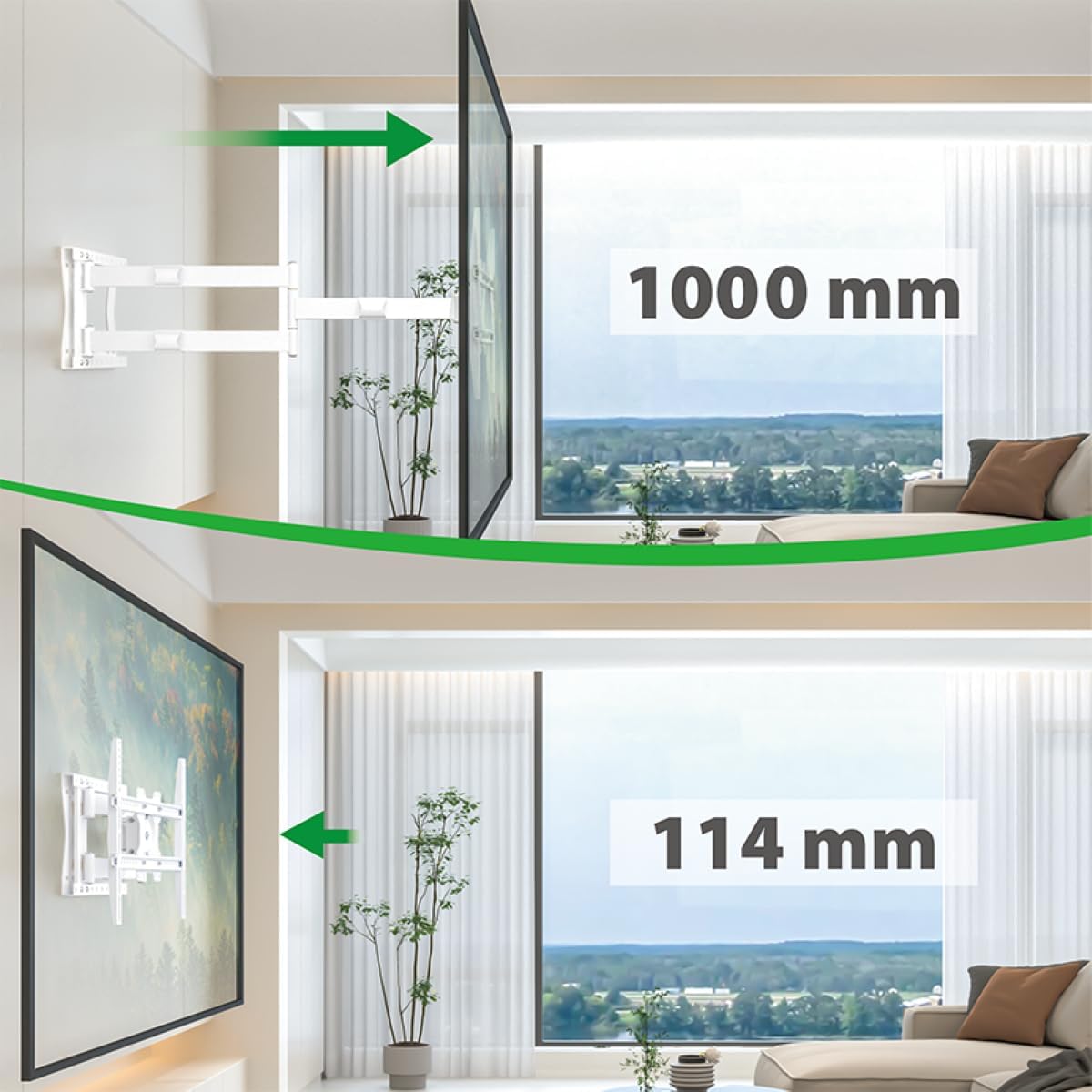
Rajah 6: Illustration of the XTRARM TiTon mount's extension capabilities, showing the TV moving from a minimum distance of 114 mm to a maximum of 1000 mm from the wall.
Melaraskan Kecondongan
The TV can be tilted downwards by 5 degrees and upwards by 15 degrees. Locate the tilt adjustment mechanism (often a lever or knob) on the TV mounting plate, adjust to the desired angle, and secure it.

Rajah 7: Visual representation of the XTRARM TiTon mount's tilt range, allowing for adjustments from -5 degrees to +15 degrees.
Adjusting Swivel and Rotation
The articulated arm allows for up to 180 degrees of swivel, enabling you to turn the TV to face different areas of the room. The TV mounting plate also supports rotation for horizontal compensation or portrait viewing.

Rajah 8: Example of the XTRARM TiTon mount's swivel capability, demonstrating how the TV can be angled up to 90 degrees left or right from the wall.

Rajah 9: The XTRARM TiTon mount allows for a 90-degree rotation of the television, useful for specific viewing orientations or corner installations.
Penyelenggaraan
- Pemeriksaan biasa: Periodically inspect the mount and all fasteners to ensure they remain secure. Retighten any loose screws or bolts.
- Pembersihan: Bersihkan pelekap dengan kain lembut dan kering. Elakkan pembersih atau pelarut yang kasar yang boleh merosakkan kemasan.
- Pelinciran: The moving parts are designed for smooth operation. If any movement becomes stiff, a small amount of silicone-based lubricant can be applied to the joints, avoiding contact with electrical components.
Menyelesaikan masalah
- Problem: TV is not level after installation.
- Penyelesaian: The mount features horizontal compensation. Adjust the leveling screws on the TV mounting plate to achieve a perfectly horizontal alignment. Ensure the wall plate itself was installed level using a bubble level.
- Problem: Mount feels loose or unstable.
- Penyelesaian: Immediately remove the TV from the mount. Recheck all wall mounting bolts and TV bracket screws for tightness. Ensure the wall type is appropriate and that anchors are correctly installed. If the issue persists, consult a professional installer.
- Problem: Difficulty moving the articulated arm.
- Penyelesaian: Check for any obstructions. Ensure no cables are caught in the joints. A small amount of silicone lubricant can be applied to the pivot points if movement is stiff.
Waranti dan Sokongan
The XTRARM TiTon TV Wall Mount comes with a Waranti 5 tahun. Waranti ini meliputi kecacatan pembuatan di bawah penggunaan biasa. Sila simpan bukti pembelian anda untuk tuntutan waranti.
For technical support, missing parts, or warranty inquiries, please contact XTRARM customer service through the retailer where the product was purchased or visit the official XTRARM webtapak untuk maklumat hubungan.
Pengeluar: usa2nl B.V.


