pengenalan
Thank you for choosing the MURPISO U-Pro2 Wireless Earbuds. These earbuds are designed to provide a superior audio experience with advanced features such as Active Noise Cancellation (ANC), deep bass, and extended battery life. This manual will guide you through the setup, operation, maintenance, and troubleshooting of your new earbuds.

Image: The MURPISO U-Pro2 wireless earbuds resting inside their sleek black charging case, with the lid open, showcasing reka bentuk kompak mereka.
Persediaan
1. Mengecas Fon Telinga dan Sarung
Before first use, fully charge the earbuds and the charging case. The earbuds provide 8-10 hours of playtime on a single charge, and the charging case extends this to a total of 35 hours. A full charge for the earbuds takes approximately 1.5 hours.

Image: An infographic illustrating the 35-hour total playtime, with 10 hours per charge for the earbuds and 35 hours with the charging case, along with a 1.5-hour charging time for the earbuds.
2. Penggandingan Satu Langkah
- Buka penutup bekas pengecas. Fon telinga akan dihidupkan secara automatik dan memasuki mod berpasangan.
- Pada peranti anda (telefon pintar, tablet, dll.), dayakan Bluetooth dan cari peranti yang tersedia.
- Select "MURPISO U-Pro2" from the list of devices to connect.
- Once paired, the earbuds will automatically connect to the last paired device when the charging case lid is opened.
The latest Bluetooth 5.2 technology ensures a faster, more stable connection with greater distance and reduced latency.

Image: A visual representation of the one-step pairing process, showing the earbuds connecting to a smartphone via Bluetooth, with a checkmark indicating successful connection.
3. Comfortable Fit
The U-Pro2 earbuds feature an ergonomic design for a stable and comfortable fit. They come with 5 additional sizes of soft eartips to ensure a perfect seal and prevent ear pain even during extended use. Choose the eartip size that provides the best comfort and sound isolation for you.
Arahan Operasi
1. Audio Quality and Deep Bass
Experience immersive and superior quality audio with the U-Pro2 earbuds. Equipped with 10mm drivers and high-quality audio decoding, they deliver powerful, thumping bass and clear Hi-Fi stereo sound, perfect for music, videos, and calls.

Image: A close-up diagram highlighting the 10mm drivers responsible for delivering premium bass in the earbuds.
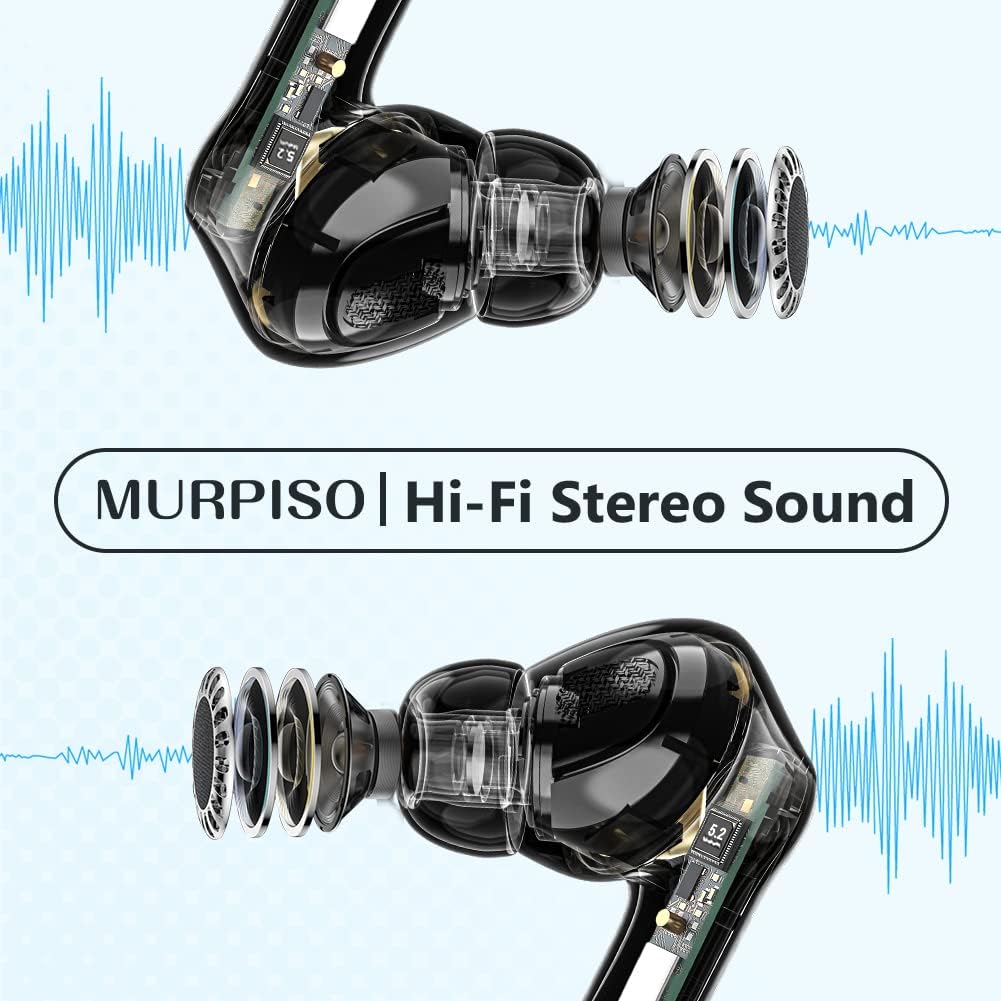
Imej: Telus view of the earbuds, showcasing their internal components and emphasizing the Hi-Fi Stereo Sound technology.
2. Pembatalan Bunyi Aktif (ANC)
The U-Pro2 earbuds feature advanced ANC technology to significantly reduce ambient noise. They offer three optional modes:
- ANC Hidupkan: For maximum noise reduction, ideal for noisy environments like subways, buses, or offices.
- Mod Ketelusan: Membolehkan anda mendengar persekitaran anda sambil menikmati audio anda, berguna untuk kesedaran di ruang awam.
- ANC Dimatikan: Disables noise cancellation, suitable for quiet environments or to conserve battery.
Refer to the product's quick start guide or touch control instructions (if applicable) for switching between these modes.

Image: A person wearing the MURPISO earbuds on a train, demonstrating the effectiveness of Active Noise Cancellation in a busy environment.
3. Kualiti Panggilan
Equipped with 4 microphones, the U-Pro2 earbuds ensure clear phone calls. The active noise cancellation mode also enhances call clarity by reducing background noise for both you and the person you are speaking with.
4. IPX6 Water Resistance
The earbuds are rated IPX6 water-resistant, protecting them from sweat, splashes, and rain. This makes them suitable for workouts and outdoor activities. Nota: Sarung pengecas tidak kalis air.

Image: A person pouring water from a bottle onto their face, with the MURPISO earbud visible, illustrating its IPX6 water-resistant and ergonomic design.
Penyelenggaraan
Penyelenggaraan yang betul memastikan jangka hayat dan prestasi optimum fon telinga anda.
- Pembersihan: Bersihkan fon telinga dengan kerap, terutamanya bahagian tepi telinga dan sesentuh pengecasan, dengan kain yang lembut, kering dan tidak berbulu. Jangan gunakan bahan kimia yang keras atau bahan yang melelas.
- Storan: Apabila tidak digunakan, simpan fon telinga dalam bekas pengecasnya untuk melindunginya daripada habuk dan kerosakan.
- Penjagaan Bateri: Avoid fully depleting the battery frequently. Charge the case and earbuds regularly, even if not in constant use, to maintain battery health.
- Pendedahan Air: While IPX6 rated, avoid prolonged exposure to water or submerging the earbuds. Dry them thoroughly if they get wet before placing them back in the charging case.
Menyelesaikan masalah
| Masalah | Kemungkinan Punca | Penyelesaian |
|---|---|---|
| Fon telinga tidak berpasangan/bersambung | Bluetooth off on device, earbuds not in pairing mode, previously paired to another device. | Ensure Bluetooth is on. Place earbuds in case, close lid, then open to re-enter pairing mode. Forget "MURPISO U-Pro2" on your device's Bluetooth settings and re-pair. |
| Tiada suara atau kelantangan rendah | Volume too low on device, earbuds not properly seated, dirty eartips/speakers. | Increase device volume. Adjust earbuds for a secure fit. Clean eartips and speaker mesh. |
| ANC tidak berfungsi dengan berkesan | Incorrect ANC mode selected, improper fit. | Ensure ANC mode is active. Adjust earbuds for a tighter seal in your ear canal. Try different eartip sizes. |
| Fon telinga tidak dicas | Charging contacts dirty, charging case battery low, faulty cable/charger. | Clean charging contacts on earbuds and case. Charge the charging case. Try a different USB cable and power adapter. |
Spesifikasi
- model: U-Pro2
- Jenama: MURPISO
- Ketersambungan: Bluetooth 5.2
- Saiz Pemandu: 10mm
- Mikrofon: 4 (untuk panggilan yang jelas)
- Masa Bermain (Fon Telinga): 8-10 jam (cas sekali)
- Jumlah Masa Main (dengan Bekas Pengecasan): Sehingga 35 jam
- Masa Pengecasan Earbud: lebih kurang 1.5 jam
- Pembatalan Bunyi: Active Noise Cancellation (ANC) with Transparency Mode
- Tahan Air: IPX6 (earbud sahaja)
- warna: Hitam
- Faktor Bentuk: Dalam Telinga
- Bahan: plastik
- Jenis Bateri: Litium-ion (3 termasuk)
Waranti dan Sokongan
For warranty information and customer support, please refer to the documentation included with your purchase or visit the official MURPISO website. If you encounter any issues not covered in this manual, please contact customer service for assistance.
Pengeluar: MURPISO


