1. Pengenalan
This user manual provides detailed instructions for the operation and maintenance of your Sunbuck AS-60BU Home Audio Amplifier Stereo Receiver. This 2-channel amplifier is designed to enhance your home audio experience, offering versatile input options including Bluetooth 5.0, USB, SD card, AUX, CD, Line-in, and microphone inputs. Please read this manual thoroughly before using the product to ensure proper function and safety.

Figure 1: Sunbuck AS-60BU Amplifier and Remote Control
2. Arahan Keselamatan
- Jangan dedahkan perkakas ini kepada hujan atau lembapan.
- Jangan tanggalkan penutup. Tiada bahagian yang boleh diservis pengguna di dalam. Rujuk servis kepada kakitangan yang berkelayakan.
- Pastikan pengudaraan yang betul di sekitar unit. Jangan halang bukaan pengudaraan.
- Connect only to a grounded AC power outlet.
- Jangan membebankan alur keluar elektrik atau kord sambungan.
- Elakkan meletakkan unit berhampiran sumber haba atau di bawah cahaya matahari langsung.
- Putuskan sambungan kuasa semasa ribut petir atau apabila tidak digunakan untuk tempoh yang lama.
- Jauhkan daripada kanak-kanak.
3. Kandungan Pakej
Sahkan bahawa semua item disertakan dalam pakej anda:
- Sunbuck AS-60BU AmpPenerima yang lebih hidup
- Kord Kuasa AC
- Manual Pengguna (dokumen ini)
- Alat Kawalan Jauh

Rajah 2: Apa yang ada di dalam Kotak
4. Produk Lebihview
4.1 Panel Depan

Rajah 3: Susun Atur Panel Depan dan Belakang
| Ciri | Penerangan |
|---|---|
| KUASA (HIDUP/MATI) | Suis kuasa utama untuk unit. |
| INPUT AUX | Bicu 3.5mm untuk menyambungkan peranti audio luaran. |
| Pemilih Input | Rotary knob to select audio input source: LINE, CD, AUX, MEDIA PLAYER. |
| Kawalan BASS | Melaraskan output audio frekuensi rendah. |
| Kawalan TREBLE | Melaraskan output audio frekuensi tinggi. |
| Kawalan ECHO | Adjusts the echo effect for microphone inputs. |
| M.TONE Control | Adjusts the microphone tone. |
| Kawalan VIC MIC | Adjusts the volume of the microphone inputs. |
| VOLUME MASTER | Kawalan kelantangan utama untuk semua output audio. |
| USB/SD/MMC Port | Input for USB flash drives and SD/MMC cards for media playback. |
| MEDIA PLAYER Display & Buttons | Digital display and controls (MODE, Play/Pause, Previous, Next) for USB/SD/Bluetooth playback. |
| MIC 1 / MIC 2 | Bicu input mikrofon 6.35mm. |
4.2 Panel Belakang
| Ciri | Penerangan |
|---|---|
| CD L/R IN | RCA stereo input for CD players. |
| LINE L/R IN | RCA stereo input for general line-level audio sources. |
| Antena FM | Connection point for the FM radio antenna. |
| Input Kuasa DC | Power input for the amplebih hidup. |
| Output Pembesar Suara (K/R) | Binding posts for connecting passive speakers (4-16 ohms). |
5. Persediaan
Follow these steps to set up your Sunbuck AS-60BU amplebih hidup:
- Sambungan Pembesar Suara: Connect your passive speakers to the "Speaker Output (L/R)" binding posts on the rear panel. Ensure correct polarity (+ to + and - to -) for optimal sound. This amplifier supports speakers with an impedance range of 4 to 16 ohms.
- Sambungan Sumber Audio:
- For CD players, connect RCA cables from the CD player's output to the "CD L/R IN" on the amplebih hidup.
- For other line-level devices (e.g., tape drive, tuner), connect RCA cables to the "LINE L/R IN".
- For devices with a 3.5mm output (e.g., smartphones, tablets), use a 3.5mm audio cable to connect to the "AUX INPUT" on the front panel.
- For PC connection, use appropriate cables to connect your PC's audio output to either the LINE IN or AUX IN.

Rajah 4: Rajah Sambungan
- Sambungan Antena FM: If you plan to use the FM radio function, connect an FM antenna to the "FM Antenna" terminal on the rear panel.
- Sambungan Kuasa: Memastikan amplifier's POWER switch is in the OFF position. Connect the supplied AC power cord to the "DC Power Input" on the rear panel and then to a suitable wall outlet.
6. Arahan Operasi
6.1 Hidupkan/Mati Kuasa
Untuk menghidupkan amppengalir, tekan KUASA switch to the ON position. The LED display will illuminate. To turn off, press the KUASA tukar ke posisi OFF.
6.2 Pemilihan Input
Putar Pemilih Input knob on the front panel to choose your desired audio source (LINE, CD, AUX, MEDIA PLAYER). When selecting MEDIA PLAYER, you can then use the MODE button on the front panel or remote to switch between USB, SD, and Bluetooth modes.
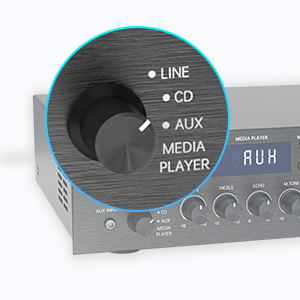
Figure 5: Input Selector
6.3 Kesambungan Bluetooth
Untuk menyambung melalui Bluetooth:
- Tetapkan Pemilih Input to MEDIA PLAYER.
- Tekan ke MODE button until "BLUETOOTH" or "BT" appears on the display.
- Pada peranti mudah alih anda (telefon pintar, tablet, komputer riba), dayakan Bluetooth dan cari peranti yang tersedia.
- Select "SUNBUCK" or "AS-60BU" from the list to pair.
- Setelah dipasangkan, anda boleh menstrim audio secara wayarles dari peranti anda ke amplebih hidup.
The Bluetooth range is approximately 40+ feet, but can be affected by obstacles and interference.

Rajah 6: Kesambungan Bluetooth
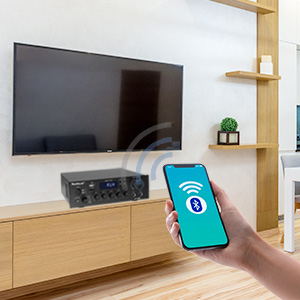
Figure 7: Bluetooth Connection Indicator
6.4 Main Semula USB/Kad SD
To play media from a USB drive or SD/MMC card:
- Insert your USB flash drive or SD/MMC card into the corresponding port on the front panel.
- Tetapkan Pemilih Input to MEDIA PLAYER.
- The amplifier will automatically detect and begin playing supported audio files (MP3, WAV, WMA, APE, FLAC).
- Use the Play/Pause, Previous, and Next buttons on the front panel or remote to control playback.
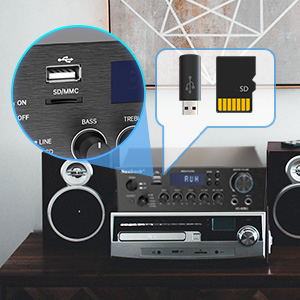
Figure 8: USB/SD Card Slots
6.5 Penggunaan Mikrofon
Connect up to two microphones to the MIC 1 and MIC 2 jacks on the front panel. Adjust the VOLUME MIC, ECHO, dan M.TONE controls to achieve your desired sound for karaoke or public address.

Figure 9: Ideal for Karaoke and Home Entertainment
6.6 Radio FM
Untuk menggunakan radio FM:
- Ensure an FM antenna is connected to the rear panel.
- Tetapkan Pemilih Input to MEDIA PLAYER.
- Tekan ke MODE butang sehingga "FM" muncul pada paparan.
- Use the Previous/Next buttons to scan for stations. Note that this model cannot fix and save FM stations.

Figure 10: FM Mode Display
6.7 Pelarasan Audio
Gunakan BASS, TREBLE, dan VOLUME MASTER knobs on the front panel to fine-tune your audio output. The VOLUME MASTER controls the overall sound level.
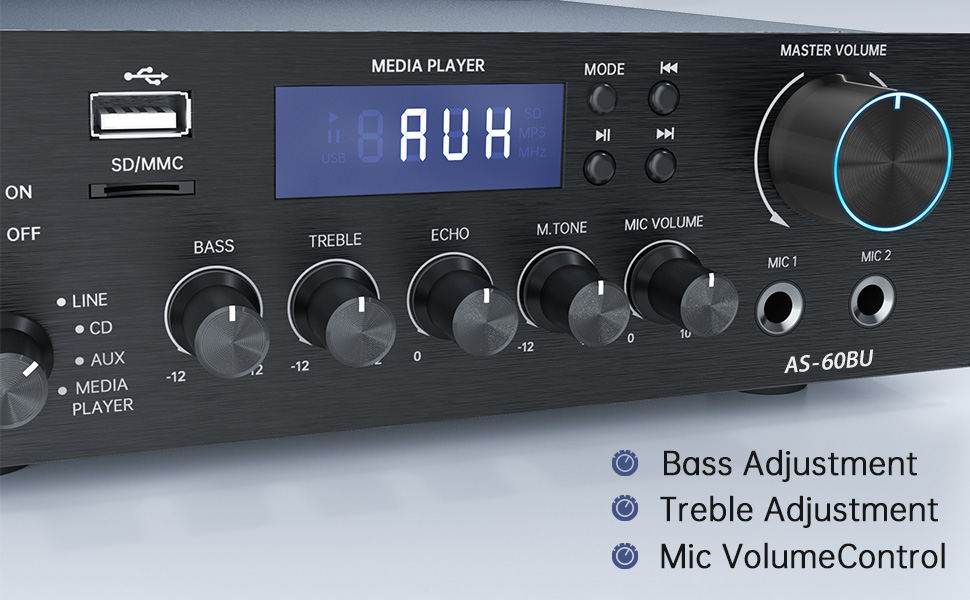
Figure 11: Audio Adjustment Controls
Video 1: Demonstration of Sunbuck AS-60BU amplifier features and sound quality.
7. Penyelenggaraan
- Pembersihan: Gunakan kain lembut dan kering untuk membersihkan bahagian luar amppengikat. Jangan gunakan pembersih cecair atau aerosol.
- Storan: Apabila tidak digunakan untuk tempoh yang lama, simpan amppenyangga di tempat yang sejuk dan kering jauh dari cahaya matahari langsung dan suhu yang melampau.
- Pengudaraan: Pastikan bukaan pengudaraan bebas daripada habuk dan serpihan untuk mengelakkan pemanasan melampau.
8. Penyelesaian masalah
| Masalah | Kemungkinan Punca | Penyelesaian |
|---|---|---|
| Tiada keluaran bunyi. | Incorrect input selected, loose speaker connections, low volume. | Verify input selection, check speaker wiring polarity and tightness, increase MASTER VOLUME. |
| Bluetooth connection unstable or short range. | Obstacles between device and amplifier, interference, device too far. | Reduce distance between devices, remove obstacles, avoid other wireless devices. |
| Alat kawalan jauh tidak berfungsi. | Dead batteries, line of sight blocked. | Replace batteries, ensure clear path to amppenerima IR liifier. |
| Settings not saved after power off. | This is normal behavior for some settings (e.g., input mode). | Re-select desired input mode after powering on. |
| Audio terherot. | Input signal too high, speaker impedance mismatch, faulty cables. | Reduce source volume, ensure speakers are within 4-16 ohm range, check/replace cables. |
9. Spesifikasi
- model: AS-60BU
- Output Kuasa: MAX 400W x 2 (RMS 70W x 2)
- Saluran: 2-Saluran
- Impedans Pembesar Suara: 4-16 ohm
- Impedans Keluaran: 0.1 ohm
- Input: 2 x RCA Audio (CD, Line), 2 x Microphone (6.35mm), USB 2.0, SD Card, Bluetooth 5.0, AUX In (3.5mm), FM Radio
- Supported Audio Formats (USB/SD): MP3, WAV, WMA, APE, FLAC
- Dimensi Produk: 8.27 x 7.68 x 2.44 inci
- Berat: 3.24 paun
- Pengeluar: JS Electronics Limited
- Pertama Tersedia: 9 September 2021
10. Waranti dan Sokongan
Sunbuck products are designed for reliability and performance. For warranty information or technical support, please refer to the contact details provided with your purchase documentation or visit the official Sunbuck webtapak. Simpan resit pembelian anda sebagai bukti pembelian untuk tuntutan waranti.
For further assistance, you may contact the manufacturer, JS Electronics Limited.


