pengenalan
This manual provides detailed instructions for the assembly, operation, and maintenance of your FLEXISPOT E4 Classic Electric Standing Desk. Please read this manual thoroughly before use to ensure proper function and longevity of your product.

Figure 1: The FLEXISPOT E4 Classic Electric Standing Desk, featuring a bamboo contour desktop and silver frame, set up with dual monitors in an office environment.
Maklumat Keselamatan
- Pastikan semua komponen diikat dengan selamat sebelum digunakan.
- Jauhkan kanak-kanak dan haiwan peliharaan dari meja semasa operasi.
- Do not overload the desk beyond its specified weight capacity (220 lbs).
- Elakkan meletakkan cecair terus pada panel kawalan atau komponen motor.
- Putuskan sambungan kuasa sebelum pembersihan atau penyelenggaraan.
- Hanya gunakan penyesuai kuasa yang disediakan.
Kandungan Pakej
Sila sahkan bahawa semua bahagian ada sebelum memulakan pemasangan. Jika mana-mana bahagian yang hilang atau rosak, hubungi sokongan pelanggan.
- Bamboo Contour Whole-Piece Desktop (55"x28")
- Silver Frame Legs (Dual Motor)
- Panel Kawalan
- Penyesuai Kuasa dan Kabel
- Perkakasan Pemasangan (skru, alatan, dsb.)
- Manual Arahan (dokumen ini)
Persediaan dan Perhimpunan
Pemasangan diperlukan untuk produk ini. Sila ikuti langkah-langkah ini dengan teliti.
- Buka Pembungkusan Komponen: Keluarkan semua bahagian dari bungkusan dengan berhati-hati dan letakkannya di atas permukaan yang bersih dan lembut untuk mengelakkan calar.
- Pasangkan Kaki ke Desktop: Position the desktop upside down. Align the leg frames with the pre-drilled holes on the underside of the desktop. Secure them using the provided screws and tools.
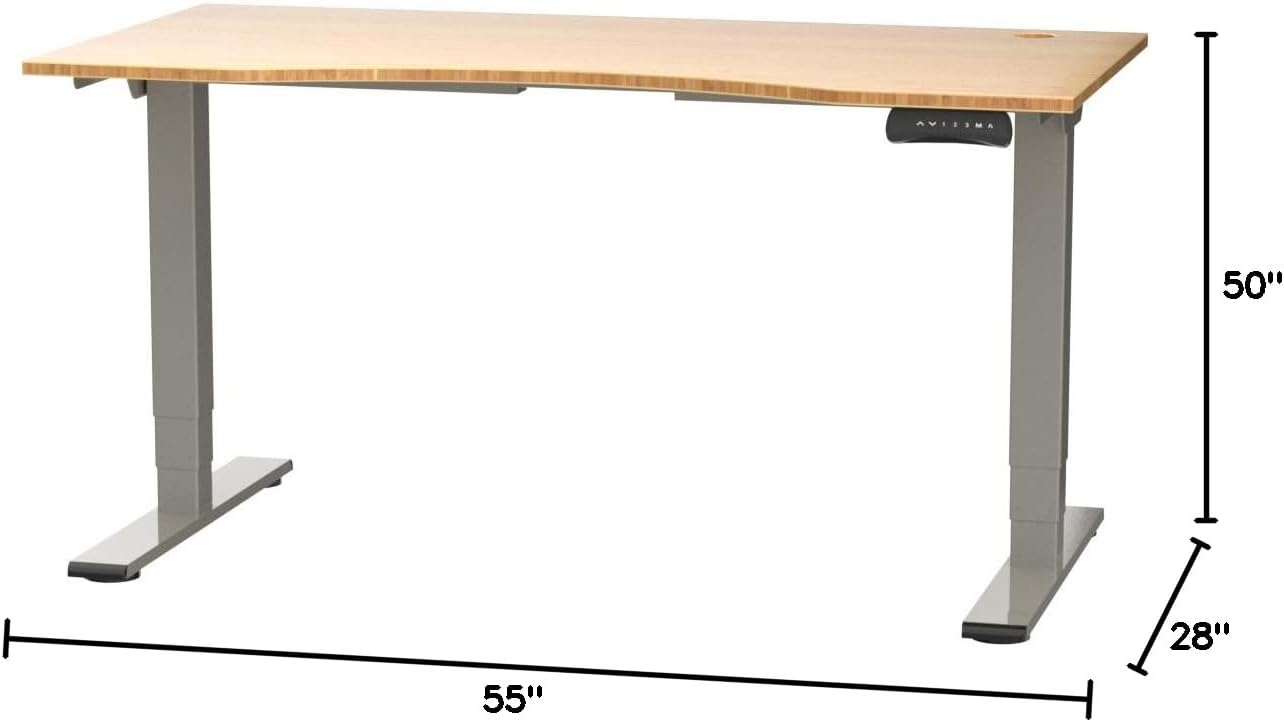
Figure 2: Desk dimensions indicating 55 inches width, 28 inches depth, and adjustable height up to 50 inches.
- Pasang Panel Kawalan: Mount the control panel to the desired location on the underside of the desktop, typically on the front edge for easy access. Connect the control panel cable to the motor control box.

Figure 3: The programmable control panel with LED display, up/down buttons, and memory presets (1, 2, 3, M, A).
- Sambungkan Kuasa: Plug the power adapter into the control box, and then plug the power cable into a standard electrical outlet.
- Pengurusan Kabel: Utilize the two cable management holes on the desktop to route and organize your cables, preventing clutter.

Figure 4: Detail showing the integrated cable management holes and the water-resistant surface of the bamboo desktop.
- Penentukuran Awal: After assembly and power connection, the desk may require an initial calibration. Refer to the "Operating Instructions" section for details on resetting or calibrating the desk.
Arahan Operasi
Pelarasan Ketinggian
The FLEXISPOT E4 Classic desk features a dual-motor lift system for smooth and quiet height adjustments.
- Naikkan Meja: Tekan dan tahan butang Anak panah atas button (▲) on the control panel. The desk will move upwards.
- Meja Bawah: Tekan dan tahan butang Anak panah ke bawah button (▼) on the control panel. The desk will move downwards.
- Release the button at your desired height. The desk can adjust from 24.4 inches to 50 inches.
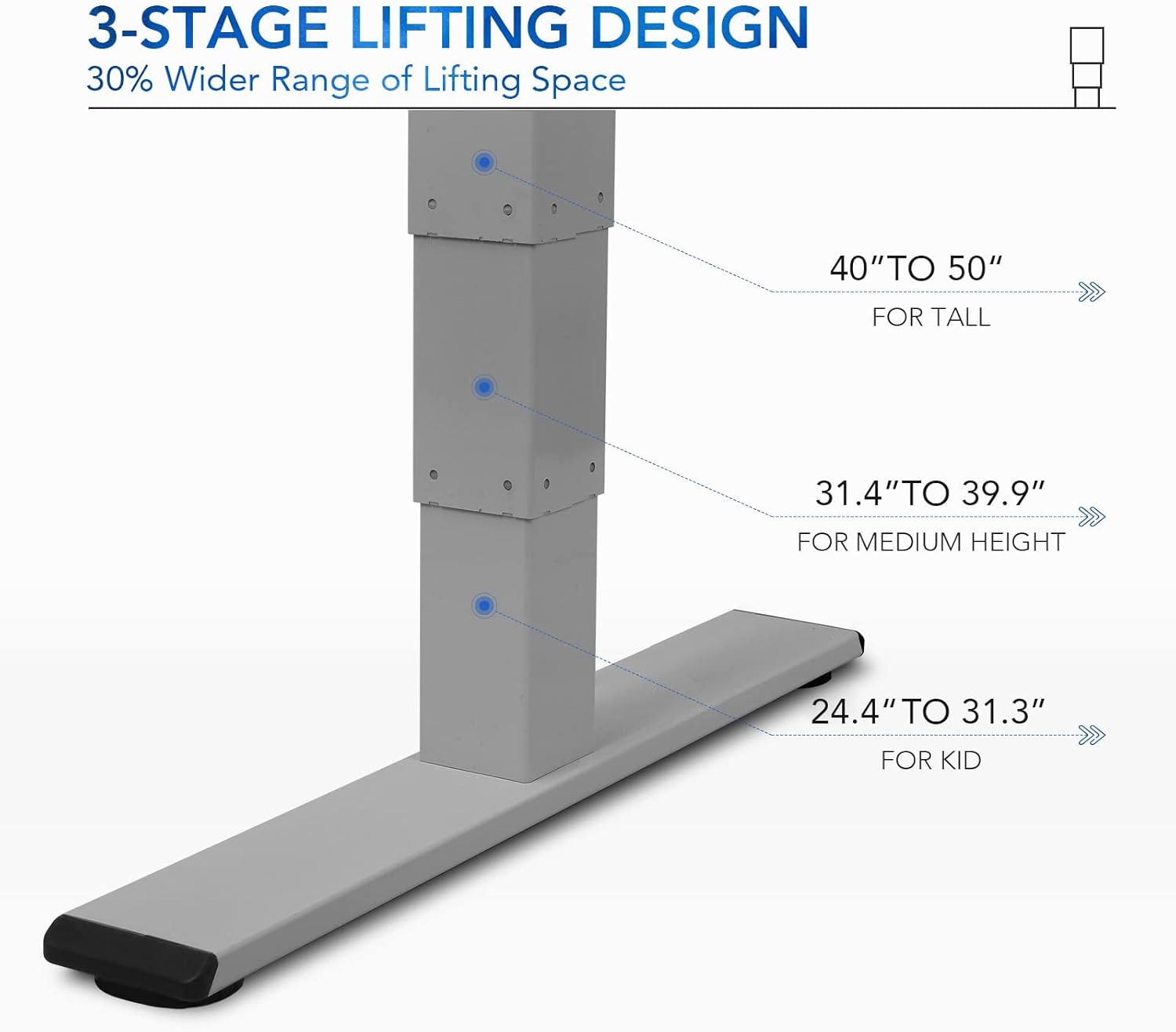
Rajah 5: 3-stage lifting design provides a wide range of height adjustments, suitable for various user heights, from 24.4" (kid) to 50" (tall).
Programmable Memory Presets
The control panel allows you to save up to three preferred height settings for quick adjustments.
- Tetapkan Kedudukan Memori:
- Laraskan meja pada ketinggian yang diingini menggunakan butang Atas/Bawah.
- Tekan ke "M" button. The LED display will show "S-".
- Dalam masa 3 saat, tekan salah satu butang nombor ("1", "2", atau "3") to save the current height to that preset. The display will show "S-1", "S-2", or "S-3" to confirm.
- Ingat Kedudukan Ingatan: Hanya tekan butang nombor yang sepadan ("1", "2", atau "3"Meja akan bergerak secara automatik ke ketinggian yang disimpan.
Sit/Stand Reminder
The "A" button can be used to set a reminder to switch between sitting and standing positions.
- Consult the full manual for detailed instructions on setting and customizing the sit/stand reminder function.
Ergonomic Curved Design
The 55"x28" desktop features an ergonomic curved design for enhanced comfort and efficiency during work or study.

Figure 6: The ergonomic curved edge of the desktop, designed to provide a more comfortable and natural working posture.
Penyelenggaraan
- Pembersihan: Lap permukaan meja dan bingkai dengan lembut, damp cloth. Avoid abrasive cleaners or harsh chemicals. The bamboo surface is designed to be water-resistant, making it easy to clean.
- Penjagaan Motor: The dual-motor system is designed for low noise and durability. No specific user maintenance is required for the motors.
- Pengurusan Kabel: Periodically check that all cables are neatly routed through the cable management holes and are not pinched or tangled.
- Pemeriksaan Pengikat: Periksa semua skru dan pengikat sekali-sekala untuk memastikan ia kekal ketat. Ketatkan semula jika perlu.
Menyelesaikan masalah
| Masalah | Kemungkinan Punca | Penyelesaian |
|---|---|---|
| Meja tidak bergerak. | Power cable disconnected; overload protection activated; motor error. | Check power connections. Reduce weight on desk. Unplug and replug power after 10 minutes. Perform a reset (see below). |
| Meja bergerak tidak sekata atau mengeluarkan bunyi yang luar biasa. | Loose fasteners; obstruction; motor synchronization issue. | Check and tighten all assembly screws. Ensure no obstructions under the desk. Perform a reset. |
| LED display shows an error code (e.g., "E01", "RST"). | System error; need for reset. | Prosedur Tetapan Semula: Press and hold the Down Arrow button until the desk reaches its lowest position and then slightly rises. Release the button. If the error persists, unplug the desk for 10 minutes and try again. |
| Pratetap memori tidak berfungsi. | Pratetap tidak disimpan dengan betul. | Re-save your desired memory positions following the "Programmable Memory Presets" instructions. |
If the issue persists after attempting these solutions, please contact FLEXISPOT customer support.
Spesifikasi
| Ciri | Perincian |
|---|---|
| Model | E4 Classic |
| Jenama | FLEXISPOT |
| Bahan Desktop | Bamboo Contour Whole-Piece Board |
| Bahan Bingkai | Alloy Steel (Silver Frame) |
| Dimensi Produk (D x W x H) | 28"P x 55"L x 50"T (Tinggi Maksimum) |
| Julat Pelarasan Tinggi | 24.4" hingga 50" |
| Sistem Mengangkat | Dual Motor, 3-Stage Lifting |
| Kapasiti Berat | Sehingga 220 lbs |
| Ciri Khas | Electric Height Adjustment, Programmable Memory Presets, Sit/Stand Reminder, Curved Ergonomic Design, Cable Management Holes, Waterproof Surface |
| Perhimpunan Diperlukan | ya |
Waranti dan Sokongan
FLEXISPOT products are designed for durability and performance. For specific warranty details regarding your E4 Classic Electric Standing Desk, please refer to the warranty card included with your purchase or visit the official FLEXISPOT webtapak.
For technical support, troubleshooting assistance, or to inquire about replacement parts, please contact FLEXISPOT customer service:
- Webtapak: www.flexispot.com
- e-mel: support@flexispot.com
- telefon: Rujuk kepada pegawai webtapak untuk nombor hubungan serantau.
When contacting support, please have your product model (E4 Classic) and purchase information ready.