pengenalan
This manual provides detailed instructions for the safe and effective operation of your Nitecore P10ix Type-C Rechargeable Ultra Compact Flashlight. Please read this manual thoroughly before use and retain it for future reference.

Image: The Nitecore P10ix flashlight shown with its included accessories: two extra NL2150HPi batteries, a USB-C charging cable, and a tactical holster.
Kandungan Pakej
Selepas membuka pakej anda, sila sahkan bahawa semua item yang disenaraikan di bawah ada dan dalam keadaan baik:
- Nitecore P10ix Flashlight
- 3x NL2150HPi Rechargeable Batteries (including one pre-installed or packaged separately)
- NTH10 Tactical Holster
- Klip
- Lanyard
- O-ring Spare
- Kabel Pengecas USB-C
Persediaan
Pemasangan Bateri
- Tanggalkan penutup ekor lampu suluh lawan arah jam.
- Insert the NL2150HPi 21700 Li-ion battery with the positive (+) terminal facing towards the head of the flashlight.
- Skrukan penutup ekor kembali mengikut arah jam sehingga ia diketatkan dengan kukuh.
Mengecas Bateri
The Nitecore P10ix features a built-in USB-C charging port for convenient recharging of the 21700 Li-ion battery.
- Locate the USB-C charging port cover on the flashlight body.
- Open the rubber cover to expose the USB-C port.
- Connect one end of the provided USB-C charging cable to the flashlight's port and the other end to a USB power source (e.g., USB adapter, computer, power bank).
- The power indicator light will illuminate to show charging status. Refer to the flashlight's specific indicator behavior for full charge notification (typically solid green or off).
- Once charging is complete, disconnect the cable and securely close the rubber cover to protect the port from dust and water.
Arahan Operasi
Fungsi Tukar
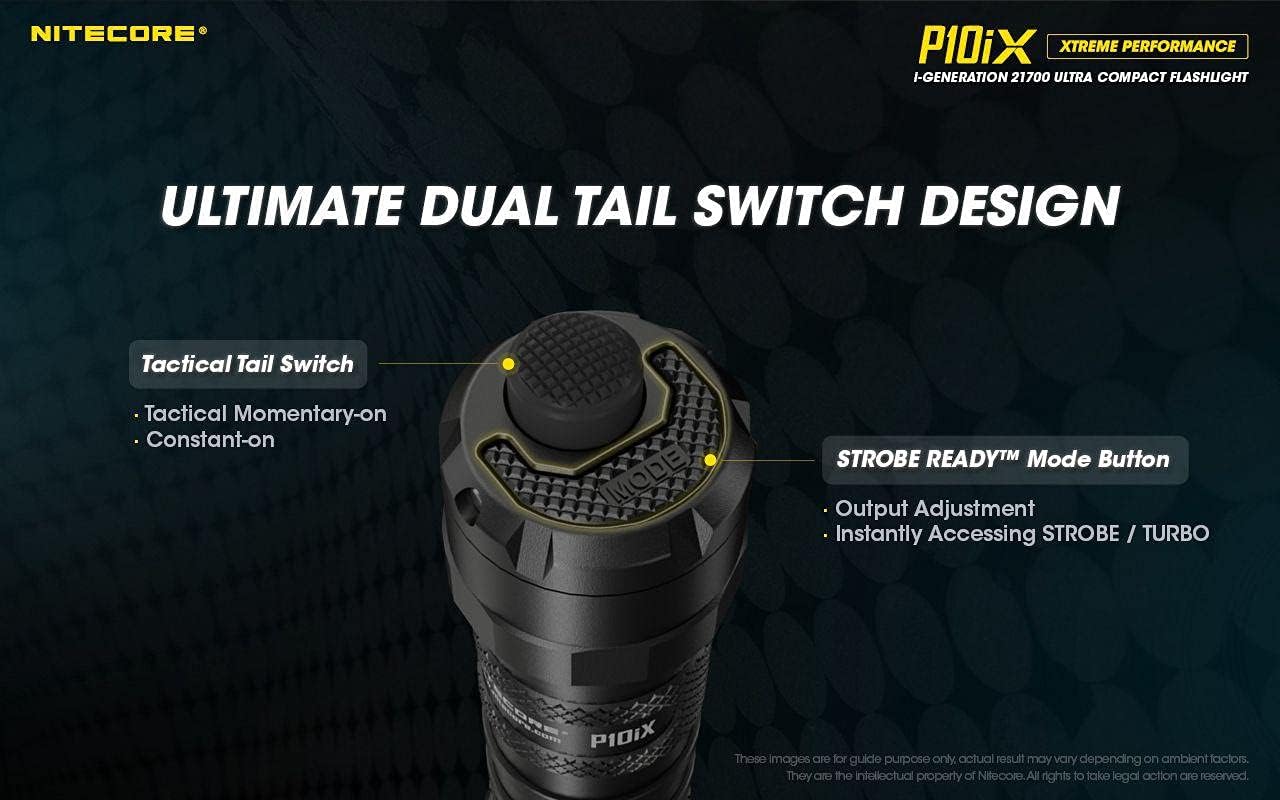
Imej: Terperinci view of the flashlight's tail cap, highlighting the main Tactical Tail Switch and the smaller STROBE READY Mode Button for output adjustment and instant strobe/turbo access.
- Suis Ekor Taktikal: This is the primary power button located at the very end of the tail cap.
- Hidup seketika: Half-press and hold for momentary illumination. Release to turn off.
- Malar hidup: Full-press until a click is heard for constant illumination. Full-press again to turn off.
- STROBE READY™ Mode Button: This smaller, raised button is located next to the Tactical Tail Switch.
- Pelarasan Output: When the flashlight is on, press this button to cycle through brightness levels (e.g., Ultra-low, Low, Mid, High, Turbo).
- Instant Strobe/Turbo: When the flashlight is off, half-press or full-press the Tactical Tail Switch to directly access TURBO mode if Strobe is not memorized. This provides an instant dazzling strike, ideal for self-defense and law enforcement.

Image: The Nitecore P10ix flashlight demonstrating its 4000 lumens instant dazzle strike capability, useful for immediate disorientation.
Mod Khas
The P10ix features a specialized Strobe mode designed for tactical applications.

Image: An illustration emphasizing the 2nd Generation STROBE READY Technology, which allows instant strobe access from any state and features an inset pedal design to prevent accidental activation.
- Mod Strob: To activate Strobe mode, ensure the flashlight is off. Half-press and hold the STROBE READY™ Mode Button. Release to turn off. This mode provides randomly changing frequencies (16Hz-20Hz) for stronger dizzying effects.

Image: A visual representation of the randomly changing strobe mode, designed to create a disorienting effect due to its variable frequency.
Penyelenggaraan
- Pembersihan: Periodically clean the threads of the tail cap and the O-rings with a clean cloth. Apply a thin layer of silicone grease to the threads and O-rings to maintain water resistance.
- Penjagaan Bateri: If the flashlight is to be stored for an extended period, remove the battery to prevent leakage. Recharge batteries every three months to prolong their lifespan.
- Tahan Air: The P10ix is not water resistant. Avoid exposing the flashlight to water or high humidity. Ensure the USB-C port cover is securely closed at all times when not charging.
Menyelesaikan masalah
| Masalah | Kemungkinan Punca | Penyelesaian |
|---|---|---|
| Lampu suluh tidak menyala. | Bateri habis atau salah dimasukkan. | Recharge or replace the battery. Ensure the positive (+) terminal faces the head. |
| Cahaya berkelip atau malap. | Loose tail cap or dirty contacts. | Tighten the tail cap. Clean battery contacts and flashlight threads. |
| Penunjuk pengecasan tidak berfungsi. | Kabel USB atau isu sumber kuasa. | Try a different USB cable or power adapter. Ensure the cable is fully inserted. |
Spesifikasi

Image: An illustration detailing the quad-core LED setup of the Nitecore P10ix, emphasizing its 4000 lumens maximum output and 158m beam throw.
| Ciri | Perincian |
|---|---|
| Output Maks | 4000 Lumen |
| Jarak Pancaran Maks | 158 meter |
| Max Beam Intensity | 6250 cd |
| Masa Jalanan Maks | 38 jam |
| LED | 4x CREE XP-L2 V6 |
| Mod Khas | Strob |
| Panjang | 137.2 mm (5.40 inci) |
| Saiz Kepala | 25.4 mm (1.00 inci) |
| Berat badan | 79.5 g (2.80 oz) |
| Sumber Kuasa | Battery Powered (3x Lithium Ion batteries required) |
| bahan | aluminium |
| Tahap Ketahanan Air | Bukan Tahan Air |

Image: A comparison chart illustrating the significant lumen output increase of the P10ix (4000 lumens) compared to previous Nitecore P10 series models.
Maklumat Waranti
Butiran jaminan khusus biasanya diberikan bersama pembungkusan produk atau pada arahan rasmi pengilang website. Please refer to the documentation included with your Nitecore P10ix flashlight for the most accurate and up-to-date warranty policy.
Sokongan dan Hubungan
For technical support, troubleshooting assistance beyond this manual, or inquiries regarding your Nitecore P10ix flashlight, please visit the official Nitecore webtapak atau hubungi bahagian perkhidmatan pelanggan mereka.
Nitecore Official Webtapak: www.nitecore.com
Please have your product model number (P10iX_2xNL2150HPi) and purchase date ready when contacting support.


