1. Pengenalan
Thank you for choosing the Sanag A5S Open Ear Headphones. These headphones utilize advanced air conduction technology to deliver sound while keeping your ears open to ambient surroundings, ensuring safety during outdoor activities. Designed for comfort and durability, the A5S features Bluetooth 5.0 connectivity, IP67 water resistance, and a lightweight design, making them ideal for sports, work, and daily use.
2. Kandungan Pakej
Sila semak pakej untuk item berikut:
- Sanag A5S Sports Headset x1
- Kabel Pengecas USB Mikro x1
- Manual Pengguna x1
3. Produk Lebihview
Familiarize yourself with the various parts and controls of your Sanag A5S headphones.
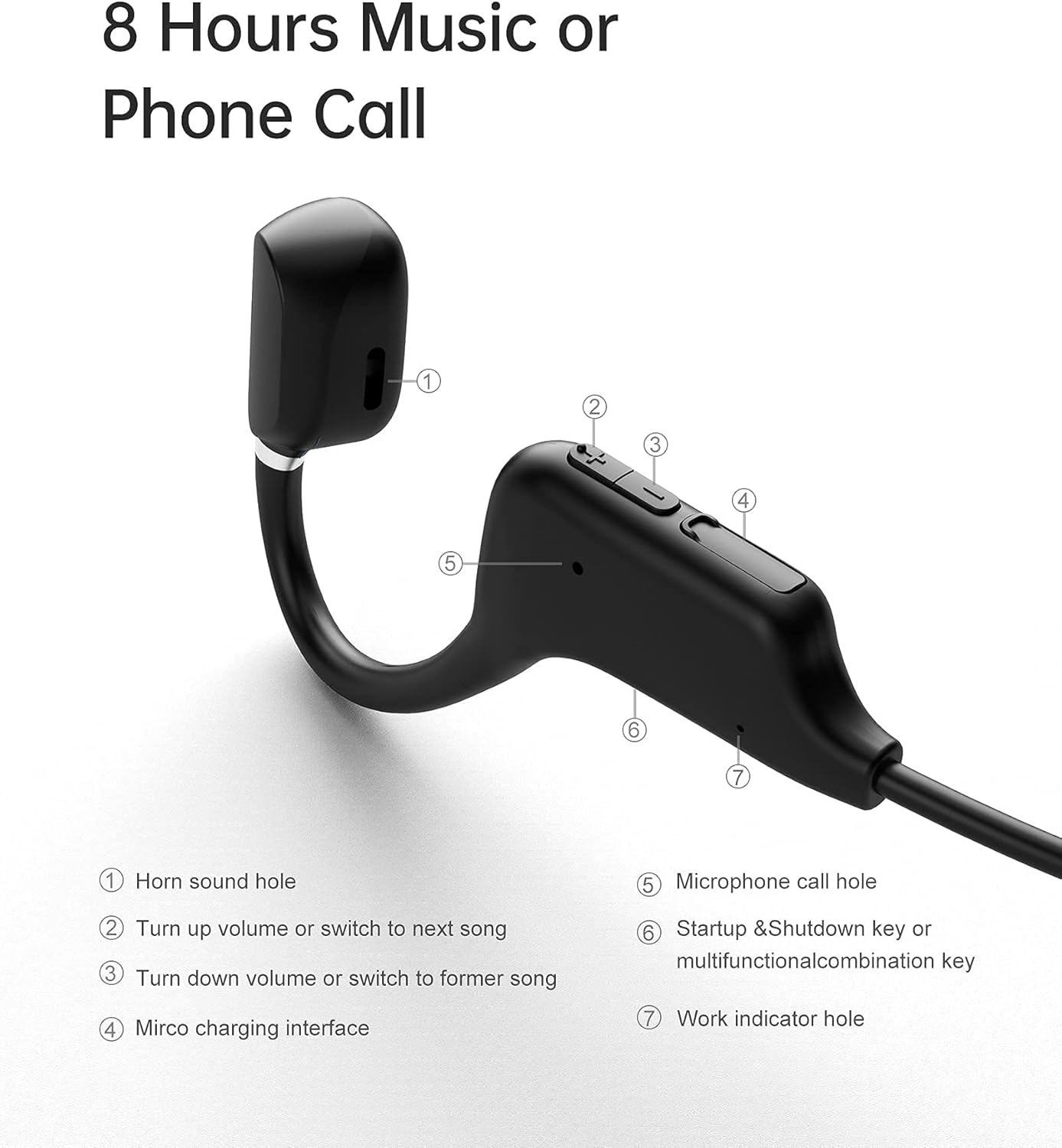
Rajah 3.1: Sanag A5S Headset Components
- Horn sound hole
- Volume Up / Next Song button
- Volume Down / Previous Song button
- Antara muka pengecasan USB mikro
- Microphone call hole
- Power On/Off / Multifunction button
- Work indicator hole

Rajah 3.2: Key Features of Sanag A5S Headphones
4. Persediaan
4.1 Mengecas Fon Kepala
Before first use, fully charge your Sanag A5S headphones.
- Connect the Micro USB charging cable to the charging interface (4) on the headphones.
- Sambungkan hujung kabel yang satu lagi ke sumber kuasa USB (cth., komputer, penyesuai dinding).
- The indicator light (7) will show charging status. A full charge takes approximately 2 hours.
A fully charged battery provides up to 8 hours of continuous use or 300 hours of standby time.

Rajah 4.1: Charging the Sanag A5S Headphones
4.2 Berpasangan dengan Peranti Bluetooth
Follow these steps to connect your headphones to your smartphone, tablet, or other Bluetooth-enabled device:
- Hidupkan kuasa: Press and hold the Multifunction button (6) for 3 seconds until the indicator light (7) flashes, indicating the headphones are in pairing mode.
- Aktifkan Bluetooth: Pada peranti anda, pergi ke tetapan Bluetooth dan pastikan Bluetooth dihidupkan.
- Sambung: In the list of available devices, select "A5S". Once connected, the indicator light will stop flashing or change color (refer to specific light patterns in troubleshooting if needed).
Fon kepala akan cuba menyambung semula secara automatik ke peranti pasangan terakhir apabila dihidupkan.

Rajah 4.2: Kesambungan Bluetooth 5.0
5. Arahan Operasi
5.1 Hidupkan/Mati Kuasa
- Hidupkan kuasa: Tekan dan tahan butang Multifungsi (6) selama 3 saat.
- Matikan: Tekan dan tahan butang Multifungsi (6) selama 3 saat.
5.2 Main balik Muzik
- Main/Jeda: Short press the Multifunction button (6).
- Lagu Seterusnya: Short press the Volume Up button (2).
- Lagu Sebelumnya: Short press the Volume Down button (3).
5.3 Kawalan Kelantangan
- Tingkatkan Kelantangan: Long press the Volume Up button (2).
- Kurangkan Kelantangan: Long press the Volume Down button (3).
5.4 Pengurusan Panggilan
- Jawab Panggilan: Short press the Multifunction button (6) when a call comes in.
- Tamatkan Panggilan: Short press the Multifunction button (6) during a call.
- Tolak Panggilan: Long press the Multifunction button (6) when a call comes in.
- Pembantu Suara: Double-press the Multifunction button (6) to activate your device's voice assistant (if supported).
6. Penyelenggaraan
6.1 Pembersihan
Regularly clean your headphones to ensure optimal performance and hygiene.
- Wipe the headphones with a soft, dry, or slightly damp kain.
- Jangan gunakan bahan kimia yang keras, pelarut pembersih atau detergen yang kuat.
- Pastikan port pengecasan kering sebelum mengecas.
6.2 Penyimpanan
Apabila tidak digunakan, simpan fon kepala di tempat yang sejuk dan kering, jauh daripada cahaya matahari langsung dan suhu yang melampau.
6.3 Tahan Air
The Sanag A5S headphones are IP67 rated, meaning they are resistant to dust and can withstand immersion in water up to 1 meter for 30 minutes. While they are sweat and light rain resistant, avoid prolonged exposure to water or using them during swimming.

Rajah 6.1: Open Ear Design for Awareness

Rajah 6.2: Flexible and Durable Design
7. Penyelesaian masalah
If you encounter any issues with your headphones, please refer to the following common problems and solutions:
- Fon kepala tidak boleh dihidupkan:
Ensure the headphones are fully charged. Connect them to a power source using the Micro USB cable. - Tidak boleh berpasangan dengan peranti:
Make sure Bluetooth is enabled on your device. Ensure the headphones are in pairing mode (indicator light flashing). Move the headphones closer to your device (within 10 meters). Turn off and on both the headphones and your device's Bluetooth. - Tiada bunyi atau kelantangan rendah:
Check the volume levels on both the headphones and your connected device. Ensure the headphones are properly paired. Try playing different audio sources. - Sambungan terputus-putus:
Pastikan tiada halangan antara fon kepala dan peranti anda. Beralih dari peranti wayarles lain yang mungkin menyebabkan gangguan. - Mikrofon tidak berfungsi:
Ensure the headphones are properly connected and selected as the audio input device on your phone/computer. Check for any mute settings on your device.
Jika masalah berterusan, sila hubungi sokongan pelanggan.
8. Spesifikasi
| Ciri | Spesifikasi |
|---|---|
| Nama Model | A5S Sports Headset |
| Teknologi Ketersambungan | Wayarles (Bluetooth) |
| Teknologi Komunikasi Tanpa Wayar | Bluetooth 5.0 |
| Julat Bluetooth | Sehingga 10m (30 kaki) |
| Tahap Ketahanan Air | IP67 (Waterproof and Sweat-proof) |
| Hayat Bateri | Up to 8 Hours (continuous use) |
| Masa Tunggu Sedia | Sehingga 300 Jam |
| Masa Mengecas | lebih kurang 2 Jam |
| Kapasiti Bateri | 120mAh |
| Berat Barang | 18g (0.63 auns) |
| bahan | silikon |
| Jenis Pemacu Audio | Air Conduction Driver |
| Jenis Kawalan | Volume Control, Multifunction Button |
| Peranti Serasi | Telefon Pintar, Komputer Riba, Tablet, Pembesar Suara Pintar |
9. Waranti dan Sokongan
9.1 Maklumat Waranti
Sanag products are designed and manufactured to the highest quality standards. This product is covered by a limited warranty from the date of purchase. Please refer to the warranty card included in your package or visit the official Sanag webtapak untuk terma dan syarat jaminan terperinci.
9.2 Sokongan Pelanggan
If you have any questions, require technical assistance, or need to report an issue with your Sanag A5S headphones, please contact our customer support team. Contact information can typically be found on the Sanag official webtapak atau melalui peruncit anda.