pengenalan
This manual provides instructions for the MageGee Typewriter Mechanical Gaming Keyboard. It covers setup, operation, maintenance, and troubleshooting to ensure optimal performance and longevity of your device. Please read this manual thoroughly before using the keyboard.
Kandungan Pakej
- MageGee Typewriter Mechanical Gaming Keyboard
- Rehat Pergelangan Tangan Magnetik
- Kabel USB
- Manual Pengguna (dokumen ini)
Persediaan
1. Menyambung Papan Kekunci
- Locate the USB cable provided with your keyboard.
- Connect the USB Type-A end of the cable to an available USB port on your computer (PC, Laptop, or Mac).
- Connect the other end of the USB cable to the port on the keyboard.
- Papan kekunci ini boleh dipasang dan digunakan; tiada pemacu atau perisian tambahan diperlukan untuk fungsi asas. Sistem pengendalian anda sepatutnya mengesan dan mengkonfigurasi peranti secara automatik.
2. Memasang Penyandar Pergelangan Tangan
If your model includes a magnetic wrist rest, align it with the front edge of the keyboard. The magnets will help secure it in place, providing ergonomic support during use.
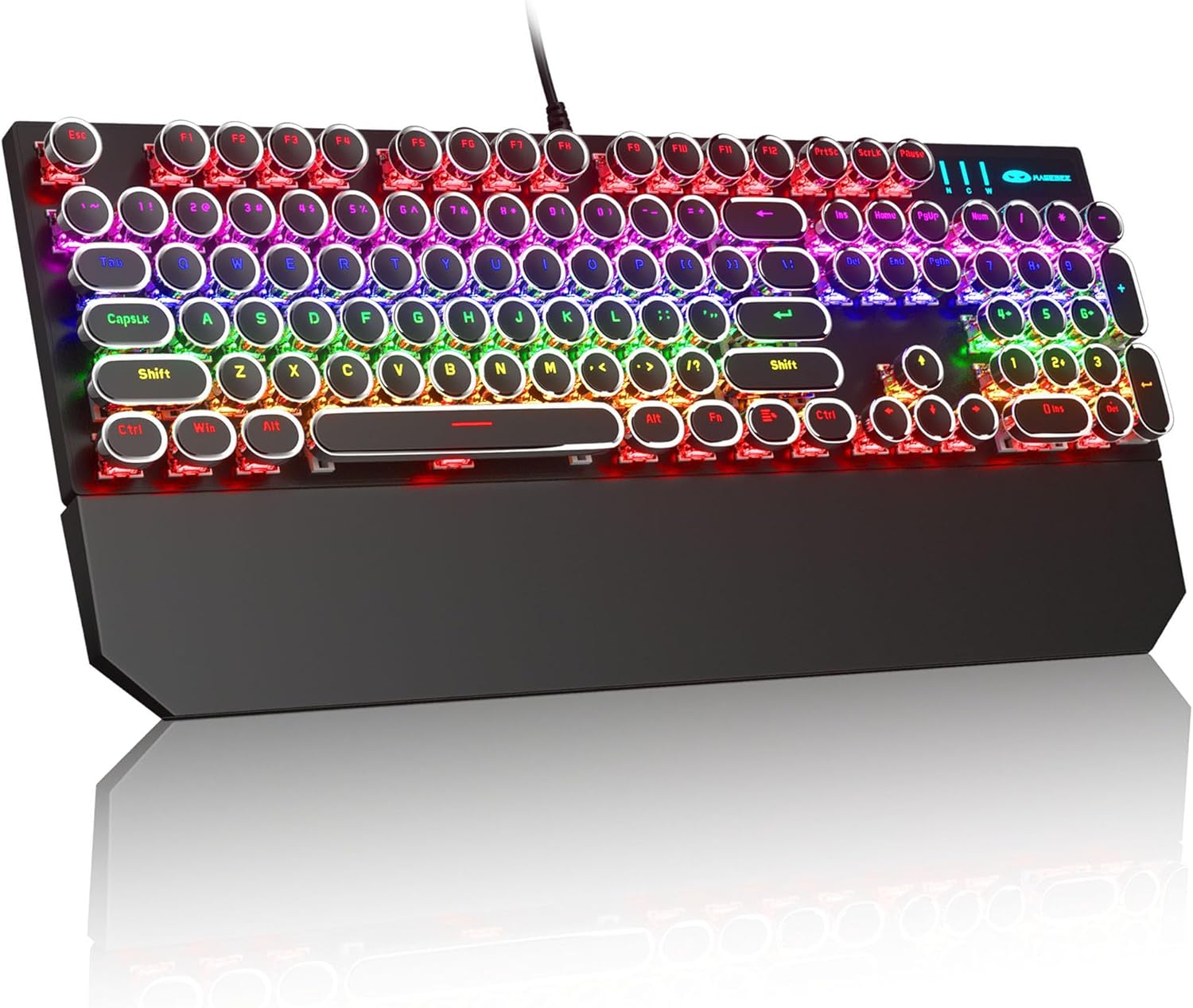
Image: The MageGee Typewriter Mechanical Gaming Keyboard connected via USB, with its magnetic wrist rest attached. The keyboard features retro round keycaps and vibrant RGB backlighting.
Arahan Operasi
Susun atur papan kekunci
The MageGee Typewriter Mechanical Gaming Keyboard features a full-size 104-key layout, including a numeric keypad and dedicated function keys (F1-F12).

Imej: Overhed view of the keyboard, highlighting the full 104-key layout and the LED backlighting effect.
Kawalan Lampu Latar
The keyboard features multiple RGB rainbow backlit modes. Use the following key combinations to adjust the lighting effects:
- Fn + Ins: Cycle through various backlight modes.
- Fn + Rumah: Laraskan kecerahan lampu latar.
- Fn + PgUp: Increase backlight speed.
- Fn + PgDn: Decrease backlight speed.
- Fn + Del: Change backlight color (if applicable to the current mode).
- Fn + Tamat: Hidupkan/matikan lampu latar.

Imej: Dari dekat view of the keyboard's keys, illustrating the RGB backlighting and the visible blue mechanical switches beneath the round keycaps.
Multimedia and Function Keys
The F1-F12 keys can be used in conjunction with the Fn key to access multimedia and system functions. Specific functions may vary slightly depending on your operating system.
| Gabungan Kunci | Fungsi |
|---|---|
| Fn + F1 | Pemain Media |
| Fn + F2 | Kelantangan Kurang |
| Fn + F3 | Kelantangan Naik |
| Fn + F4 | bisu |
| Fn + F5 | Berhenti |
| Fn + F6 | Trek Sebelumnya |
| Fn + F7 | Main/Jeda |
| Fn + F8 | Trek Seterusnya |
| Fn + F9 | E-mel |
| Fn + F10 | Web pelayar |
| Fn + F11 | Komputer Saya |
| Fn + F12 | Kalkulator |
Penyelenggaraan
Membersihkan Papan Kekunci
- Putuskan sambungan papan kekunci daripada komputer anda sebelum membersihkan.
- Gunakan kain lembut dan tidak berbulu sedikit dampdibasahkan dengan air atau larutan pembersih lembut untuk mengelap penutup kekunci dan permukaan papan kekunci.
- Untuk habuk dan serpihan di antara kunci, gunakan udara termampat.
- Elakkan menggunakan bahan kimia yang keras, pembersih yang kasar atau menyembur cecair terus ke papan kekunci.
Penjagaan Am
- Elakkan mendedahkan papan kekunci kepada suhu, kelembapan atau cahaya matahari langsung yang melampau.
- Do not drop the keyboard or subject it to strong impacts.
- Keep liquids away from the keyboard to prevent damage.
Menyelesaikan masalah
Papan Kekunci Tidak Membalas
- Pastikan kabel USB disambungkan dengan selamat ke kedua-dua papan kekunci dan komputer.
- Cuba sambungkan papan kekunci ke port USB lain pada komputer anda.
- Uji papan kekunci pada komputer lain untuk menolak isu khusus komputer.
- Mulakan semula komputer anda.
Lampu Latar Tidak Berfungsi atau Salah
- Ensure the backlight is not turned off (Fn + End).
- Adjust backlight brightness (Fn + Home).
- Cycle through different backlight modes (Fn + Ins) to see if the issue persists across all modes.
Keys Not Registering or Double Typing
- Clean the affected key(s) using compressed air to remove any debris.
- If the issue persists, it may indicate a hardware fault. Contact customer support for assistance.
Spesifikasi
| Ciri | Perincian |
|---|---|
| Model | Typewriter Mechanical Gaming Keyboard |
| Ketersambungan | USB 2.0 berwayar |
| Jenis Kekunci | Mechanical (Blue Switch) |
| Kekunci Kekunci | Retro Round, Double-shot injection molded |
| Lampu latar | RGB Rainbow Backlit |
| Susun atur | 104-Key Full-Size, Anti-ghosting |
| Keserasian | Windows (2000, XP, ME, Vista, 7, 8), Linux, Mac |
| Dimensi (L x W x H) | 17.1 x 4.9 x 1.3 inci (434mm x 130mm x 37mm) |
| Berat Barang | 1.99 paun |
| bahan | Aluminum alloy metal panel |

Image: A diagram illustrating the physical dimensions of the keyboard and its detachable wrist rest.
Waranti dan Sokongan
Maklumat Waranti
MageGee products are designed for quality and reliability. This product comes with a standard manufacturer's warranty against defects in materials and workmanship. Please refer to the product packaging or the official MageGee webtapak untuk terma dan tempoh jaminan tertentu.
Sokongan Pelanggan
If you encounter any issues or have questions regarding your MageGee Typewriter Mechanical Gaming Keyboard, please contact our customer support team:
- e-mel: support@magegee.com
- Webtapak: www.magegee.com
When contacting support, please provide your product model and a detailed description of the issue.


