1. Pengenalan
This manual provides essential instructions for the safe and efficient operation of your Crosley Cruiser Portable Bluetooth Turntable. Please read this manual thoroughly before use and retain it for future reference.
The Crosley Cruiser is a portable, belt-driven turntable designed to play 33 1/3, 45, and 78 RPM records. It features built-in stereo speakers, Bluetooth receiver functionality for streaming music to the turntable, and Bluetooth transmitter functionality to stream your records to external Bluetooth speakers or headphones. Additional features include an auxiliary input, headphone jack, RCA audio out, and adjustable pitch control.
2. Kandungan Pakej
- Crosley Cruiser Portable Bluetooth Turntable (Model CR8005F-WS4)
- Penyesuai Kuasa
- Penyesuai 45 RPM
- Manual Arahan
3. Produk Lebihview
Familiarize yourself with the components of your turntable:
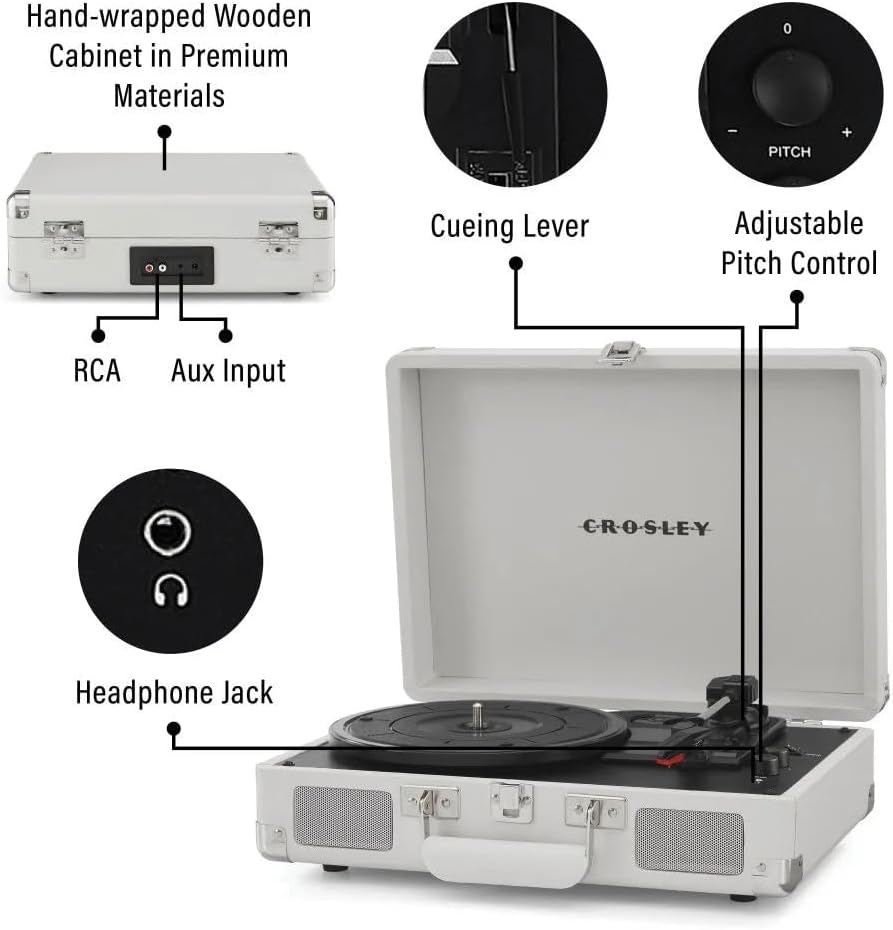
Rajah 1: Berakhirview of the Crosley Cruiser Portable Bluetooth Turntable, highlighting key features such as RCA and Aux Input ports, the cueing lever, adjustable pitch control, and the headphone jack.
- Pinggan Meja Putar: Where records are placed.
- Tonearm: Holds the stylus (needle).
- Stylus: Membaca alur rekod itu.
- Tuas Petunjuk: Lifts and lowers the tonearm.
- Pemilih Kelajuan: Adjusts playback speed (33 1/3, 45, 78 RPM).
- Kawalan Padang: Fine-tunes playback speed.
- Function Switch (Phono/Bluetooth/Aux): Memilih sumber input.
- Volume Control/Power Knob: Menghidupkan/mematikan unit dan melaraskan kelantangan.
- Jack fon kepala: Untuk mendengar secara peribadi.
- Input Bantu: Sambungkan peranti audio luaran.
- RCA Audio Output: Sambungkan ke luaran amppembesar/ pembesar suara.
- Pembesar Suara Terbina dalam: For direct audio playback.
4. Persediaan
4.1 Membongkar dan Meletakkan
- Keluarkan meja putar dari bungkusannya dengan berhati-hati.
- Place the unit on a flat, stable surface away from direct sunlight, heat sources, or excessive vibration.
- Remove any protective materials from the turntable platter and tonearm.
4.2 Sambungan Kuasa
- Connect the power adapter to the DC input jack on the back of the turntable.
- Palamkan penyesuai kuasa ke salur keluar dinding standard.
4.3 Persediaan Tonearm Awal
- Lepaskan kunci tonearm.
- Ensure the stylus protector is removed from the needle before playing a record.
5. Arahan Operasi
5.1 Memainkan Rakaman
- Open the turntable lid.
- Place a record on the turntable platter. If playing a 45 RPM single, use the included 45 RPM adapter.
- Select the appropriate speed (33 1/3, 45, or 78 RPM) using the speed selector switch.
- Turn the Volume/Power knob clockwise to power on the unit.
- Set the Function Switch to "PHONO".
- Angkat lengan atas menggunakan tuil isyarat.
- Position the tonearm over the desired starting point of the record.
- Gently lower the tonearm onto the record using the cueing lever. The record will begin to play.
- Laraskan kelantangan ke tahap yang anda inginkan.
- To stop playback, lift the tonearm using the cueing lever and return it to the tonearm rest. Secure the tonearm lock.

Rajah 2: The Crosley Cruiser Turntable in operation, with a record spinning on the platter and the tonearm engaged.
5.2 Bluetooth Receiver Mode (Streaming to Turntable)
- Turn the Volume/Power knob clockwise to power on the unit.
- Set the Function Switch to "Bluetooth". The Bluetooth indicator light will flash.
- Enable Bluetooth on your external device (e.g., smartphone, tablet) and search for "Crosley Cruiser".
- Select "Crosley Cruiser" to pair. Once paired, the indicator light will stop flashing and remain solid.
- Anda kini boleh menstrim audio daripada peranti anda ke pembesar suara terbina dalam meja putar.
5.3 Bluetooth Transmitter Mode (Streaming Records to External Speakers/Headphones)
- Ensure your external Bluetooth speaker or headphones are in pairing mode.
- Set the Function Switch to "PHONO".
- Start playing a record as described in Section 5.1.
- Press and hold the Bluetooth pairing button (if available, otherwise the unit may automatically search). The turntable will search for nearby Bluetooth devices.
- Once connected, the audio from the record will stream to your external Bluetooth device.
5.4 Input Bantu
- Connect an external audio device (e.g., MP3 player) to the AUX IN jack using a 3.5mm audio cable.
- Set the Function Switch to "AUX".
- Play audio from your external device. The sound will play through the turntable's speakers.
5.5 Output Fon Kepala
- Plug 3.5mm headphones into the headphone jack for private listening. The built-in speakers will be muted.
5.6 Kawalan Pitch
- Use the Pitch Control knob to slightly increase or decrease the playback speed of a record, allowing for fine-tuning.
6. Penyelenggaraan
6.1 Membersihkan Meja Putar
- Lap bahagian luar unit dengan kain lembut dan kering. Jangan gunakan pembersih atau pelarut yang melelas.
- Keep the stylus clean. Use a soft brush (not included) to gently brush the stylus from back to front.
- Regularly clean your records to prevent dust buildup, which can affect sound quality and stylus life.
6.2 Penggantian Stilus
The stylus is a consumable part and will wear out over time. A worn stylus can damage records and degrade sound quality. Replace the stylus after approximately 200-300 hours of playback. Refer to the Crosley website or your retailer for replacement stylus information.
7. Penyelesaian masalah
| Masalah | Kemungkinan Punca | Penyelesaian |
|---|---|---|
| Tiada kuasa | Penyesuai kuasa tidak disambungkan; soket tidak aktif. | Ensure power adapter is securely connected and plugged into a working outlet. Check if the Volume/Power knob is turned on. |
| Tiada suara dari pembesar suara | Volume too low; Function Switch incorrect; headphones plugged in. | Increase volume. Set Function Switch to PHONO or Bluetooth/AUX. Unplug headphones. |
| Record skips or repeats | Record is dirty or damaged; stylus is worn or dirty; turntable not level. | Clean the record. Clean or replace the stylus. Ensure the turntable is on a flat, stable surface. |
| Isu berpasangan Bluetooth | Device too far; incorrect mode; device already paired. | Ensure devices are within range. Set turntable to Bluetooth mode (receiver) or ensure external device is in pairing mode (transmitter). Forget previous pairings on your device. |
8. Spesifikasi
- model: CR8005F-WS4
- Jenama: Crosley
- Dimensi Produk: 10.51 x 14.02 x 4.65 inci
- Berat Barang: 5.48 paun (2.49 Kilogram)
- Kelajuan: 33 1/3, 45, 78 RPM
- Ketersambungan: Bluetooth (Receiver & Transmitter), Auxiliary Input, Headphone Jack, RCA Audio Out
- Ciri Khas: Mudah alih
- Bahan: kayu
- Komponen yang Disertakan: 1 x Crosley Cruiser Portable Bluetooth Turntable, White Sands
9. Waranti dan Sokongan
For warranty information and technical support, please refer to the official Crosley webtapak atau hubungi peruncit anda. Simpan bukti pembelian anda untuk sebarang tuntutan waranti.
Untuk bantuan lanjut, lawati Kedai Crosley di Amazon.


