pengenalan
Welcome to the user manual for your Naztech NXT-700 Trucker Headset. This guide provides detailed instructions on how to set up, operate, maintain, and troubleshoot your new wireless headset. Please read this manual thoroughly to ensure optimal performance and longevity of your device.
Produk Selesaiview
Komponen yang Disertakan
- Naztech NXT-700 Headset
- Kabel Pengecas USB-C
- 2x Microphone Windscreen
- Headset Hanging Hook
Ciri-ciri Utama
- Crystal-Clear Calls & Music: Features HD Sound and patented NoiseHush technology for 96% background noise cancellation.
- Kemudahan Tanpa Wayar: Bluetooth 5.0 for untethered movement, ideal for hands-free communication.
- Keselesaan Sepanjang Hari: Designed with an extra-wide adjustable headband and ultra-soft memory foam ear cups.
- Jangka Hayat Bateri: Up to 32 hours of talk time and 550 hours of standby time.
- Seamless Multi-Device Connectivity: Multipoint connectivity with an impressive 300 ft Bluetooth range.
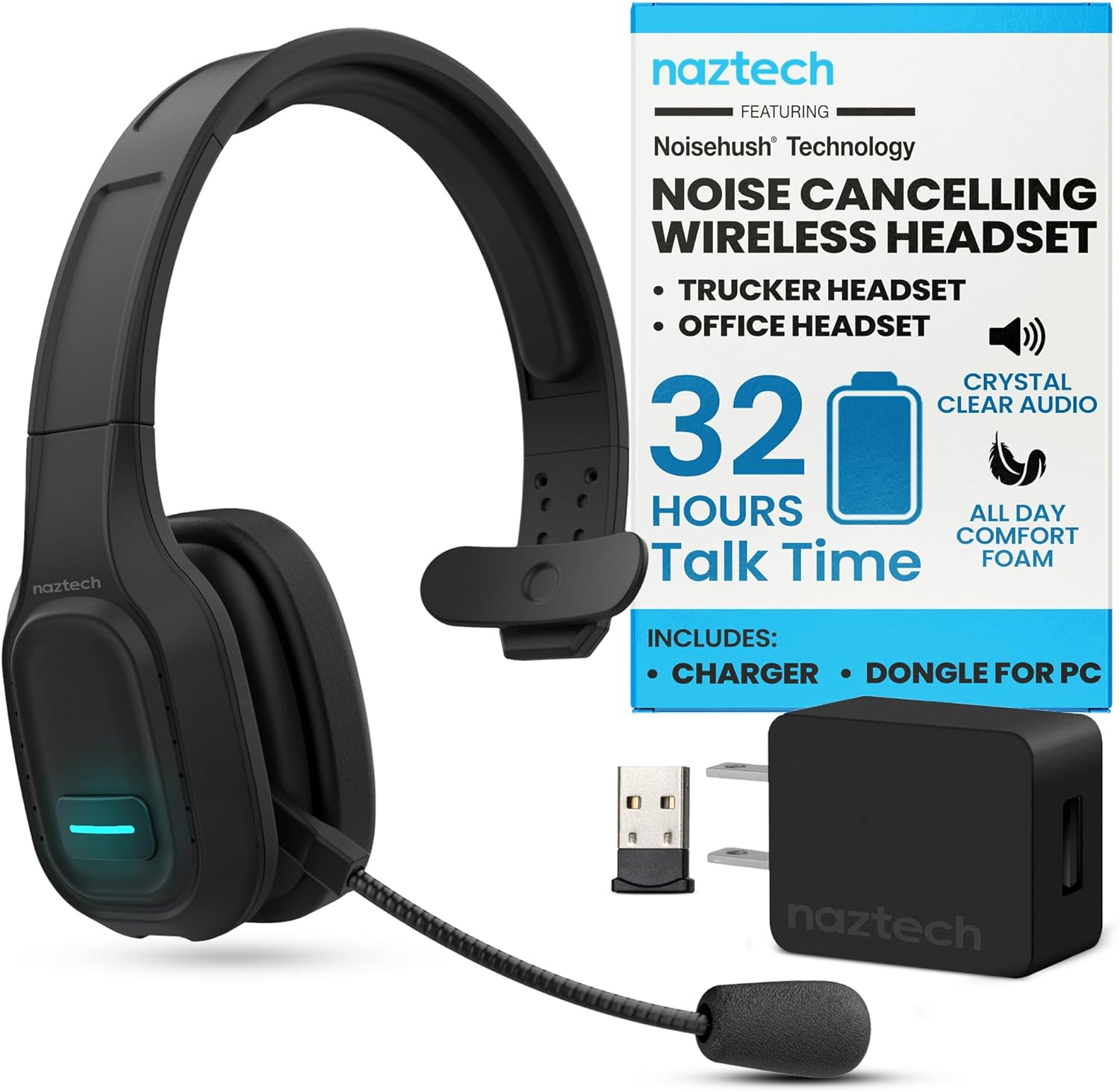
Image: The Naztech NXT-700 headset shown with its included accessories: a USB-C charging cable, a USB wall adapter, and a USB dongle for PC connectivity. This image highlights the complete package for the user.

Image: The Naztech NXT-700 headset displayed alongside icons representing its key features: HD Definition Audio, Voice Assistant, lightweight design (4.8 oz), GPS Navigation, Caller ID Announcement, and Extreme Comfort. This visual summary helps users quickly grasp the headset's capabilities.
Persediaan
Mengecas Alat Dengar
- Connect the USB-C charging cable to the charging port on the headset.
- Sambungkan hujung kabel yang satu lagi ke sumber kuasa USB yang serasi (cth, penyesuai dinding, port USB komputer).
- The LED indicator on the headset will show charging status. A full charge takes approximately 90 minutes.
- Once fully charged, the headset provides up to 32 hours of talk time and 550 hours of standby time.
Berpasangan dengan Peranti
- Pastikan alat dengar dimatikan.
- Press and hold the Multi-function button until the LED indicator flashes blue and red alternately, indicating pairing mode.
- Pada peranti anda (telefon pintar, tablet, komputer riba), dayakan Bluetooth dan cari peranti yang tersedia.
- Select "NXT-700" from the list of found devices.
- Setelah disambungkan, penunjuk LED akan bertukar menjadi biru pepejal atau biru berkelip perlahan-lahan.
- For multipoint connectivity, repeat the pairing process with a second device. The headset can maintain a connection with two devices simultaneously.
Melaraskan Alat dengar
- Adjust the headband for a comfortable and secure fit on your head.
- Position the flexible, rotatable microphone boom close to your mouth for optimal voice pickup.
- Attach one of the included microphone windscreens to reduce breath noise and environmental sounds.
Arahan Operasi
Hidupkan/Mati Kuasa
- Untuk menghidupkan: Tekan dan tahan butang Kuasa sehingga penunjuk LED menyala.
- Untuk mematikan kuasa: Tekan dan tahan butang Kuasa sehingga penunjuk LED dimatikan.
Pengurusan Panggilan
- Answer/End Call: Press the Multi-function button once.
- Reject Call: Press and hold the Multi-function button for 2 seconds.
- Redial Last Number: Double-press the Multi-function button.
- Mute/Unmute Microphone: Press the Mute button on the microphone boom.
Main Balik Audio
- Main/Jeda: Tekan butang Berbilang fungsi sekali.
- Next Track: Press and hold the Volume Up button.
- Previous Track: Press and hold the Volume Down button.
- Volume Up: Press the Volume Up button.
- Volume Down: Press the Volume Down button.
Pembantu Suara
- Activate Voice Assistant: Press the dedicated Voice Control button (if available) or double-press the Multi-function button (refer to specific model instructions).

Image: A woman wearing the Naztech NXT-700 headset while driving a truck, demonstrating its use for crystal-clear audio during extended journeys. The image emphasizes the headset's design for eliminating road noise.

Image: A woman wearing the Naztech NXT-700 headset while working on a laptop in an office environment, illustrating its suitability for clear calls and productive meetings.
Penyelenggaraan
Pembersihan
- Lap set kepala dengan kain lembut dan kering.
- For the ear cups, use a slightly damp kain jika perlu, dan biarkan kering sepenuhnya sebelum digunakan.
- Regularly replace the microphone windscreen to maintain optimal sound quality and hygiene.
- Elakkan menggunakan bahan kimia yang keras atau bahan kasar untuk pembersihan.
Penyimpanan
- Simpan alat dengar di tempat yang sejuk dan kering jauh dari cahaya matahari langsung dan suhu yang melampau.
- Use the included headset hanging hook for convenient and safe storage when not in use.
Menyelesaikan masalah
| Masalah | Kemungkinan Punca | Penyelesaian |
|---|---|---|
| Alat dengar tidak dihidupkan. | Bateri lemah. | Charge the headset fully using the provided USB-C cable. |
| Tidak boleh berpasangan dengan peranti. | Fon kepala tidak dalam mod berpasangan; Bluetooth dimatikan pada peranti; peranti terlalu jauh. | Ensure headset is in pairing mode (flashing blue/red). Turn on Bluetooth on your device. Move headset closer to the device. |
| Kualiti audio yang lemah atau terputus sambungan. | Di luar julat Bluetooth; gangguan; bateri lemah. | Stay within the recommended 300 ft Bluetooth range. Avoid strong electromagnetic interference. Charge the headset. |
| Mikrofon tidak menangkap suara dengan jelas. | Microphone muted; improper positioning; worn windscreen. | Ensure microphone is unmuted. Adjust microphone boom closer to your mouth. Replace the microphone windscreen. |
| Tiada bunyi dari set kepala. | Volume too low; headset not selected as audio output. | Increase headset volume. Check your device's audio settings to ensure NXT-700 is selected as the output device. |
If you continue to experience issues, please refer to the support section or visit the Naztech webtapak untuk bantuan lanjut.
Spesifikasi
| Ciri | Perincian |
|---|---|
| Nama Model | NXT-700 |
| Nombor Model Item | 15443 |
| Teknologi Ketersambungan | Wayarles (Bluetooth) |
| Versi Bluetooth | 5.0 |
| Julat Bluetooth | Sehingga 300 kaki (100 meter) |
| Hayat Bateri (Masa Berbual) | Sehingga 32 Jam |
| Hayat Bateri (Masa Siap Sedia) | Sehingga 550 Jam |
| Masa Mengecas | lebih kurang 90 minit |
| Kawalan Bunyi | Active Noise Cancellation (NoiseHush Technology) |
| Penempatan Telinga | Atas Telinga |
| Faktor Bentuk | Atas Telinga |
| warna | Hitam |
| Berat Barang | 14.4 auns |
| Dimensi Produk | 8.08 x 9.45 x 2.76 inci |
| Pengeluar | NAZTECH |
| UPC | 633755154430, 633755155048 |
Waranti dan Sokongan
Naztech products are backed by warranties, ensuring quality and performance. For specific warranty details regarding your NXT-700 headset, please refer to the warranty card included in your product packaging or visit the official Naztech webtapak.
For technical support, troubleshooting assistance beyond this manual, or to inquire about replacement parts, please contact Naztech customer service through their official webtapak atau maklumat hubungan yang diberikan bersama produk anda.
Official Naztech Webtapak: www.naztech.com
Maklumat Keselamatan Penting
- Do not expose the headset to extreme temperatures, humidity, or liquids.
- Elakkan daripada menjatuhkan atau meletakkan set kepala kepada kesan yang kuat.
- Jangan cuba membuka atau mengubah suai alat dengar. Ini akan membatalkan jaminan.
- Jauhkan daripada kanak-kanak.
- Dispose of the headset and its components responsibly according to local regulations.
Tiada Video Produk Rasmi Tersedia
Berdasarkan data produk yang diberikan, tiada video produk rasmi daripada penjual tersedia untuk dibenamkan dalam manual ini.


