1. Pengenalan
The JVC HA-A5T Gumy Mini True Wireless Earbuds are designed for convenient, high-quality audio on the go. These compact and lightweight earbuds feature a Neodymium magnet driver for clear sound, Bluetooth 5.1 for stable wireless connection, and an IPX4 rain-proof rating for durability. They offer hands-free calling with voice assistant compatibility and simple one-button control.
Ciri-ciri Utama:
- Reka bentuk padat dan ringan
- High sound quality with Neodymium magnet driver
- Bluetooth Version 5.1 for stable wireless connectivity
- Rain Proof (IPX4) for protection against splashes and sweat
- Up to 15 hours of total battery life (including charging case)
- Hands-free microphone with Voice Assistant compatibility
- Kawalan satu butang untuk operasi mudah
- Auto on/off/connect function
- Compatible with iOS, Android, and Windows devices
2. Kandungan Pakej
Sila pastikan semua item terdapat dalam pakej:
- JVC HA-A5T True Wireless Earbuds (Left and Right)
- Kes Pengecasan
- Regular Silicon Earpieces (S/M/L sizes)
- Kabel Pengecas USB

Image: The retail packaging for the JVC HA-A5T Gumy Mini True Wireless Earbuds, showing the earbuds and charging case.
3. Persediaan
3.1 Mengecas Fon telinga dan Sarung
Before first use, fully charge the earbuds and the charging case. The charging case provides additional power to the earbuds, extending their usage time.
- Letakkan fon telinga ke dalam slot masing-masing dalam bekas pengecas. Pastikan ia diletakkan dengan betul.
- Sambungkan kabel pengecas USB yang dibekalkan ke port pengecasan pada bekas dan ke sumber kuasa USB (cth., komputer, penyesuai dinding USB).
- The indicator lights on the case will show the charging status. Refer to the indicator light section for details.
- Once fully charged, disconnect the USB cable. The earbuds and case together provide up to 15 hours of playback.

Image: The JVC HA-A5T earbuds placed inside their open charging case, ready for charging.
3.2 Berpasangan dengan Peranti Bluetooth
The earbuds feature an auto on/off/connect function for seamless pairing.
- Buka bekas pengecas. Fon telinga akan dihidupkan secara automatik dan memasuki mod berpasangan.
- Pada peranti Bluetooth anda (telefon pintar, tablet, dll.), dayakan Bluetooth dan cari peranti yang tersedia.
- Select "JVC HA-A5T" from the list of found devices.
- Once connected, a confirmation sound or indicator will notify you. The earbuds will automatically reconnect to the last paired device when taken out of the case.
3.3 Selecting the Right Earpieces
For optimal sound quality and comfort, choose the silicone earpieces that best fit your ears. The package includes Small (S), Medium (M), and Large (L) sizes.
- Try each size to find the one that creates a snug seal in your ear canal. A good seal enhances bass response and noise isolation.
- Masukkan fon telinga ke dalam telinga anda dengan lembut dan pusingkan sedikit sehingga terasa selamat dan selesa.
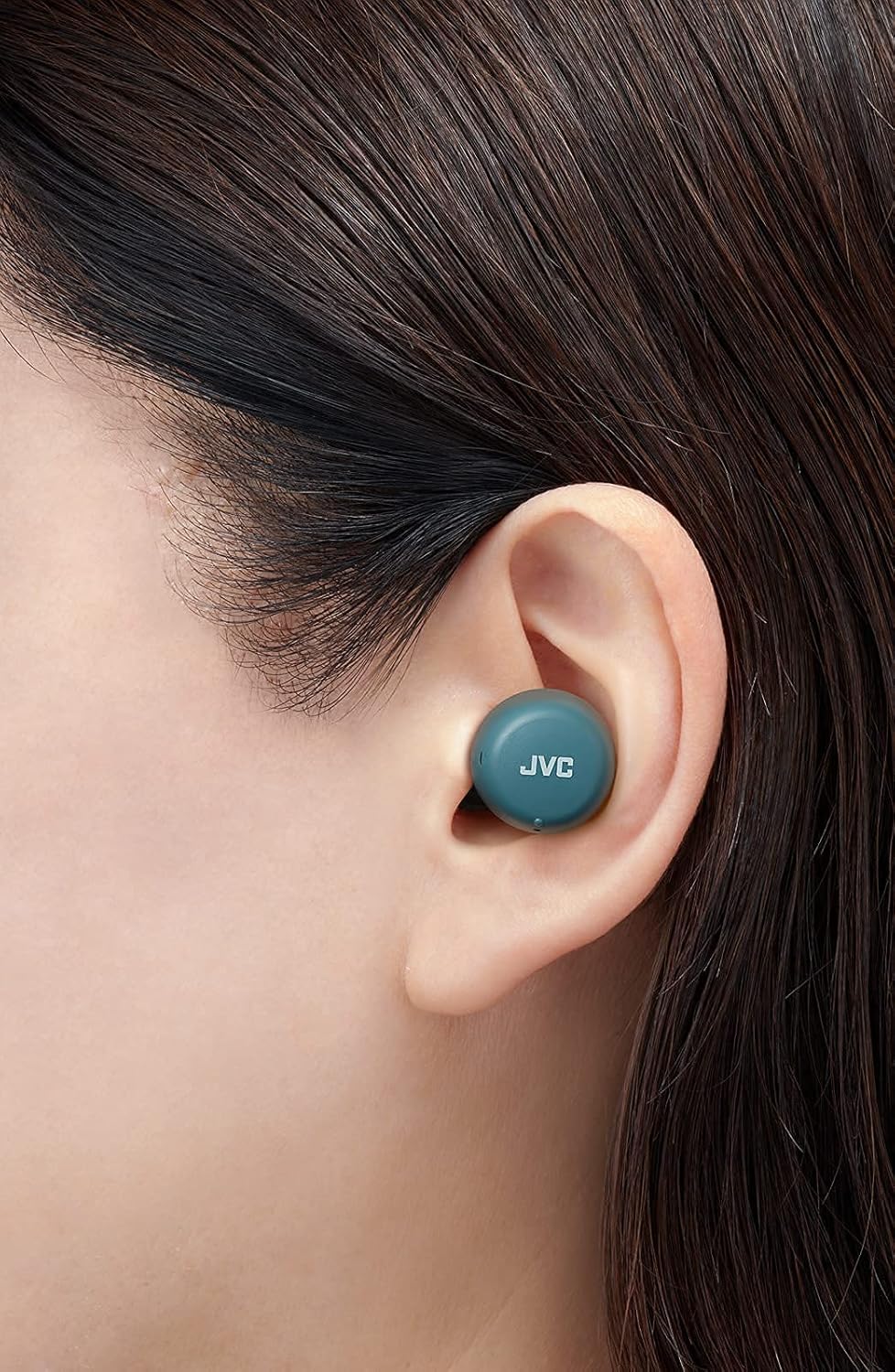
Imej: Dari dekat view of a JVC HA-A5T earbud correctly positioned in a user's ear, demonstrating proper fit.
4. Mengendalikan Fon Telinga
4.1 Hidupkan/Mati Kuasa
- Hidupkan kuasa: Open the charging case or press and hold the button on each earbud for approximately 2 seconds.
- Matikan: Place the earbuds back into the charging case and close the lid, or press and hold the button on each earbud for approximately 5 seconds.
4.2 Basic Controls (One-Button Operation)
Each earbud features a multi-function button for controlling playback and calls.
| Fungsi | Tindakan |
|---|---|
| Main/Jeda | Tekan butang pada mana-mana fon telinga sekali. |
| Trek Seterusnya | Tekan butang pada fon telinga kanan dua kali. |
| Trek Sebelumnya | Tekan butang pada fon telinga kiri dua kali. |
| Jawab/Tamatkan Panggilan | Press the button on either earbud once during an incoming call or active call. |
| Tolak Panggilan | Press and hold the button on either earbud for approximately 2 seconds during an incoming call. |
| Aktifkan Pembantu Suara | Tekan butang pada mana-mana fon telinga tiga kali. |
4.3 Penggunaan Fon Telinga Tunggal
The JVC HA-A5T earbuds support single earbud use, specifically with the left earbud. This allows you to use one earbud while the other is charging or stored.
- To use only the left earbud, simply take it out of the case. It will automatically connect to your device if previously paired.
- The right earbud cannot be used independently for calls or music playback.
4.4 Pembantu Suara
Activate your smartphone's voice assistant (e.g., Siri, Google Assistant) directly from the earbuds.
- Press the multi-function button on either earbud three times to activate the voice assistant.
- Sebutkan arahan anda selepas gesaan.

Image: A woman wearing JVC HA-A5T earbuds, demonstrating their use for listening to audio.
5. Penyelenggaraan
5.1 Pembersihan
Pembersihan berkala membantu mengekalkan prestasi dan jangka hayat fon telinga anda.
- Lap perlahan fon telinga dan bekas pengecas dengan kain lembut, kering dan tidak berbulu.
- Remove the silicone earpieces and clean them with a mild soap solution if necessary. Rinse thoroughly and dry completely before reattaching.
- Do not use harsh chemicals, abrasive materials, or immerse the earbuds or case in water.
5.2 Penyimpanan
Apabila tidak digunakan, simpan fon telinga di dalam bekas pengecasannya untuk melindunginya daripada habuk, kerosakan dan memastikan ia sentiasa dicas.
- Simpan di tempat yang sejuk dan kering, jauh dari cahaya matahari langsung dan suhu yang melampau.
5.3 Rintangan Air (IPX4)
Fon telinga diberi penarafan IPX4, bermakna ia dilindungi daripada percikan air dari mana-mana arah. Ini menjadikan mereka sesuai untuk senaman dan hujan renyai.
- Jangan tenggelamkan fon telinga dalam air.
- Pastikan fon telinga kering sebelum meletakkannya semula ke dalam bekas pengecas untuk mengelakkan kerosakan pada sesentuh pengecasan.

Image: A woman engaged in physical activity while wearing the JVC HA-A5T earbuds, highlighting their sweat and rain-proof capabilities.
6. Penyelesaian masalah
If you encounter issues with your JVC HA-A5T earbuds, refer to the following common solutions:
| Masalah | Kemungkinan Punca | Penyelesaian |
|---|---|---|
| Fon telinga tidak dihidupkan. | Bateri lemah. | Letakkan fon telinga dalam bekas pengecas dan cas sepenuhnya. |
| Tidak boleh berpasangan dengan peranti. | Bluetooth dimatikan pada peranti; fon telinga tidak dalam mod berpasangan; peranti yang dipasangkan sebelum ini mengganggu. | Ensure Bluetooth is enabled on your device. Place earbuds in case, close, then open to re-enter pairing mode. Forget "JVC HA-A5T" from your device's Bluetooth list and try pairing again. |
| Tiada bunyi atau kelantangan rendah. | Volume too low on device; earbuds not properly seated; poor earpiece fit. | Increase volume on your connected device. Ensure earbuds are properly inserted. Try different earpiece sizes for a better seal. |
| Sambungan terputus-putus atau audio tercicir. | Jarak dari peranti; gangguan; bateri fon telinga rendah. | Keep earbuds within 10 meters (33 feet) of your device. Avoid areas with strong Wi-Fi or other Bluetooth signals. Charge earbuds fully. |
| Mikrofon tidak berfungsi. | Mikrofon disekat; tetapan peranti. | Ensure the microphone port is not obstructed. Check your device's audio input settings to confirm "JVC HA-A5T" is selected. |
7. Spesifikasi
| Ciri | Spesifikasi |
|---|---|
| Nama Model | HA-A5T |
| Teknologi Ketersambungan | Bluetooth, Wayarles |
| Versi Bluetooth | 5.1 |
| Tahap Ketahanan Air | IPX4 (Rain Proof) |
| Hayat Bateri | Sehingga 15 Jam (dengan kes pengecasan) |
| Sumber Kuasa | Battery-Powered (2 Lithium Polymer batteries included) |
| Format Mikrofon | Terbina Dalam |
| Jenis Kawalan | One-button control, Voice Control |
| bahan | plastik |
| Faktor Bentuk | Di Telinga |
| Impedans | 16 ohm |
| Berat Barang | 90 g |
| Dimensi Produk | 40 x 47 x 23 Sentimeter |
| Komponen yang Disertakan | Regular Silicon Earpieces (S/M/L), USB charging cable, Charging case |
8. Waranti dan Sokongan
Untuk maklumat jaminan dan sokongan pelanggan, sila rujuk kad jaminan yang disertakan dengan produk anda atau lawati laman web rasmi JVC. webtapak. Simpan bukti pembelian anda untuk sebarang tuntutan waranti.
- Sokongan dalam talian: Visit the JVC official webtapak untuk Soalan Lazim, muat turun pemandu dan maklumat hubungan.
- Maklumat Hubungan: Refer to your product packaging or the JVC weblaman web untuk butiran perhubungan khidmat pelanggan serantau.


