1. Panduan Persediaan
This section provides instructions for setting up your ViewSonic VX1755 Portable Gaming Monitor.
1.1. Apa yang ada di dalam Kotak
Sila sahkan bahawa semua item yang disenaraikan di bawah disertakan dalam pakej anda:
- Monitor Mudah Alih
- mini HDMI to HDMI Cable
- USB Type-C Cable (Male-Male)
- USB Type-C to Type-A 3.2 Gen1 Cable
- Penyesuai AC/DC
- Panduan Mula Pantas
- Lindungi penutup

Imej tersebut memaparkan ViewSonic VX1755 portable monitor along with its accessories: a protective cover, power adapter, USB-C to USB-C cable, USB-C to USB-A cable, Mini HDMI cable, and a QuickStart Guide.
1.2. Menyambung Monitor
The VX1755 monitor offers versatile connectivity options for various devices.
- Sambungan USB Jenis-C: Connect your laptop, smartphone, or gaming console using the provided USB Type-C cable. This single cable can transmit video, audio, data, and provide 60W power delivery.
- Sambungan Mini HDMI: Use the Mini HDMI to HDMI cable to connect to devices with an HDMI output, such as gaming consoles or desktop PCs.
- Kuasa: The monitor can be powered via one of the USB-C ports using the included AC/DC adapter or a compatible power bank.

This image shows the back of the ViewSonic VX1755 monitor, highlighting its two USB-C ports, one Mini HDMI port, and an audio output. Below the monitor, icons illustrate compatibility with various devices including Nintendo Switch, Xbox, PlayStation (PS3/4/5), mobile phones, and laptops.

The image illustrates the 2-way powered USB Type-C functionality of the ViewSonic VX1755 monitor, showing it connected to a laptop. Icons above the monitor indicate that the 60W USB-C connection supports audio, data, video, and charging.
2. Arahan Operasi
Learn how to operate your ViewSonic VX1755 monitor for optimal performance.
2.1. Hidupkan/Mati Kuasa
To power on the monitor, connect it to a power source using the AC/DC adapter or a compatible USB-C power delivery source. The monitor will automatically power on when a signal is detected. To power off, disconnect the power source.
2.2. Tetapan Paparan
The VX1755 features a 17.2-inch Full HD (1920x1080p) IPS display with a 144Hz refresh rate and AMD FreeSync Premium technology for smooth gameplay. Adjust display settings via the On-Screen Display (OSD) menu using the buttons on the side of the monitor.
- Resolusi: Full HD (1920x1080p) for crisp visuals.
- Kadar Segar Semula: Up to 144Hz for fluid motion, especially beneficial for gaming.
- AMD FreeSync Premium: Ensures tear-free and stutter-free gaming by synchronizing the monitor's refresh rate with your GPU's frame rate.
- Panel IPS: Provides wide 178° viewsudut dan warna yang terang.

This image shows the ViewSonic VX1755 portable monitor set up on a surface, displaying a vibrant gaming scene. The monitor is open, revealing its 17-inch screen, ViewSonic branding, USB-C port, and 144Hz AMD FreeSync Premium features.

The image features the ViewSonic VX1755 portable gaming monitor alongside a PlayStation 5 console and controller, showcasing its use as a portable gaming display. Icons above the monitor highlight its Full HD 1080p, IPS SuperClear, 144Hz, and AMD FreeSync Premium features.
2.3. Built-in Stand and Magnetic Cover
The monitor comes with a built-in stand that allows for flexible orientation in both portrait and landscape modes, with an adjustable tilt range of 20° to 62°. The durable magnetic cover protects the screen during transport and can also serve as an additional stand.

Imej ini memberikan sisi view daripada ViewSonic VX1755 portable monitor, showcasing pro slimnyafile and the integrated kickstand that supports the display.
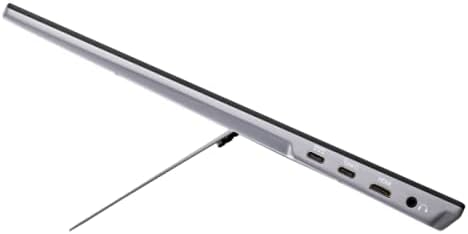
This image presents an angled side view daripada ViewSonic VX1755 portable monitor, highlighting its slim design and the integrated stand that props it up for viewing.
3. Penjagaan dan Penyelenggaraan
Penjagaan yang betul memastikan jangka hayat dan prestasi monitor anda.
3.1. Membersihkan Monitor
- Sentiasa matikan monitor dan cabut semua kabel sebelum membersihkannya.
- Gunakan kain lembut dan tidak berbulu sedikit dampdisapu dengan air atau pembersih skrin yang lembut dan tidak melelas.
- Do not spray liquid directly onto the screen or into the monitor's openings.
- Elakkan menggunakan bahan kimia yang keras, pembersih yang melelas, atau pelarut.
3.2. Penyimpanan
When not in use, store the monitor in a cool, dry place. Always use the provided protective cover to prevent scratches and damage to the screen and body.
4. Menyelesaikan masalah Isu Biasa
This section addresses common issues you might encounter with your VX1755 monitor.
4.1. No Signal / Black Screen
- Ensure all cables (USB-C, Mini HDMI) are securely connected to both the monitor and the source device.
- Sahkan peranti sumber dihidupkan dan mengeluarkan isyarat.
- Try connecting the monitor to a different port on your source device or a different source device to isolate the issue.
- Check the monitor's OSD menu to ensure the correct input source is selected.
4.2. Intermittent Restart / Power Issues
- Ensure the monitor is receiving sufficient power. If using a USB-C connection for both power and display, ensure your power adapter or source provides adequate wattage (e.g., 60W or higher if also powering a laptop).
- Use the included AC/DC adapter for dedicated power to the monitor if experiencing instability with USB-C power from a low-wattage sumber.
- Cuba salur keluar kuasa yang berbeza.
4.3. Imej Berkelip-kelip atau Terherot
- Periksa sambungan kabel untuk kelonggaran atau kerosakan.
- Ensure your source device's display settings (resolution, refresh rate) are compatible with the monitor's capabilities.
- If using AMD FreeSync, ensure it is enabled on both the monitor and your graphics card settings.
5. Spesifikasi Produk
Spesifikasi teknikal terperinci untuk ViewSonic VX1755 Portable Gaming Monitor.
| Ciri | Spesifikasi |
|---|---|
| Nombor Model | VX1755 |
| Saiz Skrin | 17.2 Inci |
| Resolusi Skrin | 1920x1080 (HD Penuh) |
| Resolusi Skrin Maks | 1920 x 1080 Piksel |
| Kadar Segar Semula | 144Hz |
| Jenis Panel | IPS |
| Teknologi Penyegerakan Adaptif | AMD FreeSync Premium |
| Nisbah Aspek | 16:9 |
| Berat Barang | 2.2 paun |
| Dimensi Produk (LxWxH) | 0.7 x 15.6 x 9.7 inci |
| Ketersambungan | 2x USB Type-C, 1x Mini HDMI, 1x Audio Out |
| Sumber Kuasa | 10 (AC/DC Adapter) |
| Voltage | 12 Volt (DC) |

This image highlights the ultra-portable design of the ViewSonic VX1755, showing its dimensions (39.6 cm / 15.6 in width, 24.7 cm / 9.7 in height, 1.7 cm / 0.7 in thickness) and its light weight of only 1kg (2.2lb).
6. Waranti dan Sokongan
Untuk maklumat jaminan terperinci dan sokongan teknikal, sila rujuk pegawai ViewSonic webtapak atau dokumentasi yang disertakan dengan produk anda.
- Panduan Pengguna (PDF): Muat turun Panduan Pengguna
- Manual Pengguna (PDF): Muat turun Manual Pengguna


