pengenalan
This manual provides detailed instructions for the setup, operation, and maintenance of your Technical Pro TPWMU99 UHF Wireless Handheld Microphone. Please read this manual thoroughly before using the product to ensure proper functionality and to prevent damage.
Maklumat Keselamatan
To ensure safe operation and prolong the life of your microphone, please observe the following precautions:
- Do not expose the microphone or receiver to water or excessive moisture.
- Elakkan daripada menjatuhkan atau meletakkan peranti kepada kesan yang kuat.
- Jangan cuba membuka atau membaiki unit sendiri. Rujuk semua servis kepada kakitangan yang berkelayakan.
- Use only the specified battery type for the microphone.
- Jauhkan peranti daripada sumber haba dan cahaya matahari langsung.
Kandungan Pakej
Sahkan bahawa semua item terdapat dalam pakej anda:
- Technical Pro TPWMU99 Wireless Handheld Microphone
- Penerima USB
- 1/8" to 1/4" Audio Cable
- Bateri
Note: The provided product data listed "amplifier" in the package contents, which is not applicable to this microphone product. The list above reflects the actual components based on product description and images.
Produk Selesaiview
The Technical Pro TPWMU99 is a professional UHF wireless handheld microphone system designed for clear audio capture. It features a high-sensitivity dynamic microphone with a cardioid pickup pattern and a USB-powered receiver for versatile connectivity.

Rajah 1: Technical Pro TPWMU99 UHF Wireless Handheld Microphone and USB Receiver. This image displays the Technical Pro TPWMU99 UHF Wireless Handheld Microphone alongside its compact USB receiver. The microphone features a black body with a green power indicator and a power switch. The USB receiver is black with a blue accent.

Rajah 2: jarak dekat view of the microphone and USB receiver. This image provides a detailed view of the microphone's head, body, power switch, and the USB receiver's design.
Persediaan
1. Memasang Bateri
The microphone requires batteries for operation. Locate the battery compartment, typically at the bottom of the microphone handle. Insert the required batteries, ensuring correct polarity (+/-).
2. Menyambungkan Penerima USB
The USB receiver powers via a USB port and transmits audio wirelessly. Plug the USB receiver into a compatible USB port on your audio device (e.g., PA system, computer, DJ mixer, amplifier). The receiver will draw power directly from the USB port.

Rajah 3: Microphone connected to a PA system. The image illustrates the Technical Pro TPWMU99 wireless microphone transmitting an audio signal (represented by blue waves) to a PA system. The PA system's control panel, featuring USB input, microphone volume, treble, and bass controls, is visible.
3. Menghidupkan
Once the batteries are installed and the USB receiver is connected, slide the power switch on the microphone to the "ON" position. The power indicator light on the microphone should illuminate, indicating it is active and attempting to connect to the receiver.
Arahan Operasi
1. Operasi Asas
- Hidupkan/Mati Kuasa: Use the slide switch on the microphone to turn it on or off.
- Kawalan Kelantangan: Adjust the microphone volume using the controls on your connected audio device (PA system, mixer, etc.).
- Julat Tanpa Wayar: The microphone operates within a wireless range of approximately 150 feet (45 meters). Optimal performance is achieved within this range and with a clear line of sight to the receiver.
2. Ciri-ciri Mikrofon
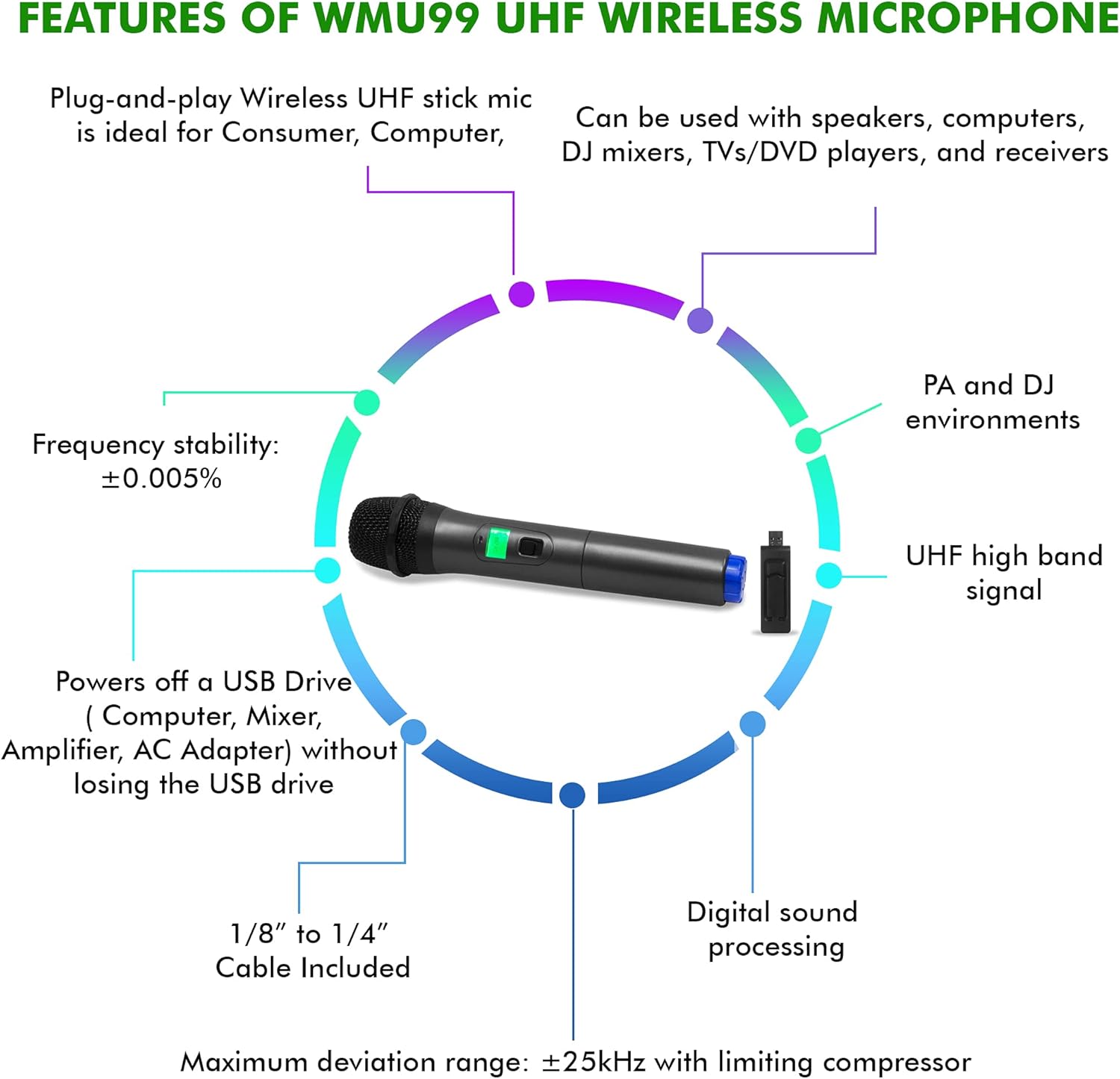
Rajah 4: Key features of the WMU99 UHF Wireless Microphone. A circular diagram highlighting key features of the WMU99 UHF Wireless Microphone. Features include plug-and-play functionality, compatibility with various devices (speakers, computers, DJ mixers, TVs/DVD players, receivers), suitability for PA and DJ environments, UHF high band signal, digital sound processing, 1/8" to 1/4" cable included, power via USB drive, and frequency stability of ±0.005%.
- Corak Kardioid: The microphone features a cardioid pickup pattern, which primarily captures sound from the front, reducing background noise and feedback.
- UHF High Band Signal: Utilizes UHF high band signal connection technology for stable and clear wireless transmission.
- Plug-and-Play: Designed for ease of use, simply connect the receiver and power on the microphone.
- Keserasian Serbaguna: Can be used with speakers, computers, DJ mixers, TVs/DVD players, and receivers that have a compatible USB input for the receiver.
Penyelenggaraan
Pembersihan
Wipe the microphone and receiver with a soft, dry cloth. Do not use liquid cleaners or solvents, as they may damage the finish or internal components.
Penggantian Bateri
When the microphone's performance degrades or the power indicator dims, replace the batteries with new ones of the specified type. Always dispose of used batteries responsibly.
Penyimpanan
Store the microphone and receiver in a cool, dry place away from direct sunlight and extreme temperatures when not in use for extended periods. Remove batteries if storing for a long time to prevent leakage.
Menyelesaikan masalah
| Masalah | Kemungkinan Punca | Penyelesaian |
|---|---|---|
| Tiada bunyi dari mikrofon |
|
|
| Poor sound quality or dropouts |
|
|
| Microphone powers on but does not connect |
|
|
Spesifikasi
| Ciri | Perincian |
|---|---|
| Nombor Model | TPWMU99 |
| Jenama | Pro Teknikal |
| Faktor Bentuk Mikrofon | Sistem Mikrofon |
| Teknologi Ketersambungan | UHF Wireless, USB (for receiver) |
| Jenis Penyambung | USB |
| Sumber Kuasa | Battery (microphone), Corded Electric (USB for receiver) |
| Julat Tanpa Wayar | 150 kaki |
| Respons Kekerapan | 40Hz-20kHz (Note: Product specifications also list 18 KHz) |
| Nisbah Isyarat-ke-Bunyi | 100 dB |
| Kepekaan Audio | 10 Desibel |
| Corak Kutub | Tidak arah (Cardioid) |
| Peranti Serasi | Amplifier, Personal Computer, Speaker, DJ Mixers, TVs/DVD players |
| Berat Barang | 10 auns (lebih kurang 283 gram) |
| Dimensi Pakej | 10 x 4 x 2 inci (lebih kurang 25.4 x 10.16 x 5.08 cm) |
| UPC | 610370147856 |

Rajah 5: Physical dimensions of the microphone. This image provides the dimensions of the Technical Pro TPWMU99 microphone. The microphone's length is 1.69 inches, width is 1.3 inches, and height is 1.3 inches. The USB receiver is also shown for scale.
Waranti dan Sokongan
Technical Pro products are designed for reliability and performance. For warranty information, please refer to the warranty card included with your purchase or visit the official Technical Pro website. For technical support or service inquiries, please contact Technical Pro customer service through their official channels.
Note: Specific warranty terms and support contact details may vary and are typically provided with the product packaging or on the manufacturer's webtapak.


