pengenalan
The SHOKZ OpenMove headphones offer an innovative open-ear listening experience, utilizing bone conduction technology to deliver audio through your cheekbones. This design ensures situational awareness by keeping your ears open to your surroundings, making them ideal for sports, workouts, and daily use. This manual provides essential information for setting up, operating, maintaining, and troubleshooting your OpenMove headphones.

Figure 1: SHOKZ OpenMove Pink Headphones
Apa yang ada dalam Kotak
Upon unboxing your SHOKZ OpenMove headphones, you should find the following items:
- SHOKZ OpenMove Bone Conduction Sport Headphones
- Kabel Pengecas USB-C
- Membawa Beg
- Panduan Pengguna (manual ini)
- Sticker Pack (for customization)

Figure 2: Included components with SHOKZ OpenMove headphones.
Persediaan
1. Mengecas Fon Kepala Anda
Before initial use, fully charge your OpenMove headphones. A full charge takes approximately 2 hours.
- Locate the USB-C charging port on the right transducer arm.
- Sambungkan kabel pengecas USB-C yang disediakan ke port.
- Plug the USB-A end of the cable into a compatible USB power adapter (not included) or a computer's USB port.
- The LED indicator will show red during charging and turn blue when fully charged.
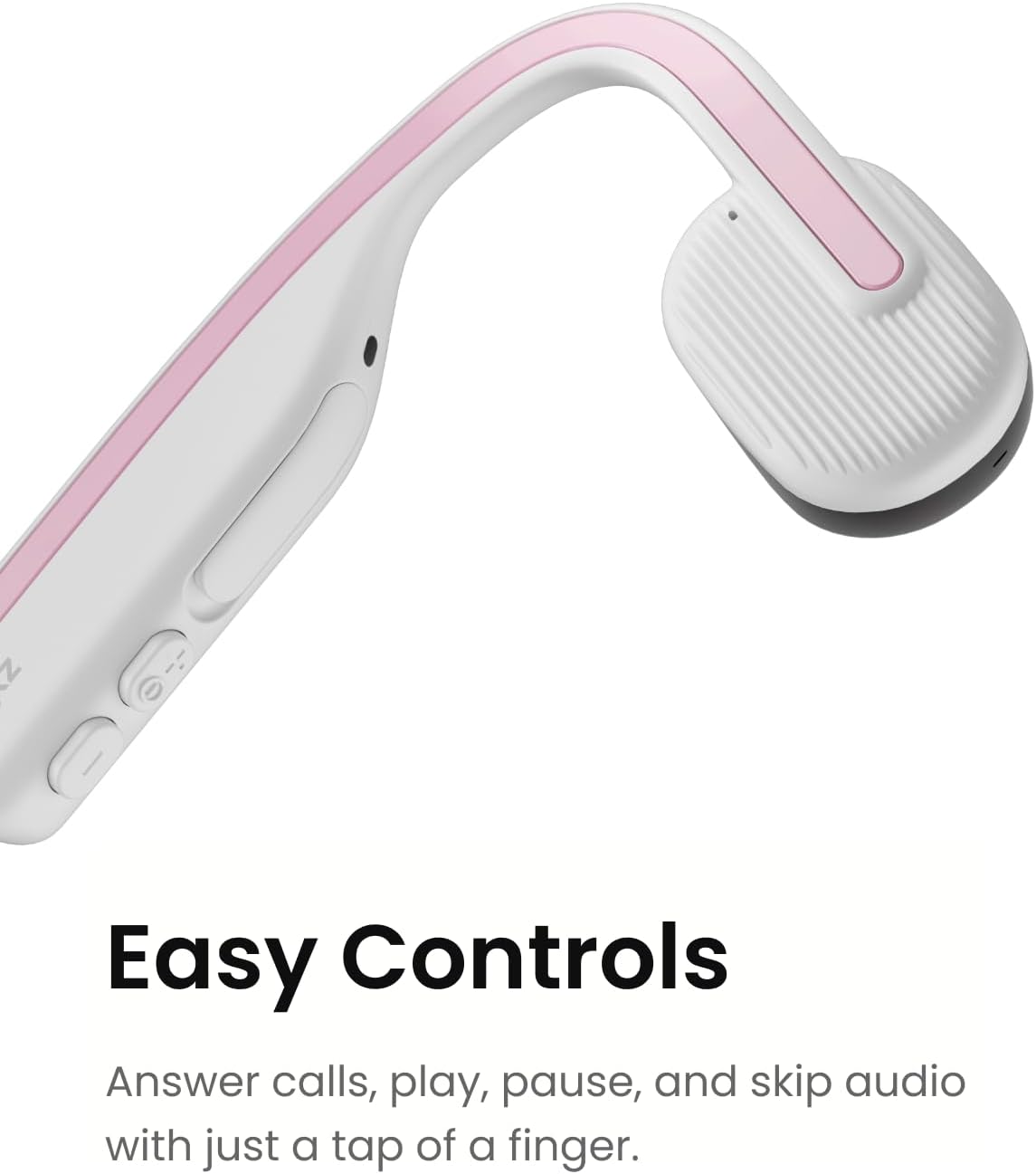
Figure 3: The control buttons and USB-C charging port.
2. Berpasangan Bluetooth
Pair your OpenMove headphones with your Bluetooth-enabled device (smartphone, tablet, computer) to begin listening.
- Pastikan fon kepala dimatikan.
- Press and hold the Power/Volume+ button for 5-7 seconds until the LED indicator flashes red and blue alternately, indicating pairing mode.
- Pada peranti anda, dayakan Bluetooth dan cari peranti yang tersedia.
- Select "OpenMove by SHOKZ" from the list.
- Once connected, the LED indicator will flash blue once, and a voice prompt will confirm "Connected".
Arahan Operasi
Memakai Fon Kepala Anda
The OpenMove headphones are designed for comfort and stability. Place the transducers on your cheekbones, just in front of your ears, with the neckband resting comfortably behind your head.

Figure 4: Proper placement of OpenMove headphones for optimal comfort and sound.
Kawalan
The OpenMove headphones feature intuitive controls for managing audio and calls:
- Hidupkan/Mati Kuasa: Press and hold the Power/Volume+ button for 2 seconds.
- Kelantangan: Tekan butang Kelantangan+.
- Perlahankan suara: Tekan butang Kelantangan.
- Main/Jeda: Press the Multi-function button (located on the left transducer).
- Lagu Seterusnya: Tekan dua kali butang Berbilang fungsi.
- Trek Sebelumnya: Tekan tiga kali butang Berbilang fungsi.
- Jawab/Tamatkan Panggilan: Press the Multi-function button during an incoming call or active call.
- Tolak Panggilan: Tekan dan tahan butang Berbilang fungsi selama 2 saat semasa panggilan masuk.
- Pembantu Suara: Press and hold the Multi-function button for 2 seconds (when not on a call).
Penyelenggaraan
To ensure the longevity and optimal performance of your SHOKZ OpenMove headphones, follow these maintenance guidelines:
- Pembersihan: Lap fon kepala dengan lembut, damp kain. Elakkan menggunakan bahan kimia yang keras atau bahan yang melelas.
- Storan: When not in use, store the headphones in the provided carrying bag to protect them from dust and damage.
- Tahan Air: The OpenMove headphones are water-resistant (IP55 rated), meaning they can withstand sweat and light rain. Do not submerge them in water. Ensure the charging port cover is securely closed before exposure to moisture.
- Suhu: Avoid exposing the headphones to extreme temperatures (hot or cold) as this can affect battery life and overall performance.
Menyelesaikan masalah
If you encounter issues with your SHOKZ OpenMove headphones, try the following solutions:
- Tiada Kuasa: Ensure the headphones are fully charged. Connect them to the charger and check the LED indicator.
- Tiada Bunyi:
- Semak tahap kelantangan pada kedua-dua fon kepala dan peranti anda yang disambungkan.
- Ensure the headphones are properly placed on your cheekbones.
- Verify that the headphones are successfully paired and connected to your device.
- Isu Berpasangan:
- Matikan Bluetooth pada peranti anda, kemudian hidupkan semula.
- Forget the device in your device's Bluetooth settings and attempt to re-pair.
- Pastikan tiada peranti Bluetooth lain yang mengganggu sambungan.
- Kualiti Bunyi Lemah:
- Adjust the placement of the transducers on your cheekbones.
- Ensure there are no obstructions between the transducers and your skin.
- Check for any physical damage to the headphones.
For more detailed troubleshooting or persistent issues, please refer to the official SHOKZ support resources.
Spesifikasi
| Ciri | Perincian |
|---|---|
| Nama Model | OpenMove |
| Nombor Model | S661 |
| Teknologi Ketersambungan | Wayarles (Bluetooth 5.1) |
| Jenis Pemacu Audio | Pemacu Pengaliran Tulang |
| Hayat Bateri | Sehingga 6 Jam |
| Masa Mengecas | lebih kurang 2 Jam |
| Tahap Ketahanan Air | Kalis Air (IP55) |
| Berat Barang | 29 Gram (1.02 auns) |
| Dimensi Produk | 4.8 x 3.94 x 1.81 inci |
| bahan | Plastik, Silikon |
| Ciri Khas | Lightweight, Microphone Included, Multipoint Pairing, USB-C Charging, Volume Control |
Waranti & Sokongan
SHOKZ Limited Corporation manufactures the OpenMove headphones. For detailed information regarding product warranty, returns, and technical support, please refer to the official User Guide PDF or visit the SHOKZ official webtapak.
You can download the complete User Guide (PDF) for comprehensive details and support information here: SHOKZ OpenMove User Guide (PDF)


