1. Pengenalan
Thank you for choosing the Kurzweil KA130 Digital Piano. This instrument is designed to provide an authentic piano playing experience with advanced digital features. This manual provides essential information for the proper setup, operation, and maintenance of your digital piano. Please read it thoroughly before using the instrument to ensure optimal performance and longevity.
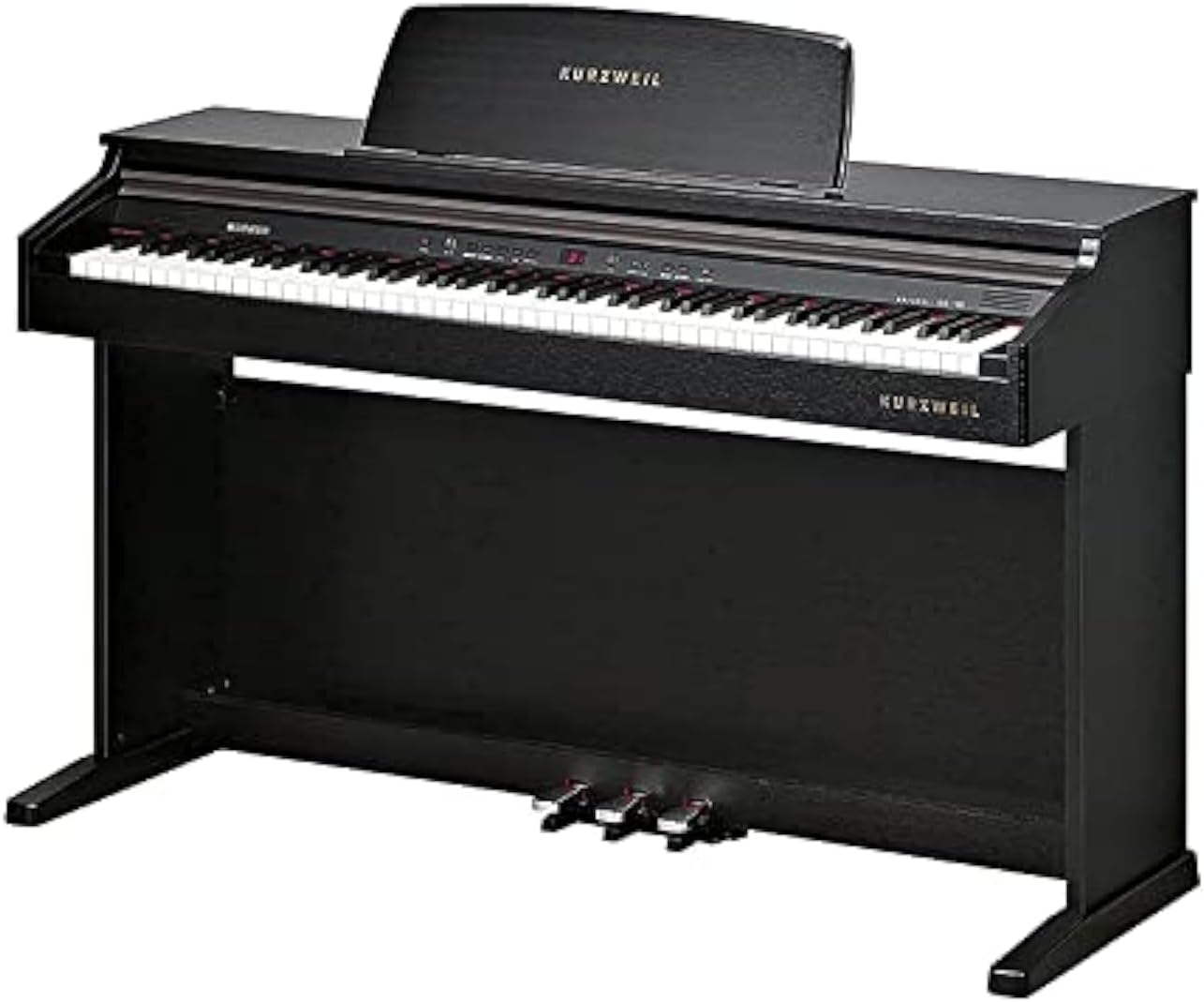
Figure 1: The Kurzweil KA130 Digital Piano. This image displays the full instrument, highlighting its black finish, 88-note keyboard, integrated music rest, and the three foot pedals (sustain, sostenuto, soft) located at the base.
2. Maklumat Keselamatan Penting
- Bekalan Kuasa: Gunakan hanya penyesuai kuasa yang ditentukan. Pastikan voltage matches the requirements of your region. Disconnect the power cord during lightning storms or when unused for extended periods.
- lokasi: Place the instrument on a stable, level surface. Avoid locations exposed to direct sunlight, extreme temperatures, high humidity, dust, or strong vibrations. Keep away from heat sources like radiators.
- Air dan Kelembapan: Do not expose the instrument to water or moisture. Do not place containers with liquids on the piano.
- Pengudaraan: Do not block ventilation openings. Ensure adequate airflow around the instrument.
- Objek Asing: Do not insert foreign objects into any openings of the instrument.
- Pembersihan: Clean only with a dry, soft cloth. Avoid using chemical cleaners or solvents.
- Servis: Jangan cuba servis instrumen itu sendiri. Rujuk semua servis kepada kakitangan perkhidmatan yang berkelayakan.
3. Persediaan dan Pemasangan
3.1 Kandungan Pakej
Sebelum pemasangan, sahkan bahawa semua komponen hadir:
- Kurzweil KA130 Digital Piano Unit
- Matching Bench
- Rehat Muzik
- Penyesuai Kuasa
- Manual Pengguna (dokumen ini)
- Assembly Hardware (screws, tools if required)
3.2 Arahan Perhimpunan
The Kurzweil KA130 is a console-style digital piano that requires some assembly. It is recommended that two adults perform the assembly to prevent injury or damage to the instrument.
- Buka Pembungkusan Komponen: Tanggalkan semua bahagian dari pembungkusan dengan berhati-hati dan letakkannya di atas permukaan yang lembut dan bersih untuk mengelakkan calar.
- Lampirkan Panel Sisi: Secure the left and right side panels to the main keyboard unit using the provided screws. Ensure they are oriented correctly.
- Install Pedal Unit: Connect the pedal unit to the base of the piano, ensuring the pedal cable is properly routed and connected to the main unit.
- Panel Belakang Selamat: Attach the back panel to stabilize the structure.
- Place Music Rest: Insert the music rest into the designated slot on the top panel of the piano.
- Pasang Bangku: Follow the separate instructions provided with the matching bench for its assembly.
3.3 Sambungan
- Kuasa: Connect the power adapter to the DC IN jack on the piano and then to a suitable wall outlet.
- Fon kepala: Two 1/4" stereo headphone jacks are provided for private practice. Connect standard stereo headphones to either jack.
- Keluar Audio: Stereo left/right RCA line outs are available for connecting the piano to external amplification systems (e.g., an amplifier, mixer, or powered speakers).
- Audio Dalam: Stereo left/right RCA line ins allow connection of external sound sources (e.g., an MP3 player, smartphone) to play through the piano's speakers.
- USB: The USB port provides Plug and Play MIDI over USB functionality. Connect a standard USB cable to a computer for MIDI communication without requiring additional drivers.
4. Arahan Operasi
4.1 Hidupkan/Mati Kuasa
Tekan ke KUASA butang untuk menghidupkan instrumen. Tekan dan tahan butang KUASA butang selama beberapa saat untuk mematikannya.
4.2 Keyboard and Touch Sensitivity
The KA130 features an 88-note, fully weighted, hammer action keyboard (88RGTA) designed to replicate the feel of an acoustic piano. You can adjust the keyboard's touch sensitivity with 6 selectable response levels to match your playing style.
4.3 Display and Voice Selection
The 7-segment 3-digit LED display shows current settings. The piano offers a Stereo PCM voice type with 32-voice polyphony. Select from 16 primary preset programs, with an additional 116 programs available for General MIDI (GM) compatibility.
4.4 Mod Main
- Splits: Divides the keyboard into two sections, allowing different voices to be played by each hand.
- Lapisan: Combines two voices to be played simultaneously when a key is pressed.
- Dwi: A specific mode that might combine elements of splits and layers, or offer a predefined layered sound. Refer to the on-screen menu for specific Dual mode options.
4.5 Demo Songs and Learning Mode
The instrument includes 50 demo songs and 221 learning songs. The Education Mode supports Bayer, Czerny 100, 30, 40, and Sonatine exercises, featuring a 'Score Lesson' mode to assist with practice.
4.6 Recorder/Sequencer
Record your performances with the built-in sequencer, which has a capacity for 5 songs. Consult the detailed operational guide for recording and playback procedures.
4.7 Fungsi Umum
- General MIDI (GM): The KA130 is GM compatible, allowing it to play back MIDI files with standard instrument assignments.
- Transpose: Laraskan pic keseluruhan papan kekunci ke atas atau ke bawah dalam langkah semiton.
- Lagu: Fine-tune the overall pitch of the instrument.
- Metronom: Use the built-in metronome for rhythm practice. Adjust tempo and beat as needed.
4.8 Pedal
The KA130 includes three built-in pedals:
- Sustain Pedal (Kanan): Sustains notes, similar to an acoustic piano. Features half-damper effect for nuanced control.
- Pedal Sostenuto (Tengah): Hanya mengekalkan not yang dipegang pada saat pedal ditekan.
- Pedal Lembut (Kiri): Softens the sound of the notes played.
5. Penyelenggaraan dan Penjagaan
- Pembersihan: Wipe the instrument's surface with a soft, dry cloth. For stubborn dirt, slightly dampLap kain dengan air dan detergen ringan, kemudian lap sehingga kering dengan segera. Elakkan pembersih, lilin atau pelarut yang kasar.
- Penjagaan Papan Kekunci: Keep the keys clean. If they become dirty, wipe them with a soft cloth dampened with water and a small amount of mild soap.
- Storan: When not in use for extended periods, cover the piano with a dust cover to protect it from dust and debris.
- Keadaan Persekitaran: Maintain a stable room temperature and humidity. Extreme fluctuations can affect the instrument's components.
6. Penyelesaian masalah
| Masalah | Kemungkinan Punca | Penyelesaian |
|---|---|---|
| Tiada bunyi |
|
|
| Keys not responding or inconsistent touch |
|
|
| Bunyi herot |
|
|
| Pedal tidak berfungsi |
|
|
If the problem persists after attempting these solutions, please contact Kurzweil customer support or a qualified service technician.
7. Spesifikasi Teknikal
| Ciri | Perincian |
|---|---|
| papan kekunci | 88-Note, fully weighted, hammer action (88RGTA) |
| Kepekaan Papan Kekunci | 6 selectable response levels |
| Paparan | 7-segment 3-digit LED |
| Jenis Suara | PCM stereo |
| Polifoni | 32 suara |
| Program Pratetap | 16 Primary (+116 for GM) |
| Main Mod | Splits, Layers, Dual |
| Lagu Demo | 50 demo + 221 learning songs |
| Recorder/Sequencer | 5 Song capacity |
| MIDI am | ya |
| Transpose | ya |
| Tune | ya |
| Metronom | ya |
| Education Mode | Bayer, Czerny 100,30,40, Sonatine with 'Score Lesson' mode |
| Selesai | Simulated Rosewood (Black) |
| Kuasa Audio | 30 W (15W + 15W) |
| Penceramah | 6" x 2 |
| Output Audio | Stereo left/right RCA line outs |
| Input Audio | Stereo left/right RCA line ins |
| Bicu Fon Kepala | (2) 1/4" stereo headphone outs |
| Port USB | (1) port; Plug and Play MIDI over USB |
| Pedal | (3) built-in sustain, sostenuto, soft (with half damper effect) |
| Termasuk Aksesori | Matching bench |
| Dimensi (H x W x D) | 86 x 136 x 44 cm |
| Berat badan | 45 kg |
| Sumber Kuasa | AC Power Adapter (Note: Product data listed "Battery Powered" which is typically incorrect for this type of instrument; AC adapter is standard.) |
| Jenis Bahan | kayu |
8. Waranti dan Sokongan Pelanggan
For warranty information, please refer to the warranty card included with your product or visit the official Kurzweil website. For technical support, service, or inquiries, please contact Kurzweil customer support through their official channels. Keep your purchase receipt as proof of purchase for warranty claims.


