1. Pengenalan
The Sonoro Easy is a compact and portable digital radio designed to provide powerful sound for various occasions. It features FM, DAB+, and Bluetooth connectivity, along with an AUX input for external devices. Its small footprint allows for easy placement in any room, and the intuitive controls ensure straightforward operation. The integrated LED night light and USB charging port add to its versatility, making it an ideal companion for your bedroom, kitchen, or on the go.
2. Persediaan
2.1 Membongkar
Carefully remove the Sonoro Easy radio from its packaging. Ensure all components are present:
- Sonoro Easy Digital Radio
- Penyesuai Kuasa
- Manual Pengguna (dokumen ini)
2.2 Menghidupkan
The Sonoro Easy can be powered via the included mains adapter or by batteries for portable use.
Kuasa Utama:
- Connect the power adapter to the "12V - 2.5A" DC input port on the rear of the radio.
- Palamkan penyesuai kuasa ke salur keluar dinding yang sesuai.
- Tekan ke kuasa button on the front panel to turn on the device.
Kuasa Bateri:
The radio supports alkaline or NiMH rechargeable batteries (not included). The battery compartment is located on the bottom of the unit.
- Buka penutup petak bateri.
- Masukkan bateri yang diperlukan, pastikan kekutuban yang betul.
- Tutup penutup petak bateri dengan selamat.
- Tekan ke kuasa butang untuk menghidupkan peranti.

Figure 1: Rear panel connections including power input and antenna.
2.3 Initial Setup and Antenna
Upon first power-on, the radio may perform an initial scan for DAB+ stations. Extend the telescopic antenna for optimal reception for both FM and DAB+ radio.

Figure 2: Front display and controls of the Sonoro Easy radio.
3. Arahan Operasi
3.1 Kawalan Asas
The Sonoro Easy features intuitive controls located on the top and front panels.
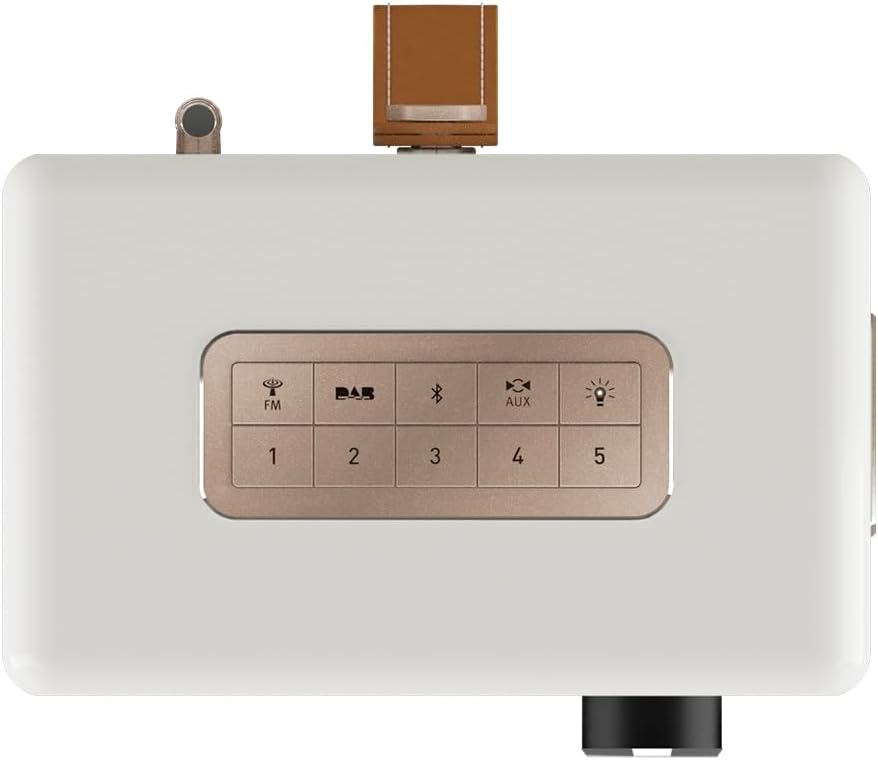
Figure 3: Top panel controls including preset and function buttons.
- Butang Kuasa: Menghidupkan atau mematikan radio.
- Tombol Putar: Used for volume control, menu navigation, and selection.
- Butang Pratetap (1-5): Store and recall your favorite radio stations.
- Function Buttons (FM, DAB, Bluetooth, AUX, Night Light): Pilih mod operasi yang dikehendaki.
3.2 Radio Modes (DAB+ / FM)
Radio DAB+:
- Tekan ke DAB button to enter DAB+ mode.
- The radio will automatically scan for available stations.
- Use the rotary knob to scroll through the station list and press to select.
- Untuk menyimpan stesen sebagai pratetap, tekan dan tahan salah satu daripadanya Butang Pratetap (1-5) until the display confirms.
Radio FM:
- Tekan ke FM butang untuk memasuki mod FM.
- Use the rotary knob to manually tune to a frequency or press and hold to auto-scan for the next available station.
- Untuk menyimpan stesen sebagai pratetap, tekan dan tahan salah satu daripadanya Butang Pratetap (1-5) until the display confirms.
3.3 Kesambungan Bluetooth
- Tekan ke Bluetooth button to activate Bluetooth pairing mode. The display will show "Pairing".
- On your mobile device, enable Bluetooth and search for "Sonoro Easy".
- Select "Sonoro Easy" from the list of available devices to connect.
- Once connected, you can stream audio from your device to the radio.
3.4 Input AUX
- Connect an external audio device (e.g., MP3 player) to the "AUX IN" port on the rear of the radio using a 3.5mm audio cable (not included).
- Tekan ke AUX button to select AUX input mode.
- Kawal main balik daripada peranti luaran anda.
3.5 Jam Penggera dan Pemasa Tidur
The Sonoro Easy features a dual alarm function and a sleep timer.
- Menetapkan Penggera: Access the alarm settings through the menu (usually by pressing the rotary knob and navigating). Follow on-screen prompts to set alarm time, source (buzzer, FM, DAB+), and volume.
- Pemasa Tidur: The sleep timer allows the radio to turn off automatically after a set period. This function is typically accessed via the menu.
- Fungsi Tunda: When an alarm sounds, pressing the rotary knob or a designated snooze button will temporarily pause the alarm.
3.6 Night Light and USB Charging
- Cahaya Malam: Tekan ke Cahaya Malam button (often represented by a light bulb icon) to activate the integrated LED night light on the rear of the unit. This provides subtle background illumination.
- Pengecasan USB: The USB port (5V - 2.1A) on the side of the radio can be used to charge compatible smartphones or other small devices. Connect your device using its charging cable.
4. Penyelenggaraan
4.1 Pembersihan
To maintain the appearance of your Sonoro Easy radio:
- Pastikan peranti dimatikan dan dicabut plag sebelum dibersihkan.
- Gunakan kain lembut, kering dan tidak berbulu untuk mengelap permukaan.
- Untuk tanda degil, sedikit dampen the cloth with water. Avoid abrasive cleaners, solvents, or chemical sprays.
4.2 Penyimpanan
When not in use for extended periods, store the radio in a cool, dry place away from direct sunlight and extreme temperatures. If using batteries, remove them to prevent leakage.
5. Penyelesaian masalah
| Masalah | Kemungkinan Punca | Penyelesaian |
|---|---|---|
| Tiada bekalan elektrik / Radio tidak dapat dihidupkan. | Power adapter not connected or faulty. Batteries depleted or incorrectly inserted. | Check power adapter connection and wall outlet. Replace or recharge batteries, ensuring correct polarity. |
| Poor radio reception (DAB+ / FM). | Antenna not extended. Weak signal in the area. Interference from other electronics. | Fully extend the telescopic antenna. Try repositioning the radio. Move away from other electronic devices. |
| Peranti Bluetooth tidak boleh bersambung. | Radio not in pairing mode. Device too far away. Bluetooth disabled on source device. | Ensure radio is in Bluetooth pairing mode. Move device closer to the radio. Enable Bluetooth on your source device. |
| Tiada bunyi daripada input AUX. | AUX cable not connected properly. Radio not in AUX mode. Volume too low on radio or source device. | Check AUX cable connection. Select AUX mode on the radio. Increase volume on both the radio and the external device. |
| Paparan terlalu terang atau terlalu malap. | Display brightness setting needs adjustment. | Adjust display brightness through the radio's menu settings. |
6. Spesifikasi
| Ciri | Perincian |
|---|---|
| Jenama | Sonoro |
| Nombor Model | 88f59bc4-6f28-4e95-95de-ba49a597f237 |
| warna | Matte Putih |
| Teknologi Penalaan | DAB+, FM |
| Ketersambungan | Bluetooth, AUX In, USB (charging) |
| Ciri Khas | Portable, Dual Alarm, Sleep Timer, Snooze, Dimmable Display, LED Night Light, USB Charging Port |
| Sumber Kuasa | Mains (12V - 2.5A), Battery (Alkaline or NiMH, not included) |
| Output USB | 5V - 2.1A (for charging external devices) |
| Dimensi (L x W x H) | 18.6 cm x 15.6 cm x 11.8 cm |
| Penceramah | 3" Full-range speaker with Bass Reflex tube |
| bahan | Hand-polished wooden cabinet |
7. Waranti & Sokongan
7.1 Waranti Produk
The Sonoro Easy Digital Radio comes with a Waranti pengilang selama 2 tahun dari tarikh pembelian. Waranti ini melindungi kecacatan pada bahan dan mutu kerja di bawah penggunaan biasa. Sila simpan bukti pembelian anda untuk tuntutan waranti.
Waranti tidak meliputi:
- Kerosakan yang disebabkan oleh kemalangan, penderaan, penyalahgunaan, banjir, kebakaran, gempa bumi atau sebab luaran yang lain.
- Damage caused by operating the product outside the permitted or intended uses described in this manual.
- Damage caused by service performed by anyone who is not an authorized representative of Sonoro.
- Products or parts that have been modified to alter functionality or capability without the written permission of Sonoro.
7.2 Sokongan Pelanggan
For technical assistance, warranty claims, or further information, please contact Sonoro customer support. Contact details can typically be found on the official Sonoro webtapak atau pada pembungkusan produk.
Please visit the official Sonoro website for the most up-to-date support information and contact options.


